Loopy Pro: Create music, your way.
What is Loopy Pro? — Loopy Pro is a powerful, flexible, and intuitive live looper, sampler, clip launcher and DAW for iPhone and iPad. At its core, it allows you to record and layer sounds in real-time to create complex musical arrangements. But it doesn’t stop there—Loopy Pro offers advanced tools to customize your workflow, build dynamic performance setups, and create a seamless connection between instruments, effects, and external gear.
Use it for live looping, sequencing, arranging, mixing, and much more. Whether you're a live performer, a producer, or just experimenting with sound, Loopy Pro helps you take control of your creative process.
Download on the App StoreLoopy Pro is your all-in-one musical toolkit. Try it for free today.
Can someone explain assigning MIDI controls for SimpLoop in AUM using my LaunchKey Mk3?

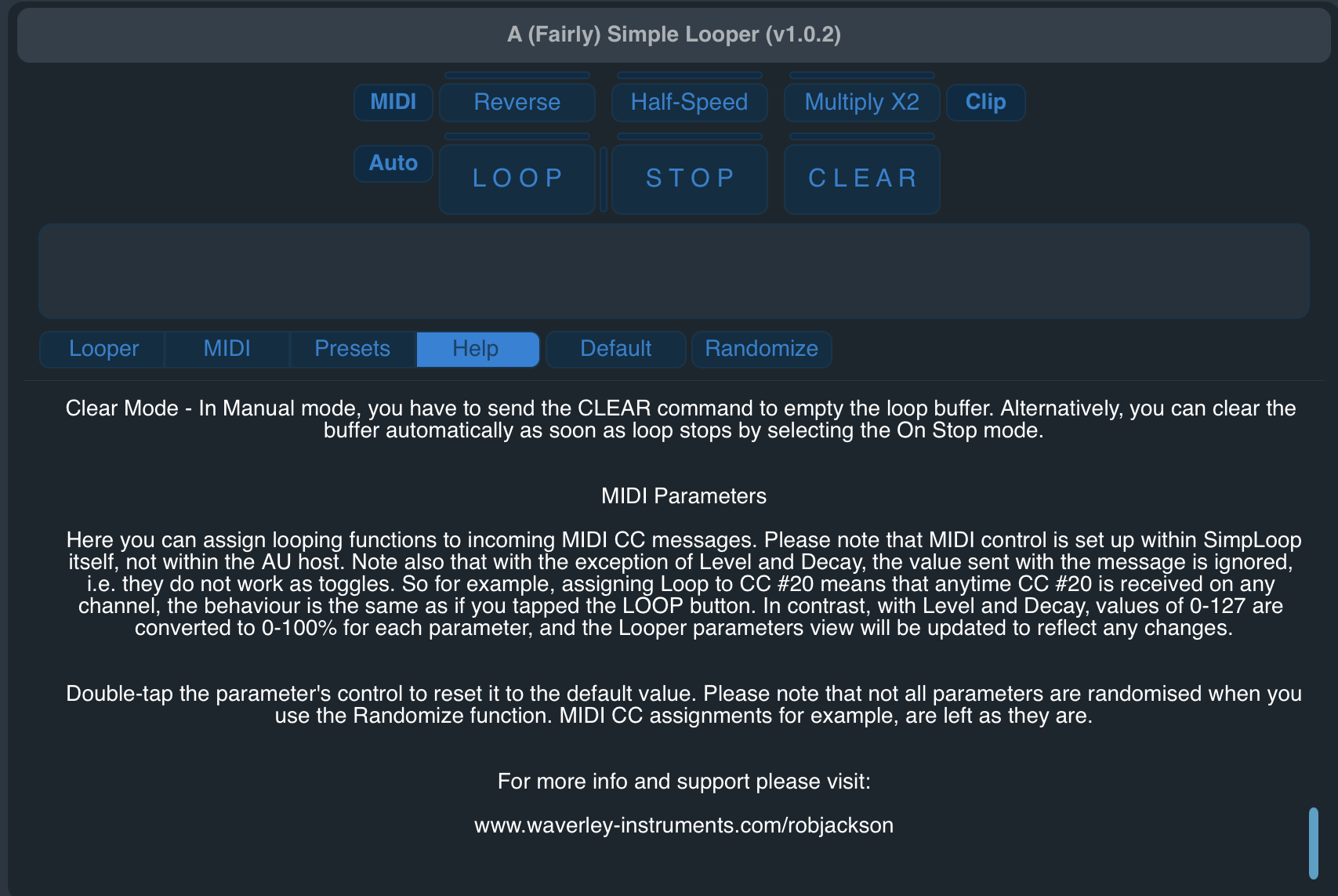
I don’t understand what this means about setting up the controls in SimpLoop itself and not the host.
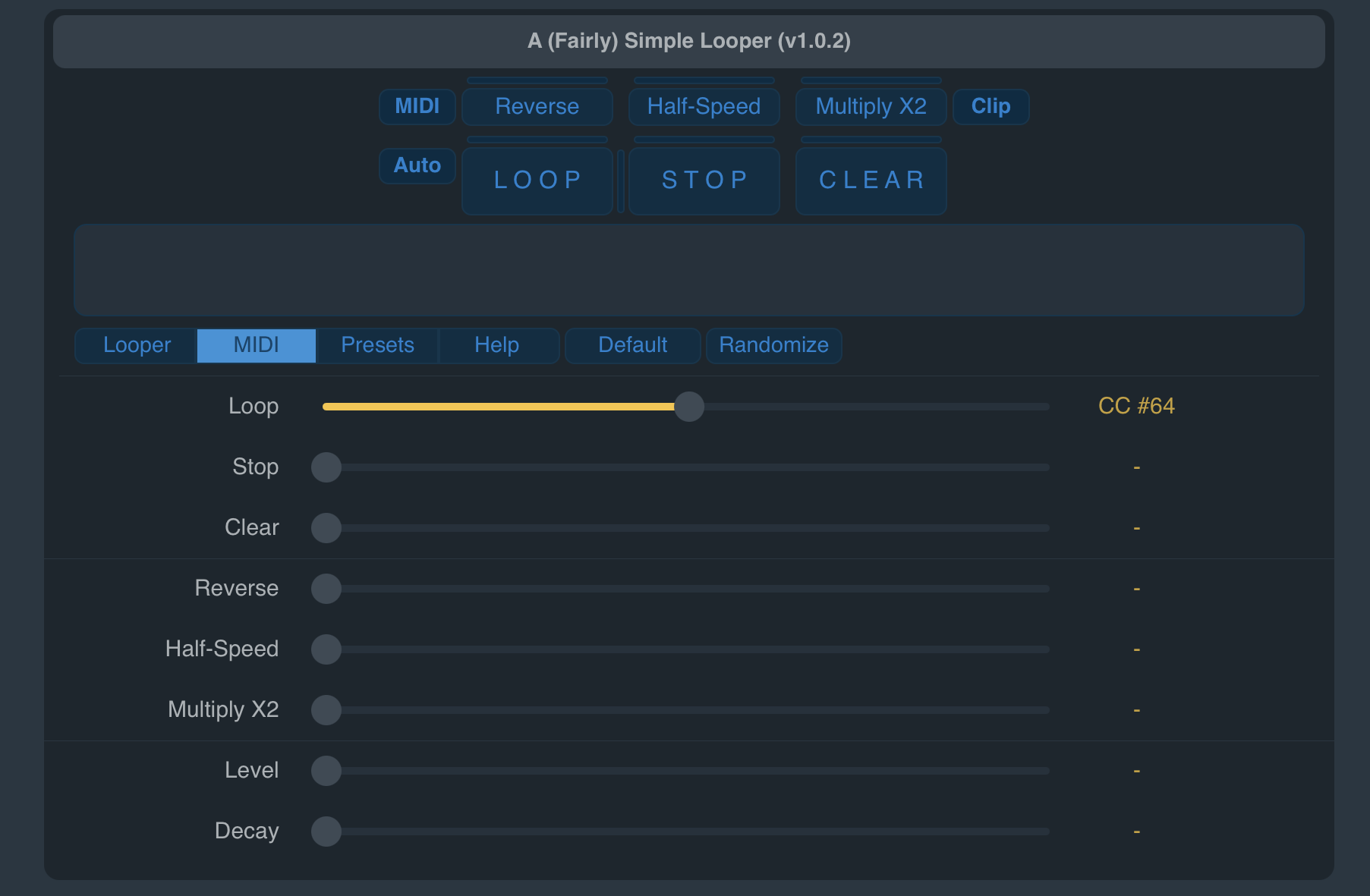
This is the setup in SimpLoop:
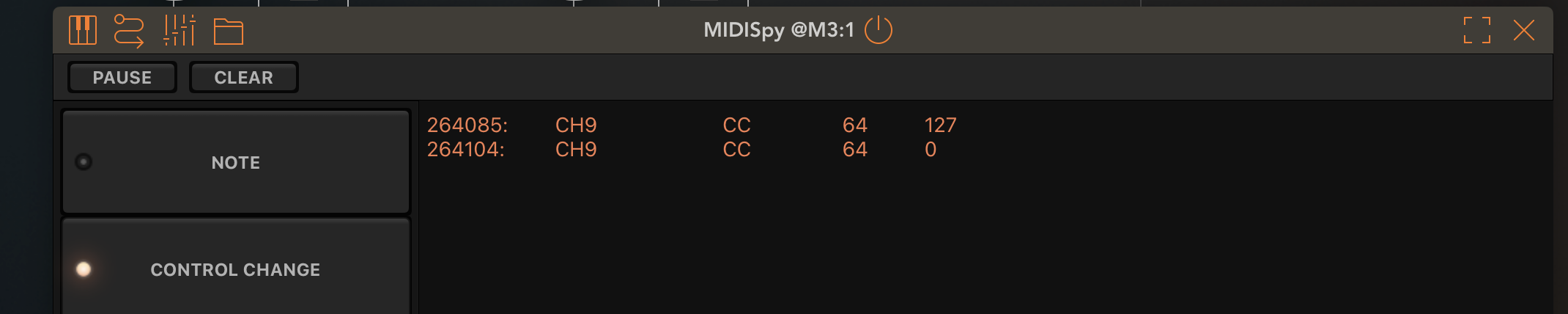
This is the MIDI messages from MIDIspy for pressing and releasing a foot switch sustain pedal. I’ve tried the same for controls on the launchkey pads as well. But nothing happens when I press the switch - I would expect the loop function to start.
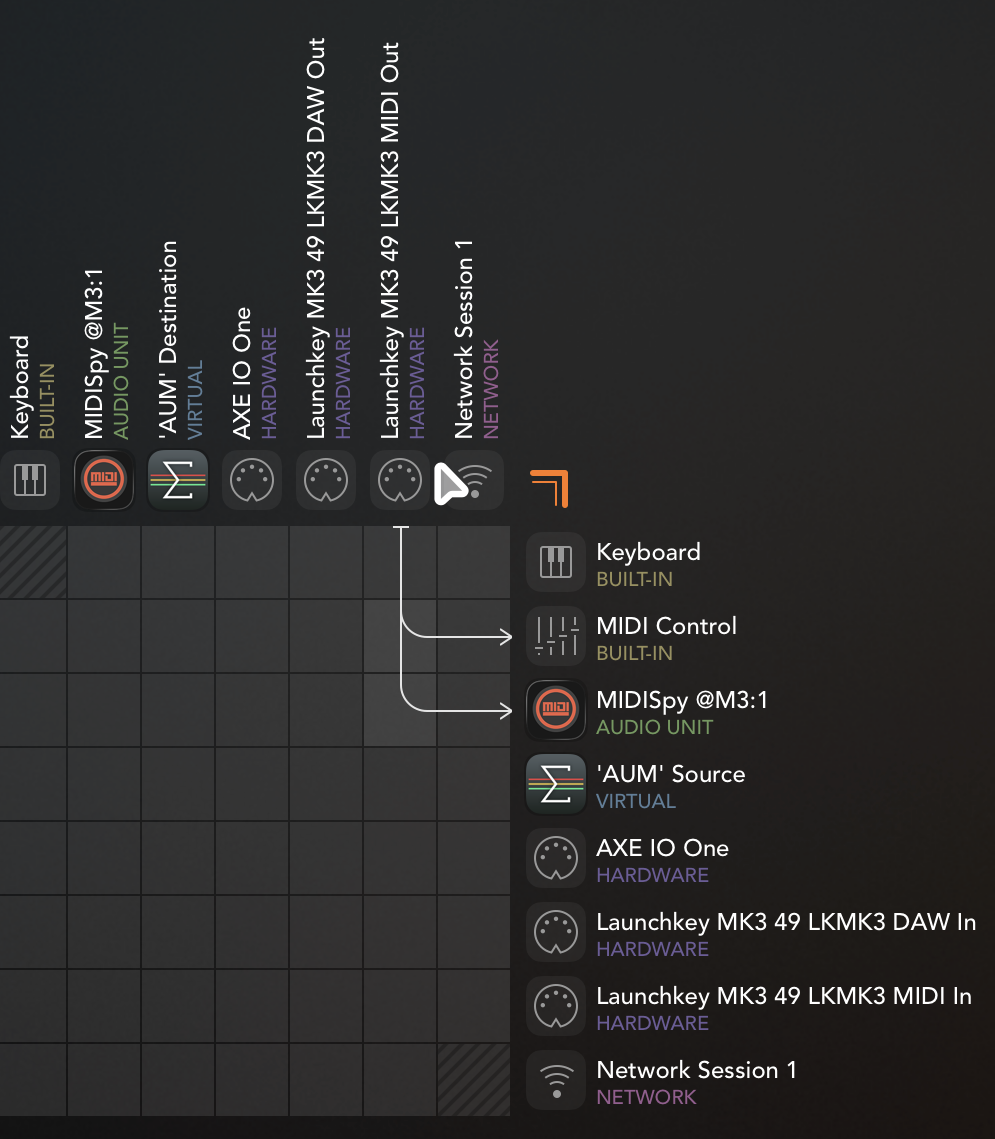
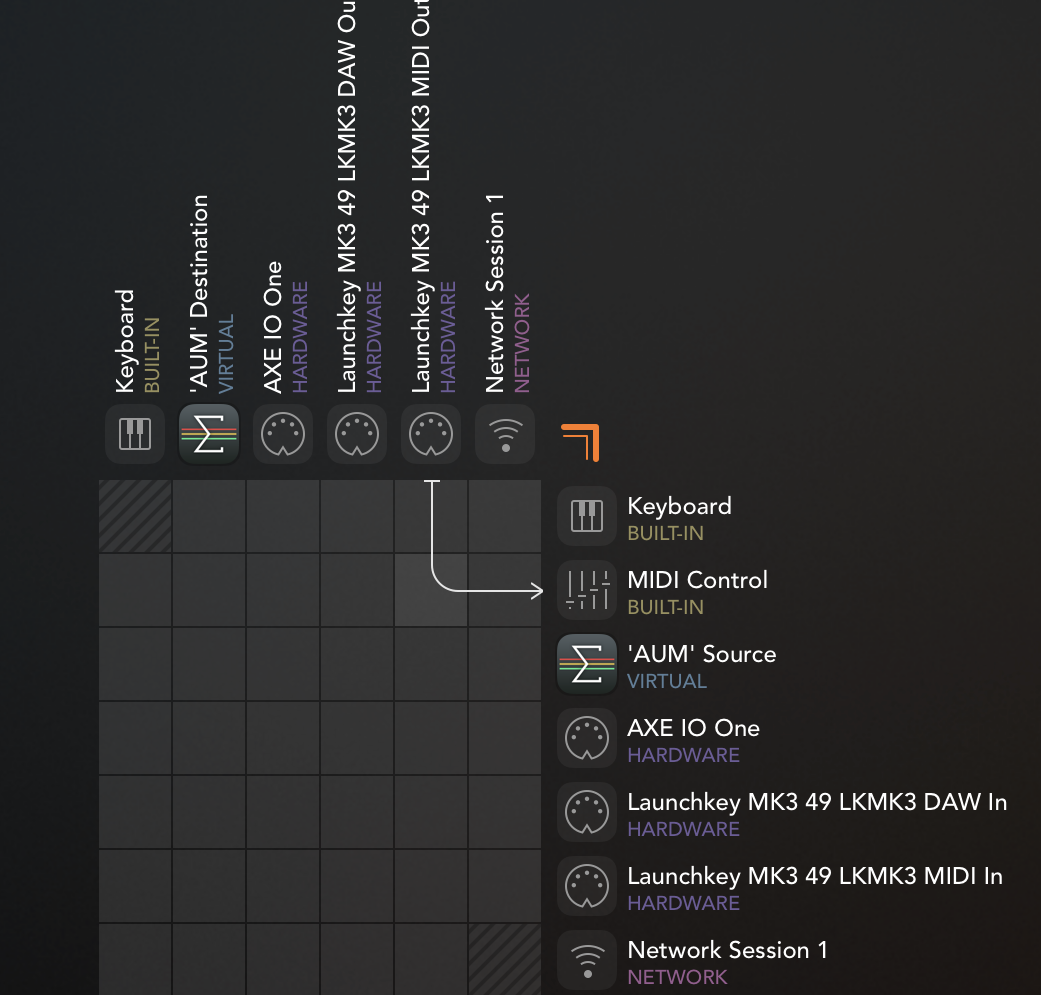
Is this how the matrix and MIDI settings in AUM should look?
Comments
You're routing the LaunchKey MIDI to AUM Control. You need to be routing it to SimpLoop.
I don't see in SimpLoop as a destination AUM?? Is it loaded?
It is loaded. It’s not appearing in the matrix.
Current matrix:
Current chain:
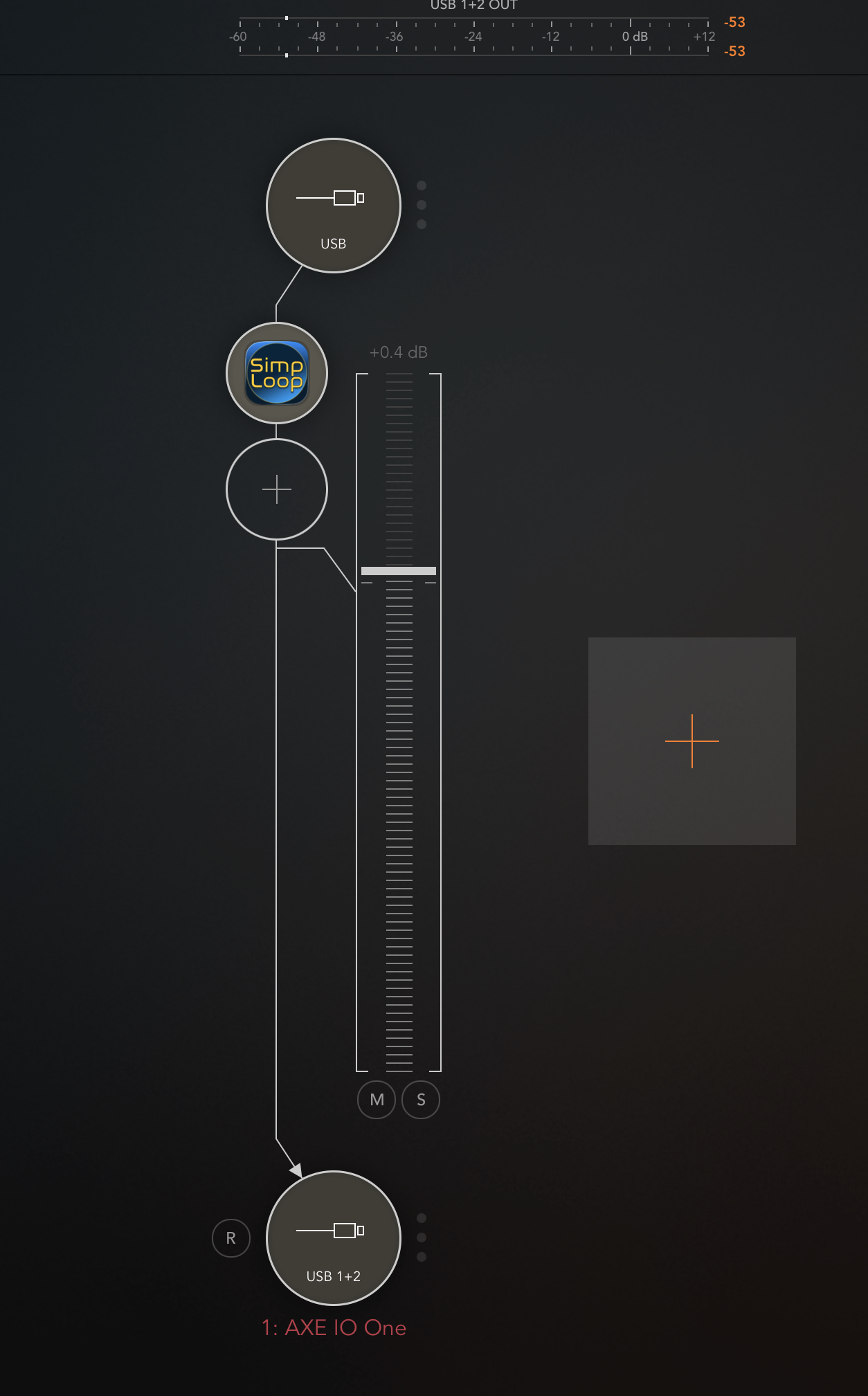
Up to date in AUM and On iOS 26.1.
That's weird. Yeh, I just bought it. I don't see it there either.
@Rob_Jackson_Music ??
However, if you use AUM's midi control you should be able to midi learn the parameters to any CCs you like.
I think this is a case of the manual being written about the standalone version, causing confusion.
Ideally there should be an mfx version of the plugin that can receive midi. I think it's too late to modify the plugin type so that the existing version can accept midi if a non-midi fx plugin type was chosen.
Fun app.
Even when assigning via MIDI learn nothing happens. I press the learn knob in AUM, hit the LOOP button, hit any switch on the Launchkey and nothing happens. Doesn’t work manually setting the channel or cc either.
And there is no learn function native in the app.
I see what you mean. 🤷🏼♂️
So I guess there’s no way to midi map the loop button? That’s kind of why I got this. Is that a bug or feature?
@Rob_Jackson_Music any troubleshooting advice?
It's weirdly configured.
For instance, if you send a note to the AUv3 parameter, it takes the velocity of the note as the CC number in the MIDI screen.
I think we have some kind of odd conflict between the parameters and the midi control system.
I'm tempted to try to puzzle it out, but I'm going to leave it up to Mr. Rob to 'splain.
Sucks that the loop isn't saved with the host session. I know that's possible, even for a 60 second loop or longer loop. I get the minimalist approach, but that's taking it too far. That's too bad. I see no use for it myself as-is.
I do think any app that has an audio buffer should at least give the option to let it be saved. Or just skip the option and make saving it the default. I wonder why the no save option was chosen.
Hi @FizzyLizzy27 - sorry about this, there does seem to be an issue here with MIDI in AUM. Currently investigating.
As a general aside, for support issues, it's sometimes best to contact me directly.
And yes, loop import / export is not supported by design, as it's supposed to be a live looper. I try and make that clear in the app description, although that said, like anything, all additional feature requests will be considered.
I'll update on the MIDI issue, as that is very strange and clearly a bug. Sorry about that.
To clarify, I wasn't talking about loop import / export. I was talking about the loop buffer being saved with the host session so that when you come back to the host session the loop isn't empty. There isn't anything particularly fancy you need to do in the plugin to do that.
Well... at the very least, the code needs to be written to do it. It's more complicated than some might think. For example, what if the sample rate is changed between sessions? That needs to be handled. Plus that's quite a lot of storage overhead to support state saving for (possibly) the majority of people who might not need it. So then do you make it optional, or does it make more sense to have an explicit (instead of implicit) loop save / restore, etc.
Update on the MIDI issue: Just testing a fix, and looking good so far. Will submit for review ASAP.
It’s your app and your vision for it. I think you’re over thinking it though. The AUv3 app experience is virtually always consistent. You come back to a host session and everything is as you left it. As for people caring about a little bit of added storage in a host session? Only a programmer would think that way. I get it about the minimalist approach, but I think you’re taking it a bit too far on this one.
I got my $2.99 of entertainment out of the app. I’m not complaining. It’s a fun one. Just not particularly useful IMO for that one shortcoming.
@wim - understood, and thanks for sharing some additional thoughts.
I think the save / restore is definitely not out of the question, it just wasn't in the original design / scope of work. It's noted though, and we'll see if it's a popular request
Thanks for listening.
I will say it's sort of liberating throwing the thing up there with no expectations of coming back to work with it further. It seems I'm getting less and less inclined to save and extend things all the time. 😉
I'll give it a +100 and I think a lot of people would prefer it worked that way. You could do a poll if you're game! I like the control over the record fade in this, it's a useful app for sure, but I really want apps like this to save the buffer. For people who do care about storage, surely they can just delete the app before saving their session if they want? But yeah, every single looper I know of saves its buffer, it's a super handy thing.
@Gavinski - cool, also noted. And it's currently the topmost popular (*) feature request!
Perhaps I'm the exception, as for my use when playing live, I actually have the Clear On Stop option enabled all the time - once I've stopped that loop, I'm done with it - never want to hear it again
On the original topic, the MIDI fix (1.0.3) has been submitted @FizzyLizzy27 - sorry about that. I'm afraid you'll also need to re-add SimpLoop to any existing projects as it also entails a subtle plugin category change from an effect plugin to a music effect plugin which might throw AUM.
(*) because it's the only one so far...
Definitely save restore 100% also if possible. If the app is left with just that update would be happy.
Howdy Folks. v1.0.3 update / MIDI destination fix has just been approved - nice that got through quite quickly.
Thanks for that quick fix! It works well now with midi direct to the plugin. However, you've also exposed the AUv3 parameters, which is good, but they mess things up. If you use the parameters, they set the CC# for that parameter to whatever value the parameter is set rather than controlling the plugin.
For instance, if I set CC#20 to AUM Midi Control for the Loop parameter, then trigger the parameter with CC#20 / value 127, the Loop parameter is set to CC#127 and the Loop isn't triggered.
It seems that the AUv3 parameters are setting byte 2 of the midi learn in the plugin to whatever the value of the parameter is. If both systems are going to exist, the parameters need to be routed to control the plugin rather than the midi learn system. Or something. 😎
This is what the original instructions meant I’m pretty sure. The controls need to be set inside of SimpLoop and not controlled by the host. You just route your controller to SimpLoop and set the CC value you want inside of the plugin.
It’s working with my foot switch and since it’s not a toggle I hold it down for the duration of my loop which is nice.
Sure, but in that case the AUv3 parameters shouldn't be there. If they're there, then the conflict needs to be resolved. I'm in favor of having both options but it really doesn't matter.
(Ha Ha! I started to say "Controlling with parameters would be nice with Loopy Pro's widget feedback." But then I realized what I was saying. 😂)
@wim, yeah... apologies this is a little confusing - my bad.
So what's happening there is you're assigning a MIDI CC assignment to a MIDI CC.
I guess it would make sense to not expose those MIDI assignment parameters, but my general policy is to expose everything!
As @FizzyLizzy27 says, you don't assign the (for example) LOOP command in the host, you do it in SimpLoop.
From scratch, in AUM for anyone else interested...
You do not need to use MIDI learn in AUM to set this up. And as @FizzyLizzy27 observes, you can hold down, or tap - it doesn't matter as the value (0 or 127) of the CC is ignored. So as soon as any value is received for this CC, on any channel, it will fire the command.
Hope this helps, and sorry about the confusion. -Rob
Wait. You're saying you've exposed an AUv3 parameter to assign a midi CC to a control rather than to control the control? I'm sorry, I hate to be so blunt, but that's bizarre. Nobody does that.
That's not how it is. There's a plugin parameter named Loop. I think you assumed that was a command assignment. It's not.
The looper commands themselves can't be plugin parameters. But I think we all get that.
Perhaps I should have called it Loop CC Assignment. But that makes the UI a bit busy.
And... as soon as I hide any plugin parameter, someone will complain it's not exposed. You just can't win I can almost guarantee, someone will want it.
I suggest you ignore them in the meantime, or I can consider a feature request to (optionally) hide them.
Alternatively, is there something you'd like to control via MIDI CC that you can't currently do with SimpLoop that I've missed? In which case, again, my bad.