Loopy Pro: Create music, your way.
What is Loopy Pro? — Loopy Pro is a powerful, flexible, and intuitive live looper, sampler, clip launcher and DAW for iPhone and iPad. At its core, it allows you to record and layer sounds in real-time to create complex musical arrangements. But it doesn’t stop there—Loopy Pro offers advanced tools to customize your workflow, build dynamic performance setups, and create a seamless connection between instruments, effects, and external gear.
Use it for live looping, sequencing, arranging, mixing, and much more. Whether you're a live performer, a producer, or just experimenting with sound, Loopy Pro helps you take control of your creative process.
Download on the App StoreLoopy Pro is your all-in-one musical toolkit. Try it for free today.
Widget design: X/Y pad for real-time feedback and volume adjustments

I’m trying to create a loop that emulates a Frippertronics-type long delay. I want to be able to change the feedback plus the volume of the feedback portion, in real time while playing. I set up a free loop with no count-in or count-out, overdub after recording, and an X/Y widget (x=feedback; y=volume). I got it working, more or less.
But even though I set the action to range the feedback from 0 to 99%, I don’t get a true 0% behavior, which I expect to be a single repeat. Instead, I get several decaying repeats. How can I fix this?
Also, what is the best way to adjust only the volume of the feedback signal only? I can change the volume of the full effect—original plus feedback--the normal way (clip or color volume). What is the best way to change the volume of the feedback relative to the original signal?
Does it make a difference if I make the settings at the clip or color level? This Fripper loop is exclusive to one color (orange).
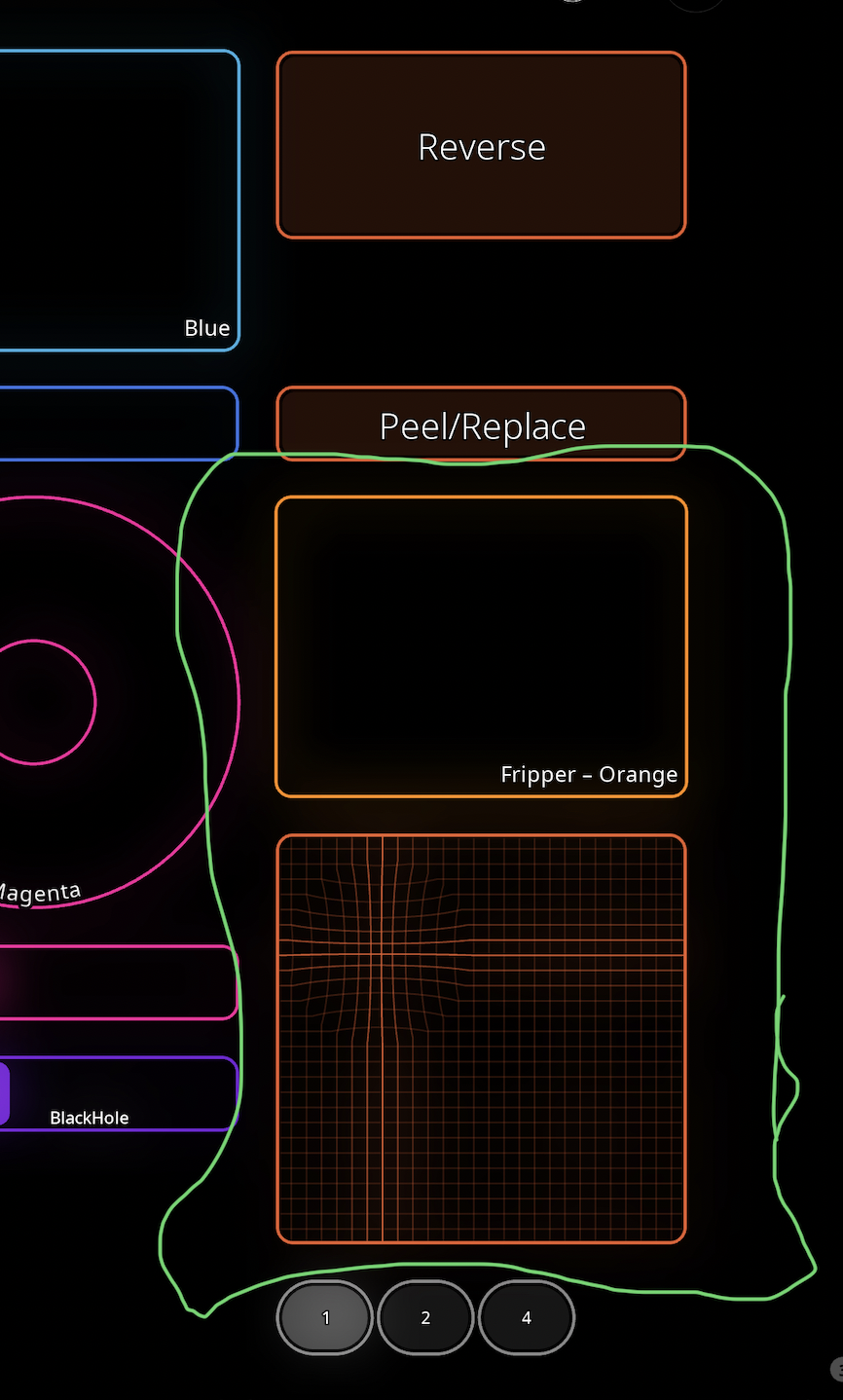
Here’s what the widgets look like. (The radio buttons change the recording count-out so I can play around with 1, 2, or 4-bar repeats.)
Comments
@ThinAirX : what do you mean by “changing the volume of the feedback”? That is what the overdub feedback parameter controls. If you want more granular control, you can set up a feedback loop where you send a color’s output to a bus that sends its output back to the color. You would set overdub feedback to 0. The bus then controls the feedback level.
When I use an xy pad and set Y to control overdub feedback to 0, the overdub feedback is being set to 0 and the old audio is erased as expected.
To test this, mute the input to the loop to eliminate any possible confounding.
Can you post screenshots of your settings and also a screenshot of your expanded mixer. And a link to a screen recording that demonstrates the issue.
As an additional troubleshooting tool, add a fader that controls the overdub feedback and see what happens when it is set to 0.
Ed, good ideas. I’ll try these things.
By “changing the volume of the feedback” I mean the decay curve. Example 1): long delay that begins repeat at a low level; Example 2): short delay but the volume of the few delays is strong, almost equal to the original.
@ThinAirX : overdub feedback is the level of the loop fed back to itself. At 100% the feedback level is 100% (full volume) at 50% it is half volume , etc.
I don’t know what you mean by long delay and short delay. Overdub feedback doesn’t involve a delay time.
Think of it this way, imagine that the loop’s output goes to a splitter. One channel of the splitter goes to the mixer output. The other splitter output goes to a volume control and gets routed back to the loop’s input. That volume control is analogous to overdub feedback.
From what you are describing you may want to be also controlling the signal going to the loop’s input.
For the ultimate in control, you would have something like this:
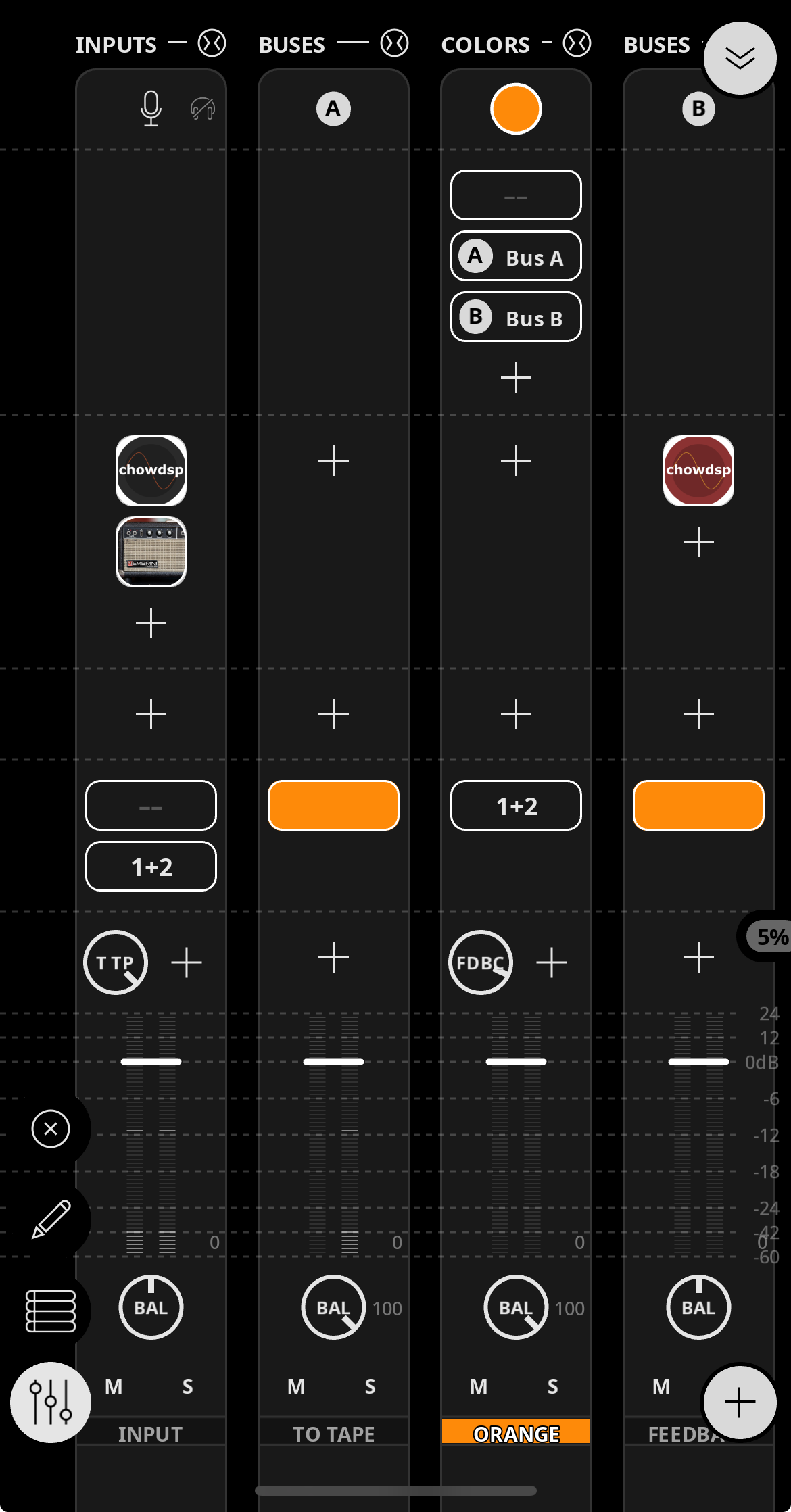
A gives you control of the initial input into the loop
B gives you control of the return signal. You could also send the return signal to other destinations such as hardware output or other buses.
Ed, I appreciate your explanations and suggestions. I’ve decided that what I had in mind—fine-tuning the overdub feedback-- is a refinement that isn’t worth the extra complexity.
Oh, and I found the cause of the overdub not behaving as it should at 0% feedback. Silly me, I had a delay in the color channel that got turned on. I moved it to a separate bus. Now the feedback x/y works as it should. Thank you for your patience in this matter.
I have another problem, though. When in overdub, I hear a slight distortion each time as the clip approaches the top—it’s like a 400 ms hiccup. I tested it with a new, completely bare project with only one clip and nothing else .All settings are default (except After Recording: Overdub). It still distorts. All levels are normal. I’m using a stage piano as input, at low volume. What could this be, and how do I troubleshoot it?
Without a demonstration, I can’t guess. This isn’t something that I have heard of. 400 ms a long hiccup.
Please screen record a demonstration and post a link to it. Reboot your device before making the recording. Please have the mixer showing in compact mode so that we can see levels and the loop. Use no plugins. Provide a full description of what all is connected.
I rebooted. The only input is a Roland stage piano (no other effects in the chain). All settings in Loopy are default, except overdub after record, and I added the slider to control overdub level. It’s not 400ms; more like 100 ms. But you can hear it. And this is consistent.
Link: https://www.dropbox.com/t/ZJCrCYxI0SXHrFfc
Please try with only the default project no changes . Use restore defaults and turn on overdub after record in the global recording settings.
Can you hear the glitch?
I’ll do it again with the default project, as you prescribe.
Is it possible Play Tail in Loop is getting in the way?
I can but I can’t reproduce it. So we need to eliminate variables to see what is responsible
The tail setting is off on this screen capture, and also on the first one I sent. (That is a setting I need eventually because I loop ambient music; but it’s off in these tests.)
In this test I’m trying different sounds on the piano. The glitch is more evident in some than others. Near the end is a particularly ugly one.
All settings are default from New Project. Except I set overdub to 30% at the clip level, and After Recording/Overdub.
https://www.dropbox.com/t/8VcXfPGYX1tjhnZE
For the sake of troubleshooting and isolating the issue, please use a default project with restored defaults and overdub after record the only change. Leave overdub feedback at the default. Perhaps my instructions weren’t clear. The only difference from the default we want at this stage is overdub after record.
Ed, I’m back at this after being pulled away by holiday commitments.
I tried it again just now, following your instructions—default at the global level, and only Dub after Record.. The glitch is still there, but much less noticeable. And it’s only on the first cycle—overdubs sound clean. I’m going to play with it for a while, and actually start making some music and see what happens.
Do you have a theory as to what might have caused this glitch in the first place? Are there other settings I might play with?
My goal is to loop sustained sounds (electrified clarinet and synths) to create ambient-style music. I’ve used a long list of hardware loopers over the years, starting with the Echoplex and Boomerang, and all of them introduce some glitch at the seam. I got good at work-arounds. Loopy handles the seam better than any of them.
Thank you for your attention and patience. I'm constantly amazed and impressed at the level of support from you and the others on this Forum. This iPad music shit is complicated, and sometimes can be discouraging. So your help with even minor issues is much appreciated.
Steve
Have you tried with record tail and play tail in loop both on?
Also, does it make a difference if you switch directly into overdub vs. waiting until the next cycle to begin overdub?
@ThinAirX : I am not quite sure why you experienced those artifacts. I tried with feedback set to 30% but didn’t experience it.
That being said I did notice a few times (in more than an hour) surprising artifacts happen during an overdub cycle. It seemed to be a playback issue as the next cycle was fine. I will look into that some more.
An absolutely seamless base loop is tricky if you play across the loop transition.some people record an empty loop and overdub over it. Some fade in the loop when the first playback cycle begins.