Loopy Pro: Create music, your way.
What is Loopy Pro? — Loopy Pro is a powerful, flexible, and intuitive live looper, sampler, clip launcher and DAW for iPhone and iPad. At its core, it allows you to record and layer sounds in real-time to create complex musical arrangements. But it doesn’t stop there—Loopy Pro offers advanced tools to customize your workflow, build dynamic performance setups, and create a seamless connection between instruments, effects, and external gear.
Use it for live looping, sequencing, arranging, mixing, and much more. Whether you're a live performer, a producer, or just experimenting with sound, Loopy Pro helps you take control of your creative process.
Download on the App StoreLoopy Pro is your all-in-one musical toolkit. Try it for free today.
MIDI pedals to control clips—what’s the best way?

I’m looking for help setting up LP so that I can trigger clips with foot pedals. I might be asking for advanced tips and techniques because I don’t have any trouble binding pedals to individual clips. I want a setup where I can control more than just clips directly. I’m starting this thread to get help, but also to start a discussion of some of the best hacks between pedals and widgets.
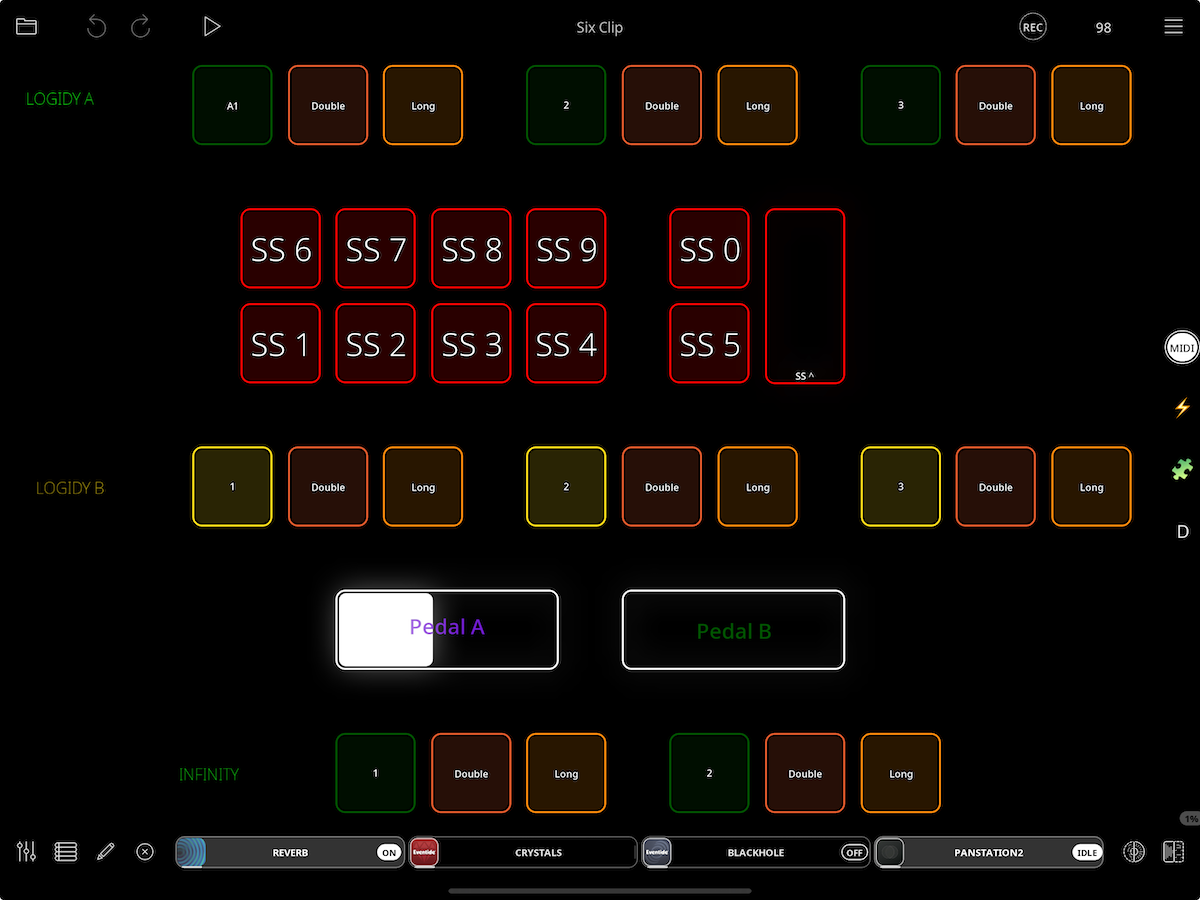
I have a collection of pedals, including a KMI SoftStep, standard button pedals, and expression rockers. I created a page (“MIDI Page”) in LP2 (stand-alone, not AU) with a button widget for each button and sliders for the expression pedals. (I actually created three button widgets for each physical button, one each for Press/Double-Tap/Hold.) I’m attaching a screenshot. MIDI binding is no problem. My plan is to bind all the pedals to that page, then connect the widgets to loop functions and controls on my main clips page. I figure this will give me the most flexibility as I design my layout, and I believe that profiles will be handy for what I want to do.
But I can’t figure out how to get the messages from MIDI Page to do what I want. In particular, I want some of the pedal actions (presses and variable) to act on whatever clip is selected (“Selected Clip.”) I don’t see anything like that in the programming choices. It seems that the Trigger Widget command is what I want, but it’s not a choice when I’m setting up the connections.
Am I missing something obvious and simple? Or is this a multi-step procedure?
Thank you,
Steve
This is MIDI Page, mapping pedal functions to widgets. SS is KMI SoftStep.
Comments
I am not following exactly where you are stuck. Can you try to explain differently — maybe more explicitly — are you trying to set a button action to target the selected clip or a midi binding — or something else?
Maybe an explanation like “when I press a button, I want X to happen.”
If you are wanting a button to perform a clip action on the selected clip, add the action to the widget and choose selected clip as the target.
I don't want to get in the way of the direct dialog between you and Edward. However I have an idea or two of what may be the issue. Like him though I'm not sure I understand exactly where you're getting stuck.
Can you give an example of just one or two actions that you're unable to target "selected clip" with? Also, we're talking about actions you're setting up on the widgets and not just actions from the midi controller directly, correct?
Ignore this if working only with Edward is more efficient. It usually is. 😂
I welcome any help I can get.
Examples of behaviors I’m endeavoring to achieve:
Two-button pedal.
Button 1 (“B1") press triggers Play/Stop for the Selected Clip—selected in real time during performance (I select on the screen with a two-finger gesture).
B1 double tap > record on selected clip.
B1 hold > clear.
B2 press > reverse.
B2 double tap > peel/replace.
Etc.
Same for expression pedals. e.g. overdub feedback for the clip currently set as "selected clip."
The layout plan is to map and bind all buttons and pedals to widgets on a separate page (“MIDI Page”). See the image in my first post. The idea is I set up the bindings once, and then experiment with how I send those commands to clips and controls on the Main Page (clips page), the only page displayed during performance.
Where I’m stuck: how do I program the widgets on the MIDI Page so that they target the currently Selected Clip? Example: the widget for B1 on the MIDI Page (mapped to the first button on my footpedal). How do I set it up so that when performing, I select clip 4, press B1 with my foot, and clip 4 plays? Then I select clip 3, press B1, and clip 3 plays.
Another example using Selected Clip: select clip 5, press expression pedal A to adjust feedback for clip 5. Then select clip 6 and use the same pedal to adjust feedback for clip 6.
Example NOT using Selected Clip: Use expression pedal B to adjust track volume of any of the tracks in the mixer, or signal input to the colors. I’m guessing this would involve routing with a step dial or radio buttons.
What I’m trying to avoid is having to dedicate physical buttons to individual clips. I have a lot of pedals—too many—and my goal is to eventually simplify and streamline so I can do more with fewer physical pedals. I also want to experiment with different things I can control with my feet without having to redo MIDI bindings for the pedals.
Like a guitarist, I need both hands to play my instrument-- an electrified clarinet.
If there’s a completely different approach to achieving this, I’m all ears.
I’m grateful, as usual, for your help and attention and bemused questions caused by my lack of clarity.
Steve
@ThinAirX : all clip actions have selected clip as a target option. Add the action you want and choose selected clip as the target.
If you want the button press to play/stop the selected clip, add the Play/Stop action. And in the action’s setup panel, choose selected clip as the target.
Solved. I discovered that the erratic behavior that confused me was partly due to conflicts with some old profiles that were still turned on.
I’m still not clear on the settings when in MIDI Binding/Learn screens that you see when clicking on Action. I used only Press and it works. What are those other choices? Specifically, are they what the widget receives from the bound controller (it listens for more than just a press), or are they mapping the press from the pedal to actions programmed in the widget? I’m still hazy about what’s actually going on under the hood here.
Do you mean the panel you get when tapping Actions? If not, please post a screeenshot or screenshots illustrating what you mean.
The screenshot below is all actions that are available for the object being MIDI Learned.