Loopy Pro: Create music, your way.
What is Loopy Pro? — Loopy Pro is a powerful, flexible, and intuitive live looper, sampler, clip launcher and DAW for iPhone and iPad. At its core, it allows you to record and layer sounds in real-time to create complex musical arrangements. But it doesn’t stop there—Loopy Pro offers advanced tools to customize your workflow, build dynamic performance setups, and create a seamless connection between instruments, effects, and external gear.
Use it for live looping, sequencing, arranging, mixing, and much more. Whether you're a live performer, a producer, or just experimenting with sound, Loopy Pro helps you take control of your creative process.
Download on the App StoreLoopy Pro is your all-in-one musical toolkit. Try it for free today.
LO-OP-1, my new Loopy Pro template
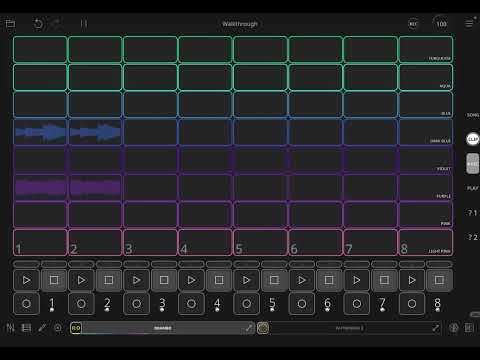
Hey everyone, I've been working on this template for a while now, and it's finally ready to be released into the wild.
As the name hints, my original inspiration for this was the OP-1 synthesizer. More specifically, it was an affordable, but still too expensive OP-1 I saw on Marketplace. Instead of buying it, I built a template. And this is an evolution of that template (let's just say, disabling the undo button was too complicated).
The basic workflow is: record, stack layers, dump into the clip launcher. Resample if desired. Sequence the clip launcher, record into the song view. I've tried to make the process as streamlined as possible, while also being focused. Some things are easy to do, others will require work-arounds. That's by design.
I've embedded a manual into the template, and I've also created a video walkthrough. But I'd be happy to answer any questions people have. This is version 1---I hope to find the time to improve on this in the future.
Enjoy!
https://patchstorage.com/lo-op-1/
Comments
Ridiculously impressive. Also, widgets as logo typography and page layout elements?!?!?!
@timfromtheborder : Wow! What a great template both functionally and aesthetically.
Just seconding the “wows”! This looks so impressive and inspiring. Can’t wait to play around with it. Thanks!!
Beautiful! An app within the app. You're not only a genius, you're also very generous to share your hard work for free. Thank you!
@timfromtheborder, just watched the video and this is astonishing, amazing work, congratulations. I’ve said it before elsewhere, but your template creations for Loopy Pro (and Drambo) really are next level. Personally, I think they should be included in the apps as examples of how flexible they are and as what can be achieved with the right know how and imagination. It’d be a shame if they were missed by users who aren’t aware of PatchStorage.
This is next level work.
I agree with @Robin2 , this should be part of the LP distro.
I love how you shrunk down the stepped dial and blew up the font size to get those tapable selectors. I had to go to edit mode to figure out what the heck was going on with those. So simple but cool!
Impressive, thank you
@wim : should this be here in patch sharing or moved to the Loopy Pro category so it doesn't get missed by people watching that category?
Wow! Will have a better look soon, but this looks incredible! Thank you @timfromtheborder, this is genius 🤓
I lean toward Loopy Pro category.
[moved]
Just a huge shout out for another mind-bogglingly good template from @timfromtheborder: Fugue Looper
Thanks for the kind words everyone!
I’ve made a small update, adding a page that simply opens/closes a MIDI AU (like a sequencer or playing surface).
@offbrands word, brother. I'm hoping to put together another video showing my whole setup and flow, maybe this weekend if I find the time. Glad you dig it.
Bonus template
https://patchstorage.com/ta-pe-1/
It’s a four-track tape recorder with some handy features. Originally it was part of LO-OP-1 but things got too complex.
Your templates are really elegant! Love the design!
Hey @timfromtheborder, I finally got round to downloading Lo-op-1 - brilliant creation - but I can’t seem to get it to save in Loopy Pro? It seems to save but then doesn’t appear in the list of projects so can’t be reopened?
Tried with Ta-pe-1 and that seems to save without any problems.
Probably user error on my part - any ideas what I’m doing wrong?
Did you put the project in your Loopy Pro folder or duplicate and save it? If you opened it from your downloads folder and saved, the saved file is still in your downloads folder. The recent projects menu only shows projects in the Loopy Pro folder.
Yes, that was it, thank you so much @espiegel123. User error as suspected! Cheers.
@timfromtheborder I was wondering, would it be possible to make the ta-pe-1 in Drambo? Or is Drambo just not made for that?
Drambo’s audio capabilities are limited. I believe the max recording length in Flexi Sampler is 60 seconds. But you can load ta-pe-1 into Drambo, of course! The Loopy Pro AU has multi-input so you could route different tracks in Drambo to the different clips.
Thanks @timfromtheborder, will have a look at this!