Loopy Pro: Create music, your way.
What is Loopy Pro? — Loopy Pro is a powerful, flexible, and intuitive live looper, sampler, clip launcher and DAW for iPhone and iPad. At its core, it allows you to record and layer sounds in real-time to create complex musical arrangements. But it doesn’t stop there—Loopy Pro offers advanced tools to customize your workflow, build dynamic performance setups, and create a seamless connection between instruments, effects, and external gear.
Use it for live looping, sequencing, arranging, mixing, and much more. Whether you're a live performer, a producer, or just experimenting with sound, Loopy Pro helps you take control of your creative process.
Download on the App StoreLoopy Pro is your all-in-one musical toolkit. Try it for free today.
Comments
They're definitely not exposed as parameters.
They have dual functions, press and long-press, so how that would work would need to be clarified.
I'd love to see implemented in some way though.
I suggested it a while ago and Bram didn’t respond. It would be neat to be able to cycle thru the memories as a pseudo song mode. But it’s probably a difficult thing to do if you haven’t designed the app to accommodate it.
Could you please explain what "the multi-input Loopy Pro plugin" is? Is this a separate app you are talking about? Or is this some function built right into Loopy Pro?
I can't seem to find it.
Loopy has multi-input capability - meaning that it's possible to use the plugin in a host such as AUM, where there are multiple inputs to the plugin. There's not a separate version with this ability, it's the same version.
That's not to be confused with multi-output plugins support inside Loopy. If you host Battlestation in Loopy, there's no ability yet to have separate outputs from BattleStation.
Here are some screenshots in AUM with a BattleStation outputting to separate inputs in Loopy Pro. I only did the first five inputs for better clarity in the screen-shots.
Thank you for quickly responding with screenshots! So- are you opening AUM as IAA in Loopy Pro? And if so, how are you getting Loopy Pro to recognize each AUM channel as a separate channel?
I didn't open AUM as an IAA in Loopy Pro. I opened Loopy Pro as a multi-input AUv3 plugin in AUM. AUM's multi input plugin setup is a bit confusing but well described in in-app help file. In Loopy Pro, you can add inputs for each of the appearances in AUM. Look at the numbers next to the appearances in AUM, then look at the labels at the bottom of the inputs in Loopy.
Loopy's manual section on this is helpful too:
https://loopypro.com/manual/#multi-in-out-operation
Oh - sorry that my brain is so slow. I should have realized looking at the screenshot that LP was loaded into AUM. So this can be the same instance of Loopy Pro just spread out to effectively be having different drum instruments on separate LP channels?
No problem! It's an involved topic. It's not something that is readily obvious. 👍🏼
Hi
I missing Midi CC via Midi Controller for drum fills, Memory Banks and low cut buttons.
First of all a big thanks to @brambos for this wonderful app, so fast and easy to get with.
It has inspired me to create "Battlestation replicas", within Drambo, BAM, etc. to help with the blank page problem, and to have "jamming boxes" ready.
So, I'm searching for one piece of the puzzle:
What could be a replica of the Turing machine note generator (amazing feat!!)
I found ShiftBud on the forum, but there's no dial for the notes. Any other idea?
https://patchstorage.com/midi-turing-machine/
Also this one, and probably more there, as well.
https://patchstorage.com/fabyrinth/
thank you @bleep , totally forgot to search for Mozaic scripts 👍
MiRack has some Turing machine modules.
Thanks @wim but Mirack seems too daunting for me.
It’s fairly simple if you do simple things. But yeah, I get how it seems.
Just wanted to say I'm in love with the app and I'm using it live now! So easy to get into the flow with it
Still I'm looking forward to future updates.
This is my current wish list:
I dislike having to switch left and right to access all instruments and would rather have everything on one screen. I think it would still look great with the memory slots and the reverb/delay on the down left/right. I still would like the look of it and would not feel overwhelmed.
Having a modular approach in order to change the drum machine and the synths would be great.
I would like to be able to quickly swipe over the mute and solo buttons of the tracks to activate them, just like the drums sequencer.
When Battlestation follows the beat of Loopy Pro, it will only adjust the BPM and will not follow if you change the meter to anything else than 4/4...
I really like playing in ternary and odd rhythms, so I would really appreciate the option for this.
I understand these might be really big efforts to undertake. I would appreciate if @brambos could outline a possible future for Battlestation. It is by far the most intuitive and fun drum and synth machine I've ever played and I'd love to see it evolving!
So so so so so so awesome. Thank you Bram!
Hey, if I'm not mistaken, there's currently no way to rename a saved preset. That would be great for a future update. The current workaround is to save a new preset and delete the old one.
One thing I don't quite understand is, why when I transpose to another key, the melodies are different? Sometimes I even have the impression that the new tonal centre is not really where I want it?
What should I do, if I want the same melodic material, but transposed to another key?
With MacOS Sequoia 15.7.5, Logic 12.2, BattleStation no longer loads as an AUv3
Standalone still operates.
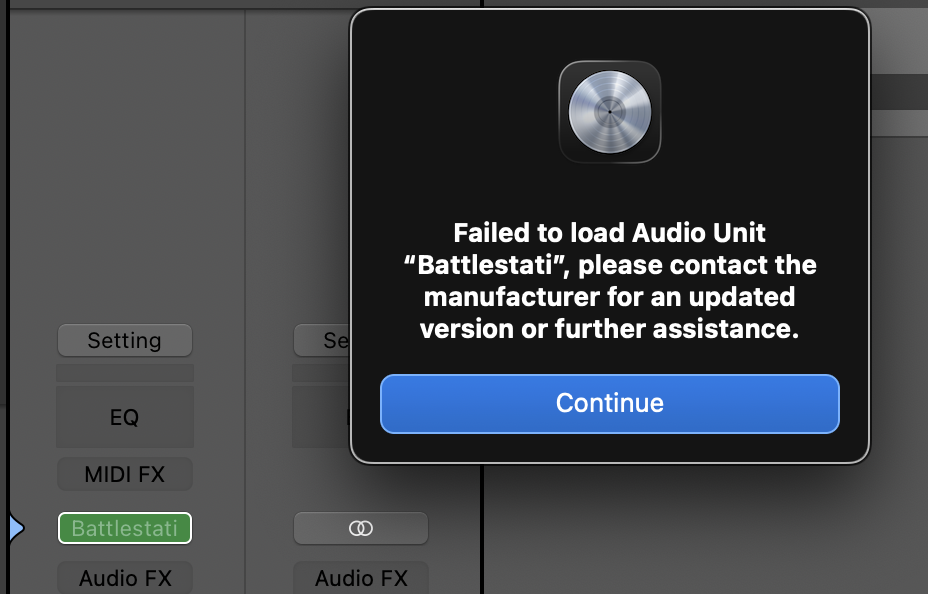
auvaltoolreports AU Validation Succeeded, but when loading in Logic, I get the error in the attached image.Meh.. that's new. And on the exact day I decided to update my last Sequoia machine to Tahoe... which isn't going to help testing.
But interesting that the standalone still works, because the standalone also loads the actual AUv3... which tells me this isn't a problem with the AUv3, but with Logic. Was there an update lately?
Does it load in GarageBand? Knowing that would help narrow it down.
12.2 came out April 9.
FWIW other instruments and plugins of yours that I have on Mac work fine (Solderbox, WOOTT, Salome).
Battlestation was last updated 5 months ago, so somewhere along the way a working setup stopped working. That's puzzling.
Obligatory IT-support question: did you try restarting the Mac?
I just installed the latest available Sequoia update (15.7.7), rebooted, and it works fine!
Apologies for the churn, hopefully this will be of use to anyone else getting that error...
No worries. That's good news! Thanks for the heads up. Have a great weekend!