Loopy Pro: Create music, your way.
What is Loopy Pro? — Loopy Pro is a powerful, flexible, and intuitive live looper, sampler, clip launcher and DAW for iPhone and iPad. At its core, it allows you to record and layer sounds in real-time to create complex musical arrangements. But it doesn’t stop there—Loopy Pro offers advanced tools to customize your workflow, build dynamic performance setups, and create a seamless connection between instruments, effects, and external gear.
Use it for live looping, sequencing, arranging, mixing, and much more. Whether you're a live performer, a producer, or just experimenting with sound, Loopy Pro helps you take control of your creative process.
Download on the App StoreLoopy Pro is your all-in-one musical toolkit. Try it for free today.
Logic - “Missing Audio Files” error fix

If you get this message…
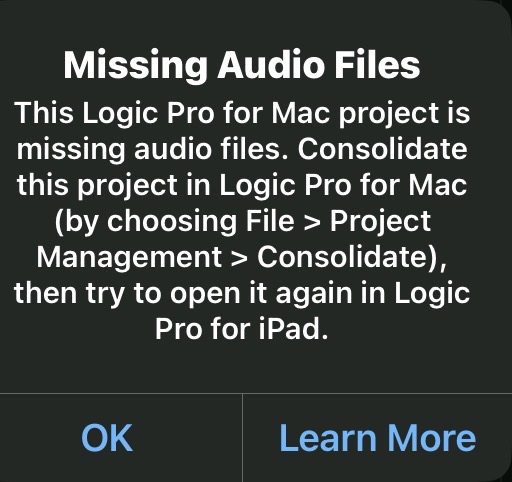
…and you don’t have desktop Logic (I.e. your project has never seen a Mac) this is how you find the offending track(s) to either delete or reload the sample:
Turn off every track. That’s the blue button

Close the project to save it.
Reopen the project - the error should be gone
Start slowly turning on each track
When you get to an offending track the error message should pop.
Deal with it however you need to.
Close to save.
This worked for me. Good luck.
Comments
Great tip - thanks!
I just learned that we can have off buttons per track, thanks for the tip @boomer - this bit me a couple of weeks ago.
@richardyot @FastGhost FYI - I submitted a bug report to Apple and today they got back to me asking for documentation. I sent them a corrupt file that demonstrates the problem in addition to causing logic to freeze when closing the file. Maybe this will get fixed.
Thanks @boomer !
I submitted a bug report for this today too, as I've now discovered it has affected basically every historical project I have in Logic - I can't open any of them without getting this message, and most of those projects only ever had bounce-in-place samples in so the samples never even existed outside of the project.
Yeah, the bounce in place samples are a problem. If you don’t have the original material you bounced from, there may be no recovery. I try now to export the bounced samples but it’s a real buzz-kill to the creative process to stop and do that. And easy to forget. Logic would be great if its features worked reliably and Apple at least tried to fix the many infuriating bugs.
Oooh, how do you export the bounced samples?
You can use for example WaveBox or any file browser that allows browsing inside document bundles and extract the samples, bundles are just ‘folders’ but unfortunately Files.app doesn’t have the option to show contents of a bundle.
I’ve been requesting an option to save/export Samples from QuickSampler and Audio Regions since LogicPro for iPad 1.0 but it apparently not a priority for Apple…
Amazing, thanks @Samu
No problemo, personally I just dump a .logicx project into the BeatMaker 3 folder when I need extract samples or other rendered/bounced audio from a project.
Another option is to add the Logic Pro folder as a Location to Koala Samplers built-in browser for quick browsing of project content and naturally loading of audio/samples to the pads
@samu. Fantastic. Thanks. Just tried the koala trick. I had no idea that was possible. Got me thinking - I was also able to use the Documents app to look inside a project. The advantage there is that you can more easily get the files back into logic. Question though…. Are the “missing” bip audio files truly gone or did quick sampler/sample alchemy just lose the pointer to the file? I would assume it’s the latter because otherwise ‘consolidating” the project on a Mac wouldn’t work. And if that’s the case why in the heck wouldn’t Apple just add the same function to the iPad version? That last question was rhetorical.
Honestly I've so far never bumped into the missing files issue in LogicPro for iPad so I can't say for sure
One thing that is worth investigating is that when a project reports missing files it could be worth it to check inside the project bundle to see if the files truly missing or just not properly linked?!
If the file is there it should be recoverable using for example WaveBox by re-saving and re-importing the file into the project.
I know iOS/iPadOS File Management has some 'issues' dealing with the Scandinavian åäö letters...
...if the *.wav filename contains any of those letters QuickLook can not preview the .wav file so I would NOT be surprised if this 'bug' is also present when some files go missing as the file-name is based on the track-name and in some cases the QuickSampler instrument name.
Also I've not managed to figure out where (most likely a hidden folder) where LogicPro for iPad stores the 'temporarily deleted' files that are brought back when doing undo?!
This as the audio-event files are immediately deleted/moved from the project folder when removing an audio-event from the time-line and saving the project, reloading the project and doing undo brings it back bur from where?
Other features I've requested (after we got the option to add user-locations to the browser to import samples) is to be able to 'Export' Midi and Audio-Events and audio recording one with Quick Sampler to a user selected location (ie. Drag'n'Drop back to the Browser).
I would also not mind being able to have a 'folder' in the LogicPro for iPad folder that could be used to batch import Sampler instruments, SF2 files etc. and also back up user-created presets etc.
But those features are likely considered 'Too Advanced' for the somewhat dumbified iPad version of Logic
@samu. Maybe it’s because my projects tend to be very large that I run into this regularly. I also often run into logic forgetting the output mappings of the modifier plugin. And then there’s the one where it changes the project sample rate on its own without warning. All of these seem to happen when the project gets past a certain size; either physical size or number of tracks or number of plugins or something. Adding all those new features you mention would be womderful. Right after they fix the existing ones that don’t work reliably. I did open an old project that throws thw missing files error. If i go by the name in the quicksampler window, that file is missing from the samples folder when i look from the documents app. It might very well be that consolidation happens via the mysterious undo files location. Maybe they are just a bunch of linked lists
Ouch, I guess all we can do then is to keep bombarding Apple with feedback posts until things get fixed…
I’ve just had this for the first time with a project. It’s just quick sampler samples so I can reload them easily enough, but if I then save the project and reopen it, it happens again.
It’s absurd that it asks you to use Logic Pro for Mac. I’ve never used it in Mac and don’t intent to.
Ok, seems that the dmd track had forgotten it was a dmd track or something. If I selected it the piano playing surface came up rather than the dmd one. I’ve recreated it on a new track and deleted the old one and all is fine again.
They really need to build in some sort of autobackup or revision system to this app.
@gregsmith they really need to do a lot of things. My most recent project required me to re-point several modifier plugins every time I opened the project. These are issues known to them but apparently do not bother enough people to warrant fixing them. Love. Hate.
Once I get to a certain point with a track I’m making daily manual backups, but it’s such a chore.
Breakthrough. Claude figured it out.
Here is how to find the names of every sample in a project and which instrument preset(s) it goes into. This has to be how “consolidate” does it.
First share a copy of the project with the Documents app or the one @Samu mentions above.
Inside the shared folder find this file: "YourSong.logicx/Alternatives/000/ProjectData"
Copy that file and paste it into Claude (others may work also)
Ask it to extract all the custom sample alchemy and/or quick sampler presets and the sample names it expects in them. It gave me a neat list. You still have to find the samples yourself but it beats guessing.
I went one step further and asked for the code to do it myself. I just tried to attach the python script here but I was unable to. I have not tried using it but If anyone wants to, I will DM it to you. I could also paste it in-line here. Not sure if the big A would approve.
Hi @boomer . You could try attaching the script as a zip.
Doh! Should have thought of that.