Loopy Pro: Create music, your way.
What is Loopy Pro? — Loopy Pro is a powerful, flexible, and intuitive live looper, sampler, clip launcher and DAW for iPhone and iPad. At its core, it allows you to record and layer sounds in real-time to create complex musical arrangements. But it doesn’t stop there—Loopy Pro offers advanced tools to customize your workflow, build dynamic performance setups, and create a seamless connection between instruments, effects, and external gear.
Use it for live looping, sequencing, arranging, mixing, and much more. Whether you're a live performer, a producer, or just experimenting with sound, Loopy Pro helps you take control of your creative process.
Download on the App StoreLoopy Pro is your all-in-one musical toolkit. Try it for free today.
Cubasis 3.8.2 Now Available

Dear all,
We are pleased to announce the immediate availability of Cubasis 3.8.2 for iOS (and Android).
Similar to Cubasis 3.8.1 which has been released on December 23, 2025, this update further improves Cubasis by addressing several user-reported issues. We hope these fixes resolve your problems and enhance your overall Cubasis experience.
A big thank you to everyone who helped us reproduce these issues, making it possible to resolve them.
Important Note:
The Apple Pencil Pro issues require upstream Qt fixes, which we’ll integrate as soon as they’re provided (same for the Android mouse issue).
Thank you again for your support and feedback!
Best,
Lars
Comments
Cubasis 3.8.2 |
Improvements & Fixes
Audio Editing
CBT-4415 – Undo of deleted audio events no longer leads to empty audio events.
CBT-4424 – Trimming a split audio file no longer shortens it excessively.
MIDI & Automation
CBT-4459 – Fixed MIDI event length trimming after recording with an open editor.
CBT-4452 – The first MIDI CC event is now visible in the editor.
CBT-4466 – Open MIDI events are no longer deleted after stopping recording.
CBT-4471 – Notes no longer jitter when moving start or end handles of events.
Effects & Track State
CBT-4482 – Fixed an issue where a swapped effect stops working after toggling it.
CBT-4467 – Effect rearranging can no longer be triggered on frozen tracks.
Audio I/O & Monitoring
CBT-4468 – Monitoring now works when connecting an audio interface after launch.
CBT-4435 – Eliminated strong feedback after disconnecting the connected audio interface.
CBT-4460 – Sample rate dropdown correctly shows “44.1” instead of “44”.
UI & Usability
CBT-4469 – Fixed an issue where the Restore Purchases button was not visible in the Shop in certain cases.
CBT-4474 – Signature track buttons no longer overlap the track list.
Plugins & Interaction
CBT-4399 – Fixes a rare problem where the AU and IAA plug-in lists were empty.
CBT-0329 - AU and IAA lists update when installing or uninstalling an app.
CBT-4470 – Amp Rack and Bass Amp stomp box knobs can now be moved via Apple Pencil.
@LFS This was a pleasant start to a new week!
I'll be stress testing the audio-editing functionality and should I bump into any issues I'll let you know.
(One thing would be that when the grid in the audio-editor is turned off it should behave the same as when setting the ruler to 'time' as currently there is some kind of 'snapping' going on even when the grid is turned off (I suspect something in the range of 1/192-1/384th note?!)).
Hopefully the Cubase Sampler Track for Cubasis is on track for a future 3.9 update?
This could very likely bring some new users on board who prefer a more sample/sampler based work-flow.
The Cubasis HUI support is very nice together with the Novation Launckey 25 Mini Mk4!
(If it's possible more 'default mappings' would be very nice, like auto-map currently selected plug-in parameters for all internal plug-ins, and additional transport controls (in addition to moving the playhead), set loop start/end etc.).
Looking forward to what ever is cooking next!
Hi @LFS,
Thank you to you and your team of engineers for this latest update.
I can confirm that all MIDI CC events are now visible.
Unfortunately the bottom drag handles are still extremely erratic when using a e-Pen to extend the track in either direction, using my finger is fine but cumbersome.
The central drag handle used for copying sections of a track does not work with a finger or e-Pen.
I have not yet fully explored this new update.
Mike
For me that gesture (to copy an event) works perfectly using either my finger or the Apple Pencil on My 11" M1 iPadPro, iPadOS26.2.
But it has to be said that when you're copying 'longer' events you have to drag for the entire length of the event you wish to copy before anything happens on the screen. (so for 8 bar events drag 8 bars, for 16 bar events drag 16 bars etc.).
So if you want to for example copy/loop an 8 bar event using the drag gesture you have to drag for 8 bars before you see the event that gets looped being copied.
Personally I prefer touch gestures as the iPad's are primarily 'Touch First' devices and I only use the Apple Pencil when UI elements are too small to accurately touch using fingers.
I'll start to dig into the audio-editor now (trim in particular).
Cheers!
Thank you for the update but i am seeing missing Interapp apps not listed?
I know its an issue with cubasis as they appear in AUM.
Groovebox is the app i want to see in cubasis - its not listed in the interapp menu anymore?
FIXED - user error.
Just remember that some IAA apps are 'Generators' and those have to be loaded to an Audio Track while other IAA apps are 'Instruments' and those are loaded to a Midi Track.
Check in both places and I'm quite sure you'll find the 'missing' IAAs.
Just been taking the improved trim functionality for a spin and for the most part it works like it should but UNDO (in the audio editor) has a mind of it's own and can in some cases set the start & end point of the trimmed audio-event to the beginning of the audio-file and not to the place in the file where original trimmed event portion came from.
What I suspect is happening here is that when trimming an audio-event the 'undo history point' for the newly created audio-event starts from the 'pre-trim state' so the events audio starts from the beginning of the original audio-file when taking undo one step too far?
Also when doing Normalize or Reverse of an audio event the entire source-file is duplicated which can bloat the project a bit when dealing with longer audio recordings.
One workaround for these few issues is to always 'trim' the file before applying Normalize or Reverse (or any other of the destructive edits) to an audio-event to avoid the whole source file being duplicated.
To avoid 'undo' causing hassle when editing trimmed audio-events clearing the projects undo-buffer seems to make things a bit more predictable as the undo-history for the audio-event will start from its current state (ie. post trim).
One thing that is also easily missed (when editing audio) is that the project/arranger and each audio-event have their own independent undo-buffers and clearing the global undo buffer clears all undo-points.
It could come in handy to be able to clear the audio-event undo's separately?
Now that I'm somewhat aware of these potential 'pitfalls' I feel I can work with Cubasis again when it comes to editing and preparing audio files for use with other apps
So Big Tank You to @LFS for making this 'bug fix' reality!
Well thank you so much @Samu your a legend - but you already know that
That worked just fine, so today i learned something new.
Best wishes db
I have tried copying a 4 bar section using the middle handle, a white line appears at the beginning of the section to be copied and that’s all, this behaviour is identical on both my iPad Air 4 and 13” iPad Air 6, this has been the case since the first v3.8 update.
Mike
Cubasis 3.8.2 on My 11" M1 iPad Pro, iPadOS26.2 and Apple Pencil.
https://www.dropbox.com/scl/fi/gd6basp688mi9kameixoc/IMG_1228.MOV?rlkey=j17nt2pjnmkmgse6oerirw8c4&dl=0
Zero issues...
All nice when the app gets updated and fixed but I can't believe you still not fixing this
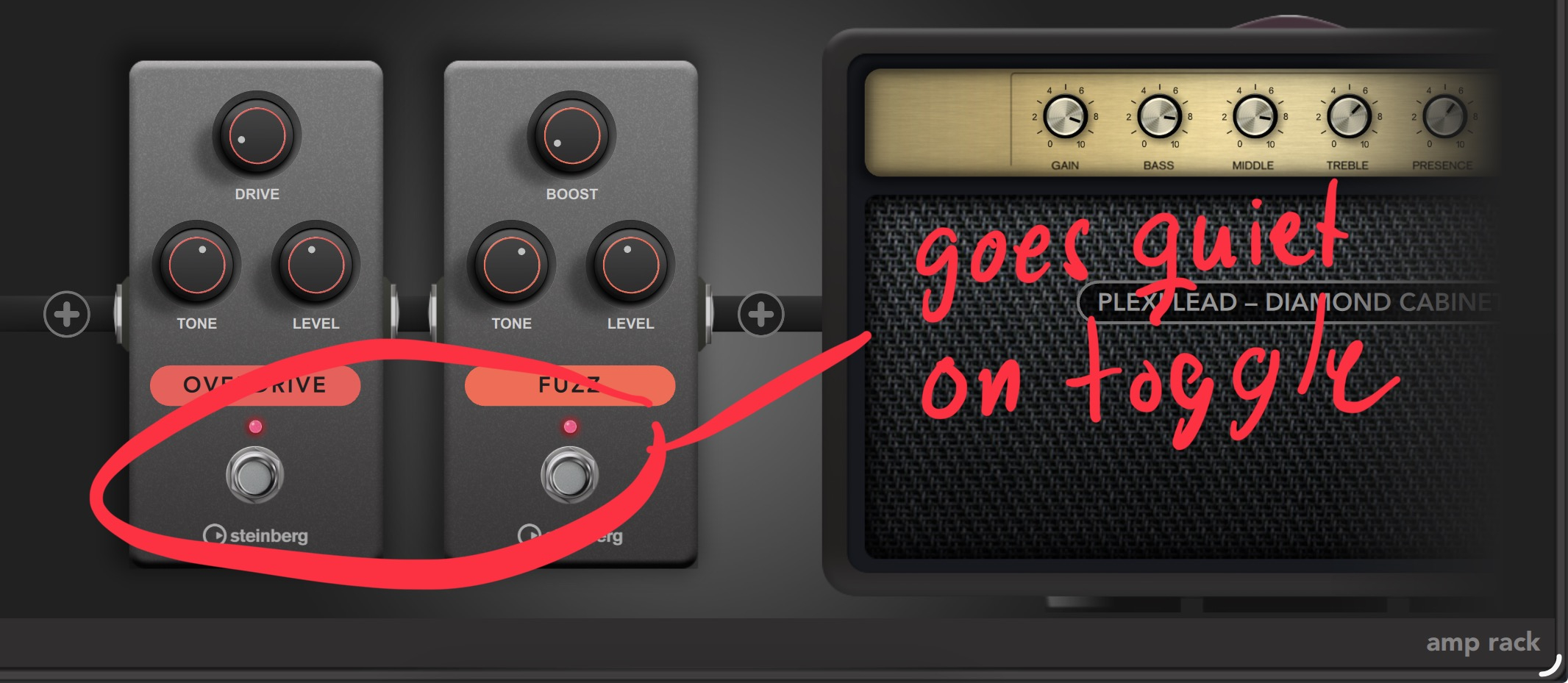
Using a picture this time eliminating language issues
edit: I should clarify that the quiet is short and the sound returns but there should be none, I don't play live but for anyone that want to, it make this effect unusable
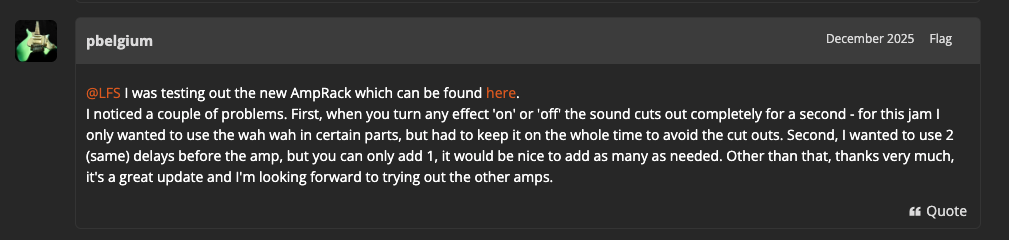
edit2: adding this @LFS to be sure it's seen
I want to "prove" that already on the 3.8 release the issue I'm reporting above (for the third time) was first called out here:
Thank you for the fixes.
The problem with non existing midi clip playing midi arpeggietors still exists.
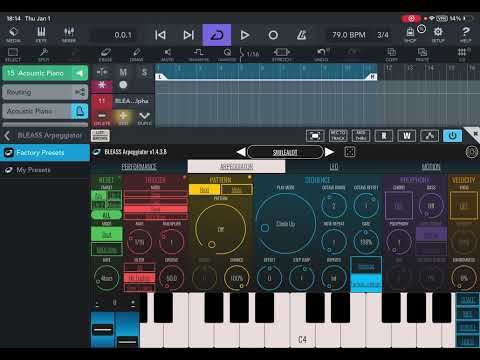
To describe the problem. I have a midi clip , when I remove it, it keeps playing like it was still in place.
My apologies, you are right, I was expecting to see the bars to be copied actually move as I dragged the centre handle, this was the case before the v3.8 update, but I am happy it now works as per your video.
Thank you @Samu🍻
For me it has always been like in the clip in Cubasis but it can get a bit annoying when extending longer events as there’s no visual indication and you can’t extend by for example half of the source length (say extend a 4 bar loop to 6 bars by only duplicating the first 2 bars and you have to extend to 8 bars and the shorten the last event by 2 bars).
Hi @ecou
We've already exchanged with the BLEASS app vendor, but did not receive a feedback to our last message. Did send a reminder today.
Update -
They've just replied shortly after and confirmed to investigate the issue further.
Best,
Lars
Hi all,
Thanks for your feedback so far which will be shared with our engineering.
Best,
Lars
I appreciate that you contacted BLEASS but in my video the problem also happens with ArpBud 2 by CeM Olay.
Hopefully what you find with BLEASS will work for the other midi Auv3.
I contacted BLEASS too 2 weeks ago.
Thank you Lars
Hi @ecou
Our engineering team performed a quick check using ArpBud 2:
"The only way we can reproduce this behavior is by dragging the MIDI event away while a note is still playing (i.e., in the middle of a note being generated by the MIDI effect). In that case, the MIDI effect assumes the note continues indefinitely and never stops."
So, from our perspective, there is no issue when using ArpBud 2 in the usual way with Cubasis.
BLEASS will review the former issue which is different to using Arp Bud 2, with Cubasis.
Please verify this on your side and let us have your feedback.
Best,
Lars
Hello Lars,
I did a new video with ArpBud starting with a new project. If you can’t replicate what do you suggest ? A reinstall of both app?
Also the drag and drop of midi clips from Helium by 4pockets to Cubasis that you had fixed in 3.81 is broken again in 3.82.
Edit : I just realized the drag and drop does not work from the maple file app either.
Does anyone else have problems with Cubasis 3 running in the background and draining batteries? Even though the app is closed. I needed to offload the app and restart the iPad to stop this behavior. 😔
My wild guess is that this looks like Cubasis listening to the localhost:8080 port indefinitely without any meaningful purpose?
iPad Pro (M5, iPadOS 26.2.1)
Is that possibly network MIDI? Have you maybe enabled something that causes this?
That seems unlikely. Network Session uses UDP port 5004 and 5005 by default. It would be very unlikely to use port 8080, which is typically an alternative TCP port used for web services.
@Luxthor my battery is draining more than usual too. How do i check this like in your image posted?
Edit - i checked with my device and the drain for me was an update indexing in the background. Nothing to do with cubasis. Maybe there is some similar for others seeing recent battery drain after system update which i had done recently.
After updating to iPadOS 26 almost every background music app drains my battery if not killed completely. Leaders are Koala, Scaler and Cubasis
You can turn off background process in Cubasis settings.
I don’t have anything MIDI connected on my local network. And this problem with Cubasis started to occur after the latest iPadOS update. (26.2.1)
This problem is probably related to the latest iOS update that specifically addresses WebKit vulnerabilities that gave apps root permissions.
First you need to enable “App Privacy Report” in Settings->Privacy & Security. Then you will have reports on app activity.
The other image is from Settings->Battery.