Loopy Pro: Create music, your way.
What is Loopy Pro? — Loopy Pro is a powerful, flexible, and intuitive live looper, sampler, clip launcher and DAW for iPhone and iPad. At its core, it allows you to record and layer sounds in real-time to create complex musical arrangements. But it doesn’t stop there—Loopy Pro offers advanced tools to customize your workflow, build dynamic performance setups, and create a seamless connection between instruments, effects, and external gear.
Use it for live looping, sequencing, arranging, mixing, and much more. Whether you're a live performer, a producer, or just experimenting with sound, Loopy Pro helps you take control of your creative process.
Download on the App StoreLoopy Pro is your all-in-one musical toolkit. Try it for free today.
Maximize mixer SOLVED

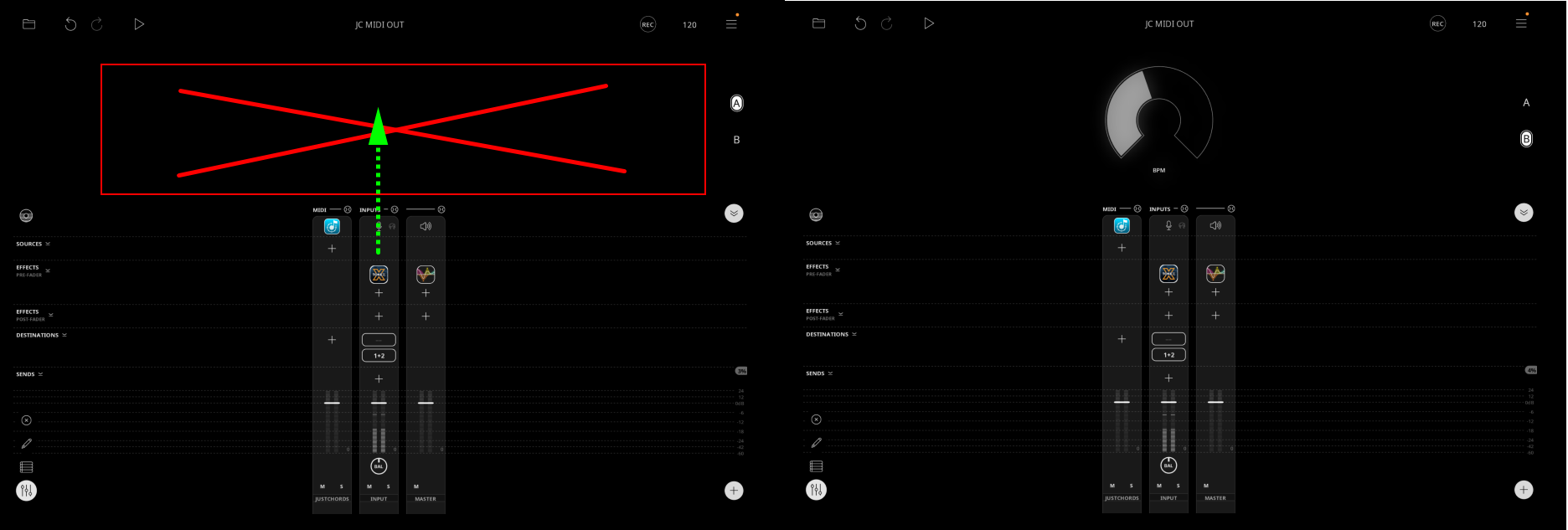
I'm using one widget as a helper for sending tempo value from JustChords to Loopy Pro. As far I know, it cannot be done directly because of CC value limitations (0-127) so I send CC from JC to widget at first and then use "Adjust tempo" action inside of it (10-266). What I can't do is to hide that widget. I tried to move it to Page B but there is still reserved space on Page A. And I would like to have my mixer maximalized. Is there a workaround how to do that? I'm aware that now it is not possible to hide a widget: https://feedback.loopypro.com/posts/164/hide-widgets-imported-feedback
Comments
It's not posible to maximize the mixer to take up the full screen, even if you have no widgets or loops at all. You can expand all the FX rows, etc, to make it take up more room, but that doesn't change the height of the fader anyway.
If precision on the mixer fader is your concern (doesn't sound like it, but ...), if you move your finger horizontally away from the fader after having "grabbed" it, you can get very precise adjustments up and down. The farther away, the more precise.
You are right, thanks. Mixer height is increasing when I'm adding FX into the channel.