Loopy Pro: Create music, your way.
What is Loopy Pro? — Loopy Pro is a powerful, flexible, and intuitive live looper, sampler, clip launcher and DAW for iPhone and iPad. At its core, it allows you to record and layer sounds in real-time to create complex musical arrangements. But it doesn’t stop there—Loopy Pro offers advanced tools to customize your workflow, build dynamic performance setups, and create a seamless connection between instruments, effects, and external gear.
Use it for live looping, sequencing, arranging, mixing, and much more. Whether you're a live performer, a producer, or just experimenting with sound, Loopy Pro helps you take control of your creative process.
Download on the App StoreLoopy Pro is your all-in-one musical toolkit. Try it for free today.
Support with Widgets, Midi Mapping and Visual Feedback

Hello,
So I’ve been exploring Widgets to be used as visual cues / feedback to the status of plugins / plugins parameters. The main purpose is visual guidance, not control (as this will be given by MIDI foot controllers - Specifically a Keith McMillen Softstep 2 and a Lehle Dual Expression Pedal.
So far I’ve been successful with most of the setup, except with two points that are driving me a bit lost:
Using the Expression Pedal to control a slide widget. For context, I can use midi learn to use the pedal to directly control the plugin parameters and it works fine, but doesn’t give me the visual feedback on the widget if the plugin is hidden. If I use midi learn to map the pedal to the widget, the slide does nothing. Trying to understand if it was an issue with the Midi Setup I’ve monitored MIDI messages with ShowMidi, and ultimately decided to try MIDI Designer as a test to check if it was an issue with the pedal. Surprisingly, I can control a slide in Midi Designer, and use this same slider to send a Midi Signal to loopy pro widget that makes the slide in Loopy Pro work (sorry if I’m being confused)… My question is, why can I use the pedal in all scenarios, except with the widgets?
Second question: one of the plugins I’m using (GigFast Lite), seems to use MIDI commands in an inverse way, with the parameters ON with a MIDI CC value of 0 and OFF with a CC value of 127. I see that Loppy Pro allows to invert the Value on some types of triggers, but when using Press to Toggle, it seems impossible to change this behaviour, meaning that my widgets are always on when the plugin is off, and vice versa. Is there a way to change this behaviour for the Toggle option?
Thank you,
Pedro
Comments
@pgargate : I am having trouble understanding exactly what is going on in your first issue. I think I need to see screenshots of all aspects of the set up…the slider actions, midi bindings, etc. I have never heard of state feedback that only works if a plugin is visible.
For the Gigfast lite issue, you can set up a 2-step dial, set step 1 to have the action you want as the off off state and set position to the on-state. You can set up a button to toggle the dial and hide the dial on another page if you want.
I think I can guess at the first issue. When you’re midi learning the expression pedal to the widget, it’s making the widget move as expected. But you also need to add an action to the widget to adjust the plugin parameter, and you don’t want a direct binding from the pedal to the plugin parameter.
Without the widget, you’re telling your expression pedal to do the work on the plugin parameter. With the widget, you tell the widget to move with the expression pedal, and when the widget moves, have it adjust the plugin parameter. In this way you’ll get feedback from the plugin parameter to the widget.
When set up indirectly this way, you don’t want to have the expression pedal bound to the plugin parameter, or the messages will be doubled up and confuse things.
I hope that makes sense. If not, or if my guess is wrong, the above requested screenshots will help get to the bottom of it.
@pgargate If that is the situation, the binding should probably be to the AU parameter rather than to the slider widget. If the widget is set to adjust the parameter, the widget’s value will update whenever the parameter value changes if the AU correctly implements AUv3 parameters. Note that some AU do not correctly notify the host when parameter values change which can throw this all off.
Thanks … those things occurred to me too after I wrote.
An easy test is to set the widget up to control the parameter, then move the corresponding control in the plugin. If it doesn’t update the widget, then the plugin doesn’t properly notify the host of parameter changes.
Hi, thank you for all your responses.
I guess. I made the explanation too confusing…. Putting it simple, I can make the expression pedal work in every scenario, except to control widgets. This even happens in an empty file, with just a slider widget. It recognizes the midi mapping, but the slider doesn’t move.
Regarding the possibility of mapping directly to the plugin, I didn’t had great success to do it, because the expression pedal is doing two tasks depending on its Value, and I can’t configure that on the plugin but will try again. Right now I have a working solution by putting midi Designer in between the pedal and loopy pro, translating the midi information from the pedal, and sending it to loopy pro widget,, but this forces me to have two apps running simultaneously. Would love to do everything under loopy pro, and can’t really understand why it works with plugins, but not with widgets…
For the reverse cc value will try the proposed solution, but would love to have the option of inverting the value directly on the midi mapping, as it exists for momentary presses…. Will post pictures soon to better show my setup
It will help immensely if you post screenshots showing how you have it all set up. Without those, it is hard to know what isn’t set up correctly.
I think I found what it was. Sorry for all the trouble, and thanks for the help. I tried to recreate the issue on a blank file again and this time it worked. So I went back to the original file and start digging further.
Apparently, I guess I was having overlapping CC messages… probably from when I was testing options here. not sure how it happened, but if I’m not understanding wrongly, even when a widget is deleted, the midi binding remains. So I deleted all the CC biddings and started from scratch. Now it works.
Something still strange, but I can live with it. If I rock the expression pedal, the widget updates, but the effect on the plugin doesn’t. If I manually move the slider with my fingers on the iPad, the plugin updates. The work around, I created a second slider that reacts to the pedal, and this second slider controls the first slider. Curiously, this way, the original slider can control the plugin….
That should not happen. And I’ve not heard similar reports. Please post screenshots of the midi bindings and the also the widget setup.
Hi espiegel123, your comment made me go back to the midi bindings again. I haven’t realised yet the difference between global and project profiles, neither noticed that inside all those menus they hide the midi bindings. After digging I found some lost bindings that probably were overlapping. I guess I was finally able to reset everything, and not it works perfectly.
Regarding the second issue, the two step dial worked perfectly. Thanks for the tip, will need to explore this type of cascading solutions as they definitively open solutions here!
Glad to hear that you got things working.
Take a look at the manual re global profiles. They should not be used for targeting onscreen objects as changes in the layout will break them.
One last question, if someone can support. Not sure if what I’m looking is possible on loopy pro:
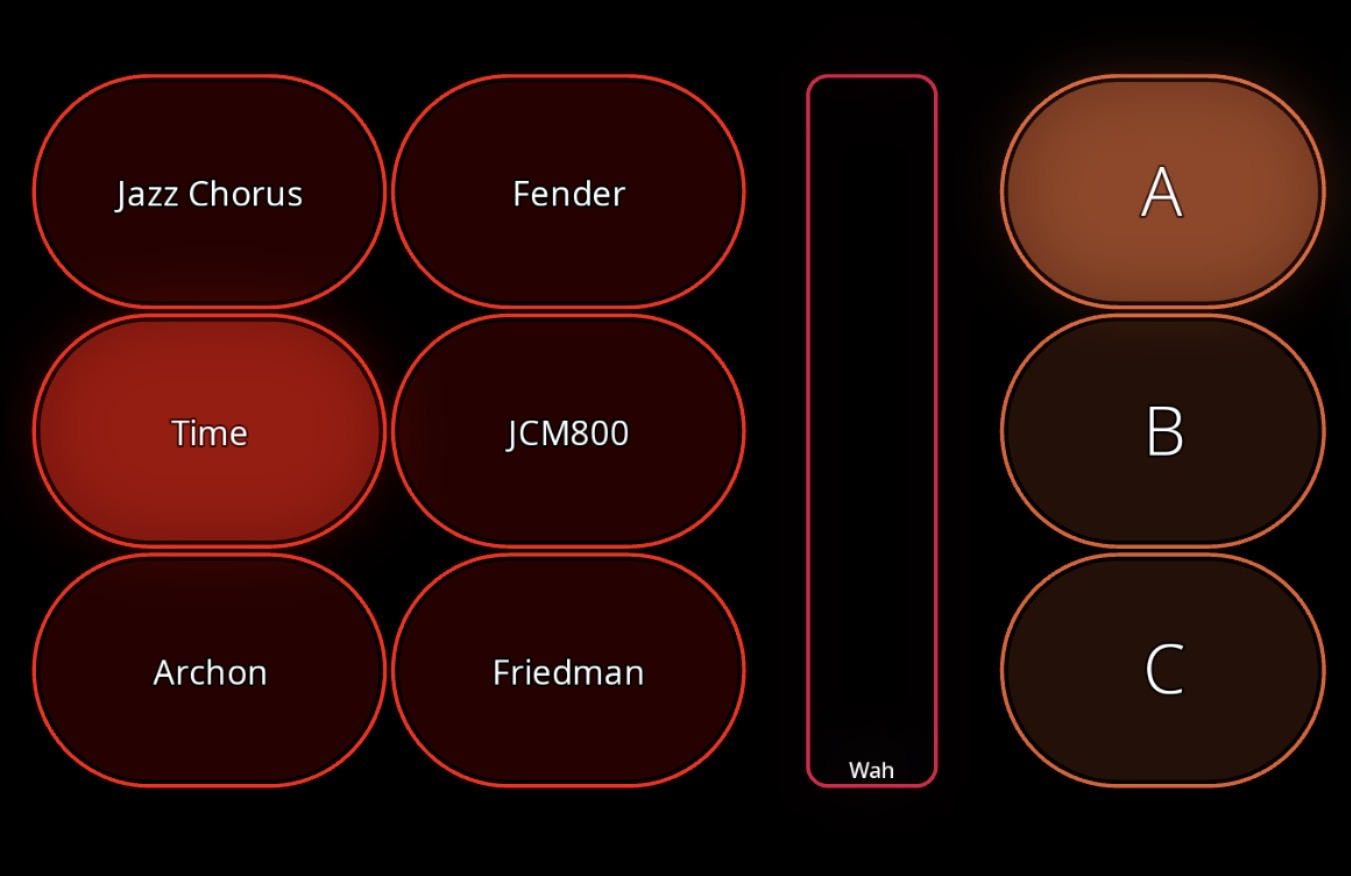
Above is my main setup to select the guitar sounds.on the left the amps, on the right the amp channels. The way it works, when I select the amp, it selects a particular preset in GigFast lite and a specific pre selected channel (lighting the widgets). After amp selection I want to freely change the channel by just pressing A, B, C. all is working except the fact that when I select a different channel, the amp widget turns off (but still works).
Below screenshots of the configuration:
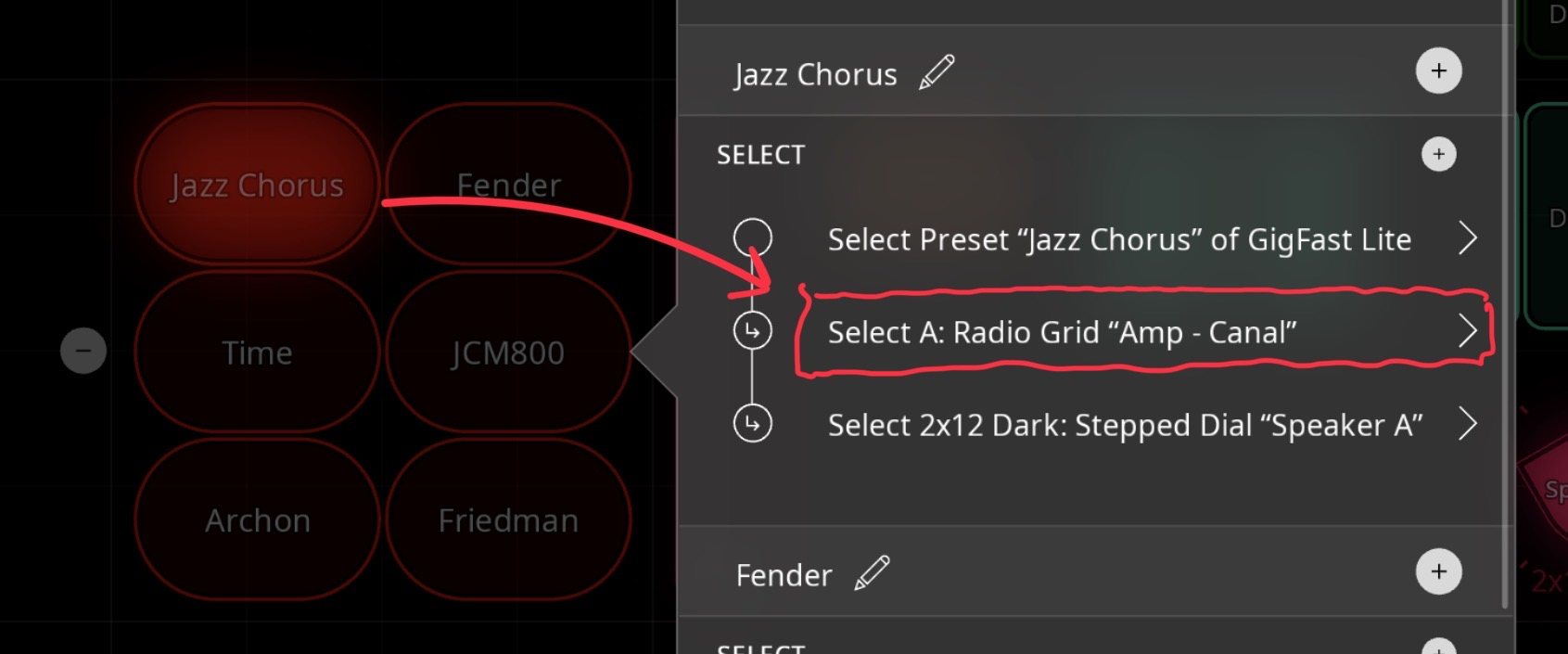
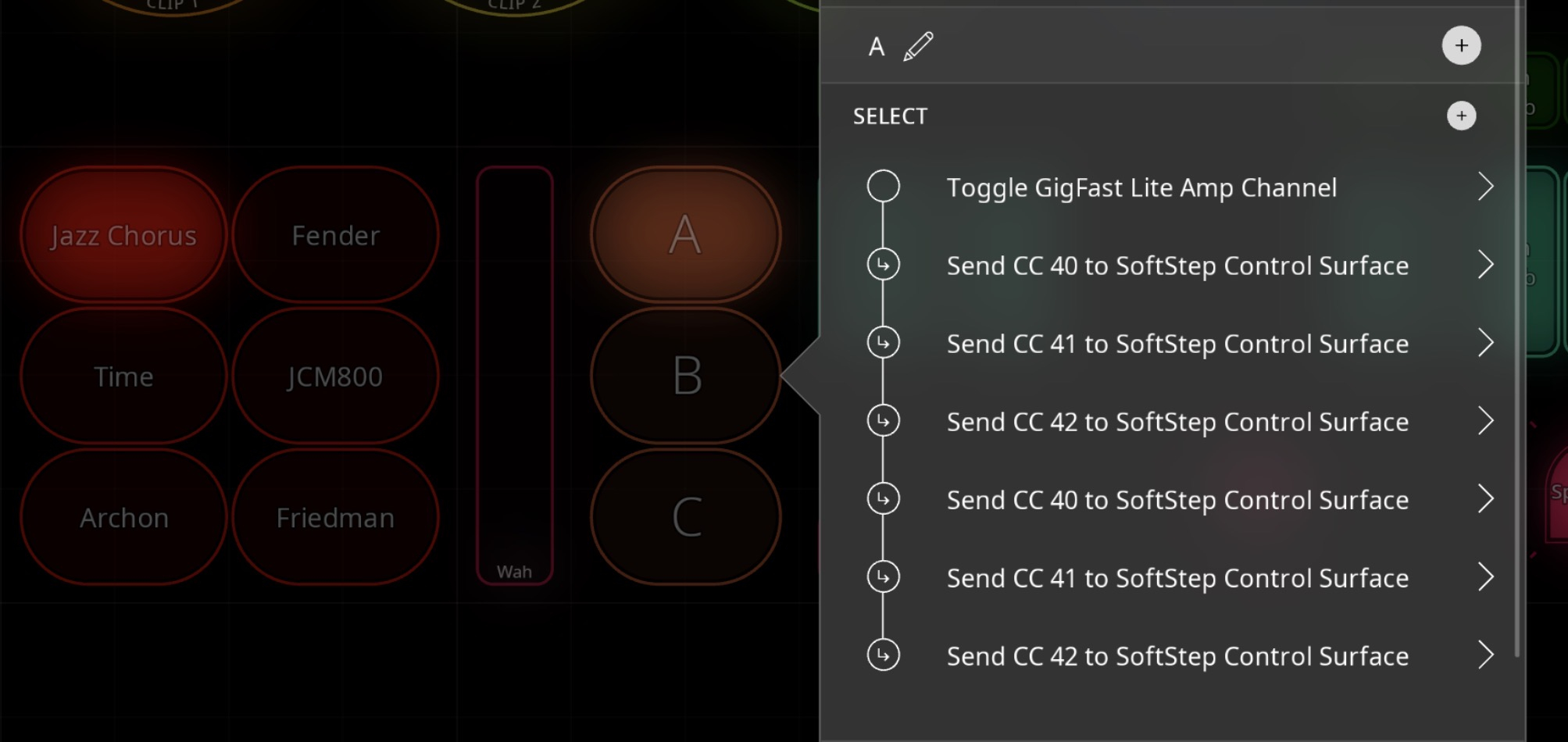
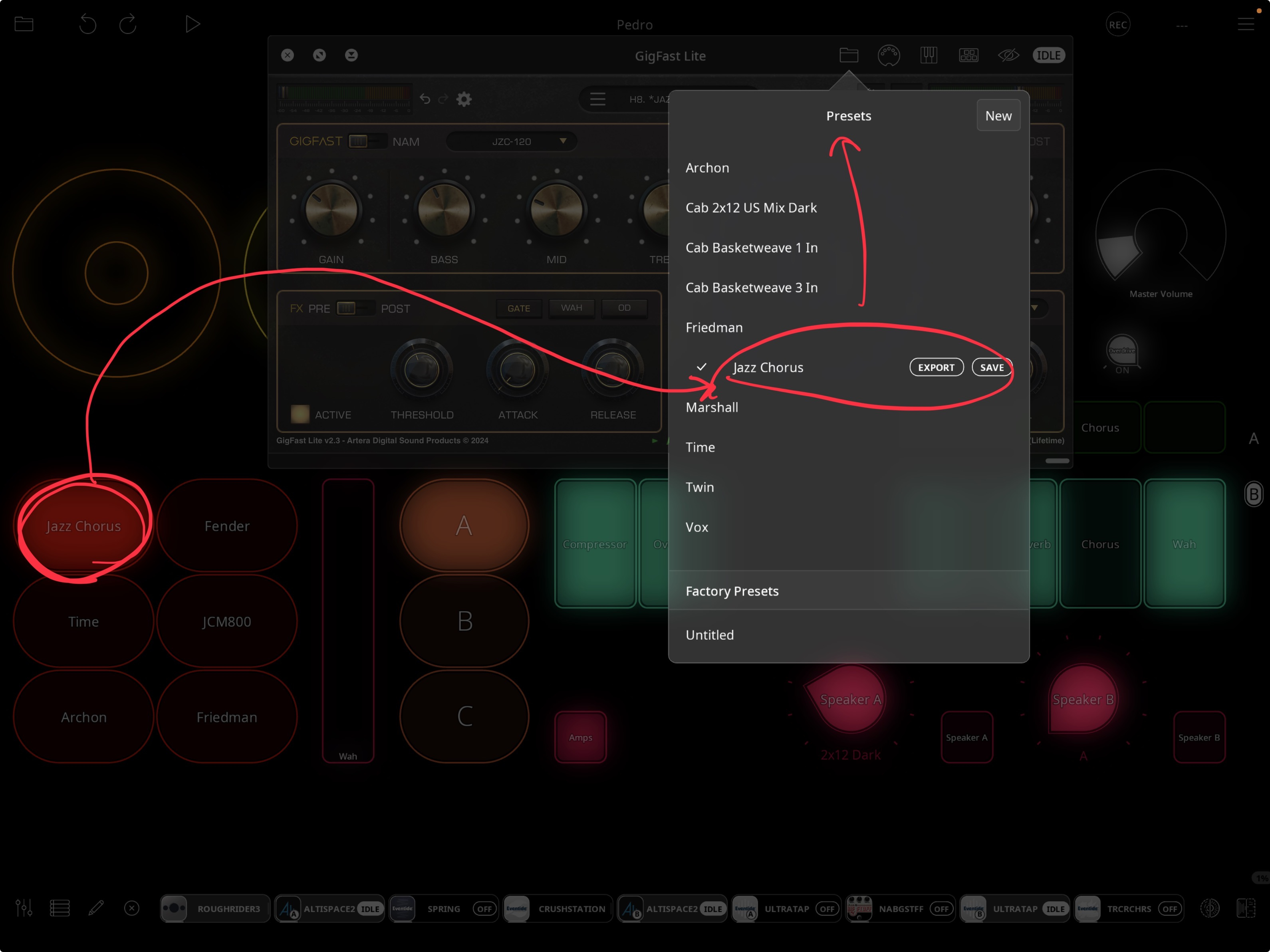
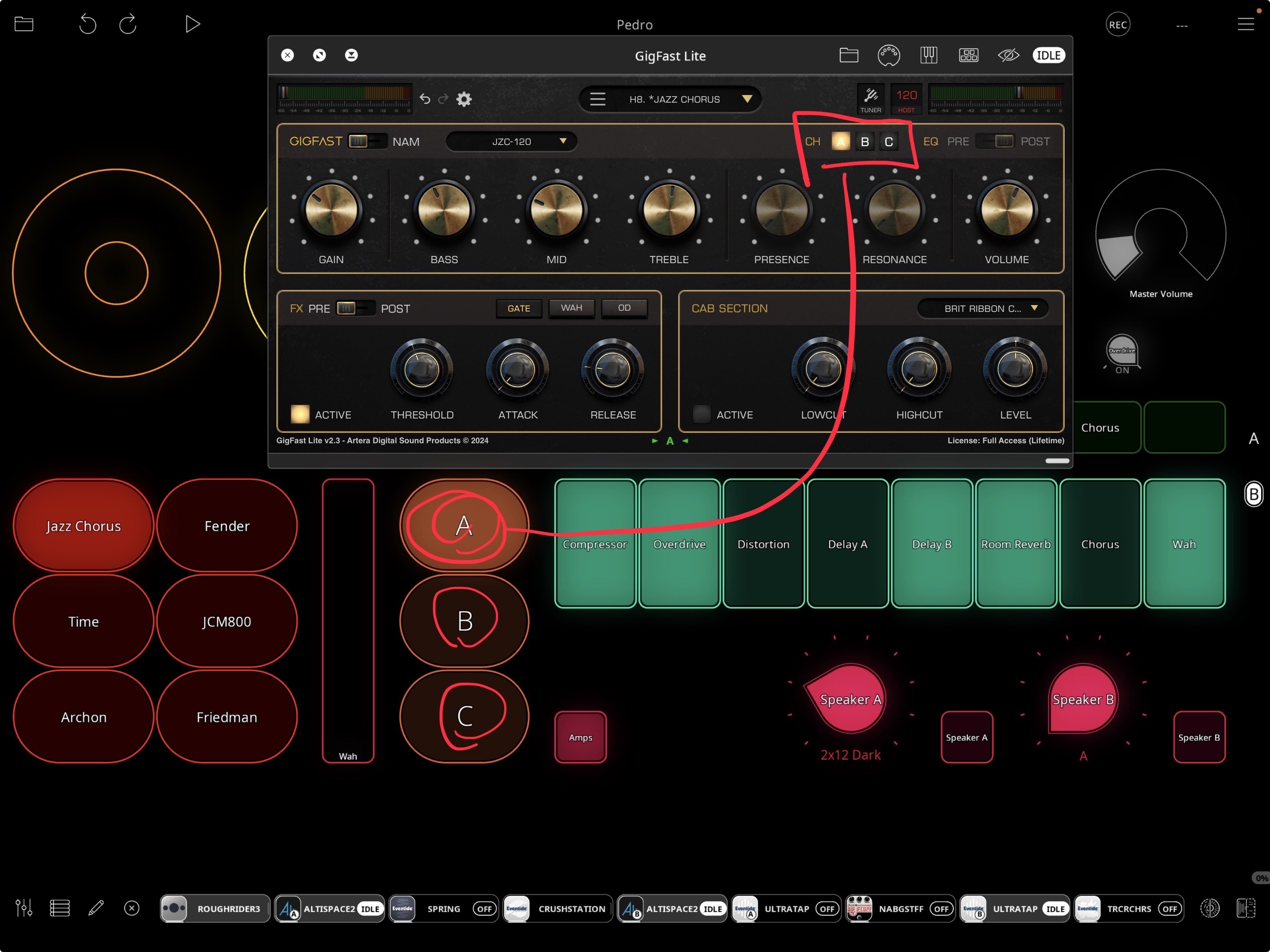
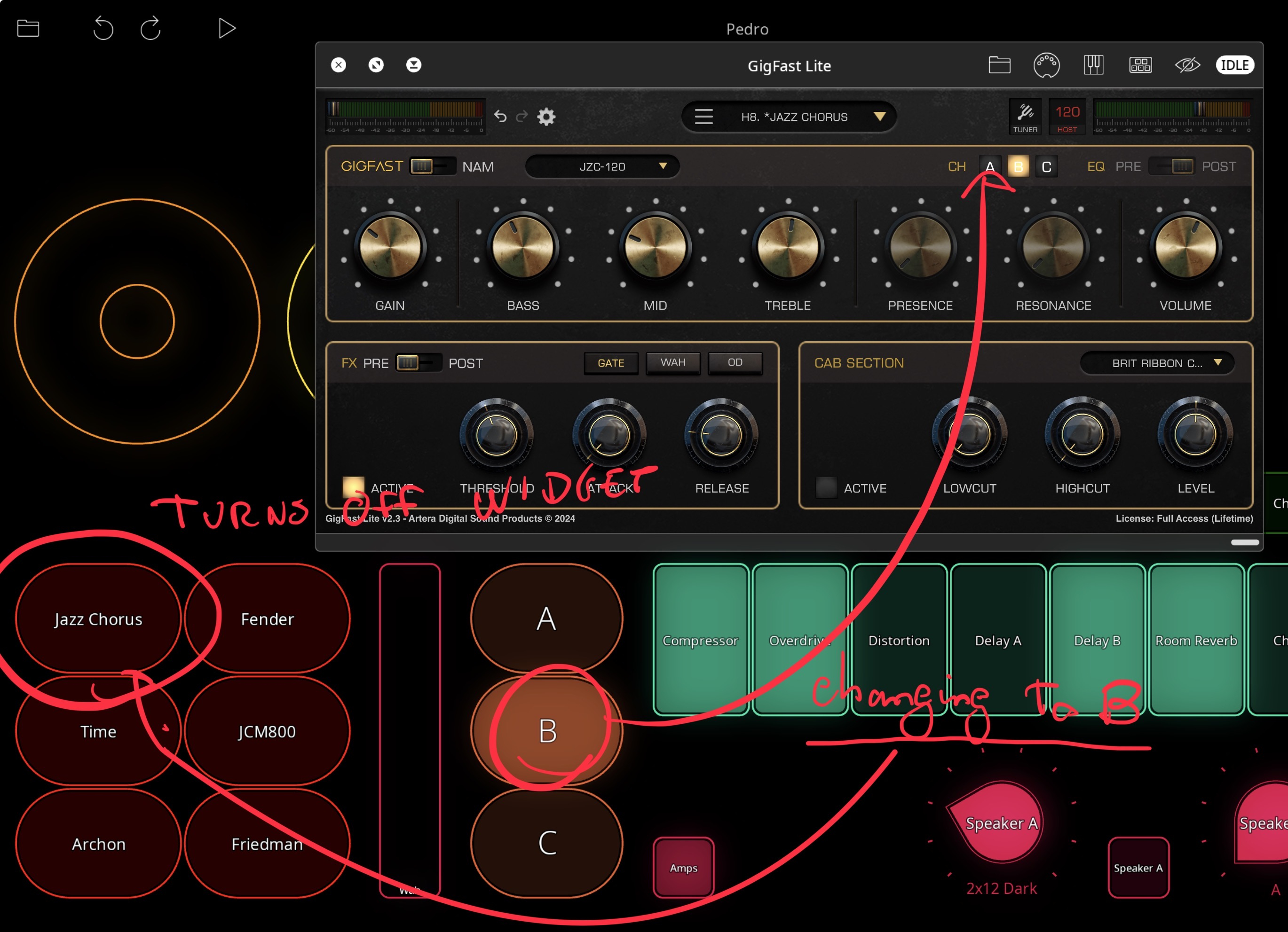
@pgargate : take a look in the manual and in the wiki about state feedback. If your radio buttons are set to use ‘All Action’ for state feedback then changing the channel will unhighlight the radio button because all the actions no longer match. You would either want “first action” or disabled.
Thank you @espiegel123 ! It worked great. I wasn’t expecting all this level of flexibility and simplicity in Loopy Pro, with full visual feedback on the iPad and on the midi controllers. I believe I have everything now to start building my presets and have fun thanks