Loopy Pro: Create music, your way.
What is Loopy Pro? — Loopy Pro is a powerful, flexible, and intuitive live looper, sampler, clip launcher and DAW for iPhone and iPad. At its core, it allows you to record and layer sounds in real-time to create complex musical arrangements. But it doesn’t stop there—Loopy Pro offers advanced tools to customize your workflow, build dynamic performance setups, and create a seamless connection between instruments, effects, and external gear.
Use it for live looping, sequencing, arranging, mixing, and much more. Whether you're a live performer, a producer, or just experimenting with sound, Loopy Pro helps you take control of your creative process.
Download on the App StoreLoopy Pro is your all-in-one musical toolkit. Try it for free today.
Backing up projects

I have read the manual and searched on "export", "back up" and "backing up" in the forum and still feel I could use some clarification about backing up my projects. Sorry if this was covered in another post previously...
In the Project Manager, selecting Export and then Project File will save all the config and audio files needed to re-import the core of my project in the future (except save points and sequencer stuff), correct? So, this seems like the option I want if I want to do a basic backup of a project, is that accurate?
Alternatively, if I want to just save/export all the clips in the project as individual audio files then in the Project Manager, I'd select Export and then Audio Clips.
Thoughts?
Thanks
Comments
Projects are fully self-contained (except for global profiles they reference and Loopy AU projects that were not set to save their entire state) and visible in the Files app. You can copy projects or the entire Loopy folder to another drive for backup.
If you copy a project in Files app, all its save points will be in the copy. If you Export a project from the project browser window, only the current state is exported. Exporting a project does not preserve save points.
Exporting a project does include the sequencer/timeline.
For "the entire Loopy folder" do you typically go inside the root app folder and 'select all' and then copy?
I'd like to find a reliable way to copy my entire Loopy folder to a Shared folder I have available on my iPad, but it can be tricky using the Files app.
Anything more you can share about any tools you use and/or your specific process to copy "the entire Loopy folder" to a shared drive.
Thanks
That's what I do for manual backups.
Setting up a simple Shortcut in the Shortcuts app is one way of guarding against accidental screwups in the files app.
Thanks @wim, interesting approach. Just out of interest, when you run your shortcut, how long do you see the "Loopy Pro" text in "Get contents of Loopy Pro" section turn green?
For me it's only about 15 seconds. It will vary according to the number and size of the files. It should be roughly the same amount of time that it would take if you were doing a manual copy.
FWIW, I use iMazing for backups supplemented by occasionally copying the Loopy Pro folder. Note that AU projects are not visible to Files app and are not copied when you copy the Loopy Pro folder.
@wim, ever seen this?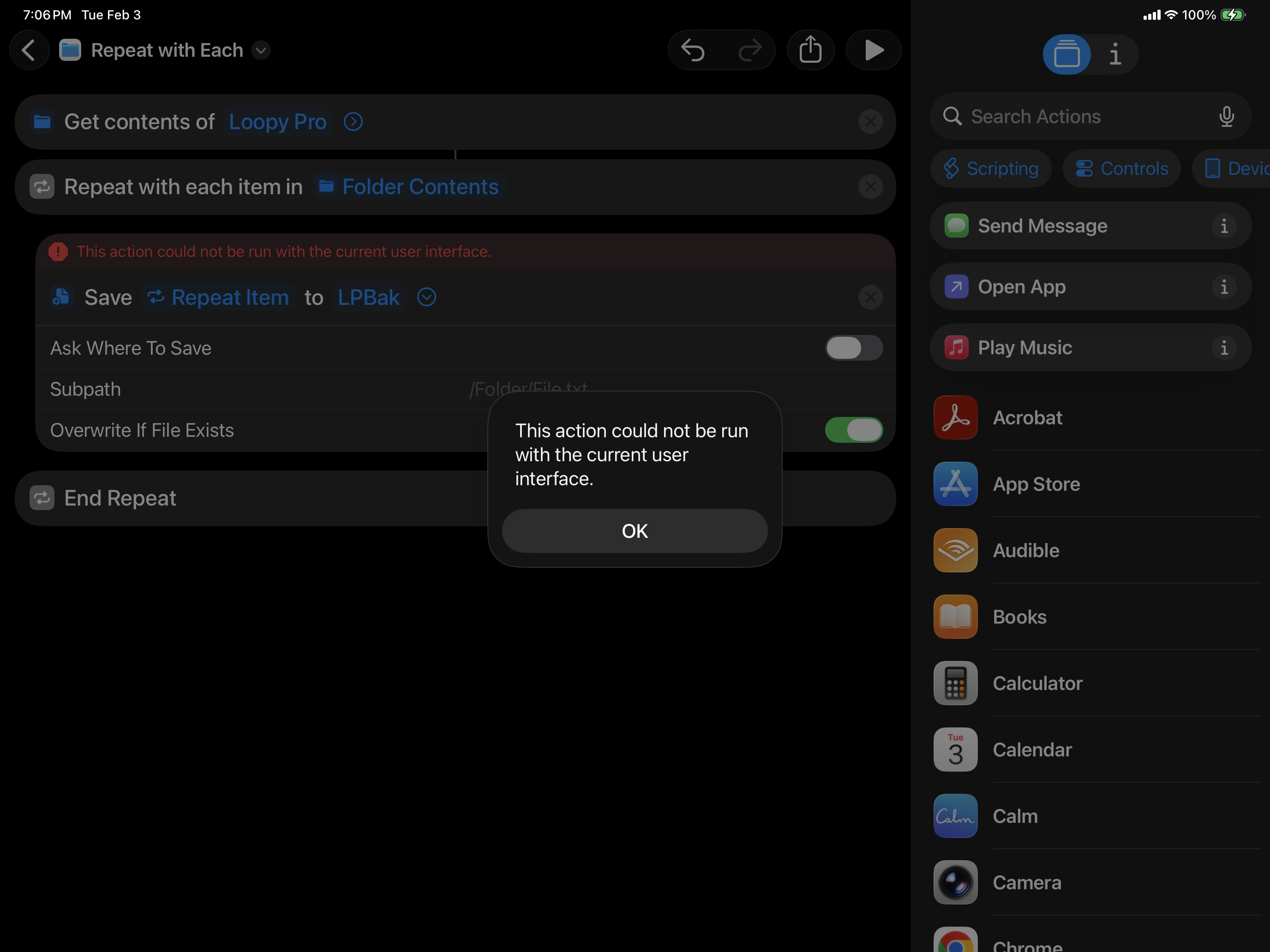
@espiegel123, I own iMazing but while I've used it for backing up things like iMessages, didn't think it was good for this type of use case (ie: backup up a folder and its contents)...Can you provide more specifics about how you are using it?
If it works well for this type of thing, then I'll purchase a large external drive in order to give it a try, since I'm sure iMazing would initially require backing up the iPad (which has about 700gb of storage on it) before it can be used for this type of use case. Thanks for any specifics you can provide
IMazing backs up your whole device unless you tell it otherwise. You can then retrieve backed up data if needed. iMazing has a pretty extensive support section that documents how to do everything.
I'm familiar with iMazing. Sounds like you are just doing a full device backup using iMazing, thought you might be doing something else I wasn't familiar with...Thanks for clarifying
Nope.
Did you give permissions when asked to the first time you ran the shortcut?
Is Loopy Pro closed by force quitting?
Maybe try running the shortcut from the shortcuts list, without having it open for editing.
@wim, it never asked for permissions, did you get a challenge for permissions the first time you ran yours?
I tried running it with Loopy Pro open and close, same behavior.
Tried running it from the "All Shortcuts" page, w/o the UI showing, and it again had the same error
Will have to do some research on Shortcuts and try to figure it out
yes
@espiegel123, please provide some specifics around how you manage your Loopy Pro backups with iMazing.
There are numerous ways in iMazing to do things and I'd like to make sure that after doing a full backup of the device, I have detailed steps to follow to:
a) Every few weeks back up only the Loopy Pro app (not full backup of device)
b) Do (a) in a way that I can "restore" Loopy Pro and all data if needed from (a)
I'm not using Loopy Pro as AU currently, fyi.
Would you mind providing specific steps on how you do (a) and (b) with iMazing, please...
Given that there is no built-in backup functionality in Loopy Pro, this will be very helpful to me and others
Thanks
@danm : I don’t do anything special in iMazing. I just do regular backups. Its default backups are incremental. Backups don’t take long. I’ve never had a need to use special backup options with it.
Thanks @espiegel123. It's the restore that's critical, so that we know how we can restore just the Loopy Pro app and all it's associated data correctly, without having to restore the entire device.
Would you mind attempting to restore just Loopy Pro and let us know if that works and specific steps, please.
Thanks
I am afraid that I don’t have time for that. I have only needed to do a full loopy pro restore once. I think you will find instructions on the iMazing web site.
Restoring documents that were in the Loopy Pro folder is as simple as drag/dropping from the backup.
Just wanted to add that if you want to be complete in saving your configuration, you might need to export some plugin presets manually and include them in your backup.
For some reason, some plugins have a distinct way of managing their presets and they are saved with their own data, which might not be accessible from the files menu, and they will not be located in the Loopy folder.
I know I have to make this exception for every Brambos and FAC plugin that I use, while the rest of the plugins are generally bundled in the Loopy preset folder. To restore those exported presets, you will have to double click them one by one and they will be imported back in Loopy, it's a bit cumbersome but I have found no other way to do it. I usually backup on one device and restore on another, so I can attest that you everything works if you grab the loopy folder + the missing presets.
Thanks @Toin00z, that's really helpful.
Do you mind sharing your process for backing up on one device and restoring on another, interested in what approach/tools you use to do that
Thanks