Loopy Pro: Create music, your way.
What is Loopy Pro? — Loopy Pro is a powerful, flexible, and intuitive live looper, sampler, clip launcher and DAW for iPhone and iPad. At its core, it allows you to record and layer sounds in real-time to create complex musical arrangements. But it doesn’t stop there—Loopy Pro offers advanced tools to customize your workflow, build dynamic performance setups, and create a seamless connection between instruments, effects, and external gear.
Use it for live looping, sequencing, arranging, mixing, and much more. Whether you're a live performer, a producer, or just experimenting with sound, Loopy Pro helps you take control of your creative process.
Download on the App StoreLoopy Pro is your all-in-one musical toolkit. Try it for free today.
Hey guys, new to looping but ...

... I've played guitar for many decades and last year went down the Boss RC-5, then RC-600 route. Then I realised that the UI for those machines was terrible and that I wanted an app that had windows, icons, and a GUI that I could get my head around....
So, I found Loopy Pro. Love at first sight.
However, 2 weeks in and I'm struggling to create a button that toggles between verse and chorus clips. That's only my latest question. And I'm sure I'll get to the bottom of it. Using ChatGTP and Gemini to help me. Now I think this forum might be a better bet.
Haha! Happy looping guys. And congrats to Michael Tyson. Great product!
Comments
There is more than one way you could go about this, but one simple one is just to add two actions to the button, one to play the verse clip and a second to play the chorus clip. Place the two clips into a play group with
One Loop at a timeselected so that you don't get the two playing at once inadvertently.Once you've added the two actions, tap the circle to the left of the second one and set it to
Next Trigger. That will make it so that the first tap triggers the first action and the second tap triggers the next.Button actions:
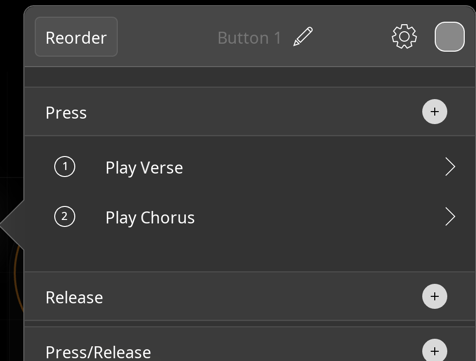
Play group setting:
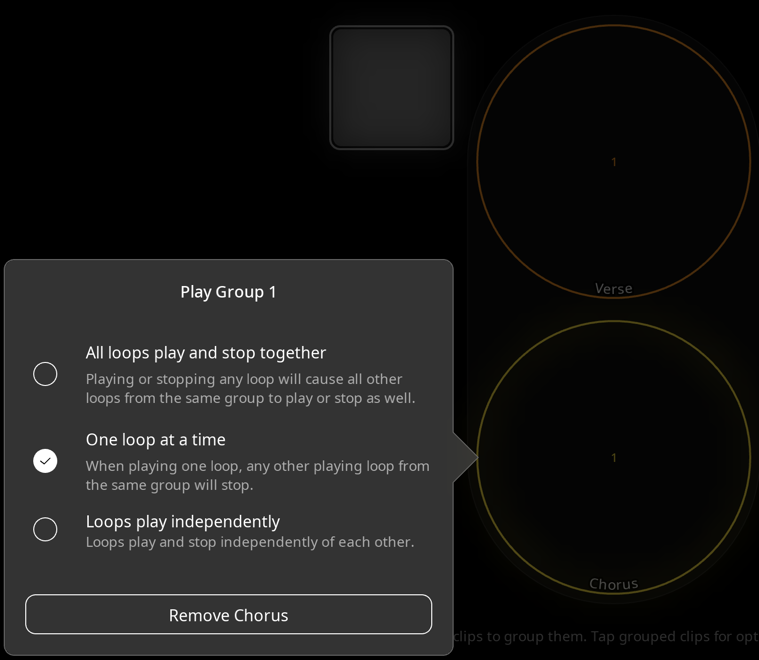
A more extensible way is to use a stepped dial, with one step set to play the verse and the next to play the chorus. You can add an action on Press of the dial to nudge it to the next step. If you add more song sections you can just add steps to the dial. If you want, you can also set up buttons to select specific steps, or bind a foot switch to nudge the dial forward / back, etc.
Note the "Wrap Around" setting on the Press action. That makes the dial go back to 1 on the next trigger after 2.
btw, Welcome to the forum. 😎
Thank you so much, Wim. I'm gonna look at this tomorrow. I'll let you know how I get on.
@robcubbon : a few tips for learning Loopy Pro:
@wim thank you for your help but I'm sorry, but I'm a bit slow understanding this issue with verse/choruses and play groups, Wim.
I should have said that the verse and chorus have two loops each, guitar and bass. And, so if the verse bass and verse guitar are in one group; and the chorus bass and chorus guitar are in another group, then wouldn't you wanna choose, "All loops play and stop together"? And the groups are mutually exclusive with each other. But, if they're "mutually exclusive" why doesn't that mean one will stop playing when the other starts? Or do I not understand what "mutually exclusive" means?
But, anyway, with this grouping, I've got to a situation where toggling between verse / chorus only requires 2 taps, instead of 4. Progress!!!!
Next step: the button!
@espiegel123 thank you! Yes, "ChatGPT and other LLMs often give wrong guidance about Loopy Pro", you're not wrong!
Going through a wiki isn't my preferred method of learning. I'm much better trying to work things out myself. However, the YouTube tutorials from John Paul Music, Loop With Jack and Max Yar are really helping ... I just need to sit down and go through them and keep trying!!
(side question about AI)
Has anyone created a Loopy Pro chatbot that uses info from the wiki and this forum? I'm not sure if it's OK to crawl both but I think that could be a useful resource.
Yes, if you had mentioned there were more than one loop per verse and chorus, I would have answered differently about the groups. You are on the right track with grouping all the loops in the verse and the chorus, setting the groups to "All loops play and stop together", and setting the groups mutually exclusive.
thanks @wim
Hello,anyone, I've got another little issue I can't work out ... it's driving me mad!
What if the loops for the chorus aren't the same length as the verse loops?
I've got 4 bars on the verse but only 2 bars on the chorus! I can't get the verse to come in at the right time because those little lines that circle round the loop are only halfway round when I want to start the verse.
I've been trying to force change playing count-in quantization to 2 bars, no, that doesn't do it. I'm stuck on this one.
Globally changing Phase Lock to Free on all clips doesn't work.
It's a weird song. "Feeling Good" by Nina Simone. The way I play it :
most of it is Em D C B7
then it goes (half the length of the above): Am B7 "... and I'm feeling good!"
I'm trying to think, but it's kinda rare for a song structure now I come to think of it.
Anyways, if anyone has any ideas, I'm all ears!
Free loops will work for this. Without seeing how you have it set up and a demonstration, I can’t speculate what isn’t set up correctly.
If you post a demonstration, we can help.
See the verse chorus looper sample project. It can do that as set up. It can be adapted to groups, but use it as is for starters.
See also:
https://wiki.loopypro.com/Templates:Edward's_Workbench#Scenes_Example_In_Progress
Thanks. I don't know if screenshots help. Below see the yellow and orange loops for verse and chorus that are grouped.
Below you see the group settings (same on both groups).
Below to show you one of verse loop settings.
How else do you "post a demonstration"?
To post a demonstration, make a screen recording. Upload to YouTube as Unlisted and post a link.
Here is a quick demo of the Verse Chorus Looper with a 4 bar verse loop and two bar chorus. The groove loop is 1 bar.
https://youtube.com/shorts/j2Kn-vcJVRI?si=MDH1nardooRMG7s7
@robcubbon : please post screenshots of the global play and record settings.
When you do, explain what you expect to happen.
Haha, I was just about to do a video of my problem .... but, I was just playing around before I did that and .... I’m not entirely sure what I did 😅 but I seem to have solved the issue.
What appears to have fixed it was changing the play quantisation on the verse clips from 1 bar to 2 bars. (The verse clips are 2 bars; the chorus clips are 1 bar.) I’d been focusing almost entirely on recording settings (count-in/count-out quantisation) and hadn’t really experimented with play quantisation before.
Now when I'm on a verse, I tap the Verse group once and the Chorus group once (and back again), the transition behaves exactly how I want. The clips are grouped and currently set to “Free” rather than “Phase,” which also seems to be working correctly in this context.
So I think this was a play quantisation timing issue rather than a grouping issue. Although I can't be sure as I'm new to Loopy and I might have changed other settings that I've forgotten about.
Thanks again for the help. Every time I get stuck and work through something like this I feel like I understand Loopy a bit more. Next time I get stuck, I'll post a better explanation and video in the main troubleshooting forum. Thanks!
@robcubbon : typically if you plan the sections to play in their entirety, use loop as both play and stop quantization as I did in my example