Loopy Pro: Create music, your way.
What is Loopy Pro? — Loopy Pro is a powerful, flexible, and intuitive live looper, sampler, clip launcher and DAW for iPhone and iPad. At its core, it allows you to record and layer sounds in real-time to create complex musical arrangements. But it doesn’t stop there—Loopy Pro offers advanced tools to customize your workflow, build dynamic performance setups, and create a seamless connection between instruments, effects, and external gear.
Use it for live looping, sequencing, arranging, mixing, and much more. Whether you're a live performer, a producer, or just experimenting with sound, Loopy Pro helps you take control of your creative process.
Download on the App StoreLoopy Pro is your all-in-one musical toolkit. Try it for free today.
Different length clips ?

Hello,
I'm struggling with having a loop that should longer than the others.
I read several posts about it but none of the solution proposed helped...
My template has 3 play groups, each group corresponds to a song section :
Group 01 = verse
Group 02 = pre-chorus
Group 03 = chorus
Generally all the sections have the same length so I only have to set the master count-out quantization before the song begins.
But in specific songs, sections can have different lengths.
As a workaround for this, I created a stepped dial above each group.
Each "item" of the stepped dials should change the clip settings ("Assign clip settings" action) to adapt the length of the clips to match the song structure :
Item 01 : MASTER
Item 02 : 4 bars
Item 03 : 6 bars
Item 04 : 8 bars
Item 05 : 9 bars
Item 06 : 10 bars
Item 07 : 12 bars
But my dials don't change anything... the clips always follow the master count-out setting.
I can see that my dials correctly change the settings of the clips (when entering the clip details I can see that my changes have been done). But there's something I should have missed...
Here are the settings I tried according to what I read in other posts :
- custom count-out quantization to the number of bars I want
- custom count-out quantization to 1 bar, 2 bars
- Auto count-out to OFF
- Pad loop length ON or OFF
- Phase lock to OFF
No success with these settings... the loops always follow the master quantization.
Thanks for your help !
Comments
It sounds like something is not set up correctly. But it isn’t clear what. We need to see how the project is set up.
Post screenshots of your dial setup and screenshots of the setup it’s actions.
How are you triggering the clips to start recording?
How are you triggering them to end?
If your sections are sometimes different lengths, you probably want phase lock off at the global level and don’t want to change it for individual clips.
The Verse Chorus looper is set up to handle this sort of situation. You can add an additional loop to it. While you want to you use groups, it is worth a look because, some follow actions are necessary that might not be obvious.
Please make a screen recording that demonstrates the problem and post a link.
Pad loop length is just for cases where you want a clip to be padded to the master cycle length with silence if you end recording prematurely.
Hello @espiegel123
Your question helped me understand the problem

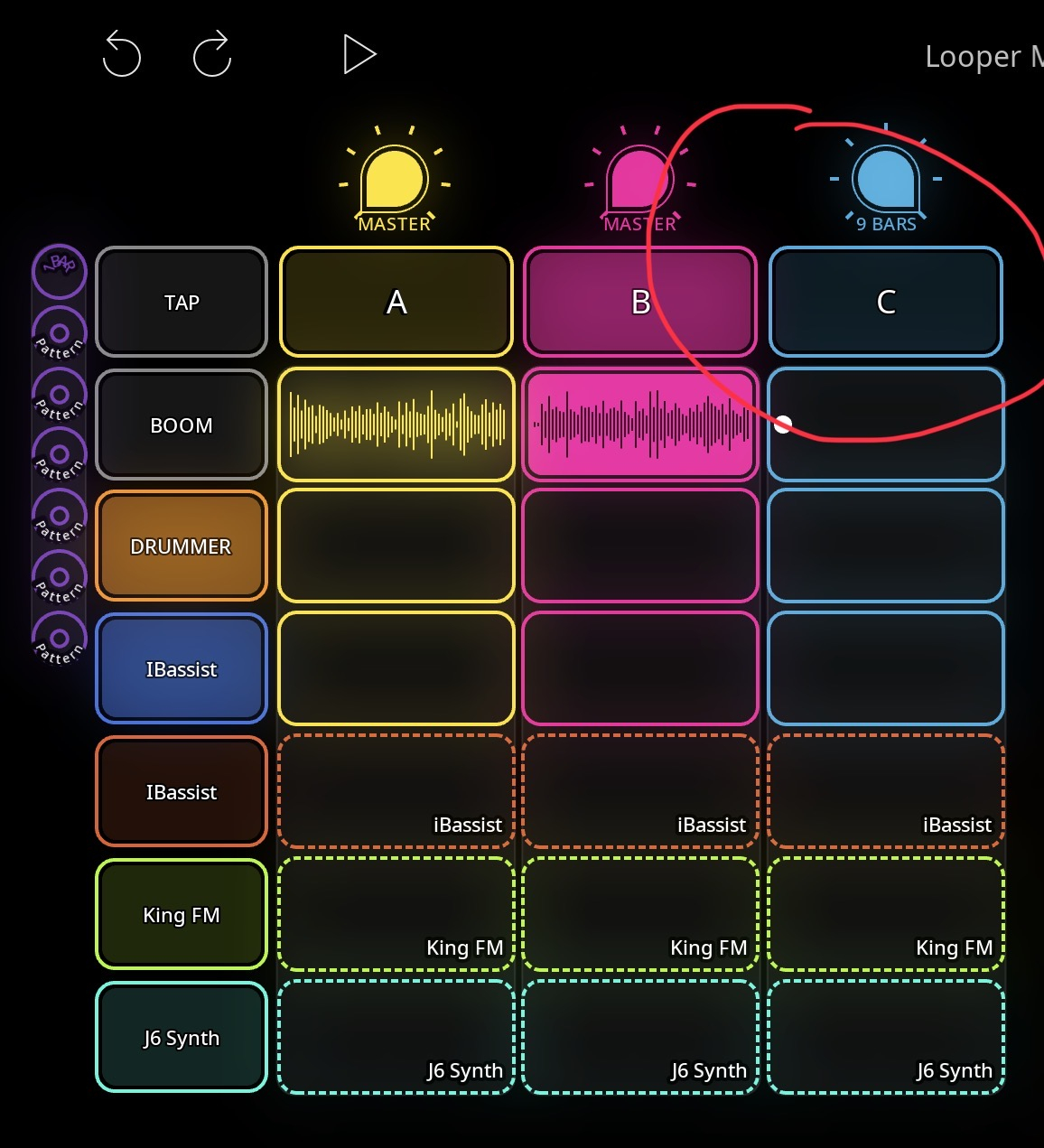
I trigger the recording by double-tapping the C button (see attached screenshot).
This button has a "Record action" that is "Record next empty clip in Blue".
The "count-out quantization" for this action was set to "Master".
That's why my "Stepped dial" didn't do anything !
Thanks ! this solved another thing...
After playing the 9 bars of the Blue clip, when I was back to play A or B (that are 4 bars long) they were starting on their 2nd bar because of the "Phase lock" enabled. When disabled, the A and B clips are playing from their beginning. That's perfect !
All is almost solved... the only thing I can't manage to do is the "Auto-stop recording" for my "Blue 9 bars" clip.
How can I have it auto stop recording instead of having to stop the recording manually ?
The "auto-count out" function doesn't make it stop recording after its 9 bars...
Thanks a lot for all this @espiegel123
Auto-count out will end recording when the count-out length is reached. If it isn’t , it sounds like something isn’t set up right.
Without seeing how you have it set up, I can’t speculate what is happening. We will need to see screenshots of the settings if all the actions and settings involved.
I recommend that you spend some time looking at the Tutorials in the Samplr Projects folder.
OK resolved !
Some clips overrided the "auto count-out" at their level.
I recommend that you spend some time looking at the Tutorials in the Samplr Projects folder.
I will ;-)
Thanks @espiegel123