Loopy Pro: Create music, your way.
What is Loopy Pro? — Loopy Pro is a powerful, flexible, and intuitive live looper, sampler, clip launcher and DAW for iPhone and iPad. At its core, it allows you to record and layer sounds in real-time to create complex musical arrangements. But it doesn’t stop there—Loopy Pro offers advanced tools to customize your workflow, build dynamic performance setups, and create a seamless connection between instruments, effects, and external gear.
Use it for live looping, sequencing, arranging, mixing, and much more. Whether you're a live performer, a producer, or just experimenting with sound, Loopy Pro helps you take control of your creative process.
Download on the App StoreLoopy Pro is your all-in-one musical toolkit. Try it for free today.
DAW development in progress. 😎
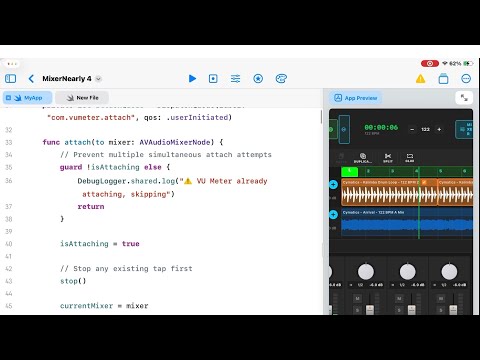
Creating my own DAW using iPad and swift playground APP.
Currently got importing audio files, multitrack playback, copy, paste, duplicate, split, moving audio events, looping, audio glue working. Mixer (group tracks, effects buses) nearly completed, I need to add pre and post for the send/effect bus. Once that is done I will move to recoding and midi tracks.
I will have to eventually move to a mac or virtual box to use xcode for implementing AUV3 host and to use other frameworks not available on the iPad. I really wish Apple would make the Playgroud App feature rich like xcode.. Also considering making the project open source so people can contribute and make it better.
Comments
Holy shit you did all this just in Playgrounds ?? Ok man, as developer for 35 years I am officially impressed. Yeah definitely move it to xCode for adding more advanced things like AUv3 support and to make code more structured, like solit it to many files and logical parts for better mainability - but my head can’t wrap around the fact you went so far with just plagrounds … Mad mad mad respect.
Very impressive. Looks like a ton of work.
I guess someone got a bit fed up with slow progress of the current DAWs we have available on iOS/iPadOS
I'm amazed you did all that in the playground app...well done!
Swift Playground is very capable. With a lot of patience and swearing you can get a lot out of it. Only issue is Apple crippled it by making it Swift only.
You will be surprise of what you can do with AI and a lot of patience.😅
😅😅 got me.
But honestly I started it out of curiosity to see what AI coding can do. And to see how far I can push the M1 ipad with Swift playground app.
Yep. It is very capable. Apple just need to show it some more love and set it free, it is currently sandboxed like crazy.
Wow, exciting stuff.
wtf? With Playgrounds??
Wow. I am impressed. With that kind of persistence, I can only imagine what you'll be able to do if you do level up to Xcode.
Plugin delay compensation and you win
I can't wait to see multi-threaded audio done in Playgrounds. 😎
I recently tried to get Claude Code to build a plugin I want that don't think exists. It didn't go well so I'm amazed at how far you've got with this.
If any devs here fancy building the delay plugin of my dreams, hit me up and I'll explain what it is. It's called "Lana Delay" and that name is the best thing about what I managed to produce with Claude Code.
Here is some progress of my DAW development on the iPad using swift playground.
I currently have most of the basics covered:
1. Made my own sampler (not apple sampler).
2. Audio tracks: recording. You can also route any tracks ( midi, audio, send, group, folder) to audio tracks to be recorded.
3. Multi track recording both midi and audio.
4. Midi track to midi track routing with the option to choose which notes range triggers the receiver. The plan here is to find a way to make single notes trigger instead of the full range.
5. Send bus with pre and post fader.
6. Group tracks.
7. Folder track.
8. Inserts effects.
9. Drum sampler with each pad (currently only 4, but very easy to increase pad number) having its own mixer strip. The track and strips are nested, so they can expand on timeline and in mixer panel.
10. Step sequencer with note repeat, velocity, pitch, tie, gate, forward, reverse, ping pong. Patterns can be saved and loaded into other sequencers of the same project or different projects.
11. Audio editor. Whatever edit made here reflects on timeline, so say I have bar loop and trim at bar 3 to 7 in the editor, the clip in timeline will show on bar 3 to 7. 9.1. Portions of audio in the editor can be copied and pasted on timeline or in sampler (midi and drum).
Plan now is to get audio loop recording sorted.
Implement midi effects.
Implement tempo track (the biggest issue here would be audio time stretch).
AUV3 implementation will be the difficulty part as i don’t own a mac. But I’m sure something will be done down the line.
However in some way I have managed to implement Apples Audio Units AUV3 effects (not shown in this video), so I am confused to why 3rd party apps are not showing.
Who knows, maybe in few months I will have a fully working DAW in the App Store.
Great job very interesting
noticed interesting thing on VU meters.. they have same orange/red color no matter what actual peak they are showing .. this is weird :-) orange / red metering shouls be fixed based on dB value it is metering , means when column is lover it should be only green
Btw - I am working on one too lol.. let's see who will be relesed first (my plans are autumn / winter this year) ... This will be DAW-ish autumn lol
also for audio track - yeah be ready making realtime timestretch working together with tempo track - that would be a "few" sleepless nights :-))
What about plugin delay compensation ? Also plans about automation - curious if you choose clip based automation or track based automation ? Also multithreading engine ?
Btw. be ready full AUv3 instrment/audioeffect/midieffect implementation will be HELL :-)) especially in terms of routing multiple inputs / multiple outputs .. and use for testing of instrumetns AudioKIT synths - if they works with your implementation, everything will work


(little hint which saves you time - they have very weird initialisation process where plugin pretends it is working but when you send notes to it, for antoher few seconds it doesn't produce sound, only then starts - for me this was major killer for bounce engine - all plugins were working perfectly just AudioKIT plugins produced silence - then i found that problem was - I was instantianting new fresh instances of plugins just for bounce - which is perfect way how to do it to not mess realtime engine plugins - but AK plugins produced silence for first few rendered bars .. at the end i capitulated and switched to reusing realtime instances for bounce with preservation of state before and after bounce)
Personally i am working more like on core DAW features, i will probably not ship any built-in plugins - at least not in first release, so here you will have advantage before me lol. Also i am building for almost everything my own custom UI, avoiding to use SwiftUI as much as possble..
.
Super nice to see that people are working on iOS DAWs!!!
Pretty cool to see this being developed! Btw, if you want to make me super happy just hit me up and I can give you very specific feedback on the exact features and workflow that would be best for ME. You wouldn't even have to think about it much as I would be in complete control, cheers!
Whichever one of you makes NS2 with audio tracks and AUv3 FX automation can have my money!
…or both of you.
To add to what @pricklyrobot said:
Hats off. Thank you.
Good catch, it’s a bug. I just left it there for now to focus on the other things 😅
I bet I will be the first 😂😂. But seriously speaking, I do not have a time frame. I want to get the basics in and starts public beta testing in a couple of months , then go from there.
I have made some progress on that last night. I got time stretch to work pretty good.
Tempo track with midi also works as it should. The issues is audio. For some reason it refuses to play with the tempo change. It chooses one of the tempo and sticks with it for some reason.
Delay compensation is something I want to get right after tempo track issues. If it’s even supported in swift playground on the iPad, that’s my main concern. Will let you know when I get there.
Automation: initially will be per trac, then once that’s perfected I can dive into clips automation.
Multithreaded engine: with this it also depends it swift playground on the iPad will let me do. Otherwise it would have to be when I move over to a Mac.
Thanks for the heads up. How is your going so far? If you wanna spill some secrets, what have you implemented so far?
Hopefully I can get it out soon soon everyone can enjoy it🙂
All ears. I am happy to take suggestions🙂
@Paa89 Excellent work!
I can only recommend to switch to XCode as soon as possible, simply because you have much more control and more freedom there. It takes time to get familiar with it and of course I don't like everything about it but when you go into the details, when you need to debug, profile and improve your app performance/latency/responsiveness and when you need to use third party libraries that don't just plug into Swift Playground, you'll need to use it anyway.
i do not want to talk publicly too much about festures cause i doesn’t want people to be too much overexcited.. anyways things i still DON’T have are
Still reconsidering “Session” view (like Ableton Live) but maybe I’ll do that after first release ..
Still reconsidering at least basic set of built-in plugins, at least effects if not instruments in first release.
.
Let’s see.. my dealine is more like time based (autumn) than feature based .. so will keep adding stuff until my time doesn’t run out 😆
Expecting that after i run small private beta group for next 2-3 months i will be fixing bugs all the day 😆😆
btw one thing - test how you app handles LARGE project .. like extreme - tons of long audio / midi clips - how audio engine and UI handles big scrolling and zooming in/out on timeline with large project.. i got pretty fucked up when i during developement was still working just with few clips and then, when i tried large project i realised that it is totally unusable - UI slow as hell, audio dropouts, etc .. massive refactoring followed (with rewriting 80% of arrangement view using Metal for drawing sensitive stuff).. bad decisions at beginning - lot’s of work later 🙈
I’m curious about maybe having 64 bit floating point audio resolution like Auria had. Auria had such a great audio sound, even before any PSP plugs were applied.
Regarding my baby, 32bit floating point .. honestly I am pretty conviced nobody on this planet can distingues between 64bit and 32bit floating point audio engine .. this has really zero impact on “sound” of DAW
Also on iOS it basically nales no sense cause AUv3 standard is I/O 32bit fp anyway, so it actually makes things more complicated (conversion needed)
What is much more important is internal sample rate - here i am aiming for optional 96khz full internal processing rate (which, to the date, to my knowledge no other DAW or AUv3 host on iOS allows, while on desktop it is absolute standard).. higher processing sample rate is what makes major difference for nin-linear processes (filters, overdive, etc)