Loopy Pro: Create music, your way.
What is Loopy Pro? — Loopy Pro is a powerful, flexible, and intuitive live looper, sampler, clip launcher and DAW for iPhone and iPad. At its core, it allows you to record and layer sounds in real-time to create complex musical arrangements. But it doesn’t stop there—Loopy Pro offers advanced tools to customize your workflow, build dynamic performance setups, and create a seamless connection between instruments, effects, and external gear.
Use it for live looping, sequencing, arranging, mixing, and much more. Whether you're a live performer, a producer, or just experimenting with sound, Loopy Pro helps you take control of your creative process.
Download on the App StoreLoopy Pro is your all-in-one musical toolkit. Try it for free today.
A way to display an effect state?

I am using Loopy Pro with a Behringer FCB-1010 foot controller. Some of my switches are set up to change effect states and mix settings (levels, pans, etc). I'm wondering is there an element I can add and assign to the same MIDI event to display different states with a color? eg. A large grey box that turns red when I change states? This would save me having to have the mixer open to see which effects are active, and I could just display clips only. Thanks.
Comments
There aren’t currently color changes by actions. If you have widgets tied to the same action, they will automatically update to reflect the state of the action. No extra midi binding needed.
For example, if you add a button that toggles a reverb on and off. If you use your foot controller to to turn the reverb on or off, the button’s highlighting will change to reflect the status.
not to hijack this thread , but I’m “exploring” midi feedback issues myself & need clarification ;
are you implying the reverb on/off is triggered directly by the footcontroller -
presumably adding a midi binding in Controller Profile directly to the Action -Effect Turn On/Off ,
& the widget button just updates its status as also bound IN PARALLEL
or are you implying the footcontroller is mapped via midilearn to the button widget -
so the footcontroller’s only action is to press the button widget ,
& it is the button widget’s action to turn on/off the reverb ?
I am still getting my head around these 2 methods myself, particularly with needing midi feedback out to
LED hardware controllers .
It has taken me a while to realise , whilst Add Binding in Controller Profile allows all Actions to be bound directly to a midi trigger ,
using MidiLearn on the Canvas only allows the Action of Trigger Widget .
Widgets normally reflect the state related to their actions. If you have a button widget that turns an effect on/off, that button will always reflect the reverb’s on/off state. Any time the reverb’s state changes, the button will be updated.
In the case discussed above, no midi binding is needed for the button.
@espiegel123
ok, so you were suggesting the footcontroller is bound directly to the reverb on/off Action ,
via Add Bindings in Controller Profile ?
I’ve been using step dials with a large font. In this way the text updates to the current selection (item). It just stands out more to me. I hope that an updatable text widget and changing colors of things are actions that will supported in the future.
OP said they had set up midi bindings to change effect states. I was explaining that if he created a widget that changes the states, it will automatically reflect the state. No new binding needed.
As someone reliant on an FCB1010, it is a strange thing to think, but I find it easier in the long term to add that "meta-layer" -
Instead of having the MIDI controller's PC message toggle the effect directly, use an on-screen widget (button/knob/radio-set/whatever) to control what you want to have happen, and then have that widget activated by MIDI learning from the FCB1010.
hih
It’s not strange at all , it is using Loopy Pro to provide an additional useful layer of visual feedback -
the 2 problems for me are/were -
there are 2 different ways to do this with the same visual outcome .
It took (too long) a while to realise that MidiLearn’s ONLY action is Trigger Widget -
& that any other actions I found in a Controller Profile I must have added using Add Binding .
Can you say more about what you mean by that?
@espiegel123
So my first impressions were that entering Controller Profile to Add Binding was the SAME but alternative method
of using MidiLearn - I could do whatever I needed in either .
It took too long for me to realise that ,as I say, MidiLearn’s only action is trigger a widget on the canvas -
I was seeing other Actions in Controller Profile that I (wrongly) assumed I had added via MidiLearn &
couldn’t work out whilst in MidiLearn how I could access that Action again …
this is where the added confusion of mentally thinking of a widget AS its action comes in -
so sometimes I was! triggering an Action via MidiLearn ! but because the widget was bound to the action,
not because the action was an Added Binding in Controller Profile .
Hope that helps explain this newbie’s possible confusion .
@RetroNewb : I don’t think I understand. You said:
Adding a binding manually is an alternate method to MIDI Learn. MIDI Learn is a shortcut for creating simple single action bindings.
@espiegel123
yes , I should have better explained that the majority of the building of my template has been
widget based , to mirror & interface with my hardware controllers to replicate mixer & fx functionality;
therefore (obviously I realise ) as the action menus are context sensitive the only actions
I am offered are trigger widget because I am mainly using widgets .
So MidiLearn only offers Widget Actions of Press, Continuous Adjust etc for Buttons , Faders etc I am using -
& their Action is set using Canvas Edit where I target the Bus , or Device or Mixer Objects ,
but these Canvas Edited Actions are not displayed in the Controller Profile - only Widget description .
e.g I created a Fader on Canvas , targeted a Reverb parameter via Canvas Edit
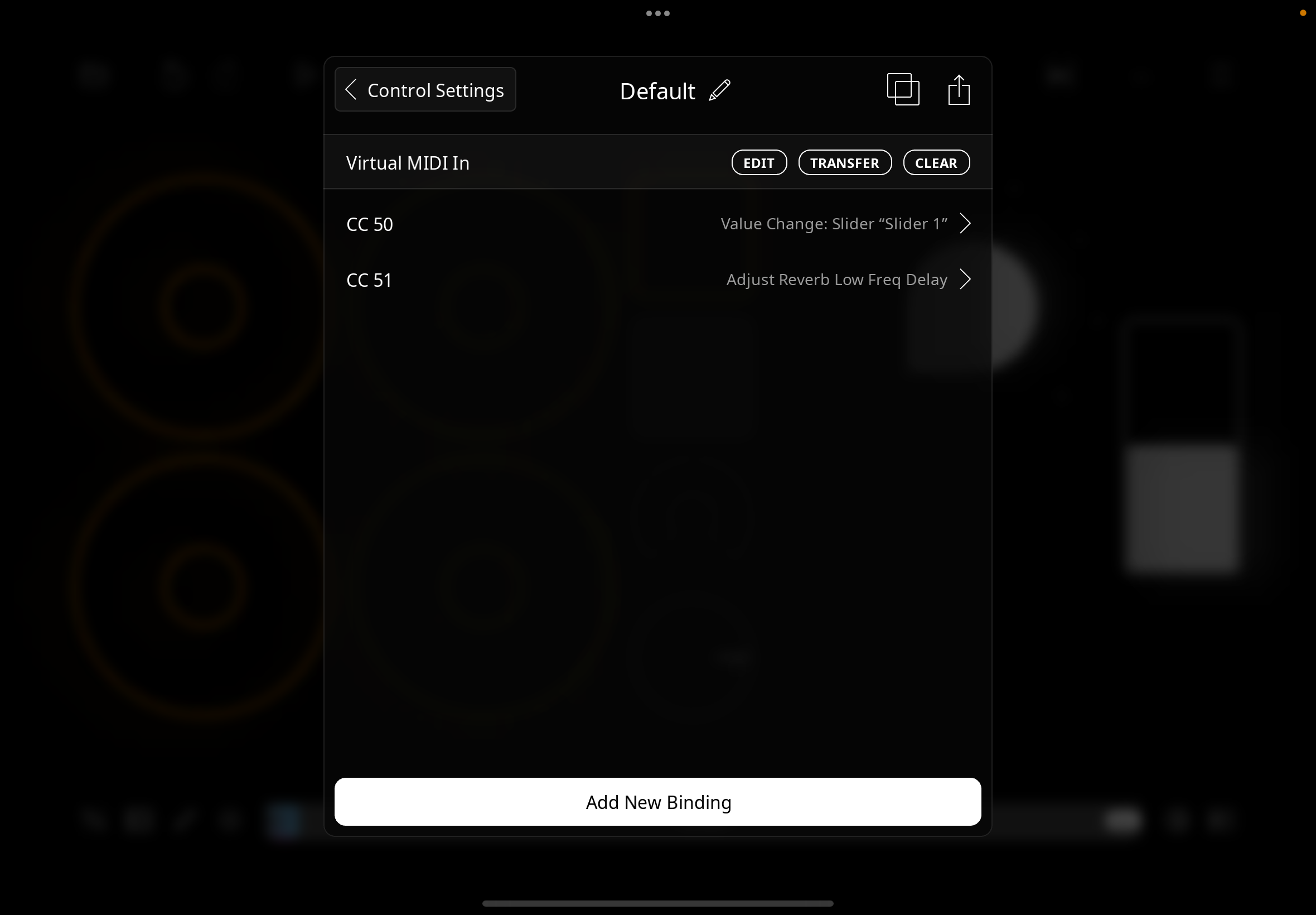
& MidiLearnt the Fader to CC50 which only shows as widget action in Controller Profile
I then Added New Binding CC51 , & was able to directly Adjust Reverb Low Delay
so there is a difference for Widgets between using MidiLearn & Add Binding ,
is all I’m saying , & that it’s taken me a while to realise -
whilst in MidiLearn selecting a widget I couldn’t see its action ( because it was set in Canvas Edit)
sometimes in Controller Profile I didn’t understand how I had MidiLearnt e.g a Mixer Action
(I hadn’t - I had Added a Binding ) etc.
I see for Clips there is a ton of Actions in the MidiLearn list ,
so my comments might have seemed strange ,
but for Button , Rotary , & Fader Widgets there is room for confusion
edit .. as discussed above there are therefore 2 ways to bind a hardware control
to an action
- either directly via Add Binding , & a widget can be added to the action for visual feedback
controls the action
but in this context MidiLearn is not the same as Add Binding
This was my confusion I hope to have explained .
@RetroNewb : I am still not understanding . I don’t know what you mean by
>
All Midi Learn does is create a binding — exactly the same as if you manually create a binding in a profile. There are more actions available when manually creating bindings. But they aren’t fundamentally different.
Do you mean that with MIDI Learn you are usually creating bindings to user interface objects but manually creating bindings gives you an opportunity to to create bindings with other actions?
I really thought I had explained this as well as possible ,
& the screenshot exactly answered the two quotes in your last post -
CC50 is midilearnt from the fader widget & the binding is a widget action to adjust continuously -
there is NO Mixer/FX Parameter reference /binding / action in the MidiLearnt Controller Profile -
all the Binding will do is make midi move the Widget .
For the Fader to control my FX Parameter I have to Bind the Action via Canvas Edit -
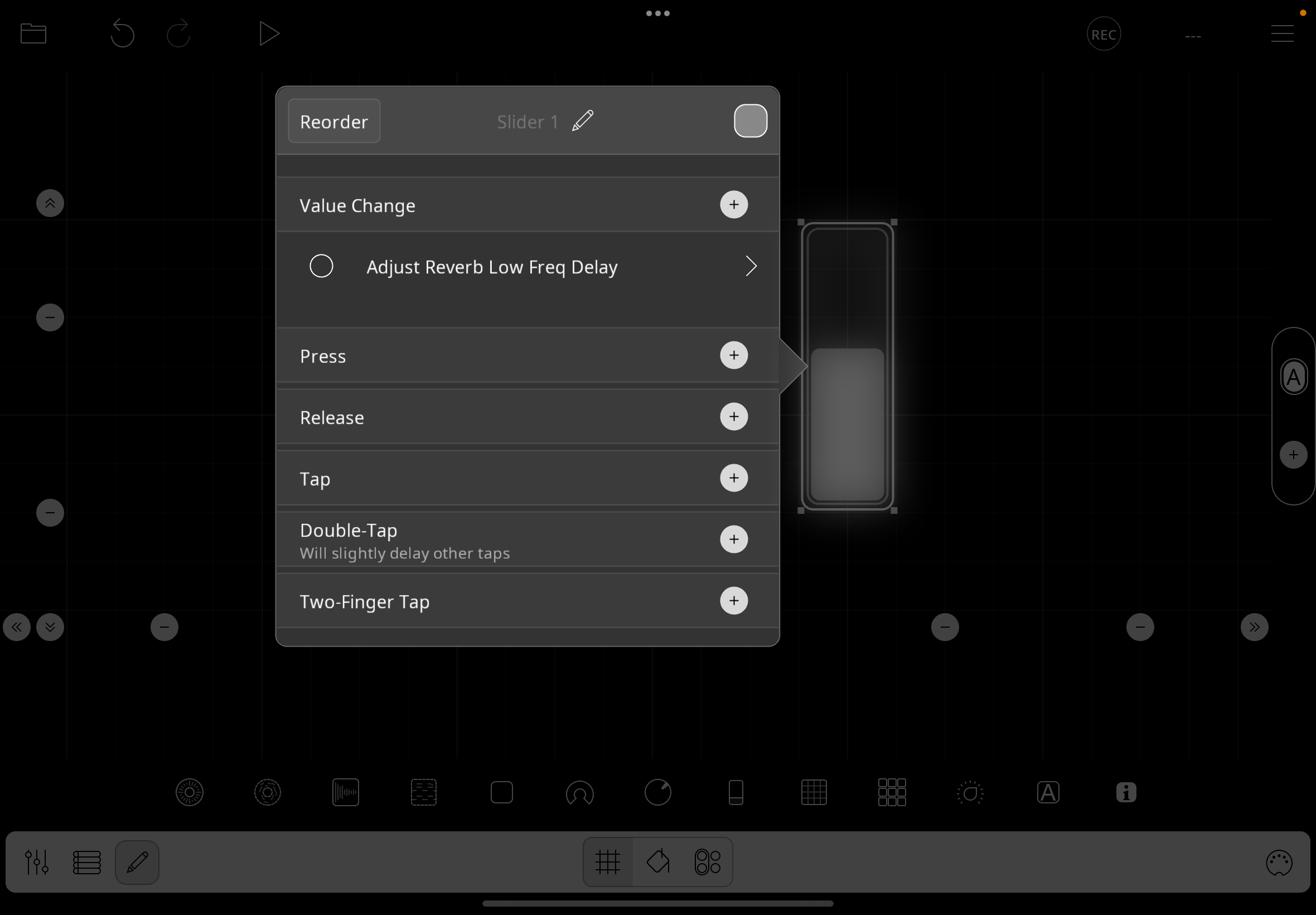
but there is no reference to this FX Parameter Action in the Controller Profile .
Whereas CC51 is Add Binding - Fx Parameter Adjust - Target > etc
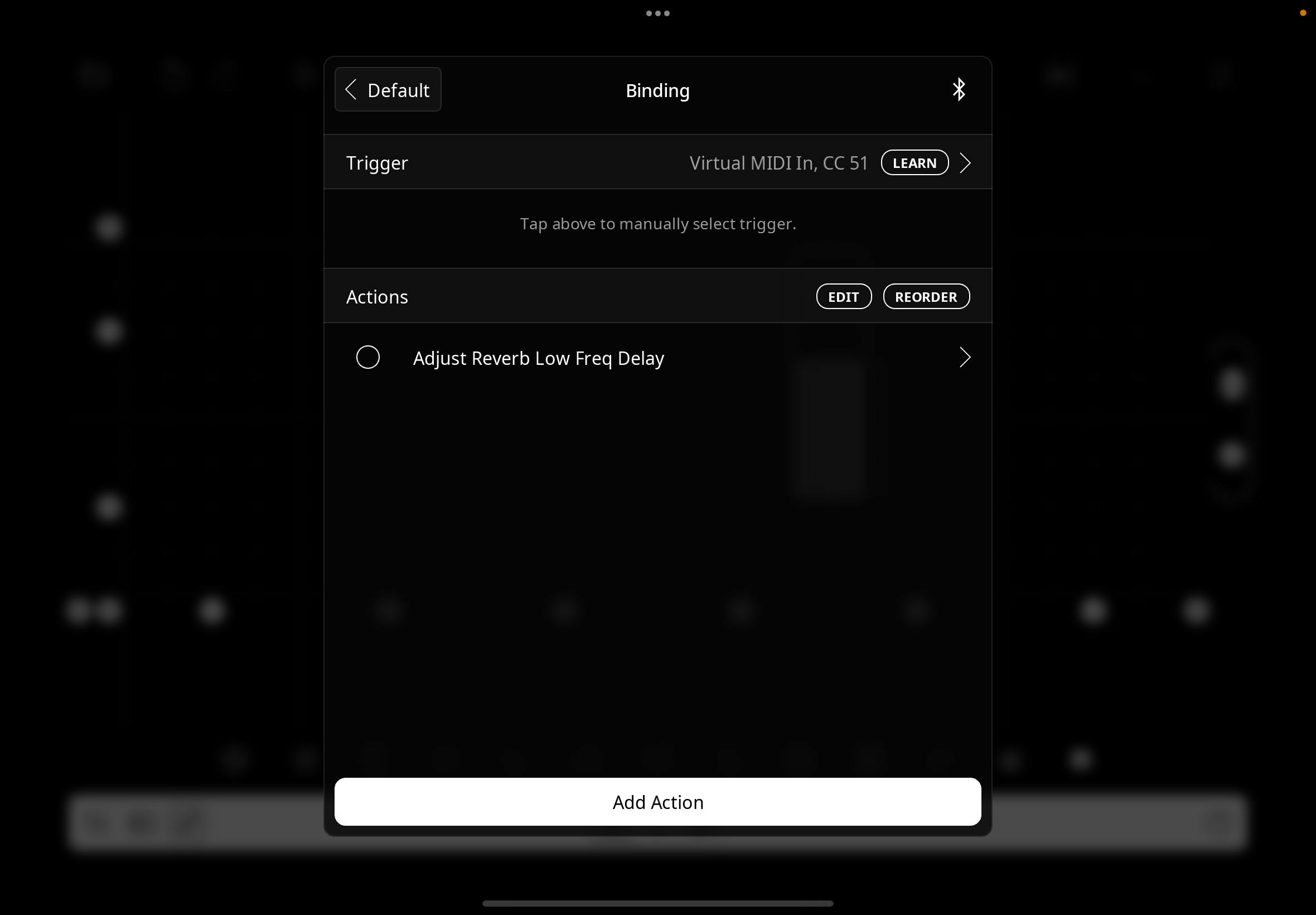
the Binding is direct to the FXParameter from the Midi CC , no widget is necessary though for visual reference
one can be added - bound to the action .
But the FX Action is defined directly in the Controller Profile with this Add Binding
whereas in CC50 the Fx Action is defined in the Canvas Edit .
That seems a significant difference , at least to me , & has taken a while to understand .
SO…
so to assign a Mixer,Bus,Fx etc action you have to do so via the Widget in Canvas Edit .
bind in MidiLearn for Controller Widgets .
MidiLearn of Clips produces a long list of Clip-based Actions ,
MidiLearn of Control Widgets merely gives press, adjust … control of the Fader ,button or rotary -
for the Control Widget to actually control something useful the widget is bound to that Action in Canvas Edit-
I don’t see how I can explain this any more clearly ,
I’m just rephrasing the fact that Add Binding defines Main Loopy Action directly in Controller Profile,
MidiLearn of Controller widgets only defines its twiddliness in Controller Profile ,
its required Main Action must be assigned in Canvas Edit .
They are therefore different ..surely ?
@RetroNewb : I am not sure that I understand. Here would be my explanation. Do you disagree?
MIDI Learning a widget is creating a binding to the widget you touch. It doesn’t look inside the widget.
This is the same as if you manually add a binding to control the widget.
There is no difference.
Manually adding bindings in a profile gives you access to additional actions and lets you bind to a series of actions. Midi Learning a fader creates the same binding as manually adding a binding to control the widget.
In most cases, it is more convenient to edit actions in widgets than in profiles and for midi bindings to be to the widgets that perform actions rather than to the actions themselves.
I have been explaining my confusion as a new user -
& how my breakthrough in understanding came in recognising this difference -
it is therefore ironic , (& baffling ,frankly) ,
that an expert user , so quick & keen to be specific & recognise distinctions in all other aspects of his
(appreciated) diagnostics & troubleshooting ,
cannot seem to recognise THIS difference .
I agree there is no difference between MidiLearning a widget , & Add Binding to control JUST the widget ,technically-
but you are missing the point -
the user wants to assign a MAIN Action in the hope of one day making some music ..
“Manually adding bindings in a profile gives you access to additional actions…”
YES ! :
the additional actions include the (bloody) ONE YOU NEED to do the job -
& that NEGATE the need to define it anywhere else ! (i.e Canvas Edit) .
and the fact that you can’t access these additional Actions from MidiLearn of a Controller Widget is
exactly why they are NOT synonymous / have similar functionality -
in use case we have to enter different modes / menus & wire things differently .
I don't think I'd blame Edward for not understanding what you're saying. I've had to read and re-read several times and I'm still not sure what your complaint is or the point you're trying to make.
Glad you have it figured out so that you can get what you want done though. I'm still curious as to what exactly you'd like to see done differently.