Loopy Pro: Create music, your way.
What is Loopy Pro? — Loopy Pro is a powerful, flexible, and intuitive live looper, sampler, clip launcher and DAW for iPhone and iPad. At its core, it allows you to record and layer sounds in real-time to create complex musical arrangements. But it doesn’t stop there—Loopy Pro offers advanced tools to customize your workflow, build dynamic performance setups, and create a seamless connection between instruments, effects, and external gear.
Use it for live looping, sequencing, arranging, mixing, and much more. Whether you're a live performer, a producer, or just experimenting with sound, Loopy Pro helps you take control of your creative process.
Download on the App StoreLoopy Pro is your all-in-one musical toolkit. Try it for free today.
Midi Feedback Update Issue on Page Change - seems not all data is sent - 0 values particularly.

My template includes Mixer type pages that mirror the layout of my Behringer XTouch Compact controller
- so I use my hardware to control Mixer/FX parameters with midifeedback from Loopy sent back
to update motorized faders , led dials & led buttons .
Using different strategies ( This Page Only + Active Page) I can switch thru different pages for
different control functionality , with visual feedback including naming of parameters & trusting when I change page there is midifeedback from new set of parameters sent to hardware .
Now the basics seem to be working , ongoing anomalies which I previously put down to my own
“programming” errors continue - today I may have discovered a cause -
on Page change (from Active Page to This Page Only ..if relevant ) not all parameters are updating
& after poking around in the data & testing it seems SOME parameters are not sent when 0 value.
The top row of rotary dials start at CC 10 -17 :
I include 2 screenshots of just switching to AMIX page ;
where the missing CCs in Protokol match the 0 value of the dials , in 2 different patterns .
CC11,13,15 missing in first , 10,12,14,16,17 missing in second
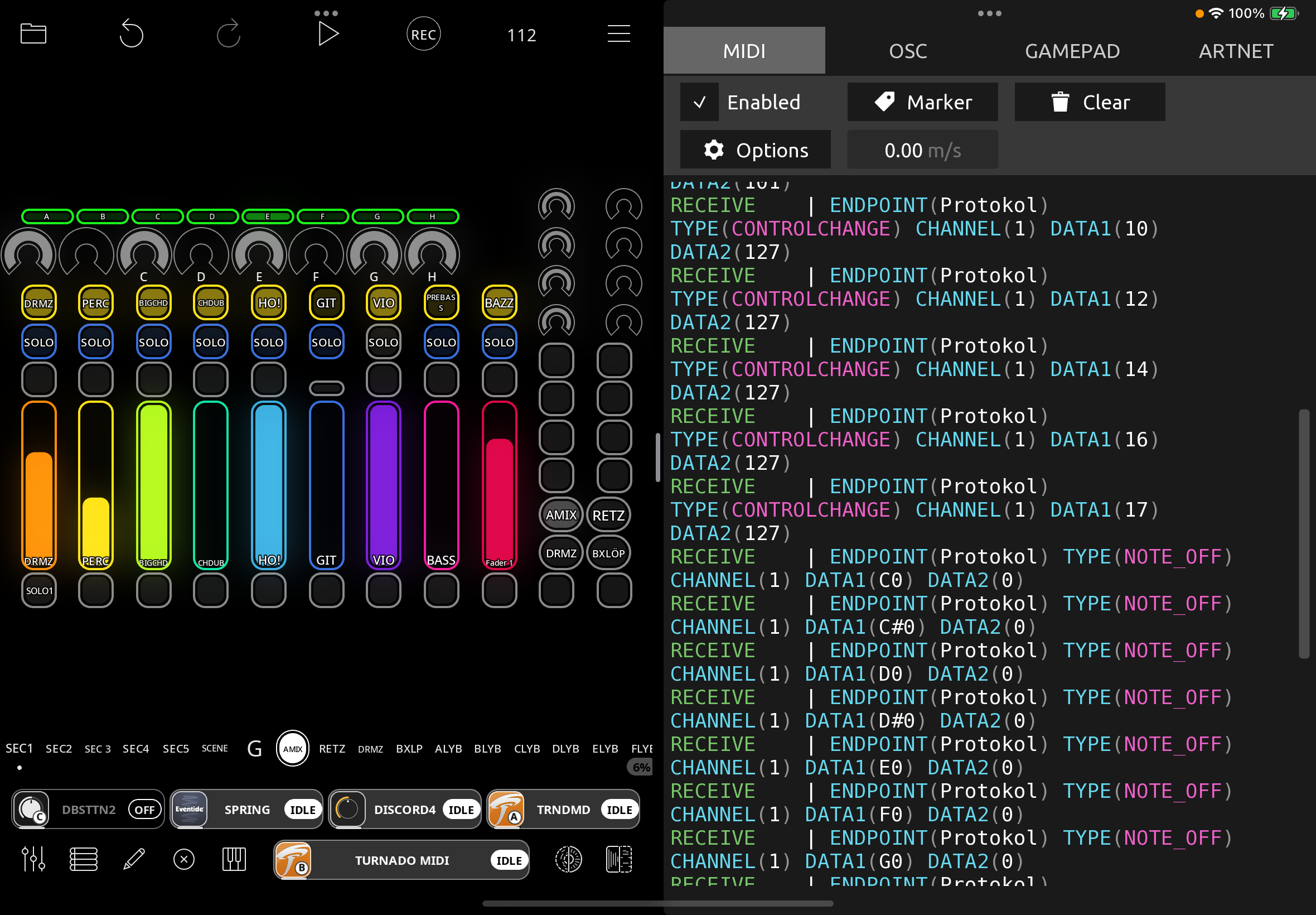
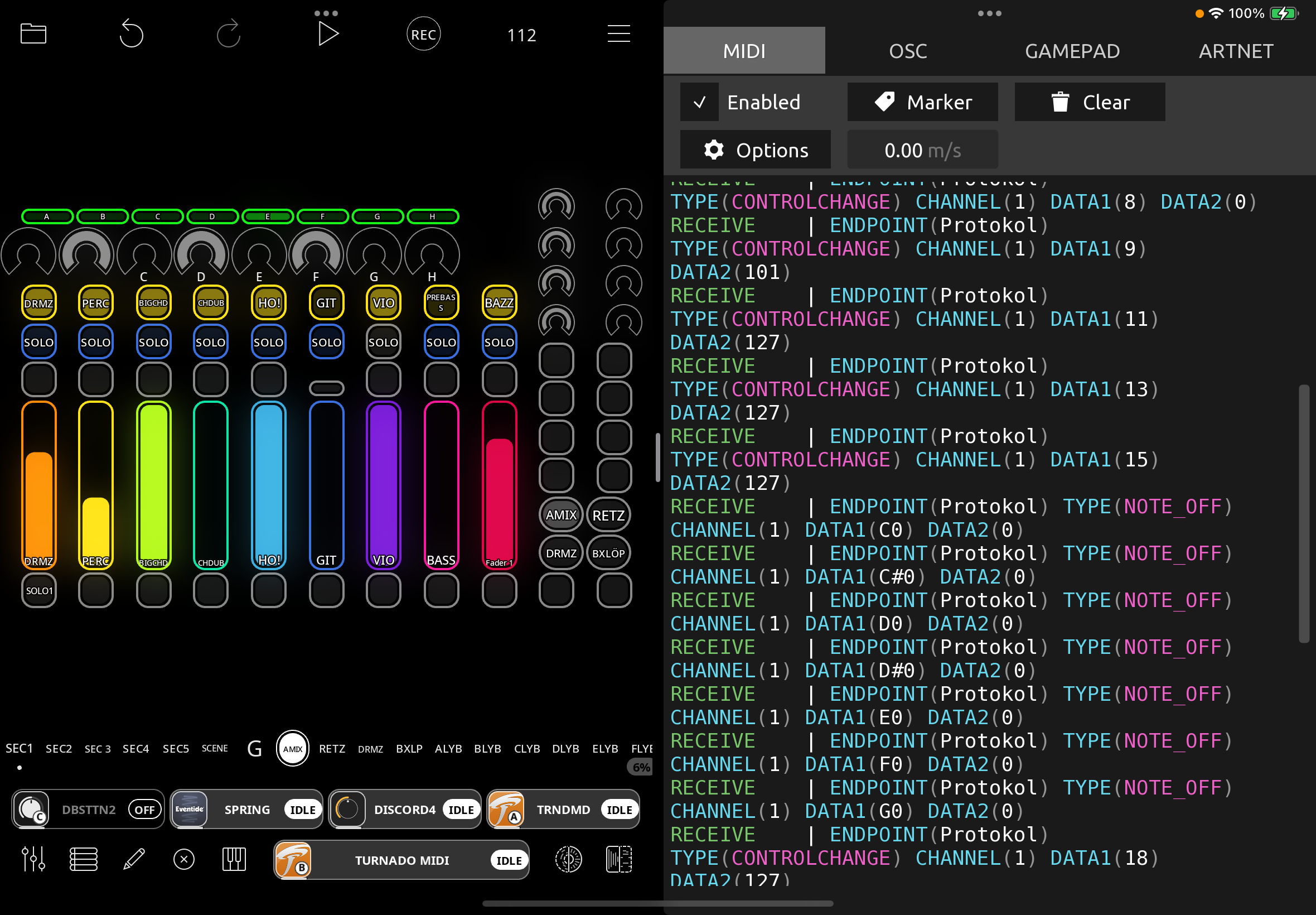
There are some other CCs missing from the other rotary banks ,
& I suspect it has also affected some of my button assignments (some CC, some notes) ;
don’t remember noticing it with the sliders .
Having discovered this using my EMU 1X1 midi interface , I transfered Profiles to directly
access the data to rule out that hardware as issue & to take Ipad screenshots .
I have triple checked the midilearnings - but they all send /receive their data from the screen &
controller when tested manually , & as screenshots show it seems to vary - with 0 value as a
strong coincidence.
I attach the empty Project file ,
hoping for @espiegel123 ’s patient attention ,
whilst dreading how long this will take to further explain .
edit ..
The AMIX Page has its MidiLearnings in “XTLAYERA-AMIX“ Global Controller Profile ,
Enabled as A Page Follow Action in Project Wide Follow Actions &
set to This Page Only -
there is a similar “XTLAYERA-DRMZ” setup for DRMZ page .
RETZ & BLOP aren’t setup yet .
Subsequent long bank of pages ALYB -HLYB are for separate 2nd LayerB of XControl ,
with different midi mappings in “XTLYR-B-Active“ & use Active Page .
Comments
@RetroNewb : can you tell me the simple steps to trigger the issue?
@RetroNewb : you mention global profiles. if you are using global profiles, you will need to zip and send them. Also, be careful about global profiles. They should not be used for onscreen objects or anything that is project specific.
@espiegel123 thanks for your continued engagement & I hope any frustration that creeps thru isn’t taken personally -
though if there is indeed an issue with onscreen elements & Global Bindings I may well let out a scream -
there is no mention of this in the manual & I have just moved all my projects across thinking it a better strategy
as I was having different issues in different projects & couldn’t keep track -
the Global Bindings are for my (currently 2 ) Mixer Pages so they are very much Global for my Template ,
but they are all about the onscreen elements - the rotary dials , sliders & buttons to interface the Mixer with
my XTouch Compact & provide visual & midi feedback .
I will attach the profiles , but ask what do you mean ?
Is it a known issue that midifeedback is unreliable using Global Profiles ?
though as I said I was having anomalies for a while , dating back to when I used Project Profiles .
The issue is also the background to my “interest” in MidiLearn vs Add Bindings in another thread -
as I have wondered which method of binding midi to actions to widgets is more reliable for hardware feedback.
Describing the issue in terms of functionality - the AMIX page widgets control Loopy mixer parameters ,
some of which are also controlled by other Page’s widgets -
so most relevant the top row of rotaries control Bus A-H levels when I am on AMIX page on Layer A of XTouch .
I can switch to Layer B on my XTouch (which has a different midi cc/notes configuration) to control each Bus A-H
individually -including controlling whatever FX for Dub -like performance -
but there is also a Bus level Fader assigned to the same Bus level parameter as AMIX -
so long story shortened I change the value of e.g H Bus level on Page H (LayerB hardware) ,
then switch back to AMIX where rotary H … HAS indeed updated value on Loopy screen ,
but only sometimes shows the correct value on hardware rotary led .
So describing the issue in terms of mididata , & answering your question how to easily trigger ,
I guess without hardware attached it would be setting recognisable pattern on AMIX dials including some 0s,
firstly switching to other pages & then back again , having cleared the midi monitor , to see if the midifeedback
was all correctly sent (just CC10-17 was enough for me to see this problem ),
& then maybe changing levels of the Mixer Buses A-H (some to 0 ) before switching back to AMIX page to again
midi monitor if all CCs have been sent as midifeedback .
Thanks .
@RetroNewb : it may take me a bit before I can look into this. It is indeed mentioned in the manual that global profiles should not be used for onscreen objects. Perhaps it should be more prominent. There should be a warning the first time one tries but maybe it isn’t coming up?
I brought it up not because there is a known issue with regard to midi state feedback but because it is an important fact to know about and I can see how it might be related though I haven’t investigated.
You brought up whether MIDI Learn or manually creating bindings is more reliable: “as I have wondered which method of binding midi to actions to widgets is more reliable for hardware feedback.”
There is no inherent difference. Midi Learn creates the exact same bindings as would be created manually if you created a manual binding to the same object/action. Manual binding creation gives access to more actions than MIDI Learn—as MIDI Learn is for creating bindings to interface elements. They are equally reliable. Manual bindings are generally used for creating bindings with multiple actions or creating bindings not related to onscreen objects.
@RetroNewb : I am not quite following your directions. Can you describe simple steps such as
The reason global profiles aren't reliable for onscreen widgets and loops is practical: Loopy can't know how to link a binding to a specific object between projects. Objects can have been moved, added, removed, changed, etc.. In other words, it's not a bug, but a practical limitation due to Loopy's flexible nature.
If you're binding to things like mixer faders, generally a global profile will be fine. But it sounds like you want to have on-screen widgets linked through actions to mixer faders. In that case, if you bind to the widget, a global profile may not be reliable between projects. To work in the global profile it's better to bind to the fader itself. The widget will still reflect the fader state and will still control it. Only the target of the binding changes.
Anyway, I don't want to butt into the troubleshooting process, but thought it might be helpful to explain the reasoning behind when to use global vs. project profiles - at least as far as I understand it.
Thanks @espiegel123 & @wim for engagement -
ALL projects use exactly the same layout - with Mixer/FX Pages based on the hardware controller layout ,
therefore warnings in manual against “project specific elements or “screen order changes” actually
encouraged me to think this was the preferred mode for my setup, the very reason it was there for .
So @espiegel123 ’s reference to “on-screen objects” above is in case their order changes ? ,
or maybe agrees @wim ‘s experience that widgets don’t work well in Global .
So …the layout IS exactly same - but wired midi to widget / widget to action -
thus allowing very minor differences between projects because the
widget to action binding IS separate from the midi-to widget for hardware control feedback.
(e.g the MUTE buttons always mute the same colour instrument track ,
but an additonal action to also mute its A-H FX Bus does vary between projects ).
That flexibilty of widget to action whilst hardwired midi to widget seemed a better option ,
assuming the feedback works correctly .
TESTING -
Objective - confirm all midi feedback data is correctly sent when switching TO AMIX page ,
midi assignments are in Global Profile “XTLAYERA-AMIX“ which is switched to on page select,
particular testing of value 0 as suspicion it stops sending CC number .
(edit 0. install XTLAYERA-AMIX & XTLAYERA-DRUMZ Global Profiles, remove 2 from name )
1 . select AMIX , set values on top row of rotaries including 0s , switch to other page/(s) DRMZ , A-HLYRB ,
clear midimonitor in preparation for AMIX midifeedback dump , switch back to AMIX
confirm all midiassignments have been sent , particularly in CC 10-17 with 0 value
select other page/s DRMZ, A-HLYRB , change values of Bus A-H levels in Loopy Mixer including 0’s
4.clear midimonitor , select AMIX page - the top rotaries are bound to Bus A-H levels so should reflect step 3 changes - then confirm in midimonitor correct feedback was sent
(edit ..each of pages A-HLYRB Fader 9 is also wired to its A-H Bus level , as another way to check
whether AMIX top rotaries update these connected values )
repeat until convinced I am wrong , or right , that sometimes some mididata is missing .
Thanks .
@RetroNewb : I am looking at your project.
are you expecting that when you switch pages that Loopy Pro is going to send MIDI feedback for every widget on the page even if the binding is to a specific widget on a specific page?
When the mapping is “active page”, switching pages will cause midi feedback since the value may have changed. But when the binding is to a specific widget on a specific page, feedback is only changed when the value changes (so that switching pages doesn’t send unnecessary feedback).
@espiegel123 thanks for looking ,
yes , I am expecting midifeedback for every widget when using “This Page Only” bindings -
in my defence though, this expectation is not just for the page change but the fact that the Controller Profile
is also being switched to XTLAYERA-AMIX (Project Wide Follow Actions Page Select )
so I assumed (hoped ) all values would be updated , as they generally seemed to ..
but also the whole issue was first noticed when some hardware leds were not changing their value switching back to AMIX after I had altered them on a different A-HLYRB page or in mixer - i.e Bus A-H levels , so the values were different.
edit
Switching to a profile that was disabled will force it to send out feedback values. If you were to disable that profile when switching away from the page, when you switch back it will re-send the values. so, if you disable that pages profile when you switch away, that should solve your problem.
You could also disable the profile and after a delay of approximately 250ms re-enable it to force re-sending.
@espiegel123
edit ..I do understand .
so my expectation that values should update on switching Controller Profile was roughly correct ,
except you are saying - only if the profile was previously disabled -
this is problematic in that , because of hardware controller limitations ,
I had left the A layer’s Controller Profile “open “ when switching to B layer ,
so I can switch back & forth more quickly….
anyway , could you explain the “switch away” action - is there one for the AMIX page itself , or would I have to
add “disable XTLAYR-AMIX “ to all other pages ?
I will implement this refinement & retest -
hopefully the issue is fixed , though my previous findings were from switching from DRUMZ to AMIX,
& therefore XTLAYR-AMIX had been disabled & then switched to .
Yes, you would disable it when switching to other pages.
Another option is to change the the load page action to end with disabling the profile and re-enabling it after about 250ms.
@espiegel123
sorry please explain this 2nd option “change load page action to end….250ms”
where do I find load page & how to time disable/re-enable ?
thanks
edit.. or do you mean , as a variation of when switching to the each of the other pages ,
so instead of just disabling I add a re-enable after 250 ms ?
Sorry, the Select Page follow action.
To set action timing, you tap on the dot to the left of an action. You can delay an action. If you tap on Beat you switch to seconds.
You would have something like:
More about actions and timing:
https://wiki.loopypro.com/Actions_Tips#Action_Timing
@espiegel123
yes thanks I found this in the meantime , though initial testing doesn’t seem good ,
as I’m now getting all my LayerB active page controller CCs (which should be disabled)
appearing in the midi monitor on changing to AMIX . sigh.
This isn’t over , but I’ve got to stop for next couple of weeks .
I have a live performance coming up , I had been working towards using Loopy Pro as a redundancy
setup in case Ableton crashes but it’s not going to be ready
& I have to switch focus back to main system (& practise).
Thanks for your help, sorry for any frustration , will be back to get this sorted for the long haul later .
Sending the feedback when disabling the profile is a bug that was unknown to us. This usage is pretty uncommon it seems.
aha ..
well amongst the unexpected midi data , it seems the 0 values of rotaries continue missing ,
as originally reported . (CC11 & 15 missing - mirroring top row rotaries pattern )
will check back in a couple of weeks .
@RetroNewb : I don’t know how to interpret the post and picture. For me, all midi values are being sent when the profile becomes enabled.
Here is a test I did by creating a button that forces the feedback to be sent by disabling and re-enabling the profile.