Loopy Pro: Create music, your way.
What is Loopy Pro? — Loopy Pro is a powerful, flexible, and intuitive live looper, sampler, clip launcher and DAW for iPhone and iPad. At its core, it allows you to record and layer sounds in real-time to create complex musical arrangements. But it doesn’t stop there—Loopy Pro offers advanced tools to customize your workflow, build dynamic performance setups, and create a seamless connection between instruments, effects, and external gear.
Use it for live looping, sequencing, arranging, mixing, and much more. Whether you're a live performer, a producer, or just experimenting with sound, Loopy Pro helps you take control of your creative process.
Download on the App StoreLoopy Pro is your all-in-one musical toolkit. Try it for free today.
Mono the left and right output?

My audio IF has a left and right output. I need the right output to reflect the same as the left output (ie no stereo). The reason for this is I use the left output as a monitor (small FRFR amp), and the right would be sent to the sound system.
Can this be done and if so, how to do it?
Comments
The free BYOD AUv3 would let you do that. Put it on the master and choose Mono or Left as the input and both output channels will be identical
I think you need to select Mono to get what's needed. When I select Left, I only get the left channel of a stereo input. With Mono I get the full output in both channels.
Left works for me. For me, mono mixes left and right inputs into a dual mono output. Left results in the left channel being sent to both outputs.
Left only input to to BYOD stereo in chosen
Left only input to BYOD; left input option chosen
Left only input to BYOD; mono input option chosen
My reading of the OP is that's what's wanted. Both right and left combined identically in the left and right output., do that if you listen only to the left you get the same as if you listen only to the right.
Maybe I have misunderstood.
They will need to experiment to see what works best. Sometimes collapsing to mono results in phasiness you don’t get using only one channel.
Wouldn’t the iOS mono settings accomplish what the OP want.
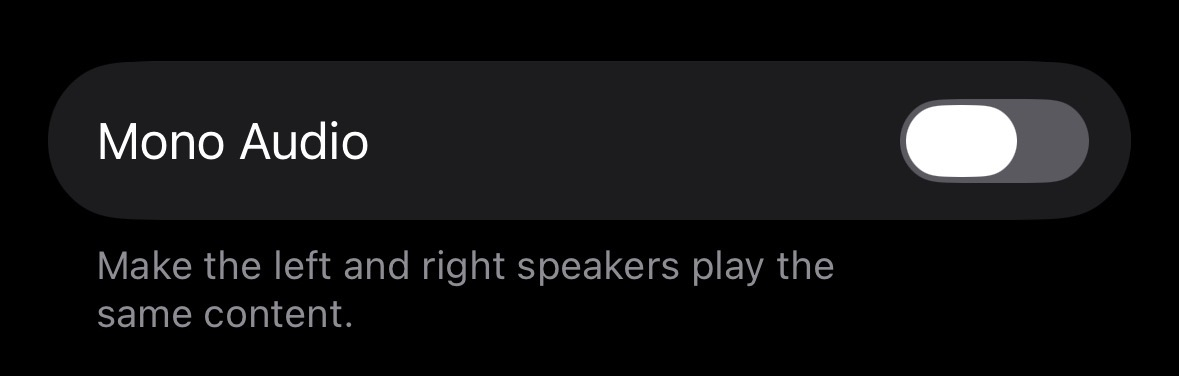
It sounds like the audio is meant to go to an audio interface, and I'm assuming would need at least separate level control, since it's going to separate destinations. But maybe not.
Maybe an audio interface with 2 sets of stereo output would work. But the OPs description is a little unclear.
They're sending to a PA, which is mono, and separately to a monitor, which is mono. If phasing is going to be a problem, it's going to be a problem no matter what. What they said they wanted is the identical output to the PA and to the monitors.
Did you listen to output with a clear difference in the left and right channels? With Left input, yes, you do get a mono output, but it's of the left channel only.
My test was with a kick panned left and a snare panned right. If I select Left, I get the kick (in mono, not panned). If I select Right, I get the snare (in mono, not panned). If I choose Mono input, I get the kick and snare combined in the center and can pan left or right for separate outputs.
Either way, BYOD is a great solution, and has all the options that could be needed. For free. 👍🏼
@wim: the phasing type issues are I am talking about happen in some cases when you mix l/r into one channel; for instance collapsing some stereo reverbs sounds worse than using either left or right channel.
Only trial and error will tell which will sound better for a particular use.
Agreed, as I said. However, what I said is that challenge is there no matter what if you're sending a stereo out to a mono PA. I don't care if you mush it into left or right channels in software or whatever, it doesn't change anything. But what the OP said is they want the full mix identically in the left and the right channels. I don't know why we're going round in circles about this. Let's just assume I'm missing your point and move on.
As already agreed.
Going round in circle to answer OP who don’t comeback is kinda what this forum does. 😆
Thank you all for the replies. I was offline due to family emergency, but back.
I will try these out.
In the end i just used a physical Y mono cable splitter on the left channel of the audio interface. one splits to the PA the other splits to the FRFR personal monitor amp.
it’s the dynamic duo in action…🙂