Loopy Pro: Create music, your way.
What is Loopy Pro? — Loopy Pro is a powerful, flexible, and intuitive live looper, sampler, clip launcher and DAW for iPhone and iPad. At its core, it allows you to record and layer sounds in real-time to create complex musical arrangements. But it doesn’t stop there—Loopy Pro offers advanced tools to customize your workflow, build dynamic performance setups, and create a seamless connection between instruments, effects, and external gear.
Use it for live looping, sequencing, arranging, mixing, and much more. Whether you're a live performer, a producer, or just experimenting with sound, Loopy Pro helps you take control of your creative process.
Download on the App StoreLoopy Pro is your all-in-one musical toolkit. Try it for free today.
Comments
same here.
today there was, another update.
now at least the "buy again" thing was fixed.
Even with the new update, yeah, seems that problems persist. In controller mode, can't manage to rename a knob, can't manage to duplicate.
Hmm.
I can reproduce the knob deletion crash.
Are you trying to duplicate something in Controller design mode? Or a module? I can duplicate a module, at least Plaits, which is what I’ve just tried out and works as usual. Not sure if you can duplicate a control in the Controller, I haven’t seen an option for it. Changing a knob’s target is an option in the pop-up form, and works as you expect.
When you mentioned renaming a control, did you mean the label? I’ve been able to edit an existing label (double tap in design mode and edit in the pop-up form).
Edit: I’ve not had the repeated IAP thing in standalone yet.
What I understood from the notes was that I should be able to duplicate a knob in controller design mode. No?I choose Duplicate, then tapped on an object like a knob I wanted to duplicate, no joy. Maybe my misunderstanding.
Naming, yeah I mean adding a label. I get the pop-up with type, style options etc. It looks like I should be able to enter text in the black space under the Behaviour options, but I can't. I keep tapping there and/or trying to write text via my Bluetooth keyboard, no joy. Tried turning the bt keyboard off too, to see whether I could get an onscreen keyboard to pop up also no joy.
Repeated iap thing is fixed in the new version
Thnx John
has anybody managed to sucessfully add a background picture to the controller module?
OK, so I think I’ve got this figured out (FLW!).
To duplicate a knob (and thanks for alerting me to the ability to do this):
In design mode, double tap the MI to get the menu up, then go to Add Component/Duplicate Any. Then tap the thing you want to duplicate. It won’t be bound to a target, so you need to double tap it to bring up the pop-up form, press the Change Target button and then tap the thing you want it to control.
For the renaming/label issue, you don’t name the knob. You make a label (Add Component/Label), which can be edited once you’ve made it if you want to change it. Double tap to bring up the pop-up form and edit the Text field.
HTH, and that I’ve not got another wrong end of the stick (wow, a multi-ended stick…!).
Something that’s probably been there for a while but I’ve only just figured out today, so maybe there are others in the same boat.
If you have the AUv3 modules you can host AU instances of MiRack inside the standalone version, so if you have a useful effect or instrument (maybe with a spiffy new control interface) you can just add it as a module. I haven’t got too deep into setting up parameters etc - my test instrument just needed gate and v/oct - but it looks like a neat way of incorporating things you use a lot.
@bygjohn I get as far as this "tap the thing you want to duplicate. It won’t be bound to a target, so you need to double tap it" and then nothing works. As soon as I tap the thing I want to duplicate (eg LFO in Krell Patch demo), nothing happens. I try single tapping on the knob, double tapping etc. Am I doing something wrong? If so, I must say this is a very poorly designed/explained feature.
Good call with the adding label, got that sorted, at least, thnx!
Is it possible, you are trying to duplicate parts of modules? I think duplicating only works inside of the new controller module. So if you want to duplicate a set of controls, you already added, you can easily do that. I may be wrong, only gave it a tiny spin so far.
Hmm, that's not the way I interpreted the blurb, maybe tho. Let's see, I emailed the dev
I had previously purchased the Auv3 hosting IAP but now it stopped working for me and the Restore Purchases button doesn’t work 😢
Never mind, I missed a second update that fixed that 👍
I haven't tested every function, but for me it has been pretty solid, and kind of a gamechanger to be honest..
To have all the messy patches as one coherent simple interface as auv3 inside drambo.. crazy that it even works.
Got some clarification from the dev about the 'duplicate any' function for building controllers, I haven't had time to test whether this solves the issues I had, but sharing here as it might be useful:
This function has two functions. The primary function is to duplicate custom components from other modules. For example, in the demo patch you see an oscilloscope display taken from Submarine EO-102. Other examples of components that can be duplicated are the spinning disc from NISTHY Jira Jira Echo, various displays, e.g. BPM display from Clocked module or the whole big display of voxglitch Glitch Sequencer, or even the configuration display from MIDI I/O modules. Not all components from other modules will work as good as these when duplicated, and not everything you see in other modules is even a component. Components that can be duplicated are highlighted with red border when in duplication mode.
And another function is to duplicate existing knobs (sliders, etc.) and labels from Controller itself, this is so that you can easily make multiple components with the same style.
There's a new update out btw, not sure what it fixes, but yeah, everything seems to be working as it should. I think one source of confusion for me was what counts as a 'component' when duplicating. Seems indeed that that's more limited than I expected, only things surrounded by the red squares can be duplicated in that way. Not sure why, but anyway, now I know there's that limitation, the rest of the process is smooth enough.
@Gavinski One fix seems to be the crash when trying to delete a knob, it worked fine after the latest update. NB I’ve not done extensive testing, just one deletion, but as it crashed every time before it’s much improved.
It's too bad that some of the components, such as the EO-102 scope come across as transparent white. Currently it appears the only way to see 'em is with a custom background.
Good, this is a really great addition to mirack!
Nope. I tried making a real simple SVG with only a colored rectangle. No luck.
I'm trying to make a 'version' of Audrey II as an experiment, if it turns out OK I'll share it on here
i find parameter mapping is not working within drambo here.
i'm quite sure it used to work before...
Email the dev?
is it working for you/others?
Haven't tried and not near iPad, will try to check when I get time, but it sounds like you're familiar enough with things and if it's not working for you, just contact him I'd say
kind of familiar with too many things, so user error is always around the corner:)
emailed anyways
I just had a quick check. I never tried to map a mirack AUv3 parameter before, but yes, it's not working. At least not in any normal way. I tried the easy AUM way - tapping the little knob symbol in the midi control menu, which should then let me select a ui element to map. But selecting one doesn't bring up the parameter mapping options, like it normally does.
its not a bug... hope this explanation helps.
The issue comes from how miRack exposes (or doesn’t expose) parameters to AUM.
AUM can only map parameters that a plugin explicitly makes available. miRack does not expose most of its module parameters as AUv3 parameters, so AUM has nothing to latch onto. That’s why when you try the usual MIDI learn method in AUM, tapping the control icon and then touching something in miRack, nothing happens. It’s not a bug, just a limitation of how miRack is built.
The reason behind this is structural. miRack is based on a modular system where a patch can contain dozens or hundreds of dynamic parameters. AUv3, on the other hand, expects a fixed list of parameters defined in advance. These two approaches don’t fit well together, so most controls in miRack remain internal and invisible to the host.
The intended way to control miRack is through its own internal MIDI mapping. You send MIDI from AUM or a controller into miRack, and then assign those MIDI messages to parameters inside the patch using miRack’s MIDI learn. In this setup, AUM acts as a router and mixer, while miRack handles all the actual control logic.
This means you shouldn’t think of miRack as a typical plugin that AUM can automate. It behaves more like a self-contained modular instrument running inside AUM. Host automation and direct parameter mapping from AUM are basically off the table.
If you still want some higher-level control, a practical workaround is to build “macro” controls inside miRack. You map multiple parameters to a single MIDI CC and then control that CC from AUM or an external controller. It’s not as seamless as normal AUv3 automation, but it gives you a workable performance interface.
In short, AUM cannot directly control miRack’s parameters, but MIDI into miRack works reliably and is the correct approach.
Makes sense, thanks for clarifying.
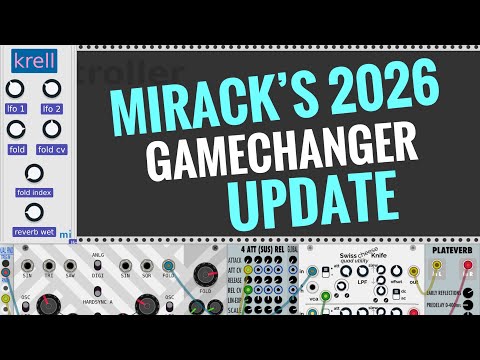
Short walkthrough of the controller mode, basics of designing a controller etc, with everything going smoothly. Got there in the end!:
You can also use miRack's MAP capability to map a control to one of its 32 pre-defined AUv3 parameters.