Loopy Pro: Create music, your way.
What is Loopy Pro? — Loopy Pro is a powerful, flexible, and intuitive live looper, sampler, clip launcher and DAW for iPhone and iPad. At its core, it allows you to record and layer sounds in real-time to create complex musical arrangements. But it doesn’t stop there—Loopy Pro offers advanced tools to customize your workflow, build dynamic performance setups, and create a seamless connection between instruments, effects, and external gear.
Use it for live looping, sequencing, arranging, mixing, and much more. Whether you're a live performer, a producer, or just experimenting with sound, Loopy Pro helps you take control of your creative process.
Download on the App StoreLoopy Pro is your all-in-one musical toolkit. Try it for free today.
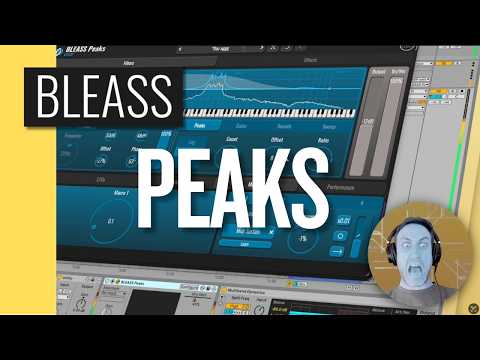
New: Bleass Peaks (Desktop, iPhone, iPad)
Polyphonic Playable Filter
Desktop version (affiliate link 🙏) :
https://www.pluginboutique.com/product/2-Effects/19-Filter/17076-BLEASS-Peaks?a_aid=65c7016dea38b
iOS version:
https://apps.apple.com/app/bleass-peaks/id6756374105
Groundbreaking polyphonic filter
Creative filtering plugin that turns filtering into a true performance tool. Based on a polyphonic bell-filter architecture, BLEASS Peaks can be controlled via MIDI: each note triggers its own resonant filter voice, allowing filtering to be played like an instrument.
Uncompromising MIDI-driven expression
At the core of BLEASS Peaks lies a filtering engine capable of generating multiple resonant peaks and notches from a fundamental frequency. In MIDI mode, these resonances are driven by incoming notes, allowing up to eight simultaneous filter voices. Technically, BLEASS Peaks relies on a bell-filter architecture that distributes and controls these resonances across the spectrum. The filter’s fundamental frequency can be set manually or via MIDI, while the distribution, number and width of the resonances can be adjusted. Integrated modulation sources (LFOs, envelopes, macros and MIDI controls) can then be used to animate the filtering.
Filtering and effects combined in a single plugin
In addition to its filter engine, BLEASS Peaks also integrates several effects such as distortion, compression, bitcrush and delay. These processes can be combined with the filtering to easily build complete creative effects chains.
iOS 12 or later
Comments
again
no video or audio for this...:)
this sounds like the good olde Majken Chimera (free/win only)
https://www.majken.se/
if its like that - it could be really interesting...
I believe they're going to post a tutorial
First video is out
Just reminds me a bit of what can already be done with FF Volcano and a bit of white noise...
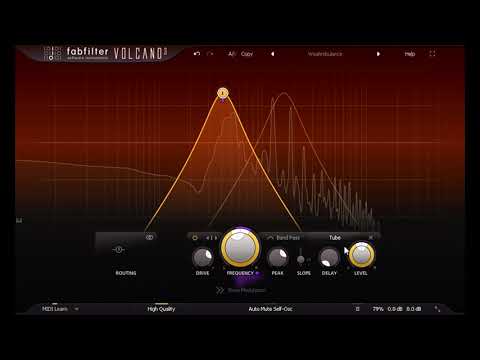
not impressed ... sounds clean and nice like a normal vocoder or a basic resonator...
too vanilla...:) not my cup of tea.
the interface looks good and Bleass makes good stuff though...
and yes - @samu is righ - one can make that in Volcano or miRack already.
Does fabfilter volcano have the option to create a separate filter for each incoming midi note, with the root set by that note? With up to 8 voice polyphony (separate filter for each midi note)? If so, I'd forgotten, been a long time since I used it
Nope but you can for example create a few nodes that are selected intervals apart (major, minor chords etc.) and control them with incoming midi which saves me from playing the chords manually and do the one-finger dance
Regarding the 'first' Bleass Peaks video, the f*king head-shot in the video made stop watching it after a few minutes, some think it might be cool but it's as cringy as it gets and the sounds were mostly dub-step-noise...
Yeah haha, the style wouldn't be for everyone, but I guess no-one's style is, for that matter.
Lol, yes that geezer put me off too. Someone needs to have a word...'dad, you know those videos you're making...'
Regarding the new app I'll just stick to my anti-new-app mantra 'Ignorance is Bliss' and enjoy what I've already got!
Surely @Samu you mean ’Ignorance is Bleass’ 😊
Not really...
...I don't even recall the last time I used a BLEASS app...
(I gave Tides a go when I got it for free after reporting a bug in Motion FX and after that I've not used it at all).
This is a cool effect. I’m into it and glad Bleass released it. I’m dropping this into my next track which I can’t say for every purchase. It’s more versatile than the first white noise video shows but it is still a polyphonic resonant filter at heart and not a multi FX so it’s going to have a specific range of sound that it can’t go beyond. I’m filing it with the Quantovox FX which I also like and use often.
Looks like fun. Okay, I have Volcano and Dual-VCF, but I'm also a Bleass completionist. Sucks I have to wait a little while to grab it.
I knew joining this forum was a mistake. Do I need this? No. Do I immediately know how I’d use it and that it would sound cool? Absolutely.
I want to see it used with different types of music and instruments. I'm still not sure I grasp all this can do just yet.
Is it really pronounced "bleess"? In my head it's always been "blee-ass".
The correct pronunciation of Bleass is one of the great mysteries of life. I quite like your take on it, though, might have to steal that 🧐
Liking app for sound design ( or just transforming a VA )
Just got volcano out.
Bleass will be easier for me to understand.
Here’s a quick sketch just to show some uses of Bleass Peaks.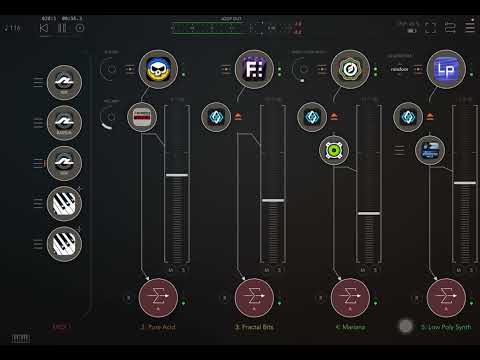
App is cool.
Were supposed to make a demo.
I like how randomly Solderbox gets Dagger like Oscilators around 6 min.