Loopy Pro: Create music, your way.
What is Loopy Pro? — Loopy Pro is a powerful, flexible, and intuitive live looper, sampler, clip launcher and DAW for iPhone and iPad. At its core, it allows you to record and layer sounds in real-time to create complex musical arrangements. But it doesn’t stop there—Loopy Pro offers advanced tools to customize your workflow, build dynamic performance setups, and create a seamless connection between instruments, effects, and external gear.
Use it for live looping, sequencing, arranging, mixing, and much more. Whether you're a live performer, a producer, or just experimenting with sound, Loopy Pro helps you take control of your creative process.
Download on the App StoreLoopy Pro is your all-in-one musical toolkit. Try it for free today.
(Mozaic) SWAM Smart Control

Hi folks!
I've been experimenting with different SWAM plugin setups for the last four years.
There are so many parameters that there are lots of opportunities, but it's pretty hard to control them all. Many iPad DAWs are not very convenient for editing MIDI CC automation, and for live performance, you need an easy way to control multiple parameters simultaneously. And if you want to combine live performance with automation correction/editing, it becomes even more complicated and inconvenient.
I've tried various approaches: for instance, iPhone custom TouchOSC layouts with faders and gyroscope; and using poly-aftertouch in my Keylab/XJam pads to control CCs. You can see this approach in my Wicked Games cover video. Both approaches are time-consuming to set up and very sensitive to skill level, especially the poly-aftertouch approach. Besides, both approaches only help while playing live.
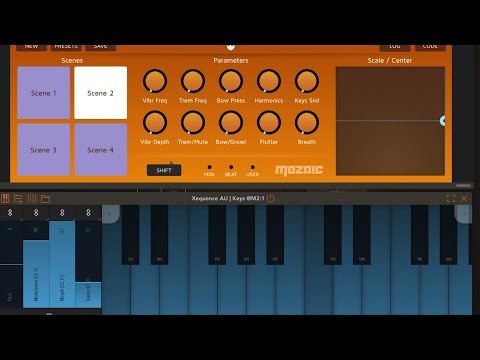
Recently, however, I came up with the idea of an A/B MIDI CC morphing plugin that allows you to easily set boundaries for the most important SWAM parameters and morph between them using a MIDI CC or AU parameter. I finally found some time to implement it, and it's looking very handy: I can control pitch and expression with the standard keyboard wheels and use the expression pedal to morph between them. I can also control state settings with both the Mozaic UI and the MIDI CC parameters that I've assigned to my KeyLab faders, knobs and buttons. So the whole setup can be programmed even without UI.
I haven't recorded anything musically interesting yet, just a technical demo. But the whole setup already feels very convenient. And if I want to program MIDI instead of playing live, I can prepare a preset and edit two or three parameters instead of a dozen.
If you are interested - feel free to check it out.
- PatchStorage
- GitHub (Contains a detailed README and SWAM MIDI presets with already mapped CCs)
Comments
@vlaoladis Cool idea, making SWAM more accessible to ‚non MPE keyboards‘ . i’m going to try it out.
As i understood, the git also contains the settings used for Claude to vibe code Mozaic scripts - did you enhance the produced code or was ithe script fully produced by a prompt ?
Regards, -ki
Hi!
I understand the fear of AI-vibe-lunatics, this whole area is very overheated now, but what do you mean by "enhance"?
Mozaic is just a rather primitive callback-based C-like DSL without any abstractions, there's no much space to mess up and enhance. Obviously, I tested it on my own setup because I wrote it for myself in the first place. During these tests I got some ideas like using long press for multi-level reset (because there are no more buttons left in the UI), and implemented them.
In my daily job I treat agents as I treated Junior Devs. If you know, what exactly do you want, if you can describe it in a clear way, if you understand the tech behind the code and can review it, if you care enough to fix some quirks after that - you can delegate this task and expect an output with quality high enough. And since my hobby is music, and not coding at my free time - I will use whatever I can to save this time for music.
@vlaoladis No worries - i‘m a senior researcher in information technologies, work with agentic programming and as long one is able to assess the output, using AI is just a tool.
I was asking because i wouldn‘t have expected Claude to add for instance the SetShortname instruction as it isn‘t functionally needed (but more of a UI feature) - you probabally had to specify its addition in the prompt.
And i was wondering if it would help to get better initial results if not only used the Moziac Manual is referneced, but also something like a condensed version of Mozaic Tips and Tricks . In that way, one could setup some common mozaic scripting grounds (like add a description, if possible make the descrition available with shift in a second layout, setup unused knobs with empty names and centered, add UI hints like using the title labels etc)
Heh, that actually was Claude's idea
I've forgotten about this doc myself, I saw it a year ago but I didn't do any Mozaic scripts since then.
But it set knob labels, added description (even two - long version for the script, and short for the float help window), used state saving, all without hints from my side.
On the other side, I "added" pad color signals, SHIFT long presses for different clean modes. "Added" is in quotes because I explained the algorithm to AI in a rather low level, so I still didn't wrote every line of code myself, but didn't give AI much freedom as well. And of course, I knew the rest of the UX before I even started, because I had a prototype made Drambo and used it for some time to finally shape the idea of what I want. And I'm not even talking about my previous experiments
Oooh. Nice idea, that I'm definitely going to play with.
As for the Claude stuff... I develop APIs and model apps, but haven't yet checked into agent building. I'm going to be interested to see what you've done there.
Edit: Ah, I see that agent building isn't actually in there, just source references for such an agent.