Loopy Pro: Create music, your way.
What is Loopy Pro? — Loopy Pro is a powerful, flexible, and intuitive live looper, sampler, clip launcher and DAW for iPhone and iPad. At its core, it allows you to record and layer sounds in real-time to create complex musical arrangements. But it doesn’t stop there—Loopy Pro offers advanced tools to customize your workflow, build dynamic performance setups, and create a seamless connection between instruments, effects, and external gear.
Use it for live looping, sequencing, arranging, mixing, and much more. Whether you're a live performer, a producer, or just experimenting with sound, Loopy Pro helps you take control of your creative process.
Download on the App StoreLoopy Pro is your all-in-one musical toolkit. Try it for free today.
Please help me with brickwalling
Hi,
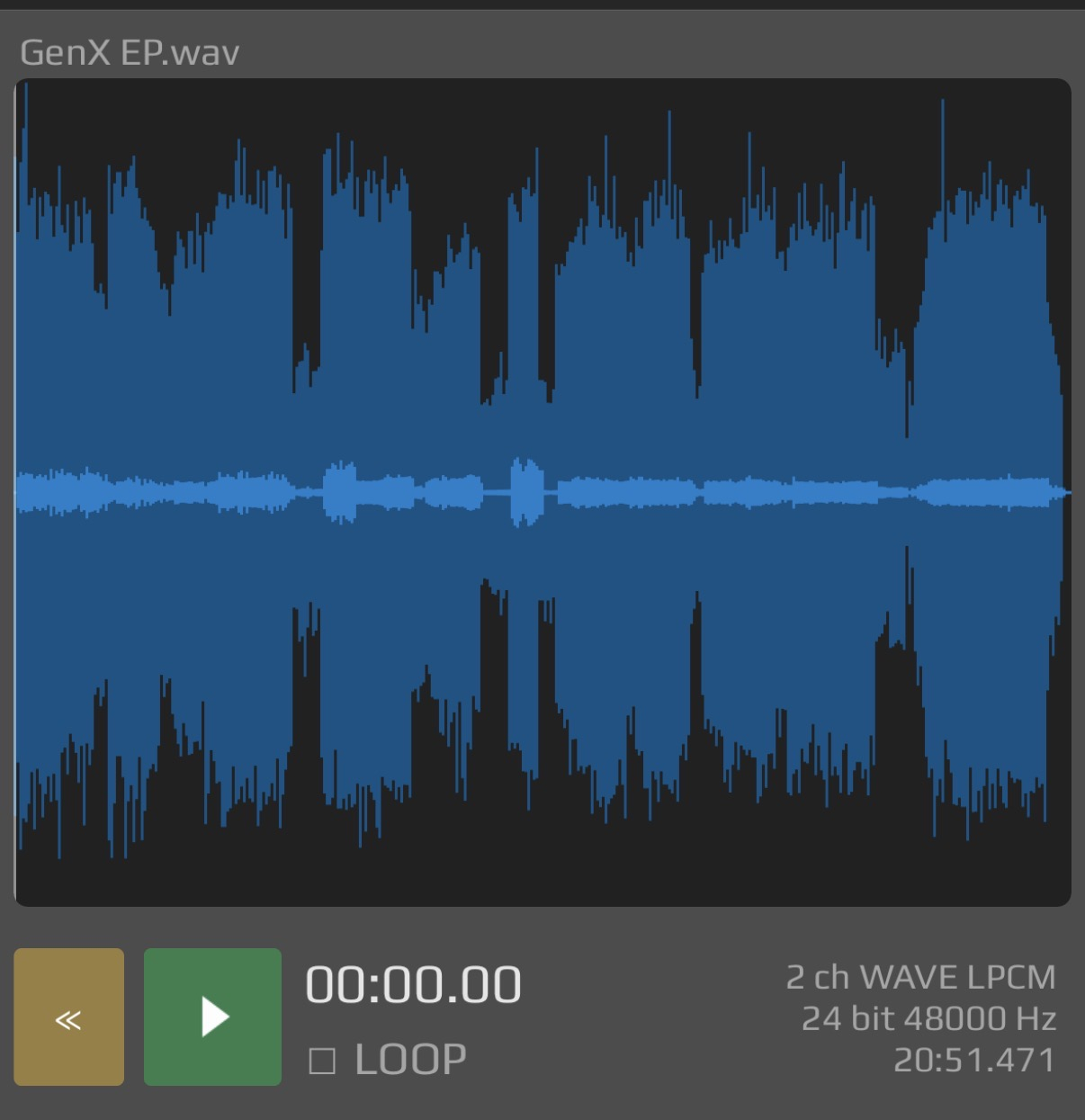
this is the wave file for 4 songs that I‘m preparing for an EP. I have them leveled fairly even. But there are these few spikes that I can’t even really hear and I don’t really know how to get rid of. Of course the overall loudness is lower than necessary. I already use a brickwall limiter, but I can’t get it to work correctly. Can you give me some advice on how to find the correct settings or tools? I‘m on Cubasis 3.
Thanks!
Comments
The waveform looks OK to me, it's normal for some transients to poke through.
The only potential issue is the spike near the start, for safety it's a good idea to set the limiter at -1 rather than zero.
But looking at that waveform, it seems dynamic and not over-compressed. The fact that some transients are prominent is a good thing, it means they are punchy and dynamic.
Thanks! I thought that those average peaks should be nearly at the top so that the overall loudness is higher.
you can always raise the input of the limiter to increase overall loudness
I don't know whether Cubasis includes a clipper tool, if not you could use something like this:
https://apps.apple.com/app/fac-clipper/id6742354555
u should put things through the clipper before doing any final stage limiting
If you are referring to brickwalling because it needs to be loudness competitive, sure that screenshot might be a little quiet depending what you are comparing with.
Before brickwalling (loudness maximizer limiting), you might finesse the mix ever so slightly which is too broad a topic to fully answer in one short post, but just a point of consideration, IE get the mix as right as you can first. Don't necessarily jump straight to brickwalling it, also if its not meant to be, don't overcook it. But the fact you're asking suggests it needs a bit.
Create a set up where you can A/B compare what you're doing with the loudness of reference material that is suitably similar in terms of instruments, and their balance to each other, and of course the target loudness.
With a maximizing limiter of suitable flexibility such as FabFilter L2, just take enough time experimenting with different settings, (turn on help tips, read the manual, watch the Dan Worrall vids) listening carefully to not noticeably distort, particularly adjusting lookahead, attack and release params, the delinking of the channels for transients, and comparing the various algorithms. if you're pushing the threshhold whereby you're getting much more than 3 or 4 dB of attenuation on the meters, you're probably already super loud and will have hit your target, especially if your mix is passably reasonable. (CD release being -9 LUFS, rather than the Spotify of -14 LUFS, for DJ-centric scenes ignore the -14 idea. A case in point, Victoria Monet Jaguar, won the Grammy for best engineering, and hits around -7 LUFS). Your screenshot is definitely much quieter than anything like that. Drum compression on a drum buss, before you get to the master makes a difference, so there's no rogue hits, high pass kick and bass so there's no weird subbier than sub moments below 40 hz.
On the master I usually combine, a very subtle very very very low ratio (glueing) very deep threshold compressor, a multiband compressor (Pro MB) that clamps down on individual bands, and really locks certain things in place, separately to each other, and Pro L2 for targeting the comparison reference loudness. (Also set it to oversampling, and turn on truepeak). When you are in the ballpark of your reference, back off just a little bit to make sure you didn't overdo it, but at least you know its not quiet
If the spikes are super narrow you might consider a DC filter.
You should be able to adjust that with the limiter. What plugin are you using as a limiter?
Did you use Cubasis' Brickwall as the final limiter in your mastering chain? What's in your mastering chain usually?
I master my pieces in Cubasis 3 as well, and I use as follows...
Cubasis' Channel Strip or "tape saturation", Bark Filter on its Tripleband preset, Cubasis' Brickwall, and Youlean's Loudness Meter. Lately I've used Reelbus' "Canadian Boards" preset for a very heavy-handed tape effect, but only due to me trying to emulate Boards of Canada's sonic aesthetic. 😂 Don't mind me, lol.
Loudness, how to achieve it and whether you should is a massive topic and worthy of spending some time researching. On a basic level once we've pushed the raw track up so it's very loudest peak is touching zero we can only gain more loudness by removing transient peaks which allows us to push what is left back up to zero hence giving us more apparent loudness. A clipper 'eats' those peaks by turning them into fast bursts of distortion. A limiter is basically a really fast acting compressor and it pushes down those peaks really fast. They are different tools with different pros and cons.
It's hard to recommend a course of action without knowing what style of music you're doing and how loud your mixes are sounding in relation to similar references. Looking at your waveform I would suggest that you can certainly gain some extra level for "free" by pushing the input to your final limiter until the peak I've marked in red gets limited which should leave the vast majority of your dynamics and transients untouched but catch those 3 or 4 errant peaks you can see. You may even be able to push the input so the limiter is catching the peak I've marked in white and all above it or even further! It just depends on the music you're making and your personal taste. It might sound amazing and more glued and complete limited hard or it might lose it's vibe!
Try this... Presuming that the last plugin on your master chain is a limiter set the threshold to zero and turn up the input until it starts to limit say by 1db. Turn down the output by the same amount you pushed the input. Now if you bypass the limiter it should be level matched so you can hear what the limiter is doing to your signal. Does it sound better bypassed? If you can't hear a difference push the input (and drop the output by the same amount) so it's limiting more. Can you hear a difference now? Try an extreme setting matching the input and output each time so you can hear what too much limiting sounds like in comparison to your unlimited mix. Find the highest input setting where some limiting is happening but the difference you hear between bypassed and engaged is minimal or positive. Now set your leave the input were it is but set the output to -0.2.
If your mix is still too quiet in comparison to similar references then you need to either push your limiter harder and accept that you're making your mix sound worse to get it louder or control those unwanted transients earlier in the chain. This could be another limiter, a clipper before the final limiter. It could be compression, it could be dealing with those transients at a track or bus level by clipping each instrument. It could be soft clipping or wave shaping. It could be a combination of all these things! It's not very often that a beautiful sculpture is made with just one massive chisel strike... It's usually lots of considered small ones.
Thanks for all your support!
Great post 🙏