Loopy Pro: Create music, your way.
What is Loopy Pro? — Loopy Pro is a powerful, flexible, and intuitive live looper, sampler, clip launcher and DAW for iPhone and iPad. At its core, it allows you to record and layer sounds in real-time to create complex musical arrangements. But it doesn’t stop there—Loopy Pro offers advanced tools to customize your workflow, build dynamic performance setups, and create a seamless connection between instruments, effects, and external gear.
Use it for live looping, sequencing, arranging, mixing, and much more. Whether you're a live performer, a producer, or just experimenting with sound, Loopy Pro helps you take control of your creative process.
Download on the App StoreLoopy Pro is your all-in-one musical toolkit. Try it for free today.
MIDI controller problem

Hello, I have HOTONE AMPERO CONTROL and I still do not understand how it right use with Loopy Pro. It is working, I am able to sometimes something control, but not what I reely want :-).
For beginning. How can I simulate same setup like with fingers? For example: SW1 like finger for clip 1, etc….. (1.tap - record, 2.tap - play, 3.tap - stop)
Thank you very much for some advice.
Comments
You're going to need to be more specific about what you want to do with each switch.
Bindings can have more than one action and you can set up the actions to happen "on next trigger" so that tap 1 does something, tap 2 does the next thing, etc. You might want to start by looking in the manual section about actions.
But there are often more than one way to do things, and the best depends a lot on the specifics you're trying to achieve.
Also, be careful about toggles. You probably want to set up the controller to send momentary CCs, value 127 on press, 0 on release.
First of all, I'm trying to understand the logic. So now I'd like to focus only on switch 1 and set it according to my previous post. I believe that I'll be able to set the rest myself depending on further use. I'll only use it for home training and small ideas.
If you midi learn a loop in Loopy Pro’s default project what you describe is what should happen.
Please create a new project from
loopy pro’s default project. Make sure there are no midi bindings in the global profile
Midi learn the first clip’s play/stop and
Press 1 will start recording
Press 2 will stop recording and start playback
Press 3 will step
See:
Also check that your controller is set up correctly:
https://wiki.loopypro.com/Footswitches#Full_Momentary_Setup
I have tried same steps like on the video, but without success. Ampero is set up on momentary.
Listening function not works, but in the past I was sometimes able to configure it handly. It is not working too now. Where is a problem please?
Here is my video:
Value is 0.
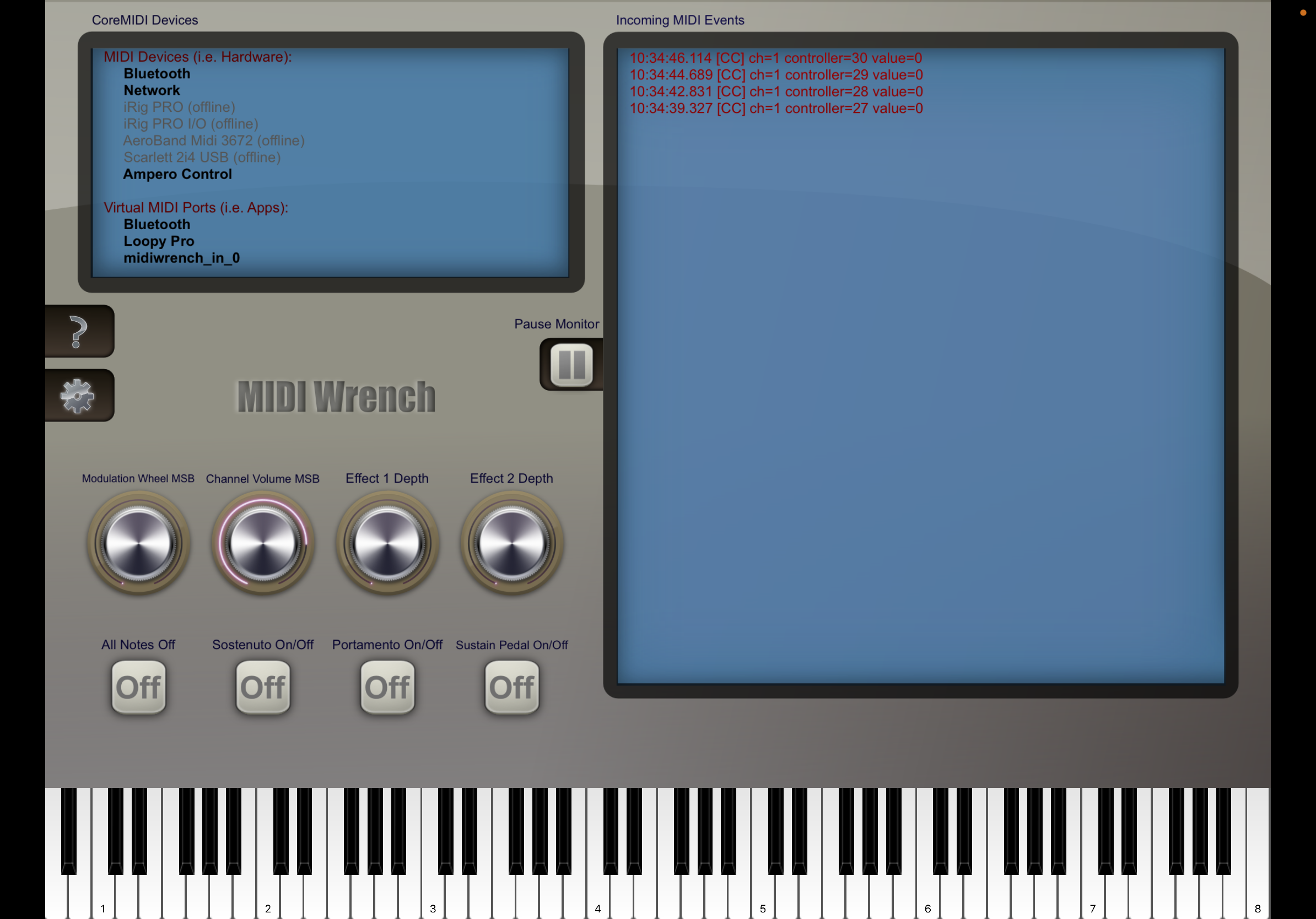
Try some different modes in the ampero setup.
Now on momentary it does not send a buttonDown, only a buttonUp.
See the instructions and video om the page I linked to about how to check for momentary set up.
https://wiki.loopypro.com/Footswitches#Full_Momentary_Setup
You screenshot from midi wrench shows only off messages being sent.
The action you want is play/stop, which is the default action, not record.
Enter midi learn and tap the clip and it will be ready to learn. If the pedal
Is set up correctly and connected, tap the pedal and the midi message will be learned.