Loopy Pro: Create music, your way.
What is Loopy Pro? — Loopy Pro is a powerful, flexible, and intuitive live looper, sampler, clip launcher and DAW for iPhone and iPad. At its core, it allows you to record and layer sounds in real-time to create complex musical arrangements. But it doesn’t stop there—Loopy Pro offers advanced tools to customize your workflow, build dynamic performance setups, and create a seamless connection between instruments, effects, and external gear.
Use it for live looping, sequencing, arranging, mixing, and much more. Whether you're a live performer, a producer, or just experimenting with sound, Loopy Pro helps you take control of your creative process.
Download on the App StoreLoopy Pro is your all-in-one musical toolkit. Try it for free today.
Dante Synth: Check out my Agentic Engineered Synthesizer - Tell us your honest opinion

Yep, I know it is controversial topic, but I have been very surprised with the results. Currently in Beta, have had some good feedback to iron out a few things, would be great to get some more.
Note: It would be nice that if you have strong opinions about the app, that you would have at least tried the app.
Get it here - https://testflight.apple.com/join/J7rrskrD
So here is the concept: What if we could all create our own dream synthesizer, you know the one with a bunch of specific features never seen on others. Well that is the world we are entering, where everyone can if they choose, create exactly what they want.
The barriers to entry have been cut down, and creativity will be what flows out from here. Of course, this is Generative AI and it will need to use what exists before, but DSP is a well know, even those who build with a text editor on bare metal, will use libraries and knowledge defined and shared by others who came before. One of the reasons people love Eurorack is that it allows them to build what they want. To me, vibe coding a synthesizer app is the digital equivalent to a modular patch that I can share with the world.
Here is Dante, it has 4 oscillators and focuses on individual oscillator control that I have not seen on any other app.
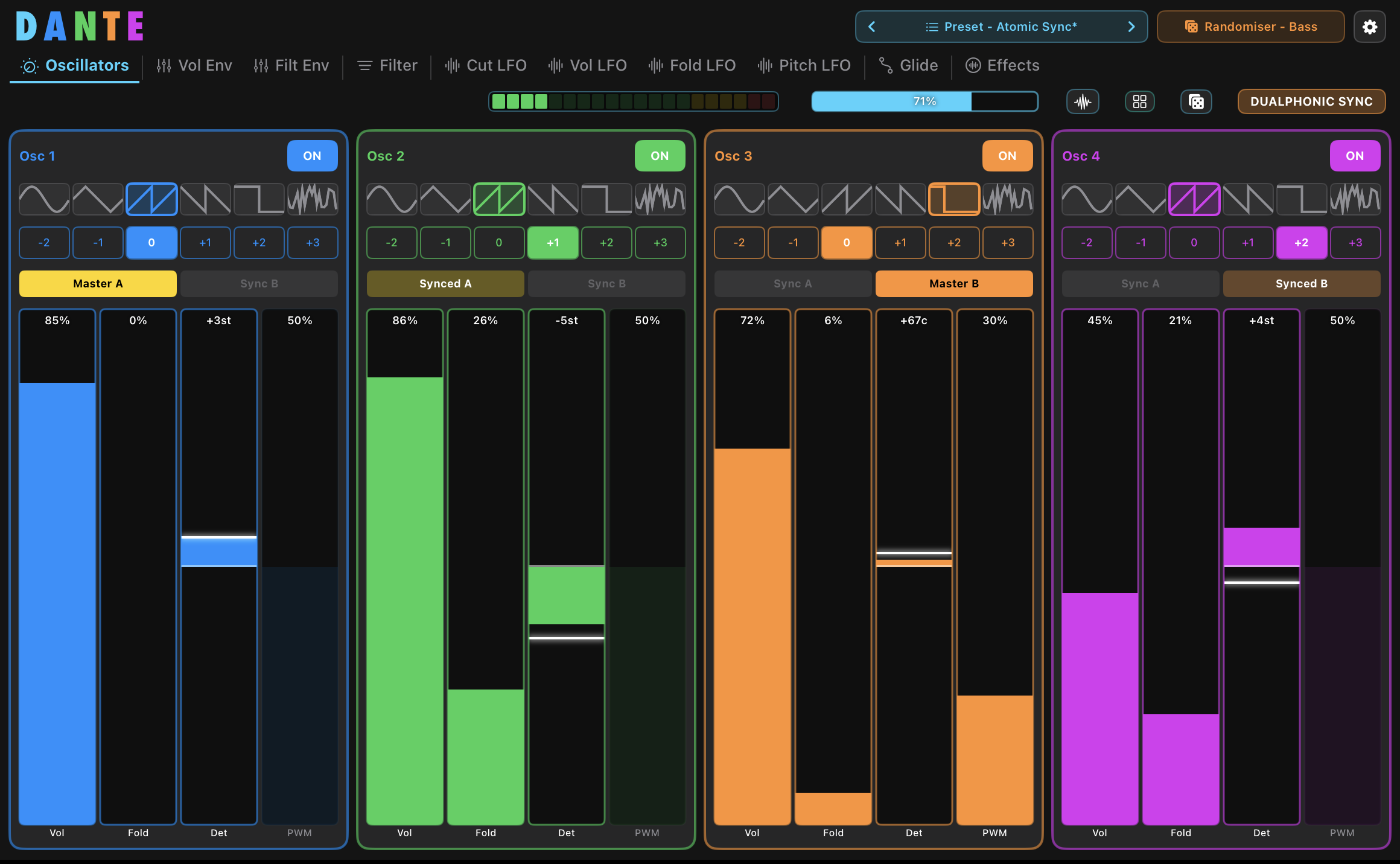
Here is the marketing blurb and a few specification
Dante is a powerful yet approachable 4-oscillator synthesizer, available as an iOS app, AUv3 plugin (iOS & Mac), and a Mac desktop app.
The standalone apps (iPad, iPhone and Mac) include a built-in music player featuring public domain tracks, designed for quick experimentation and inspiration. These versions focus on simplicity and ease of use, with a clean, playful colour palette, originally inspired by its roots as an educational tool.
The AUv3 version takes things much further. It includes expanded modulation and sound-shaping capabilities, giving you deep control over your sound design. For each oscillator, you have access to:
- Dualphonic sync - Got to hear it to appreciate it.
- Per-oscillator or Linked VCA Envelopes with Drone mode.
- Per-oscillator or Linked Filter Envelopes
- Per-oscillator or Linked Filters
- Per-oscillator or Linked FIlter LFO
- Per-oscillator or Linked Volume LFO
- Per-oscillator or Linked Wavefold LFOs
- All LFOs can be Gated/Reset with phase selection of 0, 90, 180 and 270 degrees.
- Per-oscillator or Linked Glide with Exp, Linear, Log and S-curve, as well as Legato
- Per-oscillator or Linked Effects processing
- Filter includes 6dB, 12dB, 18dB and 24dB Lowpass, Band pass, Notch and High pass.
Combined with flexible preset management and a high-quality random preset generator, Dante can move from quick experimentation to detailed sound design with ease.
Whether you're exploring synthesis for the first time or pushing into more complex territory, Dante is designed to be both intuitive and surprisingly powerful.
Requirements:
- Requires iOS 17.6 or later
- Compatible with iPhone and iPad
- Requires macOS 14.6 or later
- Mac must have apple silicon chip.
Comments
Best vibe coded synth I’ve ever used.
Really dig the UI
Out of curiosity.. what price point do you intend this to be?
Excited to check it out. Would also be interested in reading about your process for creating it
Tip: You should use log or even exponential range for some parameters like cutoff or attack/decay/release times - it makes musically MUCH more sense than linear range .. for example for citoff - it is ideal when first half of knob (slider) range goes to 500-600hz and rest of path the goes to max (8khz in your case).. i think exp range is ideal.. same goes for envelope times, you can extend attack/decay/release easily up to 10-15 seconds if you ise EXP range - means first half of slider path is around 1-2 sec
Also - do you use vDSP* stuff for optimslisations ? You need to explicitly tell claude to use that, it then makes reslly big difference in CPU efficiency.
Btw at least your plugin intialisation is way smoother and well implemented when compared to few other famous plugins lol. Worls really smooth in my AUv3 hist i am working on.
In terms of UI i my suggestion would be at least get rid off those ugly default swift glass sliders - Claude Code can do nice custom sliders and buttons if you tel him .. Think about knobs rather than sliders for snything else thsn ADSR - it helps you save the UI space (and it’s more natural to tweak)..
I would try to work a bit harder on UI, male it more like tabbed interface without need of too much scrolling up/down
Developer gold right there 👏
also.. just in case you will be willing to implement this, you would make me SUPER happy
just plain this would make DSP code of your plugin better than 99% of currently available plugins :-)) Cause this is MAJOR thing and sadly nobody on iOS gives single fuck abiout this (proper implementation of handling of sample rate, and listening to sample rate requested by HOST instead of being hard-locked to device sample rate)
1/ Read the sample rate from your bus format, not from AVAudioSession. After the host calls allocateRenderResources(), your input and output bus formats contain the correct sample rate. Use that.
2/ Never call AVAudioSession.sharedInstance().sampleRate from within your audio unit. That property reflects the hardware rate, which may differ from what the host is processing at.
3/ Reconfigure your DSP when allocateRenderResources() is called. This is where you learn the actual format — sample rate, channel count, buffer size. Rebuild your filter coefficients, oscillator tables, delay line lengths based on this format.
4/ Handle deallocateRenderResources() / allocateRenderResources() cycles gracefully. The host may change sample rate mid-session — it will deallocate, reconfigure buses, and reallocate. Your plugin should handle this without leaking state.
I can promis you at some point until end of this year, there will be at leat one host trying to break unspoken rule of all iOS hosts that "we simply don't try HQ sample rate processing internally cause most of plugins will not support it anyway". Would be nice to havre at least one plugin which actually works :-)))
/sorry for little rant/
.
This is one of those apps that produces some really fantastic sounds using the preset randomize button. Nice work, enjoying this a lot so far 🤘 @digitalferret
Is it mono only or am I missing a poly toggle somewheres?
Any way to hide the Song Player in standalone?
@dendy. You sound like you know what you’re talking about.
Let’s hope for our sakes he does - as he’s in the middle of making an iOS DAW haha
Yeah, seems mono only?
You might be right about 99% of plugins written in native Swift / Obj-C, but I'd wager a significant proportion of plugins on iOS have been developed using the JUCE framework and C++.
How do you know this one isn't?
With JUCE, your plugin gets its implementation of prepareToPlay() called in those situations and you get passed the sample rate and block size. Then you simply do all that stuff you mention with all of the components that make up your plugin - delay lines, filters, etc., etc.
Sounds a lot easier, right?
And if need be, the same code will work for AU, VST3, etc., etc., on Windows, Linux, etc.
The song player is not needed- would be nice to kill it, although it was interesting hearing happy birthday with the presets.
It's a very strange design with these long horizontal windows, they could easily be severely compacted and with that collect a lot more on one tab instead of all this jumping between tabs. I mean, it's great that all are easily read and you should keep that but....
Maybe replace sliders with knobs, I dunno.. I'm on an 11inch, on a 13 the volume slider must feel like 100 meters😃
Sounds good though, the little I tried it.
Ill give it a go.
It just looks that way, i'm much dumber than it looks )))
)))
Thanks for info, good to known about JUCE, i always knew this is great framework !
Also this time shame on me, just realised that looks like my massive refactoring of audio enginge in my app during recent 2 weeks fucked up non-hw device sample rate processing so - this time - it's actually shame on me ! Quick test showing that Dante is actually handling this right.
But knowing that onter JUCE-related plugins are handling this right (i bet all your apps too) is valuable information, it helps me to fine tune my engine !
A true sign of knowledge and knowing is being humble, which you are sir dendy (sorry if i have misgendered you)
correct gender :-))
Ok, fixed shit in my code - now i am pretty sure DANTE doesn't handle this right.
Your plugins sir - those which i tested - flawless adoption to 96khz, respect !!! From now, your plugins are my benchmark of quality, thanks !
Well I still applaud your knowledge sharing (and Rob's too). That's what it's all about
sharing is part of learning .. if you share what you THINK you know, you sometimes learn that what you known is actually completely wrong
Cool. And, yeah... can't say everyone using JUCE is doing it "right" but I just felt it was a little "cleaner" as you just have this one call that's not platform-specific.
Then of course, you still need to decide what you're gonna do when the sample rate changes.
Thanks for the kind words re 96KHz! Good to know, and much appreciated.
Wow thanks for the feedback. You are making Dante sound amazing, if you saved that sound as a preset, and are happy to share it, I will include with Dante and reference egobeats.
This is one of those situations where humans excel over AI. In my efforts to stay the 100% vibe coded course, I also had AI create all the presets without any tweaking. It did well when creating presets for known synths architectures, but performed badly when I asked it to take advantage of the Dante's unique architecture and feature combination. A skilled human on the other hand, could use their deep knowledge, creativity, ears and emotions to dial in something wonderful. This is an area the current crop of AI struggles to compete against.
And great to see someone have a similar perspective on UIs to me. I really like it's simplicity and structure. I wanted to make something that was easy to understand, even for those new to synthesis. I know there are advantages to compact dial based interfaces, with having everything there with out the need to tab, but they can be overwhelming and confusing. Dials can also be fidderly, and I haven't see many that show how a modulation source is impacting the dial, where as this is very clear on Dante, even if you need to tab over to see the impact.
I hadn't really thought about charging for Dante, this is an experiment and learning exercise to see how far I could push vibe coding, it was also an opportunity to make what I have always wanted to make, but did not have the time.
There are far better apps out there, built by people dedicated to the craft, I am a big fan of BeepStreet, Zeeon is in my opinion the best synth app ever made, it looks and sounds great AND it is really easy to understand and use, that is very hard to pull off. BLEASS is another company that pulls off this combination really well, love they use sliders mostly, or big dials.
Anthropic has recently released Claude Design, was curious to see if this could help make things a little prettier with Dante, then perhaps I would have earned the right to charge.
I just used Claude Code (usually Opus) inside of Xcode. There was a lot of discussion with Claude before implementing things, I spent at least 20% of my tokens talking about performance, checking on various approaches, sometimes I would go into ChatGPT and check there to get a "second opinion".
I am thinking of writing something about the process and experience, but less so technical, more so what AI can now do, as part of educating the industry I work in, which is far more conservative than the iOS music world. However this conservatism is understandable, as mistakes can be very costly and even cause death. But showing something as complex as DSP being possible, will help reduce some of those fears.
Dendy, you are truly generous and kind to share this knowledge with me.
I did have log and exp on my sliders, but it wasn't quite working right, it was something I had planned to get back to, I want to find an algo that works a little better than those did, but didn't want to use my math degree to work it out, as it needs to be the AI to keep with my 100% vibe coded mandate.
I never asked it specifically to use vDSP* stuff for optimising, but I just asked and it said it has not implemented it yet. It also told me this is a great ideas, and will provide a "cleaner path to polyphony", as I had been discussing polyphony as a potential upgrade.
Regarding UI, this is an area I have been thinking about, I'd be interested to see if Claude Design could help out here. I want to keep the basic layout, as I feel this is the part that makes it easy to understand, with all the per oscillator modulation, but do want to make it a little prettier. Would be good for less scrolling for smaller devices, no issue on an iPad 11inch and up.
Will definitely look into this. But how do I know it is working? Should I just print a value on the app from allocateRenderResources(), and then change sample rate in the host and see if it changes?
Glad you like the random preset maker!
I am looking into Poly, was concerned about processing power, but also how it would sound, but can fork the build and give it a try and see, though not a high priority for now.