Loopy Pro: Create music, your way.
What is Loopy Pro? — Loopy Pro is a powerful, flexible, and intuitive live looper, sampler, clip launcher and DAW for iPhone and iPad. At its core, it allows you to record and layer sounds in real-time to create complex musical arrangements. But it doesn’t stop there—Loopy Pro offers advanced tools to customize your workflow, build dynamic performance setups, and create a seamless connection between instruments, effects, and external gear.
Use it for live looping, sequencing, arranging, mixing, and much more. Whether you're a live performer, a producer, or just experimenting with sound, Loopy Pro helps you take control of your creative process.
Download on the App StoreLoopy Pro is your all-in-one musical toolkit. Try it for free today.

Comments
It does.
Thanks!
And it works well!
Any templates that incorporate retrospective MIDI recording? I'd love to have a good starting point.
There's nothing very involved about it. The simplest approach is to keep in mind the master clock length. Unless overridden by lower settings, this controls the length of the buffer. For example, if you think your phrase will be four bars, set the master clock length to four bars and watch the progress of the clock cycle around the displayed tempo. Your goal will be to play a good take based on one cycle. (Doesn't necessarily have to be, but that's what I find easiest.)
The second thing is triggering the retrospective record when you want that buffer to be captured. There are several ways to do this. I like to set Left-Swipe as the gesture by going to
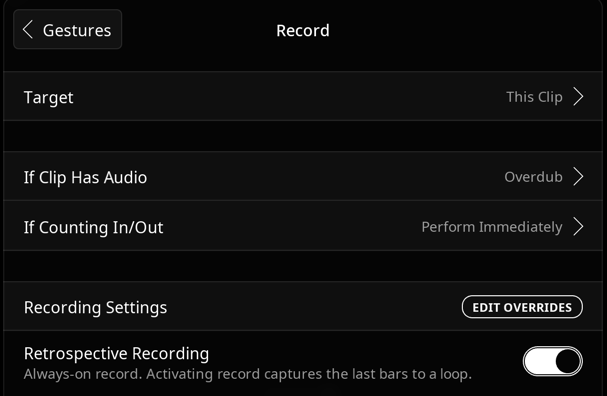
global clip settings > gestures > left swipeand setting it like this:You don't need to use that gesture, you can also set up a button with that same action, but with the target as
Selected Clip,Next Empty Clip,Next Tapped Clip, etc.Once you have those two elements understood, there's nothing about retrospective that particularly needs a template centered around it. I'd suggest starting a project with the default template, adding the gesture I described, or a button, then saving the project and making it a template to start. I think it'll be fairly intuitive to add those ideas into any template you like.
@espiegel123 's https://patchstorage.com/whadisay/ is a great template to demonstrate always on retrospective recording in Loopy Pro plugin version.
Another handy retro recording trick which I think I picked up from @wim is to have buttons on a page set up for different lengths. Tap a button then tap the clip to receive the audio.
Something like this:
Each button is set to a different bar length. Tap the button then tap a clip. You could set the target to next empty or the selected clip. Whatever you want:
Wasn't me on that idea. That's a good one. I've always thought in terms of setting the length in advance.
A cool thing to keep in mind too @des1303 is retrospective recording works for overdub as well. So, for instance, if you can kind of hear a drum groove in your head but it's too challenging to tap out all in one go, you can just do, for instance, the kick. Then jam the snare until you get it right and dump that on top, etc.
There's nothing stopping you editing the clip in-between passes as well.