Loopy Pro: Create music, your way.
What is Loopy Pro? — Loopy Pro is a powerful, flexible, and intuitive live looper, sampler, clip launcher and DAW for iPhone and iPad. At its core, it allows you to record and layer sounds in real-time to create complex musical arrangements. But it doesn’t stop there—Loopy Pro offers advanced tools to customize your workflow, build dynamic performance setups, and create a seamless connection between instruments, effects, and external gear.
Use it for live looping, sequencing, arranging, mixing, and much more. Whether you're a live performer, a producer, or just experimenting with sound, Loopy Pro helps you take control of your creative process.
Download on the App StoreLoopy Pro is your all-in-one musical toolkit. Try it for free today.
Kombinat4 by Audio Damage (Released on iOS)

https://apps.apple.com/us/app/kombinat4/id6761697917
Early bird promo price 50% off through May only! 38 distortion engines × 8 frequency bands = the most flexible distortion plugin Audio Damage has ever built.
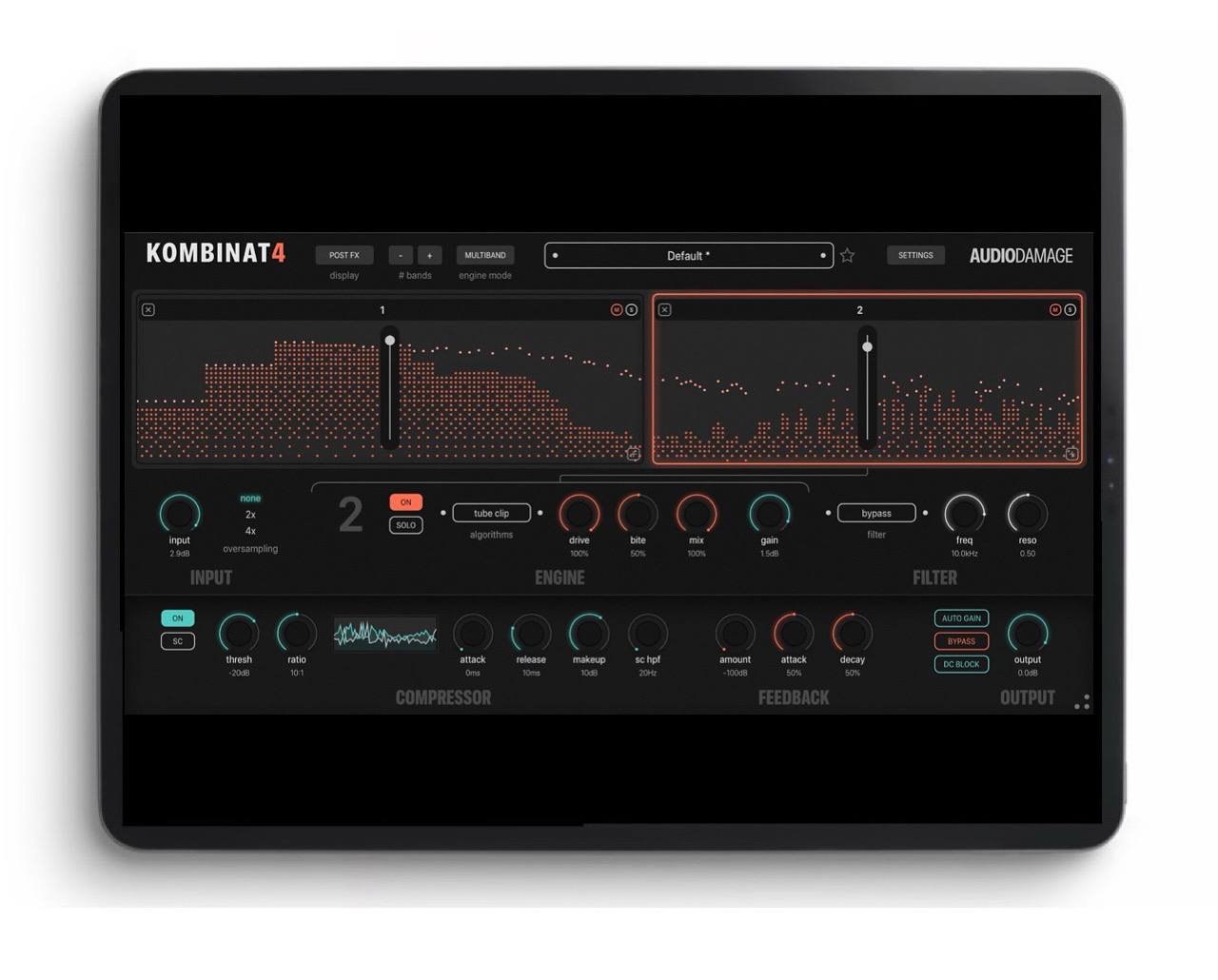
KOMBINAT4 is Audio Damage's fourth-generation flagship distortion. Take any sound, split it into up to eight frequency bands, and assign one of 38 distortion engines to each band. Or flip to Serial mode and chain those eight engines end-to-end for stacked, cascading mayhem.
THIRTY-EIGHT DISTORTION ENGINES
The complete roster from Kombinat Tri returns: Fuzz, Saturate, Distort, Clip, Warp, Degrade, Ring Mod, X Noise, Octaver, Wavy, Rectify, Tube Clip, and the famously unhinged Nerd Rage. Joining them is the entire engine set from our Grind distortion: Tanh, Asym Tanh, Overdrive, Polynomial, Linear Distort, Sine Drive, Var Hard Clip, Gloubi Boulga, MXR, Soft Clip, and Cubic NLD. Plus thirteen brand-new algorithms built specifically for Kombinat4: Wavefold, Chebyshev, Bitwise, Slew Limit, Comparator, Diode Clip, Feedback FM, Fractal, Dropout, Shapeshift, Phase Distortion, Stutter, and Erosion. Every engine has up to three custom-labeled controls plus per-band gain and solo. Pick a different engine for each band and design distortion tones that simply weren't available before.
EIGHT BANDS, TWO MODES
In Multiband mode, the input is split by Linkwitz-Riley crossovers into up to eight parallel bands. Each band gets its own engine and gain stage, and everything recombines at the output. Drop to two bands for classic low/high splits, push to eight for full-spectrum surgical distortion design, and solo any band to dial it in cleanly. In Serial mode, those same eight slots become a chain — every engine processes the full-bandwidth signal in turn, for layered drive structures impossible to achieve with a single algorithm.
OUTPUT SECTION
A dedicated output filter with twelve types: 2-pole and 4-pole low-pass, high-pass, and band-pass shapes, a notch, three OTA-style filters, a 914-style ladder bandpass, our Filterpod, and bypass. Built-in Rough Rider compressor at the output with sidechain HPF and external sidechain input. Global feedback path with attack and decay envelope for self-oscillating screams and slow-blooming sustain. Optional AGC for level-matched A/B comparisons across heavy distortion settings. DC blocker. 2x and 4x oversampling for clean high-frequency content.
PRESETS AND WORKFLOW
Factory preset library covering subtle saturation, mix-bus enhancement, mid-range fattening, lead guitar tones, low-end mangling, full-on industrial destruction, and everything in between. Folder-based user preset browser with favorites and import/export of single presets or full folders as ZIP. XML preset compatibility with the desktop edition — your iOS presets work in your DAW and vice versa.
AUv3 plugin for iOS hosts including GarageBand, Logic Pro for iPad, AUM, Cubasis, Loopy Pro, Audiobus, drambo, BeatMaker 3, and others. Standalone app included.
Tooltips on every control. Animated band display with realtime spectrum overlay. No DRM, no account, no online activation.
Comments
“38 Distortion Engines”?! Great googly moogly!!
at 4 squid it'd be rude not to
Worth the money.
Premiere starting now
I've been using the beta - it's absolutely great.
Are you using it on guitar? Was wondering how this would sound...
Love this, you can enable/disable dc blocking so you can distort low frequency oscillator cv signals .
Yes, I've used it on guitar, one of the very few digital distortion effects I've ever liked on guitar.
A bit of a demo.
2 x Mononoke.
Youtube ( the anti distortion app )
this is really great plugin … surprising i lile it more than Saturn whichbwas No.1 distortion plugin for me until now ..
nice. I'm going to try it.
This will probably replace Trash which LOVES to quit on me…
It’s a hairy, fuzzy, unruly but loveable beast.. it’s a keeper.. thanks Audio Damage..
Very nice indeed, 5 stars from Sweden!
5 stars from Samu is basically 11 haha, they should frame that. But yes, this is great.
Yeah, for the most part it works, what threw me off a bit is that if I've already set the width of a few bands they all get reset when adding a new band (ie. it auto-distributes the 'bands' cover the whole frequency spectrum) and there's no indiction of what range the band actually covers so I'll just use My ears and use the solo-mode for the band when adjusting.
In some cases it could be handy to copy settings from one band to another (but it's just ~4 parameters per band so no big deal) and In serial mode it could be nice to re-arrange the 'bands/effects' using drag'n'drop.
But for the asking price I shouldn't really complain
I had the same thought about serial mode earlier, drag and drop to rearrange is so obviously useful, I'm really surprised they didn't add it
Great UI, prefer using this vs Saturn 2 for dialling in a quick sound.
Audio Damage seem to be knocking it out of the park recently.
A per band filter in serial mode could also be pretty interesting to filter the effect before it goes on to the next one and well, envelope follower for the filter is another one but I'll stop here and just play around with what it already offers which is a LOT!
Haha, I was also surprised there was no ability to use multiple filters at the same time. Could use multiple instances I suppose. Envelope followers never go amiss, can always use an external one I suppose. I do find myself wishing it had a built in gate to help me sculpt the sound. Again, can use an external one...
Please educate me: does ‘50% off through May only’ mean it’s ‘50% off through to the beginning of May’ or it’s ‘50% off through the duration of May’?
Doesn’t really matter in this case, I’m definitely going to buy it before May begins anyway, but the terminology has always slightly confused me.
I also find that phrase confusing, pretty sure it means til the end of May tho
Yeah, I would assume that of the two as well but hopefully the American contingent here can confirm one way or the other?
I have a demo coming.
I just demo some of the algorithms.
Thanks.
Flo
American here. We don't know and we don't care.
Rueful sort-of-kidding aside, I've always understood "through" to mean "through the duration of". So, from now until 12:00 a.m. on June 1st.
iirc, my experience with the App Store has usually borne that out, but sometimes not. I just now went ahead and bought it.
Thanks, I guess we’ll have to see when the sale ends and then we’ll know for sure what it means (well, according to Audio Damage at least).
For the time being I think I'm covered on desktop, but for iPad, this is a beast. So many flavours, great control of the gain, straight forward up. Very nice, Is there a mix knob?
Sadly not. i asked about this on their Discord and received a rather odd and sarcastic response.
Not having a mix knob on an FX app seems like a rather notable omission