Loopy Pro: Create music, your way.

What is Loopy Pro?Loopy Pro is a powerful, flexible, and intuitive live looper, sampler, clip launcher and DAW for iPhone and iPad. At its core, it allows you to record and layer sounds in real-time to create complex musical arrangements. But it doesn’t stop there—Loopy Pro offers advanced tools to customize your workflow, build dynamic performance setups, and create a seamless connection between instruments, effects, and external gear.

Use it for live looping, sequencing, arranging, mixing, and much more. Whether you're a live performer, a producer, or just experimenting with sound, Loopy Pro helps you take control of your creative process.

Download on the App Store

Loopy Pro is your all-in-one musical toolkit. Try it for free today.

Kombinat4 by Audio Damage (Released on iOS)

2

Comments

  • @Fear2Stop said:

    @craftycurate said:

    @Ailerom said:
    For the time being I think I'm covered on desktop, but for iPad, this is a beast. So many flavours, great control of the gain, straight forward up. Very nice, Is there a mix knob?

    Sadly not. i asked about this on their Discord and received a rather odd and sarcastic response.

    Not having a mix knob on an FX app seems like a rather notable omission

    It's easy enough to use it as a send fx, but I also find it odd they didn't add that.

  • I can’t see any LFOs. That would be nice.

  • @gusgranite said:
    I can’t see any LFOs. That would be nice.

    I thought the same. Then again, I feel that lfos in plugins are usually not as sophisticated as 3rd party lfos. Look at the Audiothing apps for example. They do make presets more interesting, but in reality are a bit gimmicky. I don't really mind just using my own LFO apps

  • @Gavinski said:

    @gusgranite said:
    I can’t see any LFOs. That would be nice.

    I thought the same. Then again, I feel that lfos in plugins are usually not as sophisticated as 3rd party lfos. Look at the Audiothing apps for example. They do make presets more interesting, but in reality are a bit gimmicky. I don't really mind just using my own LFO apps

    What LFO app would you recommend? I use Rozeta at the moment, but it would be nice to have something with a few more options.

  • @oldsynthguy said:

    @Gavinski said:

    @gusgranite said:
    I can’t see any LFOs. That would be nice.

    I thought the same. Then again, I feel that lfos in plugins are usually not as sophisticated as 3rd party lfos. Look at the Audiothing apps for example. They do make presets more interesting, but in reality are a bit gimmicky. I don't really mind just using my own LFO apps

    What LFO app would you recommend? I use Rozeta at the moment, but it would be nice to have something with a few more options.

    Midilfos is my goto for basic functionality. Better than Rozeta as it has lots of cross-modulation options, gorgeous ui. Not available in EU AppStores any more, sadly.

    For fancier stuff, I sometimes use LFOH!, LFOCH or PolyFlo. The latter two have a steeper learning curve than the others. Mlfo is supposed to be a good option, also, I never ended up exploring it though.

  • edited April 30

    @Gavinski said:

    @oldsynthguy said:

    @Gavinski said:

    @gusgranite said:
    I can’t see any LFOs. That would be nice.

    I thought the same. Then again, I feel that lfos in plugins are usually not as sophisticated as 3rd party lfos. Look at the Audiothing apps for example. They do make presets more interesting, but in reality are a bit gimmicky. I don't really mind just using my own LFO apps

    What LFO app would you recommend? I use Rozeta at the moment, but it would be nice to have something with a few more options.

    Midilfos is my goto for basic functionality. Better than Rozeta as it has lots of cross-modulation options, gorgeous ui. Not available in EU AppStores any more, sadly.

    For fancier stuff, I sometimes use LFOH!, LFOCH or PolyFlo. The latter two have a steeper learning curve than the others. Mlfo is supposed to be a good option, also, I never ended up exploring it though.

    Thanks Gav.

    Midilfos is available in the UK I see, looks like a good go-to option. LFOH! looks interesting though, and PolyFlo is a beast. LFOH! is tempting me most, though maybe on the more experimental side of things. Thanks again!

    Edit: ah, notice LFOH! is an audio effect, so maybe stick with Midilfos.

  • @oldsynthguy said:

    @Gavinski said:

    @oldsynthguy said:

    @Gavinski said:

    @gusgranite said:
    I can’t see any LFOs. That would be nice.

    I thought the same. Then again, I feel that lfos in plugins are usually not as sophisticated as 3rd party lfos. Look at the Audiothing apps for example. They do make presets more interesting, but in reality are a bit gimmicky. I don't really mind just using my own LFO apps

    What LFO app would you recommend? I use Rozeta at the moment, but it would be nice to have something with a few more options.

    Midilfos is my goto for basic functionality. Better than Rozeta as it has lots of cross-modulation options, gorgeous ui. Not available in EU AppStores any more, sadly.

    For fancier stuff, I sometimes use LFOH!, LFOCH or PolyFlo. The latter two have a steeper learning curve than the others. Mlfo is supposed to be a good option, also, I never ended up exploring it though.

    Thanks Gav.

    Midilfos is available in the UK I see, looks like a good go-to option. LFOH! looks interesting though, and PolyFlo is a beast. LFOH! is tempting me most, though maybe on the more experimental side of things. Thanks again!

    Edit: ah, notice LFOH! is an audio effect, so maybe stick with Midilfos.

    LFOH can be used as an audio effect, for tremolo effects. But it can still be used just as an LFO. The weird thing is that to do that it still needs to be loaded in an fx slot. Pretty sure I did a vid on YouTube back in the day you could hunt out.

  • @Gavinski said:

    @oldsynthguy said:

    @Gavinski said:

    @gusgranite said:
    I can’t see any LFOs. That would be nice.

    I thought the same. Then again, I feel that lfos in plugins are usually not as sophisticated as 3rd party lfos. Look at the Audiothing apps for example. They do make presets more interesting, but in reality are a bit gimmicky. I don't really mind just using my own LFO apps

    What LFO app would you recommend? I use Rozeta at the moment, but it would be nice to have something with a few more options.

    Midilfos is my goto for basic functionality. Better than Rozeta as it has lots of cross-modulation options, gorgeous ui. Not available in EU AppStores any more, sadly.

    For fancier stuff, I sometimes use LFOH!, LFOCH or PolyFlo. The latter two have a steeper learning curve than the others. Mlfo is supposed to be a good option, also, I never ended up exploring it though.

    I’m using FAC Polyflo quite a bit … it is more complex than some but the LFO shapes can end up being very complex or just basic, as you need. It also has a broader range of starting LFO shapes than most other LFO apps so it’s full of interesting possibilities.

  • @craftycurate said:

    @Ailerom said:
    For the time being I think I'm covered on desktop, but for iPad, this is a beast. So many flavours, great control of the gain, straight forward up. Very nice, Is there a mix knob?

    Sadly not. i asked about this on their Discord and received a rather odd and sarcastic response.

    Yah i think they are like one of those restaurants where the wait staff abuse the customers in a low key 'charming' way.

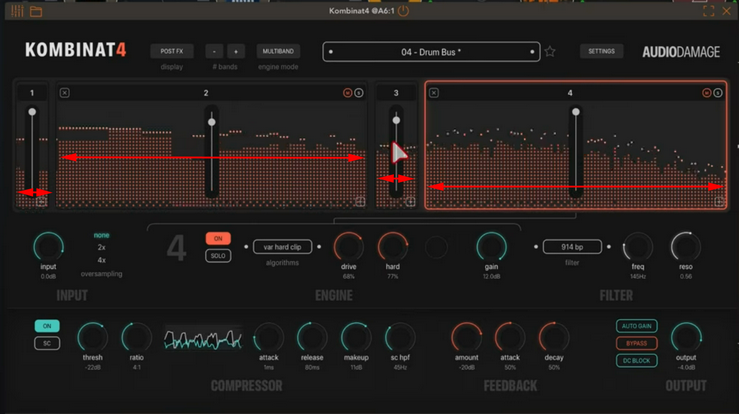
  • What does the width represent for each band? Is it a frequency range? I don't see any "from Hz" "to Hz" information below the bands.
  • @filo01 said:
    What does the width represent for each band? Is it a frequency range? I don't see any "from Hz" "to Hz" information below the bands.

    Yes, it's the frequency range when using the Multiband engine mode, the manual implies that you can rely on the spectrum analyzer for visual information and individual mute/solo for more easily determining what's being processed by each band.

  • They seem rather socialist to me. They dislike the capitalists. You can order the whole menu if you want certainty over availability.
    I love what they make, three stars for the cook.
    Kombinat sounds very soviet to me.

  • @Grandbear said:

    @filo01 said:
    What does the width represent for each band? Is it a frequency range? I don't see any "from Hz" "to Hz" information below the bands.

    Yes, it's the frequency range when using the Multiband engine mode, the manual implies that you can rely on the spectrum analyzer for visual information and individual mute/solo for more easily determining what's being processed by each band.

    Thanks! So no specific information on the "from–to" frequency range, I see.

  • edited April 30

    @filo01 said:

    @Grandbear said:

    @filo01 said:
    What does the width represent for each band? Is it a frequency range? I don't see any "from Hz" "to Hz" information below the bands.

    Yes, it's the frequency range when using the Multiband engine mode, the manual implies that you can rely on the spectrum analyzer for visual information and individual mute/solo for more easily determining what's being processed by each band.

    Thanks! So no specific information on the "from–to" frequency range, I see.

    The easiest way I've found is to open up the Kombinat GUI, then get a ruler, and measure the width of the whole specttum, and then with a non-permanent marker, draw a line and then draw in 1kHz chunks, with 100 Hz subdivisions.

    This allows the band divisions to be dialled in precisely :)

    PS Don't use a permanent marker or you'll have to reposition Kombinat there precisely every time.
    PPS I think v1.1 is going to ship with a free Sharpie for this purpose.
    PPPS If they're using a logarithmic scale, the above procedure gets a wee bit tricky.

  • @craftycurate said:

    @filo01 said:

    @Grandbear said:

    @filo01 said:
    What does the width represent for each band? Is it a frequency range? I don't see any "from Hz" "to Hz" information below the bands.

    Yes, it's the frequency range when using the Multiband engine mode, the manual implies that you can rely on the spectrum analyzer for visual information and individual mute/solo for more easily determining what's being processed by each band.

    Thanks! So no specific information on the "from–to" frequency range, I see.

    The easiest way I've found is to open up the Kombinat GUI, then get a ruler, and measure the width of the whole specttum, and then with a non-permanent marker, draw a line and then draw in 1kHz chunks, with 100 Hz subdivisions.

    This allows the band divisions to be dialled in precisely :)

    PS Don't use a permanent marker or you'll have to reposition Kombinat there precisely every time.
    PPS I think v1.1 is going to ship with a free Sharpie for this purpose.
    PPPS If they're using a logarithmic scale, the above procedure gets a wee bit tricky.

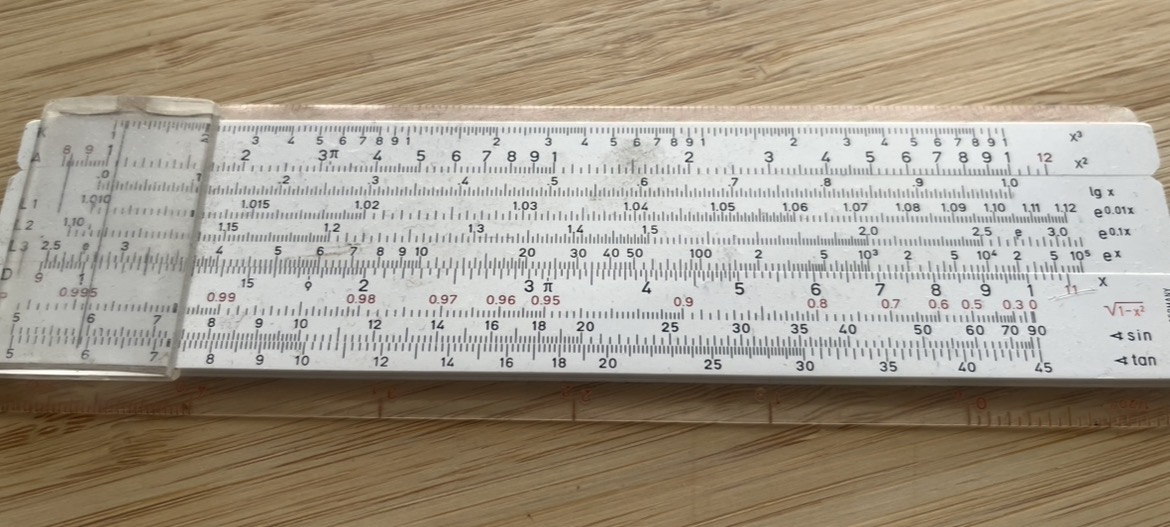
    Just get a slide rule for the log scale, or you can print mine:
  • @Gavinski said:

    @Fear2Stop said:

    @craftycurate said:

    @Ailerom said:
    For the time being I think I'm covered on desktop, but for iPad, this is a beast. So many flavours, great control of the gain, straight forward up. Very nice, Is there a mix knob?

    Sadly not. i asked about this on their Discord and received a rather odd and sarcastic response.

    Not having a mix knob on an FX app seems like a rather notable omission

    It's easy enough to use it as a send fx, but I also find it odd they didn't add that.

    Yeah since that’s not really an option in GarageBand it’s a deal breaker for me. It’s just weird though …I can’t think of another FX app that doesn’t let you adjust the wet/dry mix..can you imagine something like Blackhole not being able to be tamed?

  • @Fear2Stop said:

    Yeah since that’s not really an option in GarageBand it’s a deal breaker for me. It’s just weird though …I can’t think of another FX app that doesn’t let you adjust the wet/dry mix..can you imagine something like Blackhole not being able to be tamed?

    It isn’t as uncommon as you imply. Many fx don’t have mix knobs. It is pretty common for distortion effects, compressors and filters to not have them.

  • @Fear2Stop said:

    @Gavinski said:

    @Fear2Stop said:

    @craftycurate said:

    @Ailerom said:
    For the time being I think I'm covered on desktop, but for iPad, this is a beast. So many flavours, great control of the gain, straight forward up. Very nice, Is there a mix knob?

    Sadly not. i asked about this on their Discord and received a rather odd and sarcastic response.

    Not having a mix knob on an FX app seems like a rather notable omission

    It's easy enough to use it as a send fx, but I also find it odd they didn't add that.

    Yeah since that’s not really an option in GarageBand it’s a deal breaker for me. It’s just weird though …I can’t think of another FX app that doesn’t let you adjust the wet/dry mix..can you imagine something like Blackhole not being able to be tamed?

    I spoke to Audio Damage today. Mix knob will be in the next update, along with a few other things.

  • @espiegel123 said:

    @Fear2Stop said:

    Yeah since that’s not really an option in GarageBand it’s a deal breaker for me. It’s just weird though …I can’t think of another FX app that doesn’t let you adjust the wet/dry mix..can you imagine something like Blackhole not being able to be tamed?

    It isn’t as uncommon as you imply. Many fx don’t have mix knobs. It is pretty common for distortion effects, compressors and filters to not have them.

    I'll take your word for it being common but I think in a distortion it opens up the use possibilities a huge amount. I honestly can recall or imagine not using the gain in conjunction with a mix knob. Having said that I have a good number of guitar distortion pedals with no mix control but that's a different use case.

  • edited April 30

    @Gavinski said:

    @Fear2Stop said:

    @Gavinski said:

    @Fear2Stop said:

    @craftycurate said:

    @Ailerom said:
    For the time being I think I'm covered on desktop, but for iPad, this is a beast. So many flavours, great control of the gain, straight forward up. Very nice, Is there a mix knob?

    Sadly not. i asked about this on their Discord and received a rather odd and sarcastic response.

    Not having a mix knob on an FX app seems like a rather notable omission

    It's easy enough to use it as a send fx, but I also find it odd they didn't add that.

    Yeah since that’s not really an option in GarageBand it’s a deal breaker for me. It’s just weird though …I can’t think of another FX app that doesn’t let you adjust the wet/dry mix..can you imagine something like Blackhole not being able to be tamed?

    I spoke to Audio Damage today. Mix knob will be in the next update, along with a few other things.

    Nice work! Don’t suppose you dared to mention drag and drop for Circa and Quanta2 by any chance?

  • @Grandbear said:

    @craftycurate said:

    @filo01 said:

    @Grandbear said:

    @filo01 said:
    What does the width represent for each band? Is it a frequency range? I don't see any "from Hz" "to Hz" information below the bands.

    Yes, it's the frequency range when using the Multiband engine mode, the manual implies that you can rely on the spectrum analyzer for visual information and individual mute/solo for more easily determining what's being processed by each band.

    Thanks! So no specific information on the "from–to" frequency range, I see.

    The easiest way I've found is to open up the Kombinat GUI, then get a ruler, and measure the width of the whole specttum, and then with a non-permanent marker, draw a line and then draw in 1kHz chunks, with 100 Hz subdivisions.

    This allows the band divisions to be dialled in precisely :)

    PS Don't use a permanent marker or you'll have to reposition Kombinat there precisely every time.
    PPS I think v1.1 is going to ship with a free Sharpie for this purpose.
    PPPS If they're using a logarithmic scale, the above procedure gets a wee bit tricky.

    Just get a slide rule for the log scale, or you can print mine:

    You're too kind. :#

  • edited April 30

    @Robin2 said:
    I spoke to Audio Damage today. Mix knob will be in the next update, along with a few other things.

    Oh that's good news!

  • @Ailerom said:

    @espiegel123 said:

    @Fear2Stop said:

    Yeah since that’s not really an option in GarageBand it’s a deal breaker for me. It’s just weird though …I can’t think of another FX app that doesn’t let you adjust the wet/dry mix..can you imagine something like Blackhole not being able to be tamed?

    It isn’t as uncommon as you imply. Many fx don’t have mix knobs. It is pretty common for distortion effects, compressors and filters to not have them.

    I'll take your word for it being common but I think in a distortion it opens up the use possibilities a huge amount. I honestly can recall or imagine not using the gain in conjunction with a mix knob. Having said that I have a good number of guitar distortion pedals with no mix control but that's a different use case.

    I am not saying that it wouldn’t be useful, merely that it isn’t shocking oversight.

  • @Robin2 said:

    @Gavinski said:

    @Fear2Stop said:

    @Gavinski said:

    @Fear2Stop said:

    @craftycurate said:

    @Ailerom said:
    For the time being I think I'm covered on desktop, but for iPad, this is a beast. So many flavours, great control of the gain, straight forward up. Very nice, Is there a mix knob?

    Sadly not. i asked about this on their Discord and received a rather odd and sarcastic response.

    Not having a mix knob on an FX app seems like a rather notable omission

    It's easy enough to use it as a send fx, but I also find it odd they didn't add that.

    Yeah since that’s not really an option in GarageBand it’s a deal breaker for me. It’s just weird though …I can’t think of another FX app that doesn’t let you adjust the wet/dry mix..can you imagine something like Blackhole not being able to be tamed?

    I spoke to Audio Damage today. Mix knob will be in the next update, along with a few other things.

    Nice work! Don’t suppose you dared to mention drag and drop for Circa and Quanta2 by any chance?

    Haha, I might work my way up to those, gulp

  • @craftycurate said:

    @Robin2 said:
    I spoke to Audio Damage today. Mix knob will be in the next update, along with a few other things.

    Oh that's good news!

    Definitely!

  • @Gavinski said:

    @Fear2Stop said:

    @Gavinski said:

    @Fear2Stop said:

    @craftycurate said:

    @Ailerom said:
    For the time being I think I'm covered on desktop, but for iPad, this is a beast. So many flavours, great control of the gain, straight forward up. Very nice, Is there a mix knob?

    Sadly not. i asked about this on their Discord and received a rather odd and sarcastic response.

    Not having a mix knob on an FX app seems like a rather notable omission

    It's easy enough to use it as a send fx, but I also find it odd they didn't add that.

    Yeah since that’s not really an option in GarageBand it’s a deal breaker for me. It’s just weird though …I can’t think of another FX app that doesn’t let you adjust the wet/dry mix..can you imagine something like Blackhole not being able to be tamed?

    I spoke to Audio Damage today. Mix knob will be in the next update, along with a few other things.

    Su weet!

  • What’s up with the multiout in this app? Was hoping it would be for each band, but I get no sound when setting it up in AUM. Is it for some other function like sidechaining? Maybe I overlooked but couldn’t find any info in the manual.

  • @Squishy said:
    What’s up with the multiout in this app? Was hoping it would be for each band, but I get no sound when setting it up in AUM. Is it for some other function like sidechaining? Maybe I overlooked but couldn’t find any info in the manual.

    Hmm, not by my iPad and can't recall whether there's anything quirky about the implementation, but I'm pretty sure I tested it when I first got the app and it worked normally.

  • edited June 1

    It’s for sidechaining
    Missed the “On” toggle last night
    Thanks! @Gavinski

  • @Squishy said:
    What’s up with the multiout in this app? Was hoping it would be for each band, but I get no sound when setting it up in AUM. Is it for some other function like sidechaining? Maybe I overlooked but couldn’t find any info in the manual.

    I believe it's just the sidechain input (SC button in lower left). AUM says "2-in/1-out"; no mention of multi-out.

Sign In or Register to comment.