Loopy Pro: Create music, your way.

What is Loopy Pro?Loopy Pro is a powerful, flexible, and intuitive live looper, sampler, clip launcher and DAW for iPhone and iPad. At its core, it allows you to record and layer sounds in real-time to create complex musical arrangements. But it doesn’t stop there—Loopy Pro offers advanced tools to customize your workflow, build dynamic performance setups, and create a seamless connection between instruments, effects, and external gear.

Use it for live looping, sequencing, arranging, mixing, and much more. Whether you're a live performer, a producer, or just experimenting with sound, Loopy Pro helps you take control of your creative process.

Download on the App Store

Loopy Pro is your all-in-one musical toolkit. Try it for free today.

bitcrust by Michele Caserta (Released)

12346»

Comments

  • I really like the sounds (and looks!) of Bitcrust @anode_labs, love to make some game music with it this weekend! Hope you’ll stick around and release other stuff in the future!

  • @Jer4 said:
    I really like the sounds (and looks!) of Bitcrust @anode_labs, love to make some game music with it this weekend! Hope you’ll stick around and release other stuff in the future!

    Great to hear that.

    Actually, I'm looking for beta testers for my ear training game app. It's going to be mobile only: android, iphone and ipad.

    Just drop me a line at [email protected] to get in the beta. Thank you!

  • @anode_labs, the new keyboard options are great, thanks, but I’m finding the pads in particular could do with an option to not be velocity sensitive based on where they are pressed. They are small pads (in one of the pad views in particular), so trying to press them in right place to get the desired velocity is very hit and miss. If using them to record, the velocity will almost certainly have to be edited afterwards to correct things.

    Sometimes it’s easier for on screen keyboards to not offer velocity in this way and just edit velocity using the host after recording rather than having the wrong velocities recorded. An option to turn off velocity on the on screen keyboards would be beneficial i feel. Cheers.

  • @Robin2 said:
    @anode_labs, the new keyboard options are great, thanks, but I’m finding the pads in particular could do with an option to not be velocity sensitive based on where they are pressed. They are small pads (in one of the pad views in particular), so trying to press them in right place to get the desired velocity is very hit and miss. If using them to record, the velocity will almost certainly have to be edited afterwards to correct things.

    Sometimes it’s easier for on screen keyboards to not offer velocity in this way and just edit velocity using the host after recording rather than having the wrong velocities recorded. An option to turn off velocity on the on screen keyboards would be beneficial i feel. Cheers.

    Synth panel -> master -> velocity knob, set to 0%. Does that work for you?

  • @anode_labs said:

    @Jer4 said:
    I really like the sounds (and looks!) of Bitcrust @anode_labs, love to make some game music with it this weekend! Hope you’ll stick around and release other stuff in the future!

    Great to hear that.

    Actually, I'm looking for beta testers for my ear training game app. It's going to be mobile only: android, iphone and ipad.

    Just drop me a line at [email protected] to get in the beta. Thank you!

    Cool!

  • @anode_labs said:

    @Robin2 said:
    @anode_labs, the new keyboard options are great, thanks, but I’m finding the pads in particular could do with an option to not be velocity sensitive based on where they are pressed. They are small pads (in one of the pad views in particular), so trying to press them in right place to get the desired velocity is very hit and miss. If using them to record, the velocity will almost certainly have to be edited afterwards to correct things.

    Sometimes it’s easier for on screen keyboards to not offer velocity in this way and just edit velocity using the host after recording rather than having the wrong velocities recorded. An option to turn off velocity on the on screen keyboards would be beneficial i feel. Cheers.

    Synth panel -> master -> velocity knob, set to 0%. Does that work for you?

    No, I’m afraid not. I’m not suggesting that the synth itself becomes unresponsive to velocity, just that there’s an option for the on screen keyboards to not have different velocities depending on where they’re pressed. In other words, an option where the on screen keyboards have a fixed velocity level wherever the keys/pads are pressed.

  • @Robin2 said:
    No, I’m afraid not. I’m not suggesting that the synth itself becomes unresponsive to velocity, just that there’s an option for the on screen keyboards to not have different velocities depending on where they’re pressed. In other words, an option where the on screen keyboards have a fixed velocity level wherever the keys/pads are pressed.

    What about a setup -> global -> fixed velocity knob, it can be turned on/off and, when on, the value is used for the on-screen keyboards/grids?

  • edited May 2

    @anode_labs said:

    @Robin2 said:
    No, I’m afraid not. I’m not suggesting that the synth itself becomes unresponsive to velocity, just that there’s an option for the on screen keyboards to not have different velocities depending on where they’re pressed. In other words, an option where the on screen keyboards have a fixed velocity level wherever the keys/pads are pressed.

    What about a setup -> global -> fixed velocity knob, it can be turned on/off and, when on, the value is used for the on-screen keyboards/grids?

    Well, that would be a workaround but it’d be rather clumsy and over complicated because you’d need to

    1. Turn ‘fixed velocity knob’ on.
    2. Record MIDI into the host using the keyboard with fixed velocity.
    3. Turn ‘fixed velocity knob’ off so that it would have an effect when you…
    4. Edit velocity levels in host piano roll.

    Most synths and DAWs, if they have the option, just allow you to turn velocity on or off for their on screen keyboards but it doesn’t mean that the virtual instrument itself becomes unresponsive to velocity if it receives its MIDI from a source other than the virtual keyboard (from an external keyboard or a host’s piano roll for example). It’s usually just a user interface option. I’m rather surprised that you haven’t encountered this as it’s in no way an uncommon option to have.

  • @Robin2 said:
    Most synths and DAWs, if they have the option, just allow you to turn velocity on or off for their on screen keyboards but it doesn’t mean that the virtual instrument itself becomes unresponsive to velocity if it receives its MIDI from a source other than the virtual keyboard (from an external keyboard or a host’s piano roll for example). It’s usually just a user interface option. I’m rather surprised that you haven’t encountered this as it’s in no way an uncommon option to have.

    Help me help you: what would you consider an acceptable solution? I ask from a genuinely ignorant point of view, having never used a soft synth like you are saying. It's just not how I do music, so I really have no idea about your expectations.

  • edited May 3

    @anode_labs said:

    @Robin2 said:
    Most synths and DAWs, if they have the option, just allow you to turn velocity on or off for their on screen keyboards but it doesn’t mean that the virtual instrument itself becomes unresponsive to velocity if it receives its MIDI from a source other than the virtual keyboard (from an external keyboard or a host’s piano roll for example). It’s usually just a user interface option. I’m rather surprised that you haven’t encountered this as it’s in no way an uncommon option to have.

    Help me help you: what would you consider an acceptable solution? I ask from a genuinely ignorant point of view, having never used a soft synth like you are saying. It's just not how I do music, so I really have no idea about your expectations.

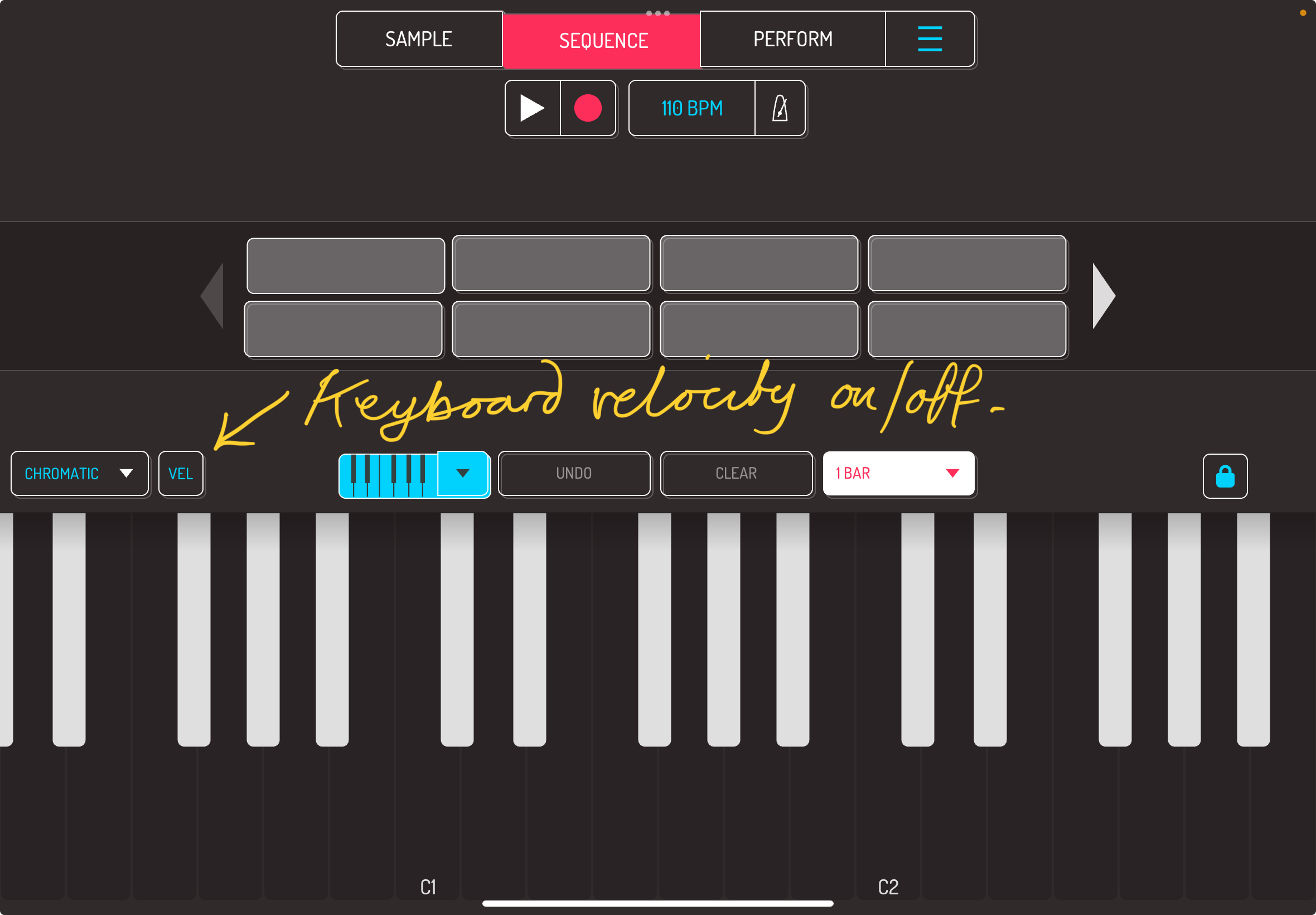
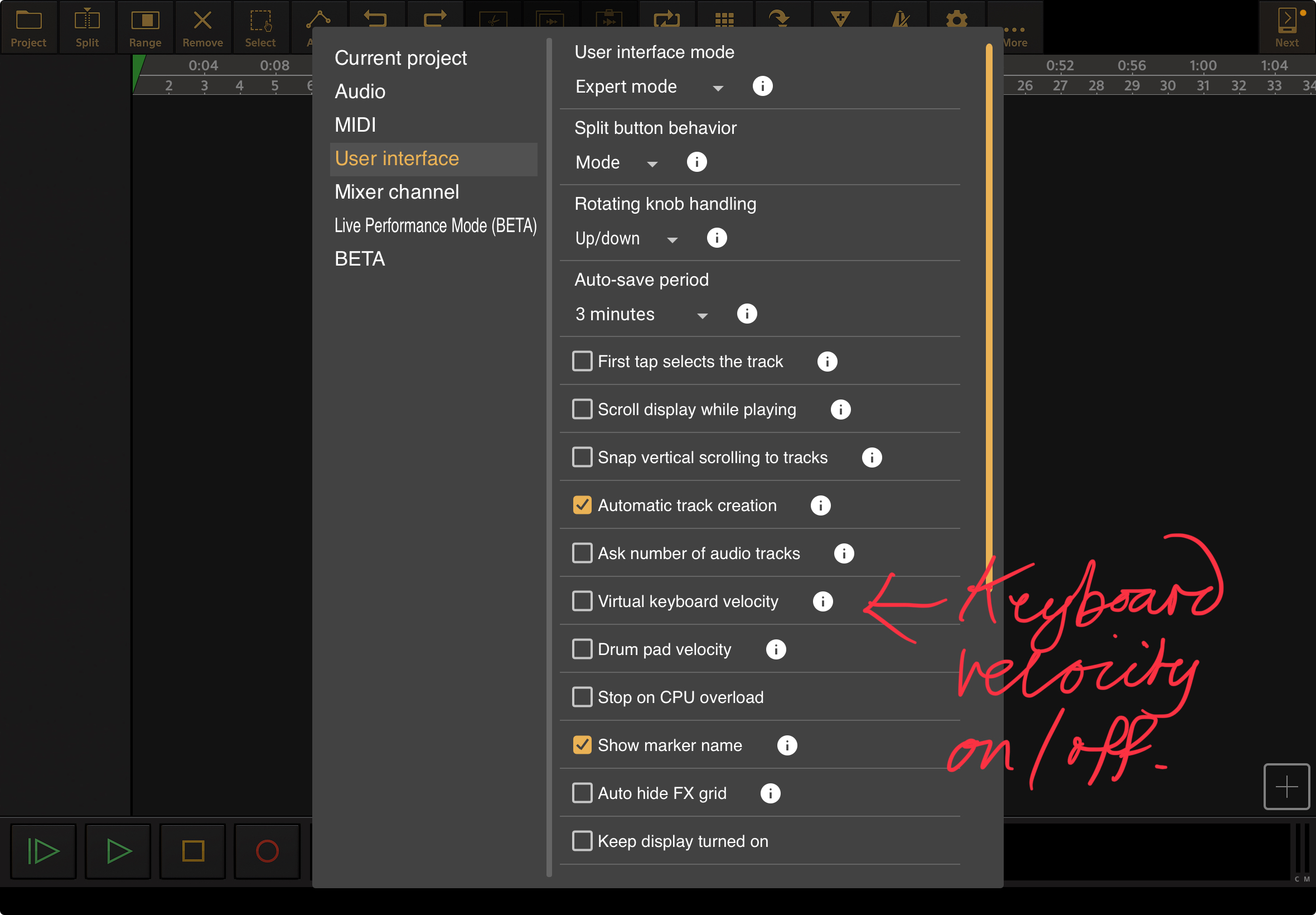
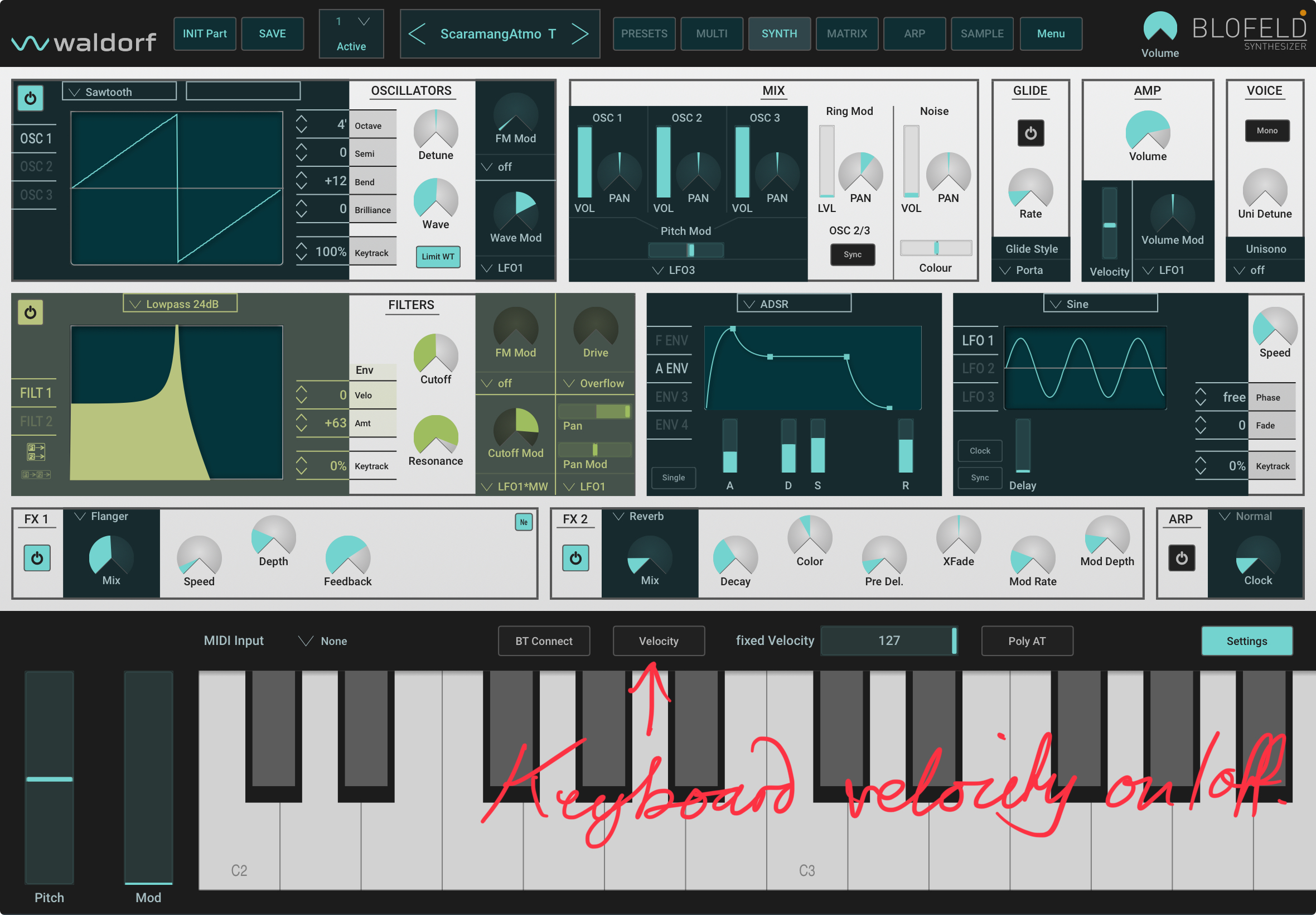
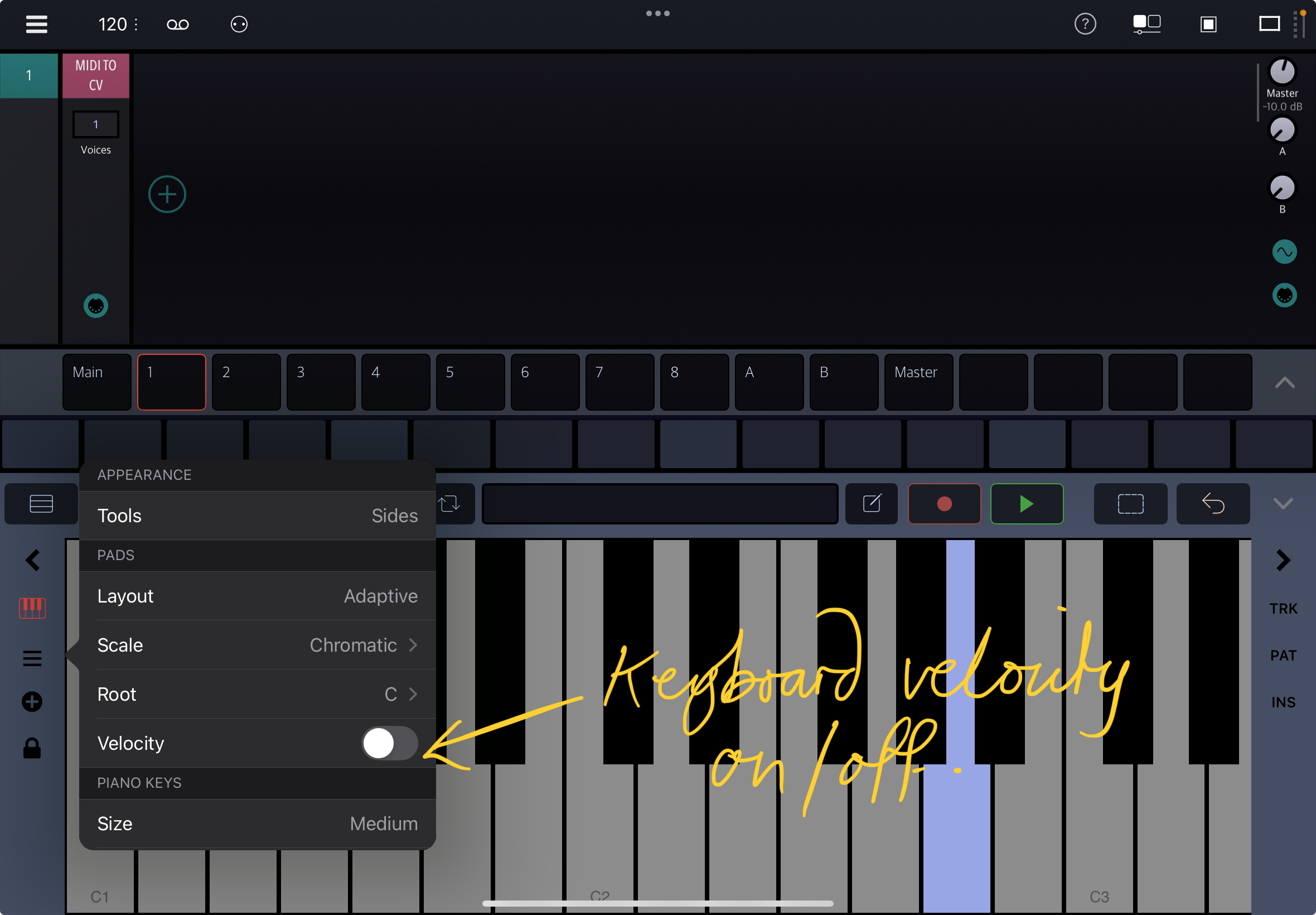
    I’m not sure how I can be any clearer to be honest? My point is that, particularly on the smaller pad setting, the pads are too small to predictably tap at a precise point to get the desired level of velocity. As such, the velocity function for those pads is more of a hindrance than a help and as such, it would be good to have the option to turn off the pad touch point/velocity function for, particularly, those smaller pads. Turning off this functionality would not affect the synths ability to respond to other forms of velocity input though (external keyboard or MIDI from host).

    Here are some screenshots of other apps to show what I’m suggesting. Hopefully this makes things clearer. Cheers.

    Koala Sampler.
    Audio Evolution Mobile Studio.
    Waldorf Blofeld.
    Drambo.
  • It look like the consensus is having a velocity on/off switch in the keyboard options. I’ll think of something, thanks.

  • @anode_labs said:
    It look like the consensus is having a velocity on/off switch in the keyboard options. I’ll think of something, thanks.

    Seems like currently, although the internal grid and keyboard are very velocity sensitive, the plugin has very little range of velocity sensitivity when it comes to using external midi. It’s impossible to play vey quietly with an external keyboard, but it’s possible using the internal keyboard/grid

  • @Gavinski said:
    Seems like currently, although the internal grid and keyboard are very velocity sensitive, the plugin has very little range of velocity sensitivity when it comes to using external midi. It’s impossible to play vey quietly with an external keyboard, but it’s possible using the internal keyboard/grid

    synth -> master -> velocity knob, make sure it's on 100%.

  • @anode_labs said:

    @Gavinski said:
    Seems like currently, although the internal grid and keyboard are very velocity sensitive, the plugin has very little range of velocity sensitivity when it comes to using external midi. It’s impossible to play vey quietly with an external keyboard, but it’s possible using the internal keyboard/grid

    synth -> master -> velocity knob, make sure it's on 100%.

    You know what, my bad - it’s actually a problem with the AUM keyboard haha. The keys in it are very limited in the lower velocity range, wow, never noticed that before. Thnx for making me double check that, I learned something new today.

  • @anode_labs, thanks for implementing optional fixed velocity for built in keyboards - works perfectly. Cheers.

Sign In or Register to comment.