Loopy Pro: Create music, your way.

What is Loopy Pro?Loopy Pro is a powerful, flexible, and intuitive live looper, sampler, clip launcher and DAW for iPhone and iPad. At its core, it allows you to record and layer sounds in real-time to create complex musical arrangements. But it doesn’t stop there—Loopy Pro offers advanced tools to customize your workflow, build dynamic performance setups, and create a seamless connection between instruments, effects, and external gear.

Use it for live looping, sequencing, arranging, mixing, and much more. Whether you're a live performer, a producer, or just experimenting with sound, Loopy Pro helps you take control of your creative process.

Download on the App Store

Loopy Pro is your all-in-one musical toolkit. Try it for free today.

GCS Model 8 by Gulf Coast Synthesis (Released on iOS)

13»

Comments

  • I’m unable to resize my auv3 windows.

  • @Gavinski said:

    Choosing an AUv3 is not gonna be easy @GulfCoastSynthesis. And I have actually now a very small number of AUv3s compared to many people here, most of mine are no longer on the device.

    For starters, the list is not always alphabetically ordered. It seems to sometimes use the developer name to determine the order, even when it doesn't show the dev name. For example, Outgrowth is near the start of the list, presumably because the dev name is Aqeel Aadam.

    Compare to something like AUM, which has a search function and various sorting options.

    Also, do you have any idea when a better manual might be available? The current one is missing so much info. I reckon the workflow here will be a lot less obvious to the average DAW user than you might expect! Thnx

    Yes! I'll be pushing an iPad update to make this better within the next couple days.
    Also here's an updated manual, its for desktop but its mostly the same. I'm currently working with a professional to create the real manual, so take this one with a grain of salt.
    https://gulfcoastsynthesis.com/GCS_Model_8_Manual_v2.29_Beta.pdf
    I also added it to the beta site if you need it again.

    Main thing to note missing in the manual for iPad is that the third party plugins need to be enabled via the menu.

    For iPad you can import audio just like desktop via the main menu.

  • @bcrichards said:
    I’m unable to resize my auv3 windows.

    This is just a quirk thats honestly hard make bulletproof on iPad. Because AUv3 all have different resizing methods its hard to have a one size fits all for it. For instance, if you load plugins into Logic (iPad version) like the Moog Model D, you can't resize it. If I were to allow for resizing then for plugins like that it would simply just crop out areas of the ui. I'll see if there's more I can optimize but its most likely not going to be perfect for everything unfortunately.

  • Hmm, I think we should be able to see the necessary controls (like play, record) along with the auv3, right? I’ll take screenshots.

  • @GulfCoastSynthesis said:

    @Gavinski said:

    Choosing an AUv3 is not gonna be easy @GulfCoastSynthesis. And I have actually now a very small number of AUv3s compared to many people here, most of mine are no longer on the device.

    For starters, the list is not always alphabetically ordered. It seems to sometimes use the developer name to determine the order, even when it doesn't show the dev name. For example, Outgrowth is near the start of the list, presumably because the dev name is Aqeel Aadam.

    Compare to something like AUM, which has a search function and various sorting options.

    Also, do you have any idea when a better manual might be available? The current one is missing so much info. I reckon the workflow here will be a lot less obvious to the average DAW user than you might expect! Thnx

    Yes! I'll be pushing an iPad update to make this better within the next couple days.
    Also here's an updated manual, its for desktop but its mostly the same. I'm currently working with a professional to create the real manual, so take this one with a grain of salt.
    https://gulfcoastsynthesis.com/GCS_Model_8_Manual_v2.29_Beta.pdf
    I also added it to the beta site if you need it again.

    Main thing to note missing in the manual for iPad is that the third party plugins need to be enabled via the menu.

    For iPad you can import audio just like desktop via the main menu.

    Thanks. Can this load midi plugins?

  • @cyberheater said:

    @Gavinski said:

    @cyberheater said:
    When you think that Jarre created Oxygene in his Paris kitchen using second hand and broken equipment all recorded on a 8 track reel to reel. Amazing really.

    Perhaps it's even more amazing that many people today think they need the perfect host and a ton of different synths plugins to make good music. People have been making amazing music with (relatively) low tech equipment for millenia 😂

    Indeed Gavinski. I also believe limitation leads to creativity. Way too many options these days.

    Absolutely. Some may scoff at the suggestion, but Android actually has a lot going for it in this regard: far, far fewer options so more focus from the user on actually making music rather than constantly being distracted by shiny new apps of desire (in my experience at least).

  • @Gavinski said:

    @GulfCoastSynthesis said:

    @Gavinski said:

    Choosing an AUv3 is not gonna be easy @GulfCoastSynthesis. And I have actually now a very small number of AUv3s compared to many people here, most of mine are no longer on the device.

    For starters, the list is not always alphabetically ordered. It seems to sometimes use the developer name to determine the order, even when it doesn't show the dev name. For example, Outgrowth is near the start of the list, presumably because the dev name is Aqeel Aadam.

    Compare to something like AUM, which has a search function and various sorting options.

    Also, do you have any idea when a better manual might be available? The current one is missing so much info. I reckon the workflow here will be a lot less obvious to the average DAW user than you might expect! Thnx

    Yes! I'll be pushing an iPad update to make this better within the next couple days.
    Also here's an updated manual, its for desktop but its mostly the same. I'm currently working with a professional to create the real manual, so take this one with a grain of salt.
    https://gulfcoastsynthesis.com/GCS_Model_8_Manual_v2.29_Beta.pdf
    I also added it to the beta site if you need it again.

    Main thing to note missing in the manual for iPad is that the third party plugins need to be enabled via the menu.

    For iPad you can import audio just like desktop via the main menu.

    Thanks. Can this load midi plugins?

    Like MIDI effects plugins or software insturments? It can definitely load software instruments that are playable via MIDI but I don't have a midi effects slot.

  • @Gavinski said:

    Choosing an AUv3 is not gonna be easy @GulfCoastSynthesis. And I have actually now a very small number of AUv3s compared to many people here, most of mine are no longer on the device.

    For starters, the list is not always alphabetically ordered. It seems to sometimes use the developer name to determine the order, even when it doesn't show the dev name. For example, Outgrowth is near the start of the list, presumably because the dev name is Aqeel Aadam.

    Compare to something like AUM, which has a search function and various sorting options.

    Also, do you have any idea when a better manual might be available? The current one is missing so much info. I reckon the workflow here will be a lot less obvious to the average DAW user than you might expect! Thnx

    I just pushed an update with a revamp for plugins. I'd love to know your thoughts, I don't have close to as many plugins as you do and so its hard to see exactly how the user experience will be with a lot. I'll try to find a source for a bunch of free ones to test it more on my end though.

  • @GulfCoastSynthesis said:

    @Gavinski said:

    @GulfCoastSynthesis said:

    @Gavinski said:

    Choosing an AUv3 is not gonna be easy @GulfCoastSynthesis. And I have actually now a very small number of AUv3s compared to many people here, most of mine are no longer on the device.

    For starters, the list is not always alphabetically ordered. It seems to sometimes use the developer name to determine the order, even when it doesn't show the dev name. For example, Outgrowth is near the start of the list, presumably because the dev name is Aqeel Aadam.

    Compare to something like AUM, which has a search function and various sorting options.

    Also, do you have any idea when a better manual might be available? The current one is missing so much info. I reckon the workflow here will be a lot less obvious to the average DAW user than you might expect! Thnx

    Yes! I'll be pushing an iPad update to make this better within the next couple days.
    Also here's an updated manual, its for desktop but its mostly the same. I'm currently working with a professional to create the real manual, so take this one with a grain of salt.
    https://gulfcoastsynthesis.com/GCS_Model_8_Manual_v2.29_Beta.pdf
    I also added it to the beta site if you need it again.

    Main thing to note missing in the manual for iPad is that the third party plugins need to be enabled via the menu.

    For iPad you can import audio just like desktop via the main menu.

    Thanks. Can this load midi plugins?

    Like MIDI effects plugins or software insturments? It can definitely load software instruments that are playable via MIDI but I don't have a midi effects slot.

    Yes, I meant like midi sequencers etc. Not supported, OK

  • @GulfCoastSynthesis said:

    @Gavinski said:

    Choosing an AUv3 is not gonna be easy @GulfCoastSynthesis. And I have actually now a very small number of AUv3s compared to many people here, most of mine are no longer on the device.

    For starters, the list is not always alphabetically ordered. It seems to sometimes use the developer name to determine the order, even when it doesn't show the dev name. For example, Outgrowth is near the start of the list, presumably because the dev name is Aqeel Aadam.

    Compare to something like AUM, which has a search function and various sorting options.

    Also, do you have any idea when a better manual might be available? The current one is missing so much info. I reckon the workflow here will be a lot less obvious to the average DAW user than you might expect! Thnx

    I just pushed an update with a revamp for plugins. I'd love to know your thoughts, I don't have close to as many plugins as you do and so its hard to see exactly how the user experience will be with a lot. I'll try to find a source for a bunch of free ones to test it more on my end though.

    Up to date list of all AUv3 plugins, including free ones, here:

    https://docs.google.com/spreadsheets/d/1vydiVIIZR48AFiRcfANzmRnec-eZ-6yiE5C21ztkU6A/htmlview

  • @Gavinski said:

    @GulfCoastSynthesis said:

    @Gavinski said:

    Choosing an AUv3 is not gonna be easy @GulfCoastSynthesis. And I have actually now a very small number of AUv3s compared to many people here, most of mine are no longer on the device.

    For starters, the list is not always alphabetically ordered. It seems to sometimes use the developer name to determine the order, even when it doesn't show the dev name. For example, Outgrowth is near the start of the list, presumably because the dev name is Aqeel Aadam.

    Compare to something like AUM, which has a search function and various sorting options.

    Also, do you have any idea when a better manual might be available? The current one is missing so much info. I reckon the workflow here will be a lot less obvious to the average DAW user than you might expect! Thnx

    I just pushed an update with a revamp for plugins. I'd love to know your thoughts, I don't have close to as many plugins as you do and so its hard to see exactly how the user experience will be with a lot. I'll try to find a source for a bunch of free ones to test it more on my end though.

    Up to date list of all AUv3 plugins, including free ones, here:

    https://docs.google.com/spreadsheets/d/1vydiVIIZR48AFiRcfANzmRnec-eZ-6yiE5C21ztkU6A/htmlview

    Great thank you so much for this.

  • @GulfCoastSynthesis Ok maybe something’s not working properly for me. I can’t unminimized plugin windows either. I’d urge you to consider. Surely there needs to be a view that supports transport access and auv3 view.

  • Love the sound and workflow here, still learning my way around and haven’t been able to do much with windowing auv3 issues but overall excited for your release.

  • @bcrichards said:
    @GulfCoastSynthesis Ok maybe something’s not working properly for me. I can’t unminimized plugin windows either. I’d urge you to consider. Surely there needs to be a view that supports transport access and auv3 view.

    Just to clarify, you're unable to x out of the plugin ui? Yep i'll definitely fine tune this more, its just super tedious!

  • I can X out but once it’s maximized tapping the - (which I would think is like a smaller window size or something) does nothing. Having trouble attaching the screenshot here but the auv3s are full screen, I can’t see any of your app. M4 air 11inch, if that’s helpful.

  • @Gavinski said:

    @GulfCoastSynthesis said:

    @Gavinski said:

    @GulfCoastSynthesis said:

    @Gavinski said:

    Choosing an AUv3 is not gonna be easy @GulfCoastSynthesis. And I have actually now a very small number of AUv3s compared to many people here, most of mine are no longer on the device.

    For starters, the list is not always alphabetically ordered. It seems to sometimes use the developer name to determine the order, even when it doesn't show the dev name. For example, Outgrowth is near the start of the list, presumably because the dev name is Aqeel Aadam.

    Compare to something like AUM, which has a search function and various sorting options.

    Also, do you have any idea when a better manual might be available? The current one is missing so much info. I reckon the workflow here will be a lot less obvious to the average DAW user than you might expect! Thnx

    Yes! I'll be pushing an iPad update to make this better within the next couple days.
    Also here's an updated manual, its for desktop but its mostly the same. I'm currently working with a professional to create the real manual, so take this one with a grain of salt.
    https://gulfcoastsynthesis.com/GCS_Model_8_Manual_v2.29_Beta.pdf
    I also added it to the beta site if you need it again.

    Main thing to note missing in the manual for iPad is that the third party plugins need to be enabled via the menu.

    For iPad you can import audio just like desktop via the main menu.

    Thanks. Can this load midi plugins?

    Like MIDI effects plugins or software insturments? It can definitely load software instruments that are playable via MIDI but I don't have a midi effects slot.

    Yes, I meant like midi sequencers etc. Not supported, OK

    I'm using AUM to send midi from sequencers to this app. Not ideal but it works. Actually any host can send midi to it . Go to setup "Configure Audio Device" and select the host name in the "Active Midi Inputs:

  • I have a pattern in the Voxtone rhythm machine with DAW sync enabled and ON button enabled.. if I turn on the click, shouldn’t the Voxtone + click both sync up when I start the transport? Right now they don’t.. 🤷‍♂️

    I know, normally you’d probably use one or the the other when recording but I was curious if this would work..

  • @royor said:
    I have a pattern in the Voxtone rhythm machine with DAW sync enabled and ON button enabled.. if I turn on the click, shouldn’t the Voxtone + click both sync up when I start the transport? Right now they don’t.. 🤷‍♂️

    I know, normally you’d probably use one or the the other when recording but I was curious if this would work..

    No its not really meant to sync with the click, just the tempo. I've done a lot of work with this and its just not feasible to have it maintain the exact timecode with the click. So users will just need to use one or the other.

  • @bcrichards said:
    I can X out but once it’s maximized tapping the - (which I would think is like a smaller window size or something) does nothing. Having trouble attaching the screenshot here but the auv3s are full screen, I can’t see any of your app. M4 air 11inch, if that’s helpful.

    Thank you! I don't experience this on my end but i'll investigate and patch it. Appreciate it.

  • @GulfCoastSynthesis said:

    @bcrichards said:
    I can X out but once it’s maximized tapping the - (which I would think is like a smaller window size or something) does nothing. Having trouble attaching the screenshot here but the auv3s are full screen, I can’t see any of your app. M4 air 11inch, if that’s helpful.

    Thank you! I don't experience this on my end but i'll investigate and patch it. Appreciate it.

    I have the same issue on my iPad Pro running 18.7.8 you can't scale the third party AU windows like you can with the
    native instrumental in the app.

  • @hacked_to_pieces said:

    @GulfCoastSynthesis said:

    @bcrichards said:
    I can X out but once it’s maximized tapping the - (which I would think is like a smaller window size or something) does nothing. Having trouble attaching the screenshot here but the auv3s are full screen, I can’t see any of your app. M4 air 11inch, if that’s helpful.

    Thank you! I don't experience this on my end but i'll investigate and patch it. Appreciate it.

    I have the same issue on my iPad Pro running 18.7.8 you can't scale the third party AU windows like you can with the
    native instrumental in the app.

    Yep, that's because the built in instruments and effects actually aren't Auv3 and don't follow the same resizing. There's really no way that i've found for universal resizing that works well for ipad and so I went with what Logic does. I mention this before, but there's not a universal resizing method and so if I implement one that's good it often is bad for others. For instance the Moog Model D auv3, if I enable resizing for that it just crops out the ui.

  • @GulfCoastSynthesis said:

    @royor said:
    I have a pattern in the Voxtone rhythm machine with DAW sync enabled and ON button enabled.. if I turn on the click, shouldn’t the Voxtone + click both sync up when I start the transport? Right now they don’t.. 🤷‍♂️

    I know, normally you’d probably use one or the the other when recording but I was curious if this would work..

    No its not really meant to sync with the click, just the tempo. I've done a lot of work with this and its just not feasible to have it maintain the exact timecode with the click. So users will just need to use one or the other.

    Totally cool 😎 .. thanks for clarifying..

  • Are the built-in synths good?

  • edited June 7

    Seems possible to me it easier on the eyes without too much work beyond text size, boldness, and some darker lines.
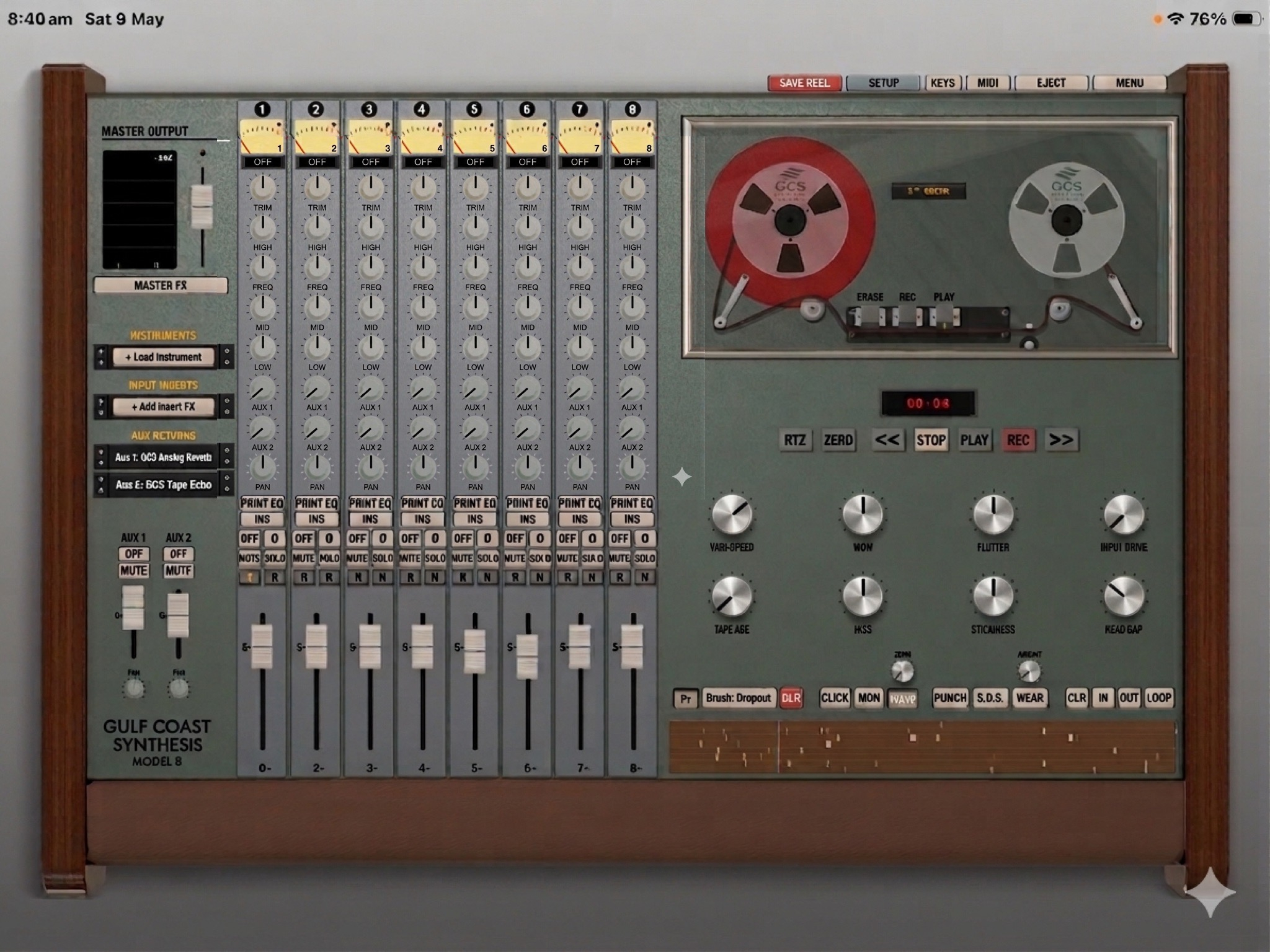
  • Super excited to announce the GCS Model 8 is now out on the app store!
    You can download it for free to test out on your iPad, then to purchase it's $14.99.

    https://apps.apple.com/app/gcs-model-8/id6762236830

    One little quirk - when you purchase please wait a few seconds for the screen to update while it connects to the app store. I'm pushing an update so the purchase button doesn't hang for older ipads but it will not allow you to double purchase.

    I also have a link to the download via my website: www.gulfcoastsynthesis.com

    Thanks everyone for all of the help with beta testing, its been extremely crucial and highly appreciated!

  • @GulfCoastSynthesis said:
    Super excited to announce the GCS Model 8 is now out on the app store!
    You can download it for free to test out on your iPad, then to purchase it's $14.99.

    https://apps.apple.com/app/gcs-model-8/id6762236830

    One little quirk - when you purchase please wait a few seconds for the screen to update while it connects to the app store. I'm pushing an update so the purchase button doesn't hang for older ipads but it will not allow you to double purchase.

    I also have a link to the download via my website: www.gulfcoastsynthesis.com

    Thanks everyone for all of the help with beta testing, its been extremely crucial and highly appreciated!

    That’s awesome news! Is this an intro price?

  • @Rodrigo1709 said:

    @GulfCoastSynthesis said:
    Super excited to announce the GCS Model 8 is now out on the app store!
    You can download it for free to test out on your iPad, then to purchase it's $14.99.

    https://apps.apple.com/app/gcs-model-8/id6762236830

    One little quirk - when you purchase please wait a few seconds for the screen to update while it connects to the app store. I'm pushing an update so the purchase button doesn't hang for older ipads but it will not allow you to double purchase.

    I also have a link to the download via my website: www.gulfcoastsynthesis.com

    Thanks everyone for all of the help with beta testing, its been extremely crucial and highly appreciated!

    That’s awesome news! Is this an intro price?

    Thx! That’s going to be the final price. I eventually will have a completely free four track version but not sure when I’ll get that out.

  • @Gavinski said:

    @cyberheater said:

    @Gavinski said:

    @cyberheater said:
    When you think that Jarre created Oxygene in his Paris kitchen using second hand and broken equipment all recorded on a 8 track reel to reel. Amazing really.

    Perhaps it's even more amazing that many people today think they need the perfect host and a ton of different synths plugins to make good music. People have been making amazing music with (relatively) low tech equipment for millenia 😂

    Indeed Gavinski. I also believe limitation leads to creativity. Way too many options these days.

    100%

    @GulfCoastSynthesis said:
    Super excited to announce the GCS Model 8 is now out on the app store!
    You can download it for free to test out on your iPad, then to purchase it's $14.99.

    https://apps.apple.com/app/gcs-model-8/id6762236830

    One little quirk - when you purchase please wait a few seconds for the screen to update while it connects to the app store. I'm pushing an update so the purchase button doesn't hang for older ipads but it will not allow you to double purchase.

    I also have a link to the download via my website: www.gulfcoastsynthesis.com

    Thanks everyone for all of the help with beta testing, its been extremely crucial and highly appreciated!

    Congratulations on the release! It’ll be a while before I can purchase it as I recently lost my job but will definitely pick this up when I can!

  • Purchased.

Sign In or Register to comment.