Loopy Pro: Create music, your way.
What is Loopy Pro? — Loopy Pro is a powerful, flexible, and intuitive live looper, sampler, clip launcher and DAW for iPhone and iPad. At its core, it allows you to record and layer sounds in real-time to create complex musical arrangements. But it doesn’t stop there—Loopy Pro offers advanced tools to customize your workflow, build dynamic performance setups, and create a seamless connection between instruments, effects, and external gear.
Use it for live looping, sequencing, arranging, mixing, and much more. Whether you're a live performer, a producer, or just experimenting with sound, Loopy Pro helps you take control of your creative process.
Download on the App StoreLoopy Pro is your all-in-one musical toolkit. Try it for free today.
Mariana save midi mapping

Can anyone save the midi mappings in Mariana? When i click on export midi map nothing happens. I already filed a ticket but after some talk they told me they will close my ticket and work on it. Its been 2 months and nothing happened. Just curious if someone is able to save the mapping.
Comments
Hi there @Thacapos,
I purchased the Mariana Bass app last April, from then and until the end of December 2025 I submitted that many bug reports to the developer and they issued loads of different ticket numbers and promises of a fix coming soon, this never…ever…ever…EVER happened. My issue were same as you, a MIDI map that would simply disappear after closing the app in both Stand-alone and as AUv3 inside Cubasis 3, my second big issue is when trying to export my own presets, I have the Mariana on two iPads and I wanted to share user presets between them, this was impossible because the moment you select EXPORT PRESETS a small window appeared on the very bottom left of the screen with all the important information completely hidden.
I have created a massive MIDI map that includes almost every controller on the Mariana, I then saved this as a user presets and named it MIDI MAP, there is a procedure for loading the mapping back into the app next time you use it and it must be loaded back every time, once you have loaded the mapping you can then select any preset in the banks and tweak until you reached your requirements, then SAVE this preset along with the MIDI Mapping. If this is something you want to do (you will die waiting for a developers fix), then I will put the saving and loading process here.
Sorry it’s not the answer you are after, but at least I can now use the Mariana with MIDI Mapping and so can you, just let me know and I will find the details for you - I saved it safely in my Files app but I can’t remember where at this present moment.
Mike
Just in case you do want the MIDI Map saving and loading procedure:
Once you have created a Map, save it as a preset specifically for storing this map and name it as such.
If you next launch the app and find the map missing, to reload this map:
1) open the Mariana Settings,
2) select MIDI CONTROL and turn on LOAD FROM PRESET (notice this switch circled in yellow in the off position),
3) enable this switch and then open Preset Browser, select and load your MIDI Map preset,
4) now re-open Settings and turn off the LOAD WITH PRESET switch, this will allow the mapping to be active with all presets during the time you have the app open, if you don’t turn it off, the mapping will stay active with that one preset only.
Every time you save a new USER preset, make sure the mapping is active first by tapping the long MIDI MAP tab to see it is still there just to make sure you don’t loose any tweaked parameter settings you may have made.
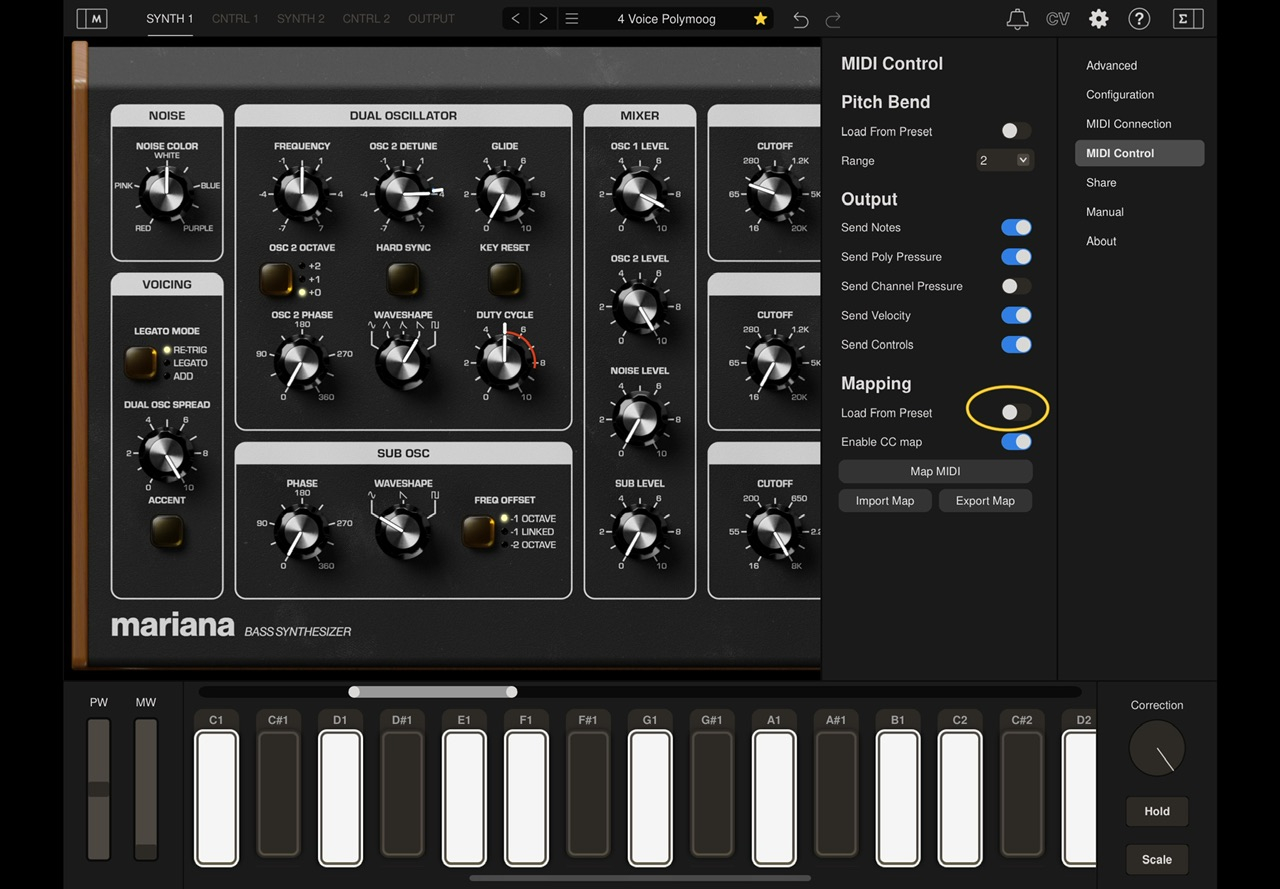
I have a complete MIDI Map File for the Mariana if you want it, it uses almost all CC numbers from CC2 to CC116.
Thanks so much for the workaround, will try it tomorrow.
Yeah that midi map file would be nice, thanks.
Unzip the Folder and paste it in your Files app, it doesn’t matter if you choose iCloud Drive or On My iPad.
Open the folder and read my instructions on the bottom of the MAPPING List. The list shows you what parameters are assigned MIDI CC#. You will also see a second file named Full MIDI Map.ccmap, only use this if you don’t want to import the MIDI Map preset, you can import this directly in the Settings > MIDI Control > Import Map, the results will be the same. Any problems (there shouldn’t be) just leave a message.
Mike
https://dropbox.com/scl/fi/w1ocxpxqt4slouaxzjkw6/MIDI-Map-List.zip?rlkey=s156vzo7zevgrxt4371mpxb87&st=8v3yqjhs&dl=0
Thank you very much
@MoogMusicInc
Couldnt load the midi map file but the preset works fine.
Thats why I included the preset, but I’m glad it’s working for you. It’s no good relying on MoogMusic for any kind of help, there is another issue that they haven’t bothered to fix and that is the forever changing buffer size which in some cases you can’t change to a normal level, it causes DSP overload when the buffer is too small, the best way around this is to launch AUM first and set the buffer size, the Mariana buffer is governed by the first plugin.
Honestly, contacting MoogMusic is a waste of time, they answer with friendly false promises and then you just wait…….and wait…….and 😴
Mike