Loopy Pro: Create music, your way.
What is Loopy Pro? — Loopy Pro is a powerful, flexible, and intuitive live looper, sampler, clip launcher and DAW for iPhone and iPad. At its core, it allows you to record and layer sounds in real-time to create complex musical arrangements. But it doesn’t stop there—Loopy Pro offers advanced tools to customize your workflow, build dynamic performance setups, and create a seamless connection between instruments, effects, and external gear.
Use it for live looping, sequencing, arranging, mixing, and much more. Whether you're a live performer, a producer, or just experimenting with sound, Loopy Pro helps you take control of your creative process.
Download on the App StoreLoopy Pro is your all-in-one musical toolkit. Try it for free today.
Moby Pixel Mighty Sampler!

This went under my radar! If it’s a duplicate thread please bin admins!
Comments
When is this going to be available?
7th May I believe
First I’ve heard of it. Thanks, @Jumpercollins! The website says free with optional IAP. Works on iPhone, iPad and Mac.
I've been beta testing this for awhile, and I can tell you it sounds phenomenal!
@MobyPixel has created a killer... dare I say "MIGHTY" app!
Thanks for starting a thread! Yes, the app is coming this Thursday! I'm holding off on releasing videos until after the app is live so other YouTubers' videos don't get buried in the algo.
Description from the App Store:
Mighty Synth Sampler turns any sound into a playable instrument. It's a free, fully-featured synth and sampler for iPhone, iPad, and Mac built for musicians who want to create, layer, and perform with their own sounds and SoundFonts (SF2/SFZ). ROMPLERS RULE!
The app is built around four pillars:
• The Synth
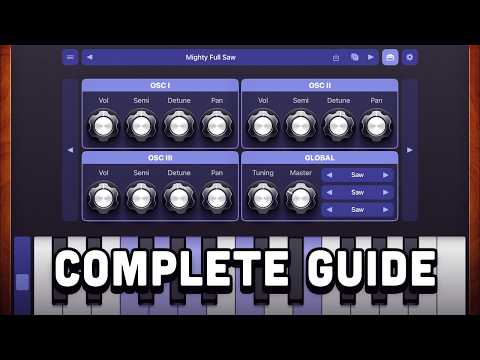
A full subtractive synth engine powered by AudioKit. Three independent oscillator layers with volume, semitone, detune, and pan controls. Shape your sound with amplitude and filter envelopes, a low-pass filter, LFO, unison, glide, drive, and more. A built-in arpeggiator, flexible play surfaces, and MIDI support round out a synth that's deep without being overwhelming.
• The Sampler
Build your own sample-based instruments from scratch. Record directly in the app or import audio files, map them across the keys, set loop points, adjust root notes and note ranges, and save your creations as reusable instruments and banks.
• Sound Packs
The app comes with a built-in starter bank and supports downloadable sound packs both free and paid. New packs are added to the store without requiring an app update. You can also create your own banks and share them with others.
• AUv3 Support
Four AUv3 plugins in one app: Mighty Synth (instrument), Mighty Sampler (audio effect for capturing and building instruments), Mighty Effects (standalone effects chain), and Mighty MIDI (MIDI processor and play interface). Load them individually in your favorite DAW or AUv3 host.
Features
• Free app with all core features included
• Three-oscillator synth engine with detune, pan, and semitone control per layer
• Amplitude and filter envelopes with per-oscillator scope
• Low-pass filter with cutoff, resonance, and key tracking
• LFO targeting filter cutoff, pitch, or volume
• Unison with up to 8 voices, width, detune, and offset control
• Effects: reverb, delay, chorus, drive, phaser, compressor, panner, and more
• Built-in arpeggiator with BPM sync, octave range, and pattern modes
• Multiple play surfaces: keys, pads, All 4ths layout, scale layout, and more
• 16-slot sampler with loop points, root note mapping, and note range editing
• Record audio directly in-app
• Import audio files and SF2/SFZ SoundFonts
• Downloadable sound packs (free and paid)
• Create, export, and share your own instrument banks
• Four AUv3 plugins: Mighty Synth, Mighty Sampler, Mighty Effects, Mighty MIDI
• MIDI CC mapping
• Available for iPhone, iPad, and Mac
Thank You & Enjoy!
Nick Culbertson
MobyPixel.com
Preordered... oh wait, it's free! Can't wait to have some fun with this.
Thanks wagdog! I think you all are really going to love it. Or it'll be a buggy mess. Either way, it'll be interesting!
Something I didn't see in the demo (but I may have missed it). Really hoping there is a sample crossfade setting. When we don't need beat synced looping, sample crossfade is kind of the classic thing in samplers. Please consider adding it (if it's not there already). I love that you have zero crossing!
Thanks!
Great instructional! Are we able to import and export in the sampler from all sources. It’s always going to be Audioshare for me. Really looking forward to this!
Short answer: No crossfade, at least not yet.
Long answer: DunneSampler is AudioKit's drop-in replacement for Apple's AVAudioUnitSampler. Both use single-point looping where they jump from loop end back to loop start without blending. Crossfade looping would require modifying that transition behavior internally. The good thing about DunneSampler is that it's open source, so crossfade could potentially be added in the future, but I couldn't get it working properly when I tried previously. It's possible, but it'll likely take a larger refactor to the library. Single-point looping is what you'll see in the app for now.
Glad you like the zero-crossing detection!
I've not used AudioShare but if it uses the standard iOS share sheet / document picker then it should be supported. You can drag and drop samples in, or use Apple's document picker (one at a time, up to 16 samples per instrument for now). Saved instruments made in the app can be exported or imported as banks (zip). Each saved instrument becomes an SFZ.
The knobs are gorgeous!
more tea, vicar?
the app looks fantastic. i want to hear the filter.
“not used AudioShare” 😳😭
😎✌🏼
Thanks Julienj!
It's the same filter used in the AudioKit Pro apps up until J6 I think (in DunneSampler). Matthew has had a couple of custom filters for his apps since then. So not self-oscillating or whistling, but very tasteful imo. There is a filter sweep preset that I think gets really close to the PlayStation 1 intro.
thanks @MobyPixel - i did wonder if might be the synth one one.
i don't think i've heard that ps1 intro sound for 25 years but something tells me i'll know just what you mean, when i fire it up.
best of luck with your various last-minute bits and thank you very much for making us all a nice sampler. i'm looking forward to this one
Thanks for the reply. I have zero knowledge of the programming behind this, but I wondered if this might be a solution. If loop start and loop start/end aren't modulation destinations, would it be possible to create an internal copy of the loaded sample that has the appropriate fade-in and tail crossfade regions in the sample copy.? Then that would get loaded into the dunneSampler. I think that would probably come with it's own set of headaches (probably far far too many) centered around making changes to the loop start, end, and xfade values. yeah. drats. oh well....
Out now! https://apps.apple.com/us/app/mighty-synth-sampler/id6445898095
🚀 Mighty Synth Sampler is OUT NOW! FREE on iPhone, iPad, and Mac.
Turns any sound into a playable instrument in standalone and AUv3.
🎛️ Get the App: https://apps.apple.com/app/id6445898095?ls=1
(Thanks wagdog! You beat me to it. ✌️)
Okay, the fact that this can play SF2 and SFZ has me intrigued to say the least. This also seems to have a lot of great sounds available for in-app purchase, so will be definitely investing some money into this. Thanks @MobyPixel .
Thanks @MobyPixel for making it available for Mac as well.
Thanks JWM! It'll take some time to handle all the various SFZ formats, it currently loads 1 instrument in at a time. SF2s are loaded and separated all at once.
🙌
All good. Happy to support the development by purchasing the packs.
Great synth! Easy to use. Im enjoying tweaking my soundfont patches. Thanks for the synth!
I've always wanted to get into knobular synthesis.
Fred Anton Corvette (sp) has the best knob design on iOS imo. I made a post about it once- it's become one of those things I get excited to see what direction he takes them considering they all differ. I dunno- I legitimately appreciate dial/knob design in audio apps. Especially when you can identify the app solely based on the knob design.
Thanks, Dav!
Hahaha! 🤣
Me too! I love the Moog and Yonac Skeuomorphic knobs.
Fun fact: @MobyPixel made the knobs for Retro Keys & Pro-A5
He's multi-knobular!
@MobyPixel nicework on the samples, knobs, and your excellent sampler.
Your introduction video is top tier. I appreciate how you walked through the features and functions right from the jump!
You can get a cream for that 👍