Loopy Pro: Create music, your way.
What is Loopy Pro? — Loopy Pro is a powerful, flexible, and intuitive live looper, sampler, clip launcher and DAW for iPhone and iPad. At its core, it allows you to record and layer sounds in real-time to create complex musical arrangements. But it doesn’t stop there—Loopy Pro offers advanced tools to customize your workflow, build dynamic performance setups, and create a seamless connection between instruments, effects, and external gear.
Use it for live looping, sequencing, arranging, mixing, and much more. Whether you're a live performer, a producer, or just experimenting with sound, Loopy Pro helps you take control of your creative process.
Download on the App StoreLoopy Pro is your all-in-one musical toolkit. Try it for free today.
Beta testers wanted for AUv3 plugin of physically modelled sitar

Hi everyone,
I’m looking for beta testers to help me verify the AUv3 functionality of my app. It's a synthesizer based on physical modelling featuring the sitar and similar instruments.
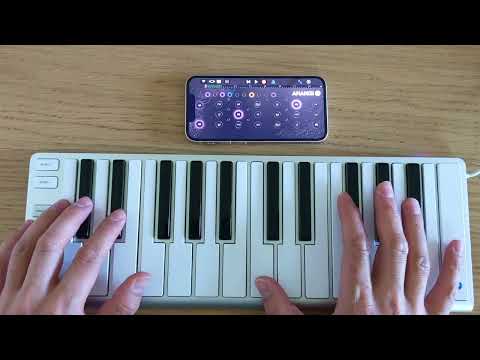
I want to ensure it integrates well into various mobile workflows. What I need help with:
- Testing the AUv3 performance in different hosts
- Basic MIDI responsiveness and parameter handling
- Reliable state saving and recall within your projects
If you have some time to check it out, I’d appreciate your feedback!
TestFlight Link:
https://testflight.apple.com/join/Ffx8AUwt
Thanks for your help!
Best, Sadjad
Comments
Welcome Sadjad! Looks cool. I'll probably test it sometime over the weekend. Also, I subbed to your Youtube channel.
Welcome Sadjad! Looks cool. I'll probably test it sometime over the weekend. Also, I subbed to your Youtube channel.
What controller is that @Ahangi
Sounds great with Riffler Flow as a midi driver. The ui looks neat, but the tactile playing interface is not rewarding. I like the sound but not the interface- it sounds a lot better than my sf2 sound fonts and I have some really good ones. I'll be using this with a midi generator for sure.
Very cool! 🔥
Ugh, nvm… beta should be fully unlocked imo. 9.99 to unlock “pro”
It sounds really nice. It kinda reminds me of the doors. Pairs well with retro keys for some indialien music- but oddly turns into folk when slowed way down
Hi!
Thanks everyone for testing and for all the valueable feedback!
@egobeats That track sounds neat!
The controller I was using in the video above is the Xkey 25
If you have installed the app using TestFlight, you can unlock the pro version without any payment. When you click on "Go pro" within the app you will come to the screen below, where it should say "For Testing purposes only. You will not be charged for confirming this purchase." Sorry, this is a little confusing and I should have mentioned it before. In case you do not see that message, please let me know.
I don't think it's possible to be charged (not 100% sure though) for IAP's within Testflight. True for this one at least.
Right on. Thx for clarifying. I should have watched the tutorial, as the way you can use the UI to bend the sounds is pretty cool and sounds great. I’ve made som really trippy stuff with it. Will purchase on a sale - like I mentioned before, this sounds much better than the sitar soundfonts I have and I have some pretty good ones.
Yeah, that's always the way it is in Test Flight. As soon as you click Buy, you'll always get a message confirming you won't be charged.
Very nice, I like all the swipe options to bend the sound!
Yeah, I neglected to catch that on my first pass. Really made the instrument sound so cool. Watch the tutorial folks.
It’s been interesting setting it to Ch.2 and running it thru piano motifs.
True! I also almost skipped the tutorial 😅
Dang, this sounds and plays amazing! I’m in love, @Ahangi. I don’t want to be THAT guy but the swipe to bend stuff sounds and feels just right—any chance we will be able to use a MIDI CC on a controller to get the same effect? Job well done here, regardless. Instabuy for me
Yes please
Wow! Thanks everyone for the nice words!
@lukesleepwalker @Kaptkraych
There are two ways to bend notes using midi:
1) You can actually swipe notes using pitch bend. The range is +/-16 semitones.
2) If you hold a key on the melody string and press another key on the melody string the pitch will bend. The velocity of the second note controls the speed of the bend.
Does this work for you or do you need another way to bend pitch?
Very impressive @Ahangi. I did find the touch response was a bit hit and miss though. Maybe there’s just a knack I need to develop?
Thanks!
It takes some time to get used to hit the keys right, but once you get the hang of that, there should not be any problems. At least I have not experienced any problems on any device I have tested so far.
But just to make sure - since this was part of the discussion here before - are you plucking the keys as explained in the app's tutorial?
The app also links to a video tutorial, let me post that link here too, just for reference:
@Robin2 , if you still have problems with the touch response, could you let me know what device you are using?
Cheers
I do love the way holding one key and hitting another melody key bends the pitch (velocity controlled). That's the part that feels great! My controller is a weird one that doesn't have pitch bend, but you nudged me to try to map the CC knob to pitch bend in my DAW. It works, though the sweep ratio makes the bend too subtle. I'll play with it.
If you own Ova Synth- it's great to moduate some wild notes with rangiin.
@Ahangi - Sounds really nice! And very cool use of the touchscreen for playing style and dynamics.
Great work. -Rob