Loopy Pro: Create music, your way.
What is Loopy Pro? — Loopy Pro is a powerful, flexible, and intuitive live looper, sampler, clip launcher and DAW for iPhone and iPad. At its core, it allows you to record and layer sounds in real-time to create complex musical arrangements. But it doesn’t stop there—Loopy Pro offers advanced tools to customize your workflow, build dynamic performance setups, and create a seamless connection between instruments, effects, and external gear.
Use it for live looping, sequencing, arranging, mixing, and much more. Whether you're a live performer, a producer, or just experimenting with sound, Loopy Pro helps you take control of your creative process.
Download on the App StoreLoopy Pro is your all-in-one musical toolkit. Try it for free today.
Comments
Update 1.0.1 is LIVE. What's New in This Version:
@MobyPixel - 1.0.1 fixed the stuck note and double trigger issues for me. Thank you! Will hopefully have some time this weekend to dive in.
@MobyPixel Hi!
Just throwing this in here as ‘brain farts’…
Thought of a few (should be relatively easy to add) functions that would make things pretty unique to Mighty Sampler and make it more ‘synth like’.
First, a per oscillator polarity switch, this would allow something rompelers have a hard time doing ie. ‘Fake PWM’ by mixing a saw wave with an inverted and detuned saw wave. In practice this would also allow PWM-Like effects on regular samples and creates an ‘airy’ sound.
The speed of the PWM sweep (controlled by the oscillator detune value) would not be constant but that’s the charm of sample-based PWM effects.
Second a ‘ring mod’ switch for each oscillator which in practice multiplies the sample value with the previous oscillators sample value. When ‘Ring Mod’ is enabled for Oscillator 1 it would be multiplied by oscillator 3, 2 would be multiplied by 1 and 3 would be multiplied by 2.
Third is per sample/note bit-reduction and decimation prior to pitch-interpolation (ie. Read the source sample thru a ‘sample and hold’ loop to simulate lowering sampling rate of the source samples sampling frequency). Or some other kind on-the-fly processing of the source sample (clipping, wave-folding etc,).
These functions are a pretty sure way to spark creative sample mangling, create clingy sound effects etc.
Naturally the choice is Yours to make and as I don’t know the inner workings of the sample engine being used it might be trickier to implement than what it sounds like?!
@MobyPixel
Really appreciate you adding the mighty midi controller- I've been pairing it with @cem_olcay 's housebud and have stopped using AUM's keyboard entirely.
I feel like the pair arranged on screen gives me access to every sound I could possibly need. (Dejayvu)
Epic! Thanks for letting me know.
Thanks, Samu! I'll definitely play around with those ideas and see what I can come up with. Ring Mod is pretty easy to add since it is already in AudioKit. I'm just not the biggest ring mod fan. If I expand the LFO section, ring mod could be interesting as a modulation target.
That's awesome! I love Cem's I'm hoping to flesh out Mighty MIDI more soon.
@betamax999 1.0.1 Should fix the MIDI issue.
With sample-based ring-mod (ie. multiply the oscillator outputs with each other) an addition 'effect' would module would not be needed as the output from one oscillator would be multiplied with the next.
To turn any speech sample into 'DALEK Voice' one could set for example Oscillator 1 to play a 30Hz sine-wave, load the speech sample into Oscillator 2 enable ringmod add some noise and BOOM!
At faster modulation frequencies it gets really robotic and metallic
What would be need though is wider tuning range for the oscillators and an option switch to disable key-tracking.
Getting carried away again
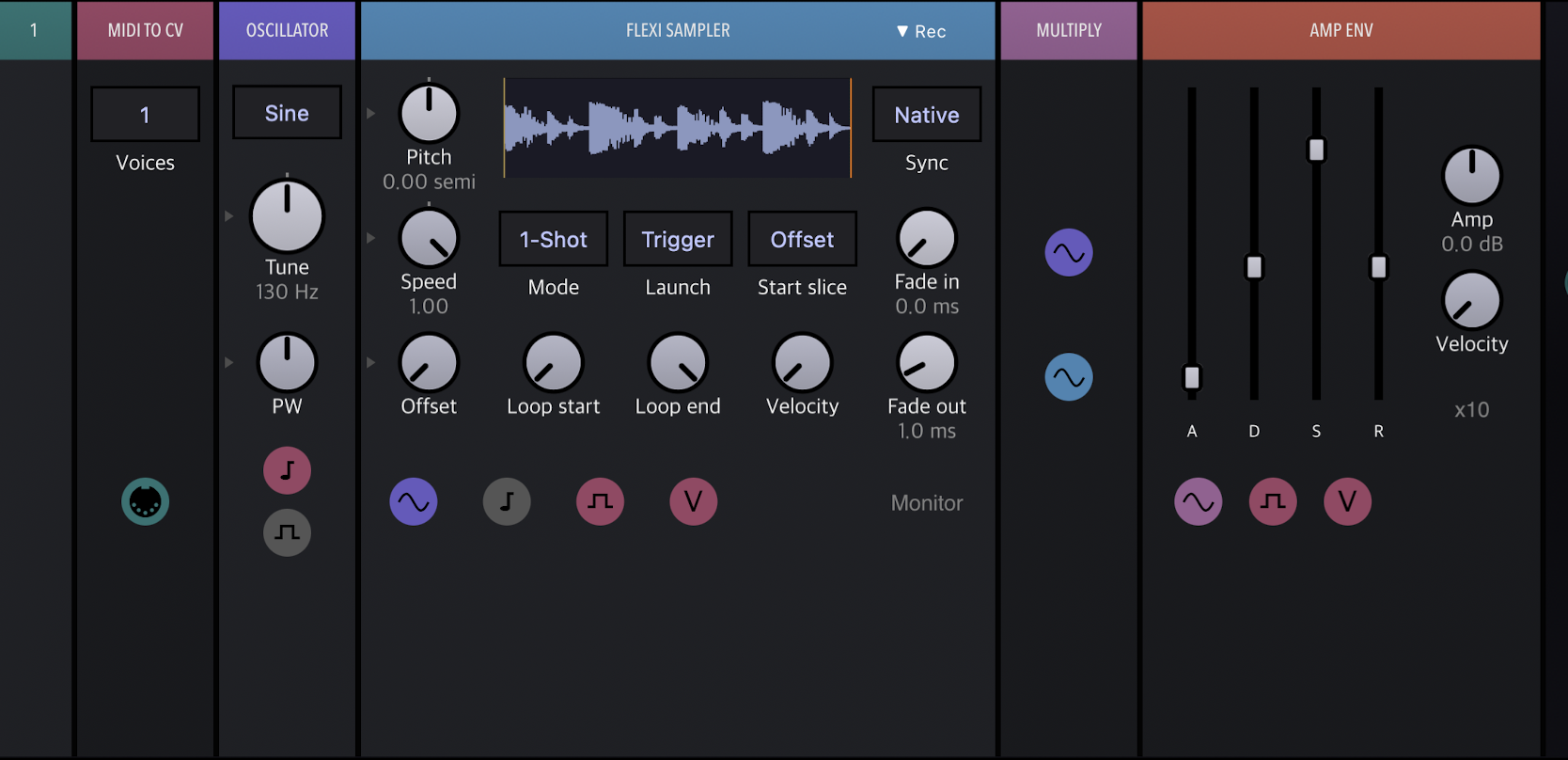
(Keyboard tracked Sine Oscillator ringmodding a sampled loop).
You had me at Dalek Voice! I'll mess around and see what I can come up with. Thanks for the idea and explanation!
Had a quick play and it's sounding and looking great! Feature request.... I've used TAL Sampler a lot on desktop and I love the way it simulates different vintage dacs at the voice level rather than at the output. It really does make a difference to how the instrument feels and there's nothing like it on iOS. TAL specifically simulates AM6070 (sp1200), EMU II and Akai SP950 dacs with limited controls but I did some quick research on Gemini and it looks like it would be very possible to build something similar in Audiokit using existing building blocks? Maybe just a single section that you can tweak the controls on for bit depth, sample rate, MuLaw, filter etc with hints or presets for different feels rather than dedicated accurate emulations?
Here's a link to my Gemini conversation - https://gemini.google.com/share/86432ea9d4ae It would absolutely rock my world!
How To Make Instruments in Mighty Synth Sampler + DMT Cymatics Presets Demo
I made a quick tutorial video showing off different ways to use the Sampler. Hopefully this well help people get up and running. More updates on the way!
Thanks Edhombre! I'll look into it.
The worlds that DMT is able to create are always astounding (the presets of course 😉). This set looks to be no different. Thanks for another great vid, you have a knack for them @MobyPixel
Thanks Squishy! I appreciate it! 🙌
Yeah, DMT seems to find hidden sounds in his AudioKit presets. 😆
Doug from The Sound Test Room is demoing Mighty Synth Sampler in a few hours! Come hang out live or catch the replay. 🤘
@MobyPixel bro….awesome update! I’ve been using it all morning, and was super surprised to see the update. What a great frkn app man.
Now it’s AuV arpeggiation!! + other stuff
Mighty Synth Sampler Update | New Arpeggiator & More | AUv3 Demo in AUM & Koala
v1.0.2
New Arpeggiator in AUv3, Import multiple SoundFonts simultaneously, and More! (iOS Available / macOS In Review)
• Added new Arpeggiator to Mighty MIDI AUv3!
• Added Import SoundFont support for multiple instruments as File, ZIP, or Folder
• Fixed AUv3 validation in Logic Pro for Mac
• Added Multi-sample import in Sampler
• Added octave ranges to keyboard in Sampler
• Added crop/trim to samples in Sampler
• Added per-sample loop toggle in Sampler
• Added WAV smpl chunk import (root + loop) in Sampler
• Added MIDI velocity dynamic range (user-configurable min/max)
• Added MIDI Learn manual CC entry
• Added MIDI Program Change
• Added Update button on Save Preset dialog
• Added "Tutorials & Resources" link in Settings
• Improved preset recall in AUv3
• Improved preset switching in AUv3
• Reduced stuck notes in AUv3
• Improved MIDI Panic to catch all notes
• Fixed Drive Mix MIDI CC jump
• Fixed Arp note-order
• Various other fixes and improvements
Thanks egobeats! I'm glad you're already putting it to good use! 🙌
Yeah man. Thank You. I asked Gemeni to propose some patch ideas using one of the bird samples as OSC 1 and it gave me some pretty interesting results for drastically different patch creation in Mighty Synth. One proposal was an ambient pad, a sub zero industrial bass, and an aggro alien lead. It provided me with the settings to dial in and everything. Really fun stuff.
Great Update! Look forward to testing it all out..
Love the included trail ride video too.. (reminds me that I have a new-ish action cam that I haven’t taken on a ride yet).. I ride nearly everyday and I love seeing other rider’s local loops.. can’t beat hopping on your bike in your driveway and hitting a sweet fun trail within a couple minutes from home.. no muss, no fuss.. just ride.. 🚵 keep ‘em coming..
@jwmmakerofmusic :Sound font alert!!!
Thanks, Royor! That's awesome you get to ride so regularly! It's definitely a perk having trails nearby. The camera is a DJI Action 4 so not totally new, but new to me. Thanks for the comment! Cheers! 🙌
😂 Lol!
I’ve just tried out importing SFZ banks, one as a zip I’d tried with the original release, and another as a folder. Both working. Thank you @MobyPixel, a great improvement!
Great update. There’s an intangible with this synth, and that’s that it feels good to play. It’s responsive. It’s also fairly simple to mess around with and cleanly designed.
Awesome! Thanks for trying it out!
Thanks, wagdog! I appreciate it!
More updates on the way. I hope everyone has a great summer! 😎
You too Mr Pixel!
As you mention actively working on the app, the “feel” of i.e. the attack/decay/release knobs isn’t ideal to me. What control law is used? Shorter times seem bunch to the bottom which smells too close to linear.
You smelled it correctly. It is linear. Only the Cutoff and Sustain values are logarithmic, everything else is linear. It does make sense to have those other ADSR values be log too. I'll see if I can change that without fudging the existing presets. In the meantime, if you drag up and down on the knobs you get finer adjustment which makes those tighter ranges easier to navigate. Thanks for the feedback!
SF2s imported into MS sound different than when they are loaded into other SF2 players like bs-16i or KQ Sampei. In MS the sound instantly dies when your finger lifts off the MS keyboard, there is no decay after lifting fingers off, the sound just dies. Yes ADSR can be adjusted inside MS but it doesn’t seem like you should have to do this to get the default sound. All SF2s loaded in MS act this way. Is this normal behavior?
Thanks
@MobyPixel
Been using it a lot lately. I made this horror instrument that sounds pretty cool- I noticed that my DSP sky rockets when I tweak with the effects- like 97% with just mighty synth. The preset uses the same sample on all three OSC.
Also, when I went to share the preset the zip included all of the samples I used for other instruments. I ended up just sending the original sample.
Patrick posted a video that's a great, quick overview of the MSS features.
Correct, the release time is not applied on import. I'll look into adding that! Eventually I'd like to have imported SF2s converted to SFZs so that you get access to all the synth parameters.
I'm glad you're finding the app useful! That track sounds awesome!
Where are you seeing the DSP jump (standalone or AUv3) and is it any parameter in particular?
When exporting a bank if you use "Auto-Generate" it should only export sounds used in the presets from that bank. If you select an actual bank like User Sounds as the "Sound Bank" it will pull all samples from that bank. This allows you to export sounds that are not included in the presets. "Auto-Generate" is what you want most of the time. If you were just trying to export 1 preset that isn't supported, only entire banks. If that is a feature you'd be interested in I can add that.
I am absolutely loving mighty sampler's sampler instruments. All of my last uploads feature custom instruments with mighty synth. It's opened a whole new dynamic with my samples.
@jwmmakerofmusic : You must LOVE this thing with your myriad sound fonts !
Very cool!