Loopy Pro: Create music, your way.
What is Loopy Pro? — Loopy Pro is a powerful, flexible, and intuitive live looper, sampler, clip launcher and DAW for iPhone and iPad. At its core, it allows you to record and layer sounds in real-time to create complex musical arrangements. But it doesn’t stop there—Loopy Pro offers advanced tools to customize your workflow, build dynamic performance setups, and create a seamless connection between instruments, effects, and external gear.
Use it for live looping, sequencing, arranging, mixing, and much more. Whether you're a live performer, a producer, or just experimenting with sound, Loopy Pro helps you take control of your creative process.
Download on the App StoreLoopy Pro is your all-in-one musical toolkit. Try it for free today.
WRECK - Sample Destroyer by Stephan Bolch (Released)

https://apps.apple.com/app/id6766505851
WRECK is a digital destruction unit — bitcrusher, sample rate reducer, and wavecycle mangler in one plugin.
BITCRUSHER — Reduce bit depth from 24 down to 1 bit. Five quantization modes (Round, Truncate, Floor, AM-Biased, Log) and three dither types (Off, TPDF, Noise-Shaped).
SAMPLE RATE — Downsample from 44.1kHz all the way down to audio-range rates. Jitter adds unstable clock feel.
WAVECYCLE MANGLER — Operates at the waveform cycle level. Five modes: Off, Formant, Reform, Hold, Reverse — cuts, holds, reverses, and reshapes individual wavecycles.
DRIVE / BIAS — Input saturation and DC offset before the destruction chain.
PRE / POST FILTER — Lowpass filters before and after the damage. Shape what goes in and what comes out.
ALIASING — Control anti-aliasing amount. Turn it up for harsh digital artifacts.
OVERSAMPLE — Off, 2x, or 4x.
MIX — Dry/wet blend.
OUTPUT — Output level.
Comments
Some sound I get from this is just jaw dropping but, the always present: but. I have issues with frozen sliders and also the app just disappeared for me on one occasion. Trying it in Cubasis this time.
Not sure how I would go about and repeat it but now I mentioned it at least.
Can't say I've ever messed with something that does the wavecycle thing. Interesting.
is this supposed to work as plugin in logic on mac? because it does not show up for me in the plug-in manager
No it's not, it's for iPhone and iPad.
It does say in the Compatibility section that it runs on Mac. Must be Silicon Mac though, @nuno_agogo are you using a Silicon Mac?
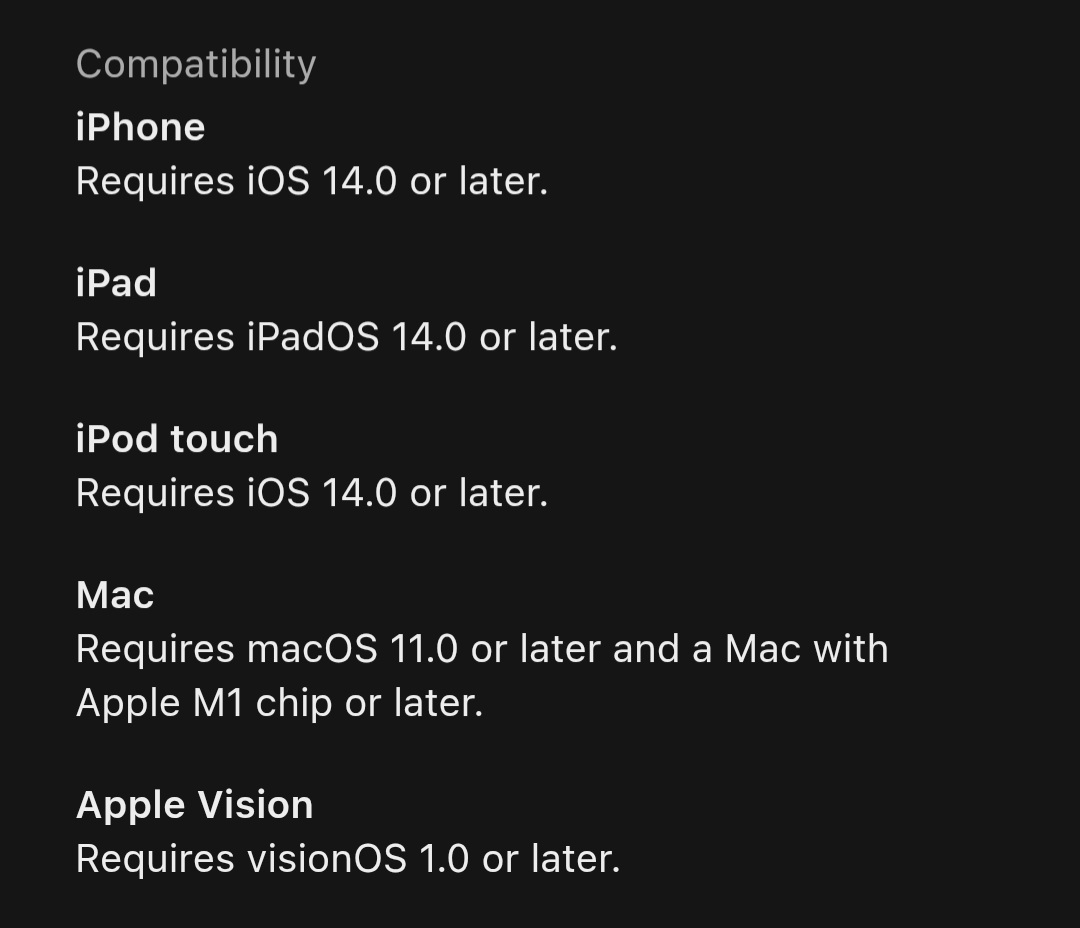
Yeah I only looked right under the top banner where, if intended for Mac - there would be a symbol for it.
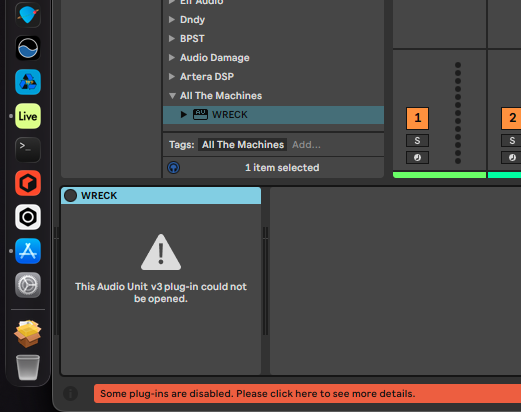
Anyway, tried it as I have nothing better to do. Here's what it looks like in Ableton Lite (latest). In stand alone it did open so somethings off I guess.
Ah @AllTheMachines what's the story?
using silicon mac
It seems a lot of these ‘universal’ apps do that. It would probably be best if devs were able to include standard AUv2 or VST plugins in the app packages, I can’t recall which one did it ages ago but I’m sure I’ve seen it…
So commonly apps that claim, in the AppStore compatibility section, to run as AUv3 on Mac, actually don't? That kinda sucks for users who buy them expecting them to run on Mac. I know it does also say in this case 'Not Verified for Mac', but some (most? many? Not sure...) apps that say that do in fact work on Mac. All mega confusing.
I have a feeling that it’s a checkbox buried somewhere in the app submission process. If a dev really wants to not allow people to use it on Mac, they’ll hunt it out and uncheck it, if not they might just miss it as there seems to be plenty that say that but just don’t function reliably. Even when they sometimes load nicely, other times you get that blank panel with the warning in Ableton.
Kinda witches brew hotch potch of ‘standards’ has fragmented things for devs I think…
Hmm, yeah, that's bad for the platform then for sure
So I guess that's two things to double check, if possible, every time something is released a) is it available in all territories b) does it actually run on Mac, if it claims it does. Would be useful,perhaps, if devs actually specifically confirmed these things in the AppStore description.
@Krupa - yes, it's a checkbox, so in theory, that's all you need to do. Or, remember to uncheck it, but you need to know it's there in the first place...
I've seen a lot of (dare I say...) new developers claim an app is "universal" when all they've probably done is checked the box.
And as @Gavinski says, the "not verified for Mac" is the giveaway in this case. Actual Mac screenshots is another massive clue
A "universal purchase" actually means there are two apps with the same name, one for iOS, one for macOS, but you only have to buy it once. In this case, the developer will submit two different builds, and one of the advantages is that the macOS version will also run on the older Silicon Macs. All my apps since the start of 2025 are Universal iOS / macOS purchases.
I know the terminology is confusing, but it's worth knowing the difference, if not only to appreciate a real universal purchase requires extra development work, testing and submission faffing
While I'm here and you mention Ableton, there's a known issue with apps developed using the JUCE Framework and Live that results in a "white" / blank window when you close and re-open the plugin editor. Only workaround (and it sucks...) is to re-add the plugin and leave the window open for your entire session. Last time I checked, there was a standoff between the JUCE guys and Ableton unable to acknowledge who was to blame / needed to fix it, with the poor developers and their customers stuck in the middle...
Useful Rob, thnx a lot
Yeah, I think at first I assumed it was a shoe in, but once this error started popping up regularly I realised that there was something under the hood that wasn’t quite so simple from the dev’s point of view. Nice one Rob 👍
Hey everyone,
Got a report that WRECK can crash in AUM when switching between audio devices (e.g. AirPods to an audio interface or vice versa). I've found the cause — a buffer size mismatch during the audio route change — and a fix is coming soon.
If you've hit this issue (or anything similar with sample rate / buffer size changes on iOS) and would like to help test the fix via TestFlight, sign up here: all-the-machines.com/contact?category=betatesting
Also a heads up — some of you may have noticed WRECK showing up as a plugin option on macOS. That was never intended, I just accidentally had some checkboxes ticked on App Store Connect. WRECK is an iOS app (Standalone + AUv3). I've fixed the listing, but if anyone bought it thinking it runs as a plugin inside a DAW on macOS, you're absolutely entitled to a refund — just request one through Apple.
Thanks,
Steve
Note that Apple often deny legit refund requests btw, many territories don't have automatic right of withdrawal, like the EU does! I can tell you from first hand experience that the China AppStore, for example, is not that easy to get refunds from, unfortunately. Many devs seem unaware of this situation, if they come from the EU or UK. But this non-automatic refund situation is why it's important stuff gets done properly and communicated properly right from the get-go.
Actually, after a bit of checking, it does seem that only the EU and the UK have automatic Right of Withdrawal on the AppStore. That's about 30 countries only, out of the 175 countries the AppStore operates in. 175 countries number comes from here, for anyone curious:
https://www.apple.com/newsroom/2026/01/2025-marked-a-record-breaking-year-for-apple-services/