Loopy Pro: Create music, your way.

What is Loopy Pro?Loopy Pro is a powerful, flexible, and intuitive live looper, sampler, clip launcher and DAW for iPhone and iPad. At its core, it allows you to record and layer sounds in real-time to create complex musical arrangements. But it doesn’t stop there—Loopy Pro offers advanced tools to customize your workflow, build dynamic performance setups, and create a seamless connection between instruments, effects, and external gear.

Use it for live looping, sequencing, arranging, mixing, and much more. Whether you're a live performer, a producer, or just experimenting with sound, Loopy Pro helps you take control of your creative process.

Download on the App Store

Loopy Pro is your all-in-one musical toolkit. Try it for free today.

SynthMaster 2 for iPad v1.1.2 update released

12930313335

Comments

  • edited May 26

    Hi @kv331audio_bulent,
    Thanks for the update.
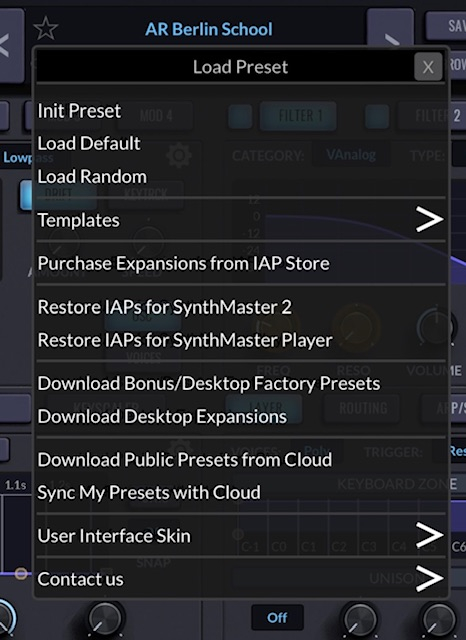
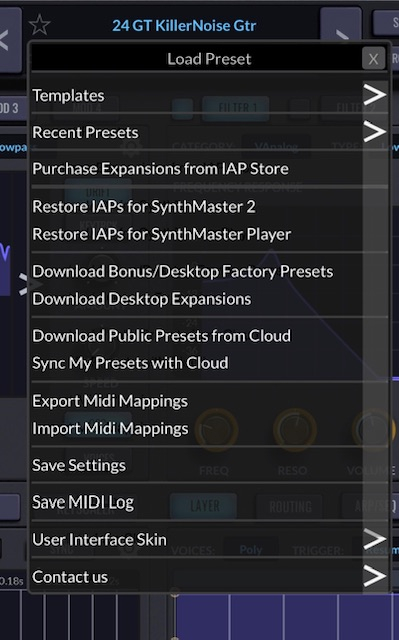
    I have just found my MIDI map has now disappeared, there is now no Import MIDI Mappings or Export MIDI Mappings in the Preset drop down menu and I don’t want to have to assign each controller all over again.
    Mike

    AFTER UPDATE
    BEFORE UPDATE
  • @rapidfire said:
    Hi @kv331audio_bulent,
    Thanks for the update.
    I have just found my MIDI map has now disappeared, there is now no Import MIDI Mappings or Export MIDI Mappings in the Preset drop down menu and I don’t want to have to assign each controller all over again.
    Mike

    Looking into this. will release another update tomorrow.

    I will add this functionality to SM3 as well.

  • @kv331audio_bulent said:

    @rapidfire said:
    Hi @kv331audio_bulent,
    Thanks for the update.
    I have just found my MIDI map has now disappeared, there is now no Import MIDI Mappings or Export MIDI Mappings in the Preset drop down menu and I don’t want to have to assign each controller all over again.
    Mike

    Looking into this. will release another update tomorrow.

    I will add this functionality to SM3 as well.

    Hi @kv331audio_bulent,
    Thank you 🍻

  • edited May 26

    BTW, I just realized this longstanding bug (exists in all products, win/mac/ios)

    If you have multiple AUv3/plugin instances and add global MIDI mapping to one of them, it's not added to the instances
    Likewise, if you remove a global MIDI mapping from one instance, it's not removed from the others.

    Fixing this as well, in SM2 and SM3 Player.

    (I will work on SM1 later as well, when I have time)

  • edited May 26

    Hi @kv331audio_bulent

    I have a major problem with Logic Pro for iPad and this latest update.

    The majority of my projects that use SynthMaster 2 (which is most of them) crash out when loading following this update. Checking some small projects that have a few tracks and these load but immediately tell me synthmaster 2 “Audio unit extension quit”. I have found that if a plugin crashes on a large project, logic just gives up and crashes.

    You can see this behaviour if you create a new project in Logic, add an instance of synthmaster 2, quit and reopen the project.

    Obviously, having in-progress projects that fail to load is a huge issue for me.

    Can you reproduce?

  • edited May 27

    Hi @kv331audio_bulent

    I decided to uninstall Synthmaster 2 on my iPad and by doing so, the projects that were crashing now load and Logic tells me the plugin is no longer available so at least these projects can be recovered but with missing sounds.

    I then reinstalled synthmaster 2, reinstalled all the preset packs and the few projects that I tested in Logic fail to load and crash out.

    I guess I just needed to confirm it was Synthmaster 2 causing these issues and it is.

    Although I made sure to backup all my user presets, I seem to have lost my favourites as I couldn’t see any way to export these.

    Also reinstalling “My presets” didn’t seem to put them back in where they were in My Presets. I eventually found them at the bottom of the list in User Presets.

    Edit: I deleted 4 instances of Synthmaster 2 from a failing logic project, leaving 1 remaining and after re-installing Synthmaster, the project now loads but the remaining Synthmaster 2 instance is blank and does not make any sound.

  • edited May 27

    I just found out that about 1 in 10 times, when I open the above project with 1 instance of Synthmaster 2, it works. Every other time, I get a blank plugin with no sound.

  • @timforsyth . Did you open the stand-alone SynthMaster2 before loading the AUv3, as mentioned here?

  • Also lost all favorites. Again.

  • @musikeer said:
    Also lost all favorites. Again.

    Actually, you didn't. I forgot to move the FavouritePresets.txt file from AppGroup documents folder to user documents folder. Fixing that now.

  • edited May 27

    @timforsyth said:
    I just found out that about 1 in 10 times, when I open the above project with 1 instance of Synthmaster 2, it works. Every other time, I get a blank plugin with no sound.

    I did my tests with Logic Pro with multiple instances. So far, it's been running smoothly:

    Does reloading the extension when you get the crash help?

  • @uncledave said:
    @timforsyth . Did you open the stand-alone SynthMaster2 before loading the AUv3, as mentioned here?

    That's very important.

  • edited May 27

    @kv331audio_bulent said:

    @uncledave said:
    @timforsyth . Did you open the stand-alone SynthMaster2 before loading the AUv3, as mentioned here?

    That's very important.

    Yeah I did. So many app updates need this that I do it out of habit.

    I've removed and reinstalled Synthmaster 2 several times, on reinstallation I have always opened the app standalone, checked I am registered and downloaded all the presets before opening logic.

    To be clear, this happens on new projects as well but instead of a blank plugin it crashes on load.

    Here’s a video of it in action

    https://www.dropbox.com/scl/fi/fwc0edwnnlx6wa2o4c0vp/ScreenRecording_05-27-2026-09-14-00_1.MP4?rlkey=i6fo7y7qv848p2pe9it594mzz&st=hkap811h&dl=0

    This is running on an M1 12.9" Pro and I'm up to date with iPADOS 26.5

  • edited May 27

    Once I can reproduce it expect a new update.

    EDIT: the crash is happening as the daw is trying to set the current au factory preset during initialization

    Thanks!

  • CC74 isn't responded to @kv331audio_bulent .
    Standard "hello world" of patching MPE, CC74 affecting a low pass filter. It does nothing at all regardless of the depth.

  • @Fantastic said:
    CC74 isn't responded to @kv331audio_bulent .
    Standard "hello world" of patching MPE, CC74 affecting a low pass filter. It does nothing at all regardless of the depth.

    Hi @Fantastic,
    I reported the disappearance of the Midi Mapping and the inability to Export/Import MIDI Maps, @kv331audio_bulent said a new update would be issued today
    Mike

  • @rapidfire said:

    @Fantastic said:
    CC74 isn't responded to @kv331audio_bulent .
    Standard "hello world" of patching MPE, CC74 affecting a low pass filter. It does nothing at all regardless of the depth.

    Hi @Fantastic,
    I reported the disappearance of the Midi Mapping and the inability to Export/Import MIDI Maps, @kv331audio_bulent said a new update would be issued today
    Mike

    This isn't midi mapping though, it's getting modulations to work.

  • @Fantastic said:

    @rapidfire said:

    @Fantastic said:
    CC74 isn't responded to @kv331audio_bulent .
    Standard "hello world" of patching MPE, CC74 affecting a low pass filter. It does nothing at all regardless of the depth.

    Hi @Fantastic,
    I reported the disappearance of the Midi Mapping and the inability to Export/Import MIDI Maps, @kv331audio_bulent said a new update would be issued today
    Mike

    This isn't midi mapping though, it's getting modulations to work.

    Ah, ok. I assigned CC71 to the Filter Frequency and since the latest update the Frequency control no longer responds to MIDI messages sent from Cubasis 3.

  • @rapidfire said:

    @Fantastic said:

    @rapidfire said:

    @Fantastic said:
    CC74 isn't responded to @kv331audio_bulent .
    Standard "hello world" of patching MPE, CC74 affecting a low pass filter. It does nothing at all regardless of the depth.

    Hi @Fantastic,
    I reported the disappearance of the Midi Mapping and the inability to Export/Import MIDI Maps, @kv331audio_bulent said a new update would be issued today
    Mike

    This isn't midi mapping though, it's getting modulations to work.

    Ah, ok. I assigned CC71 to the Filter Frequency and since the latest update the Frequency control no longer responds to MIDI messages sent from Cubasis 3.

    Ah ok so maybe they are the same issue, with regards that the filter frequency also does not respond to my modulation. In my case I'm using the add modulation feature, not midi mapping, but we are talking about the same thing as far as the filter not being controlled.

  • @Fantastic said:

    @rapidfire said:

    @Fantastic said:

    @rapidfire said:

    @Fantastic said:
    CC74 isn't responded to @kv331audio_bulent .
    Standard "hello world" of patching MPE, CC74 affecting a low pass filter. It does nothing at all regardless of the depth.

    Hi @Fantastic,
    I reported the disappearance of the Midi Mapping and the inability to Export/Import MIDI Maps, @kv331audio_bulent said a new update would be issued today
    Mike

    This isn't midi mapping though, it's getting modulations to work.

    Ah, ok. I assigned CC71 to the Filter Frequency and since the latest update the Frequency control no longer responds to MIDI messages sent from Cubasis 3.

    Ah ok so maybe they are the same issue, with regards that the filter frequency also does not respond to my modulation. In my case I'm using the add modulation feature, not midi mapping, but we are talking about the same thing as far as the filter not being controlled.

    Hopefully the new update should fix things, I keep checking the App Store.

  • @Fantastic said:
    CC74 isn't responded to @kv331audio_bulent .
    Standard "hello world" of patching MPE, CC74 affecting a low pass filter. It does nothing at all regardless of the depth.

    I know what CC74 is :)

    We have a "Map CC74 to CC1 setting" in SynthMaster One/2. Somehow, that setting was not visible on the iOS version of SynthMaster 2, so just added that. Just turn it off. If it's on, CC74 is changed to CC1 by the synth:

  • edited May 28

    @rapidfire said:
    Hopefully the new update should fix things, I keep checking the App Store.

    Hopefuly it did. I look into the system crash logs, and apparently it was a race condition / multithreaded issue. I am planning to submit a new update tonight my time (GMT + 3)

  • Thank you @kv331audio_bulent,
    It’s good to have a devoted developer that we can easily contact, there are many that stay hidden and silent.
    Mike

  • @kv331audio_bulent said:

    @Fantastic said:
    CC74 isn't responded to @kv331audio_bulent .
    Standard "hello world" of patching MPE, CC74 affecting a low pass filter. It does nothing at all regardless of the depth.

    I know what CC74 is :)

    We have a "Map CC74 to CC1 setting" in SynthMaster One/2. Somehow, that setting was not visible on the iOS version of SynthMaster 2, so just added that. Just turn it off. If it's on, CC74 is changed to CC1 by the synth:

    Thanks that makes sense , btw I wasn't suggesting you didn't know. Obviously you know. I was describing that MY standard "hello world" of patching MPE, which is to say, the first thing that I am likely to do, is map CC74 to the filter

  • @Fantastic said:

    @kv331audio_bulent said:

    @Fantastic said:
    CC74 isn't responded to @kv331audio_bulent .
    Standard "hello world" of patching MPE, CC74 affecting a low pass filter. It does nothing at all regardless of the depth.

    I know what CC74 is :)

    We have a "Map CC74 to CC1 setting" in SynthMaster One/2. Somehow, that setting was not visible on the iOS version of SynthMaster 2, so just added that. Just turn it off. If it's on, CC74 is changed to CC1 by the synth:

    Thanks that makes sense , btw I wasn't suggesting you didn't know. Obviously you know. I was describing that MY standard "hello world" of patching MPE, which is to say, the first thing that I am likely to do, is map CC74 to the filter

    A Request for future: would it be possible to make pitchbend range a global setting? or if not, make it that if global midi channel is set MPE that pitchbend range defaults to 48 (Though that would need to be overrideable) ? At the moment it seems if I load a pre existing preset I have to always change pitchbend range.

  • edited May 28

    @Fantastic said:
    A Request for future: would it be possible to make pitchbend range a global setting? or if not, make it that if global midi channel is set MPE that pitchbend range defaults to 48 (Though that would need to be overrideable) ? At the moment it seems if I load a pre existing preset I have to always change pitchbend range.

    You can already do that from Settings -> Audio Engine. By the default global pitch bend range is "Preset". You can set it to another value so that it is set globally for all presets.

  • @kv331audio_bulent said:

    @Fantastic said:
    A Request for future: would it be possible to make pitchbend range a global setting? or if not, make it that if global midi channel is set MPE that pitchbend range defaults to 48 (Though that would need to be overrideable) ? At the moment it seems if I load a pre existing preset I have to always change pitchbend range.

    You can already do that from Settings -> Audio Engine. By the default global pitch bend range is "Preset". You can set it to another value so that it is set globally for all presets.

    I find the choice of using a long pop-up menu to select such a wide value range a bit of a mystery when a slider or knob could have done the same thing?!

  • @Samu said:
    I find the choice of using a long pop-up menu to select such a wide value range a bit of a mystery when a slider or knob could have done the same thing?!

    Adding up/down arrows would be much better, right?

  • @kv331audio_bulent said:

    @Samu said:
    I find the choice of using a long pop-up menu to select such a wide value range a bit of a mystery when a slider or knob could have done the same thing?!

    Adding up/down arrows would be much better, right?

    That would definitely work for smaller adjustments and maybe optionally type in a value for larger changes?

  • edited May 29

    @Samu said:
    That would definitely work for smaller adjustments and maybe optionally type in a value for larger changes?

    That's difficult to implement for now.

    But, when you long press a dropdown control (press longer than 0.5 seconds), you can change its value like a slider/knob. That's already in place.

Sign In or Register to comment.