Loopy Pro: Create music, your way.
What is Loopy Pro? — Loopy Pro is a powerful, flexible, and intuitive live looper, sampler, clip launcher and DAW for iPhone and iPad. At its core, it allows you to record and layer sounds in real-time to create complex musical arrangements. But it doesn’t stop there—Loopy Pro offers advanced tools to customize your workflow, build dynamic performance setups, and create a seamless connection between instruments, effects, and external gear.
Use it for live looping, sequencing, arranging, mixing, and much more. Whether you're a live performer, a producer, or just experimenting with sound, Loopy Pro helps you take control of your creative process.
Download on the App StoreLoopy Pro is your all-in-one musical toolkit. Try it for free today.
ChordPond by Steffen Mølgaard Larsen (Released)

https://apps.apple.com/app/id6769392239
CHORDPOND - Visual Chord-Tile Sequencer
CHORDPOND is a tactile chord sequencer for iPad and iPhone where progressions become paths through chord tiles. Drop a chord on the canvas, draw a path between tiles, hit play - and send the MIDI to any synth on your device or to any AUv3 host.
Built for songwriters, producers, live performers, and playful souls ChordPond turns chord progressions into something you can see, touch, and rearrange in seconds.
Key Features:
- Visual chord tiles on a freeform canvas
- Scale-aware voicings, tensions, inversions, and bass control
- Multiple play modes per tile - Hold, Stutter, Roll / Arp, Motif
- Paths: draw the order tiles trigger in — with per-node duration, gate, and ratchet
- Scenes: multiple progressions per project, switch on the fly
- Progression presets - jazz, pop, modal, and more, applied with one tap
- Per-tile step grid with user notes, velocity, micro-timing, and ratchets
- AUv3 MIDI processor - embeds the full editor in any AUv3 host, follows host transport and tempo, sample-accurate MIDI output
- CoreMIDI to external instruments
- Shared project library between the standalone app and the AUv3 plugin (App Group)
- Touch-optimized performance controls
- Designed for iPhone, iPad, MacOS (Catalyst)
ChordPond is intentionally focused - no built-in synth, no clutter.
Just chords, paths, scenes, and MIDI out to whatever instruments you love.
Designed for ideas.
Built for progression.
Details:
Universal: Yes
Minimum OS version: 17.0
Comments
Pretty good actually very easy to get some progressions going with strum or arpeggios what have you. There's a few improvements possible for sure but I was up and running in no time.
The background can't be set in the Auv3 version which is hella annoying, I really don't want an image and being able to select not to would be great.
How easy is the scene switching? (I’m starting to figure out a way to have simple chord progressions for jams, but really would like ab sections so we don’t get stuck in endless Am loops)
I just wrote on his FB post that there should be automation for that. As it is now you can only switch manually. It's a really good start, better than most chord generators in this price range. I'm hopeful for improvements as it's the guy making Gorilla and Raven synths and he seem fairly active, I think.
Can you undo once dropped a chord haven’t found an option ? Or just delete ? Also chord circle sizes could become an issue on smaller screens with this ? Hopefully they can be adjusted. Drawing in connections seems a bit hit and miss having an arrow showing path movement would be good.
Can you create custom chords, I can’t tell from the description and AppStore pictures?
Does it have randomisation options?
🙏
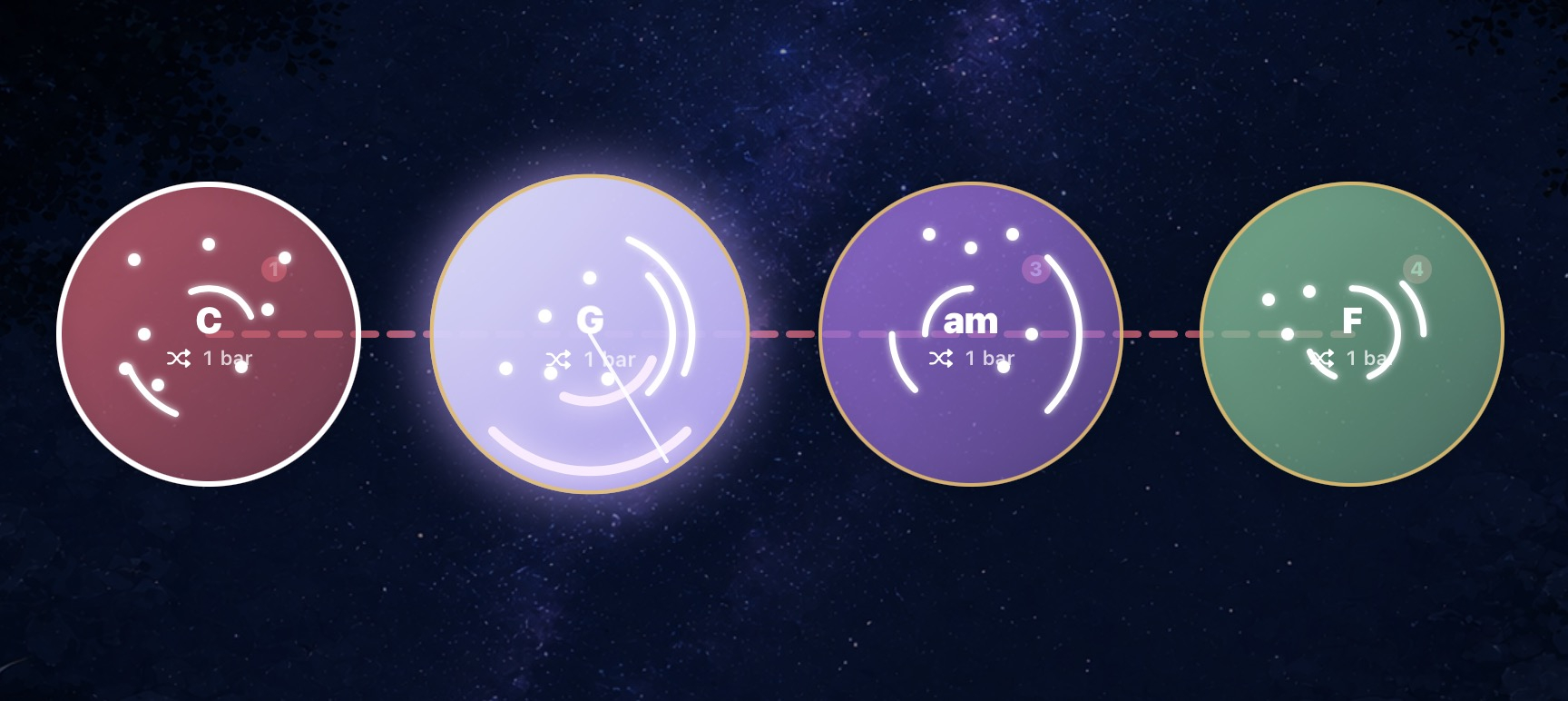
There's some but not for a progression but if you e.g choose a pre-made progression you can randomise how notes are played. See image: the white dots are randomly generated and also the playback mode has a random position (beside: arp, strum, stutter and some more)
Takes me back to the beginning of iOS music, nice simple cheap apps that are fun to play with.
I really like the ui
Absolutely all though I've not been that long in the game (6-7 years)
I got a reply from the developer which I really liked.
I kind of liked this, I duplicated progression and made one keys and one more plucky. Maybe not the music I wanna do but it sound pretty neat.
Love ur vibe @Pxlhg where is that bass coming from?!
Thank you, gotta be the knock plug on the drums as there's no bass on the synths. I've hardly analysed it myself, just a quick and dirty setup. It's really fast, as I said before, to get going and to make changes with this one.
This is a nice little app, would love to see more scales though...
Thank you!
Just bumping my own question. Anyone know?
You can clear the active circle and draw whatever you want but it's kinda of not meant to I think because if you close and
open again, the notes are not there to be edited again (they still sound), a bug or a feature? Beats me. You can add and move notes over any chord.
Edit: you can add an empty circle to start from, that's probably better.
Kind of hoped you could move the 'stones' (?) around easily. Seems not? Would be cool if you could flick them off the screen or something to delete them. Seems you have to go into the settings for an individual chord to do that, or am I missing something?
Cool, thanks @Pxlhg.
Long press on the circles to move them
Tried that and it didn't work, but it does now. I guess I wasn't pressing long enough, thnx for putting me right
It's definitely fiddly, I get hit and miss results, seems like it needs optimizing
I so want this to move from scene to scene by internal or external sequencer (and to have more scales - or even custom scale)
Other than that it works as advertised, though a bit fiddly I appreciate little details like Drop-2 very much.
V1.1 is on the way, what it entails I do not know. I think it's pretty awesome but with some first release flaws.
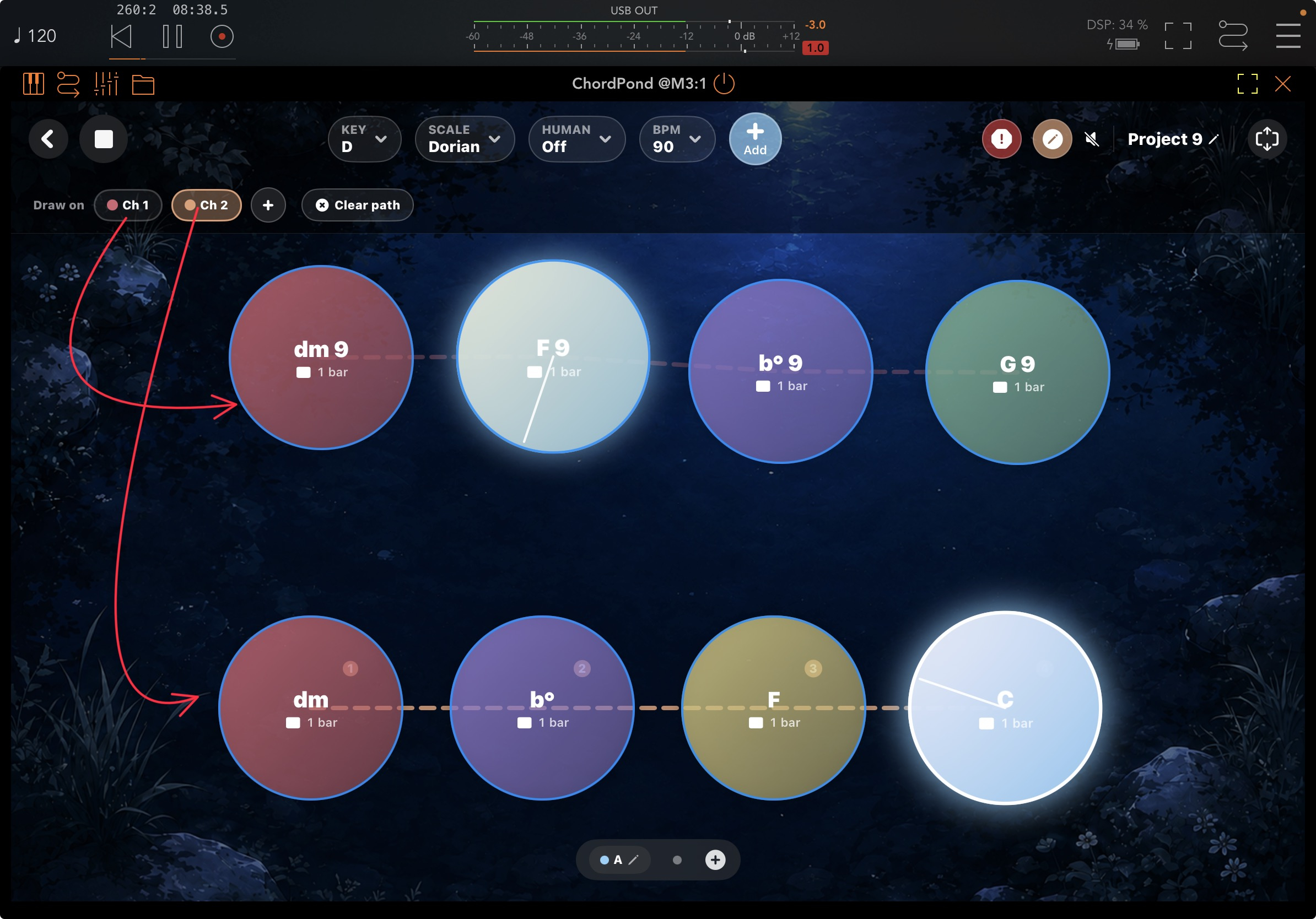
You can have two chord progression on the same scene with different channels. On the example I just added two from the presets so they aren't maybe the best choice, but this is really powerful. Select the channel you want and press clear path, then draw a (new) line.
>
For not being your preferred style i was digging that beat.
I think I'm about to cave on this one…
Save developer as Gorilla Synth and Raven Synth.
Video by Dev
Can u not audition the chords accessed via the + button by tapping on them? I remember trying this yesterday and thinking it should work but it didn't. Audition button was on btw
No midi whatsoever in Logic Pro. Any idea? Is there a way to contact the dev?