Loopy Pro: Create music, your way.
What is Loopy Pro? — Loopy Pro is a powerful, flexible, and intuitive live looper, sampler, clip launcher and DAW for iPhone and iPad. At its core, it allows you to record and layer sounds in real-time to create complex musical arrangements. But it doesn’t stop there—Loopy Pro offers advanced tools to customize your workflow, build dynamic performance setups, and create a seamless connection between instruments, effects, and external gear.
Use it for live looping, sequencing, arranging, mixing, and much more. Whether you're a live performer, a producer, or just experimenting with sound, Loopy Pro helps you take control of your creative process.
Download on the App StoreLoopy Pro is your all-in-one musical toolkit. Try it for free today.
Comments
Can not reproduce this one. I created and saved 2 separate MIDI Mappings. and switched between them, no issues so far in standalone or AUv3. and the settings is persisted across StandAlone and AUv3.
Hi @kv331audio_bulent,
I created a new map today and I exported it to Files, I removed all the MIDI CCs from SM2, I then attempted to Import Mapping but nothing happened.
My video shows my original MIDI Map that I have always used.
Mike
https://dropbox.com/scl/fi/kgepindcodesdxn8qns3m/Video-31-05-2026-10-46-10-am.mov?rlkey=zep1k1ls8hv66tc1c5deih3fu&st=wo84gz2m&dl=0
If I find anything else after Tuesday I'll let you know @kv331audio_bulent but those were the two most significant that prevented me from making the most of SM2, modulation editing, and the sustain. When the editing then works, put together with what were always excellent presets, it becomes an equal first choice synth, very looking forward to this version.
Could you send me that mapping file? Is the file under SynthMaster2 documents folder or somewhere else? I noticed that there was a bug reading files outside SynthMaster 2 documents folder.
Hi @kv331audio_bulent,
The File is in a separate folder, whenever I Export a Map I am always directed to the Files app instead of a specific folder, that’s why the file is outside Synthmaster.
OK that explains the issue. Anyway, this issue is also fixed in the next update. Thank you for your patience
Try moving the file under SynthMaster 2 \ MidiLearn, then it will be loaded.
@kv331audio_bulent, I thank you a thousand times, the moment I touched the map in its new file position, SM2 instantly opened with all parameters assigned 🎉🎊🎈even Frequency CC74 👍
Mike
I am also adding a very critical memory guard that prevents the AUv3 from crashing when there is not enough system memory available. Right now, the threshold is 80 MB, but that can be made a global system setting:
v1.0.25 is on the AppStore now:
NEW FEATURES:
BUG FIXES:
@kv331audio_bulent thanks for the switching presets toggle. Going through presets is much faster now 🙂
Thank you @kv331audio_bulent for all the recent continuous work you have put into making Synthmaster 2 more reliable and keeping it up to date with today’s music technology, it really is a true power synth and one that will continue to be used for many years to come.
Mike
You are welcome guys. I will have another update today, because looks like there are still some issues regarding saving presets, and overwriting them.
I hope our efforts pay off, because we are literally trying to survive, business is still not generating sufficient enough to pay our bills (It's just me and my brother now, we had to let go other employees). and I honestly believe that we don't deserve this with these products...
I'm really sorry to hear that - I hope you guys can turn the corner.
Everyone here hopes the best I'm sure. It might be that the extra effort on ipad will reap future desktop benefits as well, as it seems to me, that the competition on desktop is tougher because there's so many contenders to sort of fight for attention against, and even after Serum, Pigments, Phase Plant, that Surge XT is free, and Vital is freemium, never mind whatever I'm forgetting, and all the other kinds of synths that are not even directly comparable but take marketshare. Whereas, on ipad, I don't think anything other than Tera Pro is as comprehensive as far as multi-engine/algorithm/synthesis types. As said plenty of times before, the bugs kept me away from singing that SM2 was really good, because I was prevented from being able to use it. The modulation and sustain fixes alone make it for me joint top choice synth on the platform, because the presets were always beautiful sounding and now thats added to being able to either tweak those appropriately or design from scratch.
I don't know if while SM3 for the platform is in longer development we might see other updates, or IAP unlocks that give us additional reasons to promote and to support. Or if that takes away from SM3's eventual offering – might be worth it? Wavetable warping feature? The wavetable editor getting added to SM2? Granular in SM2? Each one as an unlock? If it takes a certain number of months or weeks to finish any one such module and that can get added to SM2 rather than waiting for the whole of SM3 to be finished, and bigger such modules might be say for example 10 euros, and smaller ones 5 euros, just making up numbers, I'm pretty sure most of us would buy those, and still buy SM3 because its still a different scale offering. With Tera the IAPs at one point were coming every few months and they were pretty much all unlocking of synthesis type modules, most of which were the ports of FM7 and Mutable Instruments.
Do you have a tipjar for whatever that might be worth? Personally I'm broke but someone on here might be rich and generous
I am also sorry hear that, there is more to Synthmaster 2 than meets the eye, by just changing the wavetables alone can create a whole new set of awesome presets, this really is a “does it all” synth.
I really hope things pick up for you and that the new SM3 ‘synth’ when released will make your products even more popular, my money is waiting to buy it, and from reading the past comments - so are many others, I know it will be more powerful than SM2, but more importantly - we need you there too.
Mike🍻
Newest 1.1.1 update, and favorites are lost again. I have to have this most-used app be reliable again! And yes, opened the stand-alone first. The favorites txt file is now missing from the user documents folder.
Just updated SM2, I made a folder called Mikes Presets a few years ago, I was able to Save Preset As, name it and select which bank to save it to before the last few updates, but now I can only Save Preset As and I am directed to the Presets folder, when I check Files > On My iPad > Synthmaster 2, I can see two folders with my name, they have the same presets in each folder. When I select just the Presets folder, there is another folder with my name on it along with mixed up copies of my saved presets? If I select Mikes folder to save the preset to it does not show in the Browser? I am tempted to rearrange these presets into one folder but I am worried I will mess the whole preset management up completely and loose trace of my presets, each time another preset is Saved As, it just goes into the folder named Presets instead of my bank?
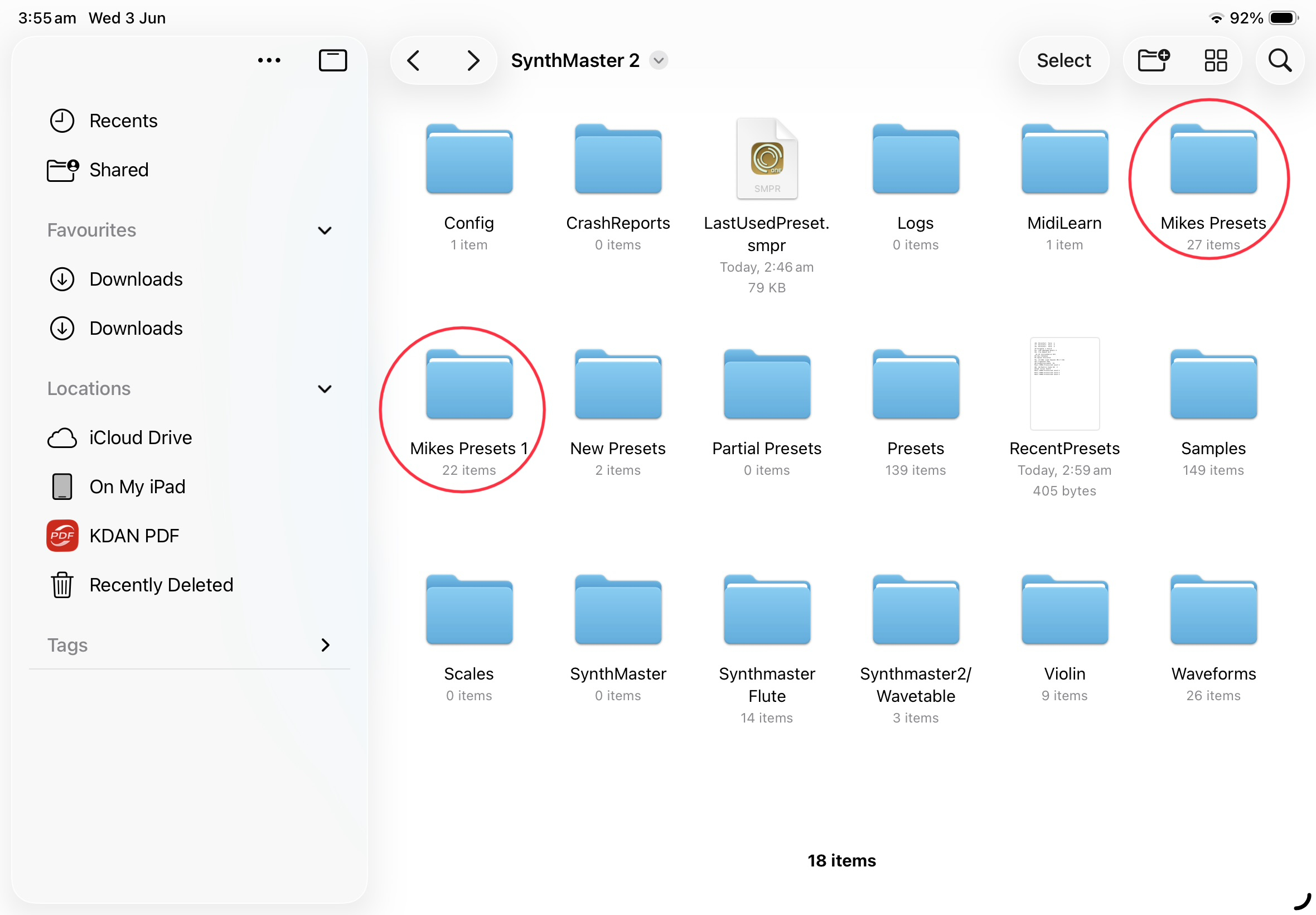
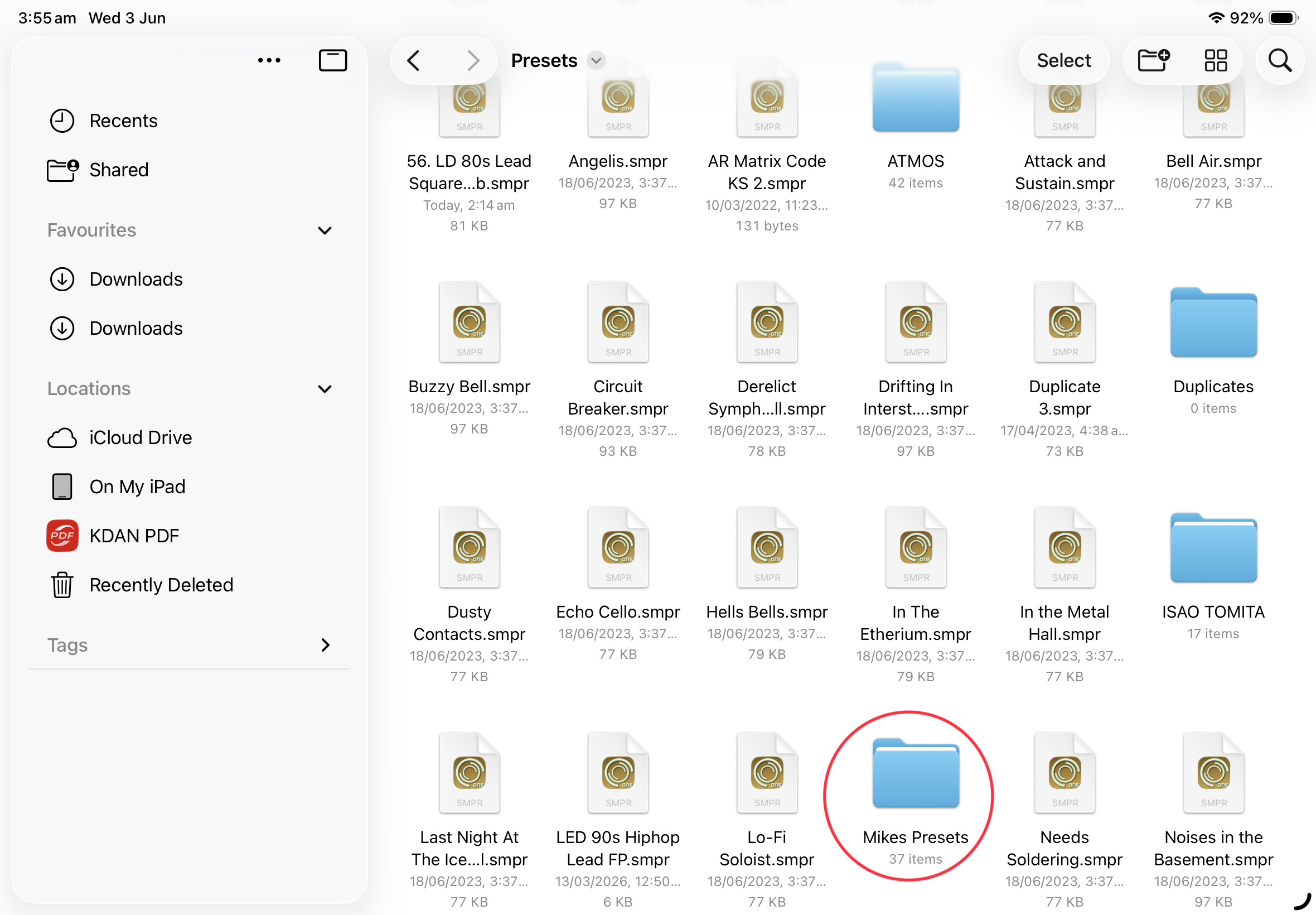
If I am doing something wrong here I would appreciate being shown the correct way to save my presets into my named folder.
Btw, I do name the intended bank location for my Save As preset in the INFO tab.
I sincerely apologise for this, this time there was indeed a bug. I don't know how to recover though. did you have any backups?
Save Preset As means the preset is not in the database.
IMPORTANT NOTE 1: There are certain root folders for Presets, Waveforms and Samples:
Presets should be under {user documents}/Presets
Waveforms should be under {user documents}/Waveforms
Samples should be under {user documents}/Samples
Please do not save presets outside this root folder.
IMPORTANT NOTE 2: About Bank Names:
SynthMaster 2 / SynthMaster 3 reads bank name from the "Bank Name" field under "INFO" tab, so please edit this field to change the bank name of a preset.
This is to prevent confusion. Many users reported issues in the past regarding bank names.
Only when saving a new preset, if bank name is left bank, and you are saving under a sub folder under Presets folder, the bank name is set to the name of that folder.
Hi @kv331audio_bulent,
Sorry, I already posted my comments on the SM3 thread by mistake.
Mike
Just a suggestion: perhaps relax these constant updates that keep breaking things. The multiple versions of SynthMasters seem to be confusing for yourself and others. The myriad preset options, trying to accommodate every audiobus forum members’ wishes/ideas etc. What was working a year or two ago is/are now broken. As I’ve said, SynthMaster 2 is the most-used synth in our releases, but if this constant unreliability continues, then it doesn’t make sense to continue. Extremely frustrating for myself, possibly other users, and I would think for yourself as well.
This is my last and hopefuly most stable build for SynthMaster 2:
Thank you @kv331audio_bulent,
It took just half hour to re-assign my 39 preset banks, now I’m running on all four cylinders again 👍
Mike
Today has been the first chance I've had to spend time since the update, so far so good @kv331audio_bulent. Just those two fixes to mpe sustain and modulation has me successfully making use of SM2 without interruption.This is the first and only version of SM2 I've ever been able to use without bugs making me give up and use an alternative. I should finally now be able to get on with actually learning your oscillator types and the functionality on offer. If anything comes up I'll let you know but so far no problems.
Hi guys, I am about to release a new major update for SynthMaster 2 desktop. I have an important question on SynthMaster 2, would appreciate if you could answer:
Are you using Logic Pro on both Mac and iPad ?
Currently there is no compatibility for SynthMaster 2 iPad & Mac versions. But I might add that compatibility at the expense of adding a new AU component on the desktop called SynthMaster 2 iOS. That component would be compatible with Logic iPad.
Will it auto update, or do I need to manually go to store? OR do I need to delete the existing and re-install from the store?
As far as I know there is no auto update mechism for iOS apps, if you are referring to SynthMaster 2 iOS. But, starting with version 1.1.1, we added version checking feature to notify users of new updates.
For those of you who use SynthMaster on Windows & MacOS, we just released our latest update v2.9.18
Please check for updates inside the plugin to download the update setup.
BTW, we started our FLASH SALE for SynthMaster 2 iPad/Win/Mac, which will last until June 30:
SynthMaster 2 iPad: $0.99 available for purchase at : https://apps.apple.com/us/app/synthmaster-2/id1566704584
SynthMaster 2 Win/Mac: $9 available for purchase at: https://www.synthmaster.com/synthmaster.aspx
Please spread the news, and write positive reviews for our products on the App Store.
Thank you guys!
Bulent
That's a steal. ipad price for desktop synth, I will click that before end of month for sure, if nothing else for the compatibility.
Thanks so much! BTW, I am planning to release one more update for SynthMaster 2 Mac to introduce a new AudioUnit v2 called "SynthMaster 2 iPad" which is compatible with the iPad version so that project files can be exchanged between Logic iPad and Logic Mac. I didn't want to rush that with today's release, but it will happen!