Loopy Pro: Create music, your way.
What is Loopy Pro? — Loopy Pro is a powerful, flexible, and intuitive live looper, sampler, clip launcher and DAW for iPhone and iPad. At its core, it allows you to record and layer sounds in real-time to create complex musical arrangements. But it doesn’t stop there—Loopy Pro offers advanced tools to customize your workflow, build dynamic performance setups, and create a seamless connection between instruments, effects, and external gear.
Use it for live looping, sequencing, arranging, mixing, and much more. Whether you're a live performer, a producer, or just experimenting with sound, Loopy Pro helps you take control of your creative process.
Download on the App StoreLoopy Pro is your all-in-one musical toolkit. Try it for free today.
Lumbeat pop drummer adding extra pads

savings new live pads, then go to load a new live pad and get extra pads. I saved a video of this 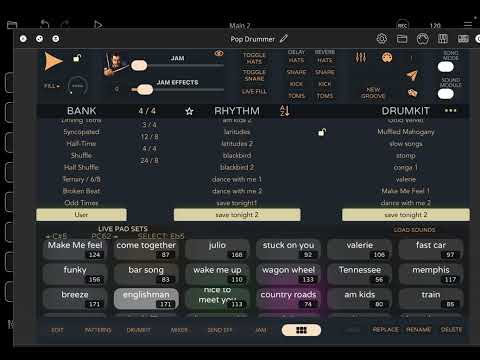
Comments
that video was too quick - how do you transition between that view with lots of pads from the standard view?
Press the load button.
so if you create more than the standard view of 8 pads, it auto creates more pads as per that view?
You can only create up to 8 pads per live pad set. You can save that set, then create a new one, save that set, etc… you press the load button to recall a previous set of pads.
The view you’re seeing is the list of previously saved live pad sets.
thanks. from what I can see you need to program full songs (ie intro vs ch etc etc) and then assign to a pad. All I'd want is to assign JUST a beat tempo and drum kit....I don't want to spend the hours necessary to play pre-programmed songs, just play beats live for a particular song, if you get me?
That’s exactly what I do. I only use 8 pads and use a groove/beat per song. The 8 beats cover 60+ sounds at this point.
You can also make use of the two toggles for live playing as well as Fill button - all via midi.
you spend the time to create intros/vs/endings? So the song is pre-programmed?
No. I just jump into the tune with drums and bass or drums and guitar at the same time.
I’m working on adding intros and endings, unfortunately pop/soft drummer doesn’t have a way to toggle the lock button via midi or otherwise. I’m hopeful it will be added as I need it on for an intro and off for breaks and other sections.
OK thanks...I want to use it live with me playing live bass and keys (I do both on the keyboard)
See, I cannot figure out how to get it looking like your screenshot? All I can ever do is edit/change/save the first pad. I cannot select any other Pad. I can save it, but I cannot laod the new saved one to a new pad, it always seems to load only into the first pad.... espiegel was going to do tutorials on various Lumbeat functions and these Pads were one that was requested but but nothing so far, and I cannot find any on YT either
I think there is a misunderstanding. I don't recall ever saying that I would create YT tutorials on the Lumbeat apps. I created a Loopy Pro project on patchstorage long ago to control the IAA Lumbeat apps.
If you are having trouble figuring out how to use the Lumbeats apps, I suggest you join their Discord. The developer is active there and he or others can answer your questions.
@pax-eterna check out Stan Guitar on YouTube https://m.youtube.com/@stan_guitar/videos?ra=m
He has some pop drummer related stuff you might find useful.
apologies, I was sure there was a thread where you or someone else mebbe?? mentioned starting some and asking for what would like to be covered re the Lumbeat apps. I probably misunderstood.
Already on Discord...not much on there really.
thanks but not really. All I could see was all loopy pro related info.
It's ok, I'll figure it out eventually
Post your questions there. I’ve gotten answers there when I have asked them.
Look at his loopy/pop drummer videos - he goes over the live pads.
thanks - just did that, will see what happens. One thing I perhaps can ask here, let's say I set up a bank and drum kit but I want to change the name of the rhythm being used to a name I choose, how does one do that? I am sure I have read (hahaha!) very early in the Lumbeat app line, that is is possible but again even though I have tried tapping everything I can I cannot find it. I can easily save a new drum kit, but saving the rhythm, ???
I will have another look, thanks again
Just skimmed through all of them and he very kindly puts time markers for what is covered. Could not find anything directly related to the issue in discussion. He does a lot of loopy pro stuff which does not really apply as I do not use it, I do own it, but I could never "get to grips" with it.
I’d be curious how to this myself, because I tried:
Taking a built-in groove, changing it slightly, saving it under a different name in the user section, that works.
Now, when I edit that slightly edited groove back to match the original, the selection automatically selects the original groove and the save button is disabled.
So my impression is that grooves have to differ in some way and you can’t have two identical grooves with different names.
You might have something there, I will have a play around with that!
EDIT: yep, you nailed it! that was the solution. I changed a single note by increasing the velocity which then "unlocked" the save button, after that I could create a new rhythm bank with that save or simply add to the User rhythm bank.
Just to add to that, if I then go to that new saved rhythm and change that same note back to the original, it automatically changes back to the original Lumbeat rhythm name and save is again disabled. So that proves the hypothesis
haha, that's one down, one to go
@pax-eterna not sure if this is what you’re asking, but live pads are set by picking your rhythm and jam settings etc in the main screen part of Popdrummer, then you tap any live pad to ‘assign’ that current beat to the pad. You can long hold the live pad to change its colour, jam, etc once its been set. Live pads can be switched on the fly by tapping them, or a midi note. Its not made clear in the midi map but if you set eg C2 for the ‘livepad’ trigger, C2 will be pad 1, C#2 will be pad 2, D2 pad 3 etc. You can save and load a pad set using the save/load buttons.
thanks, yes I tried that, however it works for the first pad, when I try the same for the second pad nothing happens?? As in there is no edit the name that pops up. All that is shown on the long press is intensity and colour and again the save tab is unavailable.
@pax-eterna : I suggest that you make a screen recording and post a link to it.
You aren’t trying to create a new livepad with the same settings as your first livepad are you?
no, new beat, rhythm and drumkit, and tempo and in any case that should not matter as I might want the same setting for a different song name...
I don’t think you can change the name of whats displayed in the livepad, its fixed to show the beat name, jam and intensity. I think if you use a user named beat then it’ll show that name, if you wanted the pad to show a song/part name for example? In terms of adding and saving, it should work very simply - pick a beat, tap the first livepad, the pad is populated with the beat. Pick another beat, tap the next pad, should be populated with the next beat. You can also long press to overwrite the beat, eg you have 4 on the floor set to pad 2, you can pick a different beat, then hold pad 2 to overwrite it with the new one.
‘Save’ is lit if its an unsaved bank and greyed out if you already have saved the current setup. As @espiegel123 recommends, maybe post a vid?