Loopy Pro: Create music, your way.
What is Loopy Pro? — Loopy Pro is a powerful, flexible, and intuitive live looper, sampler, clip launcher and DAW for iPhone and iPad. At its core, it allows you to record and layer sounds in real-time to create complex musical arrangements. But it doesn’t stop there—Loopy Pro offers advanced tools to customize your workflow, build dynamic performance setups, and create a seamless connection between instruments, effects, and external gear.
Use it for live looping, sequencing, arranging, mixing, and much more. Whether you're a live performer, a producer, or just experimenting with sound, Loopy Pro helps you take control of your creative process.
Download on the App StoreLoopy Pro is your all-in-one musical toolkit. Try it for free today.
Grainsmith Field — native iOS granular instrument, TestFlight beta open

Hi all!
I've been working on a native iOS granular synth and it's ready for a wider beta. TestFlight link at the bottom.
Some context: I make the desktop Grainsmith VST3/AU/AAX plugin on Mac and Windows (see https://plasticfactory.com. I'm also a co-owner of a traditional recording studio, and the desktop version is built with Pro Tools style studio session work in mind. This is not a port of that. It has a single granular layer with multitouch control, four XY performance pads (Density × Size, Jitter × Spread, Scan × Reverse, Cutoff × Resonance) plus a Morph macro that sweeps multiple parameters at once. It's built in SwiftUI, with the same C++ granular engine underneath.
It ships as a standalone app and as AUv3. Most of my testing has been in AUM, and that's where it feels best.
Current beta status: runs well and sounds like the desktop version. Presets save and restore (ten factory sounds ship with it, pulled from the desktop library), patches survive a host session close/reopen, and there's a MIDI instrument mode if you want to play patches from a keyboard. Known rough edges: the granular envelopes can sometimes be prone to clicks which seems to show up more in live mode. Fix is coming. I'm looking for AUv3-host users specifically. If you load it in AUM and anything doesn't work as expected, let me know! Also, let me know what your go-to controllers are. I will have a OXI e16 profile and am working on getting Midi Fighter Twister working well.
If you'd rather see it before you load it, here's a full walkthrough:
https://youtu.be/WTqEOlAtuR8
https://testflight.apple.com/join/ARte4wP2
If you post feedback here or DM me, I'll definitely read it. Thank you!
Andy / Plastic Factory
(Also, you may have seen this referred to as Grainulator previously - I decided to change the name after feedback that that could be confused with other related products)
Comments
Can I record into it?
You can! It will record from the mic/input in standalone mode, or the sound source if it is placed as an FX on an instrument or audio track when it is hosted. There is definitely a discoverability issue with wet/dry - it is set to 100% wet by default and to get to the wet/dry control you have to long press the record button for record settings popup (see the video above at 3:20 for an example of this). I'll work on that.
I'd be interested if you all have thoughts on the choice to make this an aumf type plugin (midi controlled effect) - it seems to best suit the needs of a granular synth, but does mean it likely won't show up in GarageBand (AUM/Logic/etc should all work).
I have to admit it sound pretty good although I'm immensely tired of everything granular as we've been practically bombed with various instruments and effects of the granular variety for quite some time now.
Anyway, the exposed parameters do not work for whatever reason, I connected some LFO's to a few of the parameters and absolutely nada happens. You might wanna look into that I could not see the scrub as a CC option, that would be cool if it was.
That's no good! I will reach out for more info - I've tested parameters modulated via CCs, but will try to reproduce. Also, visual feedback is missing, which is a definite gap. And position should 100% be there as well. Thank you!
I really like the sample selection you added. The weather preset sounds great with drums.
I’m liking this. Why dual scrub sliders?
I’m liking this. Why dual scrub sliders?
There is no position (although I looked for "scrub"). I tested again and 'Filter Cutoff' works but: where is the filter represented visually? [edit: ah, it's the 'Tone pad' - sorry, missed that]
In AUM you have this sorta midi cc helper (image) and it's totally dead, I never seen that before on an app with exposed parameters. Hope that helps.
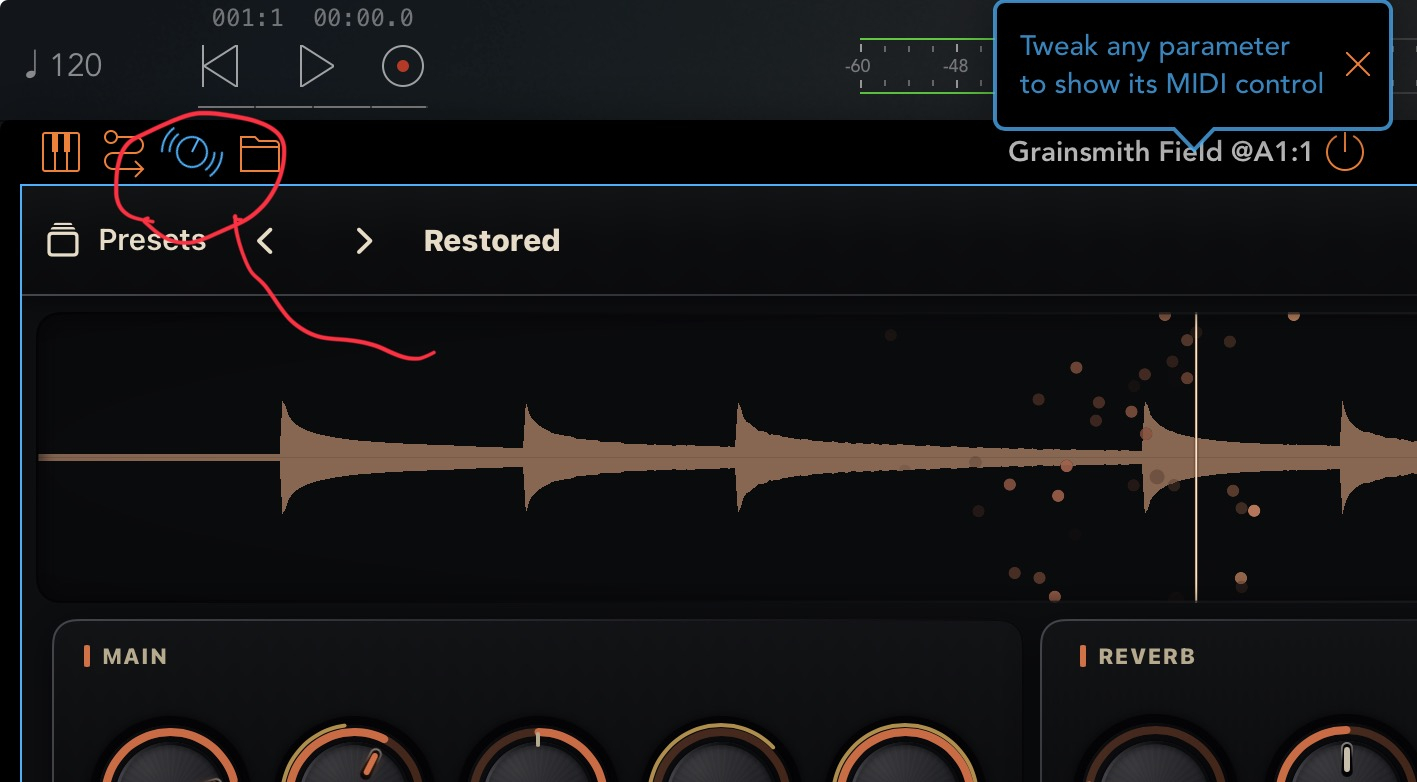
I've seen (rarely, mind you) apps with exposed parameters where the midi control finder in AUM doesn't work. This is definitely something the dev can/should fix.
And fixed! New build just shipped. Now the exposed parameters should be fully discoverable by the midi control finder. There is also better visual feedback when parameters are being automated.
Awesome! My theory for the dual scrub rockers is when holding the phone or iPad, it makes it easier to scrub with your thumb while adjusting another control, regardless of which side the other control is on.
Makes sense. Just played with the xy pads while scrubbing, definitely useful to have the scrubbing available on each side.
Would be could if you could eventually record motion on the controls and xy pads.
Seems like a solid and release ready app so far… what pricing are you thinking? I too am flush with grain apps already, but I like your easy uncluttered interface and I could see myself using this often
Motion recording is definitely on the roadmap! I've prototyped out an approach, but not quite happy about how it sits in the UI yet. Speaking of roadmap, I've been thinking a lot about how much modulation to bake into the experience vs. lean on external modulation that people bring to the party. The core engine it shares with desktop has a pretty rich set of LFOs and other modulators that aren't yet exposed.
For pricing, it will be $11.99, $9.99 intro. I recognize there are a lot of granular options out there these days, but hope to earn a place in people's toolkits.
Quick update - build 9 is on TestFlight now.
In addition to the automation fixes in build 8, this fixes a rare crash on teardown that a couple of you on older iPads may have run into. It also cleans up an AUv3 resource leak, so it should stay smoother over long sessions and repeated open/close in a host.
If you've got a minute, please update and try to break it: background and reopen the app a bunch while the cloud is moving, and open/close it as an AUv3 in AUM a few times. Thank you to everyone putting it through its paces!
State saving is a bit broken.☺️ It's e.g 'Grain Shape' and 'Morph' that goes back to default while for the 'Main' knobs it seem to work as it should.
I like the straight forward UI. Sounds great.
anybody know of a small setups. dual mic input to run stereo microphones. to make this a true field recorder ? such a cool app i’d love to compliment it with mic setup to match
Update shipped! This was quite the thread to pull.
I have added additional slots to the beta pool. Than you all for the feedback!
This is such a dangerous rabbit hole for me...maybe a nice pair of Sonorous Objects mics plus something like the Rode AI micro? Or some kind of XY usb c mic that attaches directly to the phone/iPad?
Nice! I have a midi-controller request: the Melbourne Instruments Roto Control, which requires midi feedback for its motorized knobs.
And I wish for some kind of area tool for the sample.
I am just working on shoring up the initial controller support, so the timing is good. The lack of midi feedback in standalone is a bug that will be fixed in the next build. Unfortunately I don't think it's possible to get feedback going when hosted in AUM and most other hosts - let me know if you have other plugins working.
The Midi Fighter Twister and OXI E16 are both working well (in the next build) with full mirroring of knob values in their LEDs, so the Roto Control should be similar. 7bit midi only, however, so not as buttery smooth as a Monome Arc. Working on that!
If you are will to share a saved profile export, I might be able to get a more intuitive out of the box experience working with a custom profile. I'll be sharing the MFT and E16 profiles. Thanks for testing!
Ohhh, this is a good one. Selecting/looping/trimming exists on desktop but needs a different interaction model here. Maybe adding edit to the long press popup? A bit inconvenient, but doesn't collide with scrubbing or moving the playhead. My favorite for that type of interaction is Koala. Will need to noodle on this.
oh never heard of those mics before. are they good. seem like they have decent pricing
Just tried this put for the first time and I really like it. The 4 xy pads make it very easy/enjoyable to dial things in. Often I find granular stuff a bit too washy, but I'm getting some nice hard stutter glitches from this. Nicer than the Tonverk imo.
New build shipped: you can now long press on the waveform, select "edit area", then drag-select the start/end points. Export, copy, and clear are also available in the long-press popup. Thanks to Pxlhg for the suggestion.
And thank you everyone for the feedback so far here and privately - it has been incredibly helpful. I think this will be the last feature update before v1 ships. Then, on to the roadmap - modulation, parameter recording, multiple playheads and refinement of instrument mode (and other ideas you have!).
I have a pair of the S0.1s permanently living inside my upright piano and like them a lot. Maybe it's time to take them on a field trip...
Btw, there is an amazing 10 year old and still active thread on field recording over on Lines if you ever want to go down that rabbit hole.
Yeah that's nice. It doesn't seem to be permanent though and no state saving.
I thought maybe the handles of the area could be permanent and thus automated (opening up a lot more variation), instead of a crop tool (right now temporary crop tool -- If you press for the area tool a second time you'll see it reverts to original)
It should be permanent, that was a state-saving regression. Fixed and new build is out now.
I like the idea of being able to automate the loop in and out positions and they certainly could be exposed as parameters, though I'd need to test how the UI would react. I've experimented with a "slices" feature along the lines of Morphagene, so you could easily switch between say 8 arbitrary slices within the buffer, but haven't yet found a UI pattern for it that isn't confusing. I'll take a crack at both approaches post release. Thank you!
Nice, thanks. One last thing that has, at least me, a bit confused is: why it only loads as an FX and not an instrument and I don't get the settings for it; if I switch to instrument in the settings it goes quiet and I guess it expects input(?).
I (again, personally) would prefer to have it in the instrument slot (AUM) when I'm using it as such, and in the FX slot when it's an FX. It feels a bit backwards but maybe I'm missing something.