Loopy Pro: Create music, your way.

What is Loopy Pro?Loopy Pro is a powerful, flexible, and intuitive live looper, sampler, clip launcher and DAW for iPhone and iPad. At its core, it allows you to record and layer sounds in real-time to create complex musical arrangements. But it doesn’t stop there—Loopy Pro offers advanced tools to customize your workflow, build dynamic performance setups, and create a seamless connection between instruments, effects, and external gear.

Use it for live looping, sequencing, arranging, mixing, and much more. Whether you're a live performer, a producer, or just experimenting with sound, Loopy Pro helps you take control of your creative process.

Download on the App Store

Loopy Pro is your all-in-one musical toolkit. Try it for free today.

Harmonal Binaurics by Faded Instruments (Released)

https://apps.apple.com/us/app/harmonal-binaurics/id6778546216

Introducing Harmonal Binaurics 2, our newest mind control drone synth and experimental sound design tool - now for iPad! It combines Binaural Beats with Isochronic Tones and custom tuning systems to hijack your brainwaves and bend your unconscious mind. It’s a psychoacoustic powerhouse – originally designed as simple tool for live performance, Harmonal Binaurics has evolved into a deeply flexible instrument for composition, performance, meditation, sound experimentation, and sonic exploration.

-------->
great app but...
Requires iOS 26.2 or later:(
hope the coder will find a way to make it lower iOSes compatible...
he's the legendary (NI Reaktor scene) instrument maker and vst maker Doron Sadja.

Comments

  • @waka_x said:
    https://apps.apple.com/us/app/harmonal-binaurics/id6778546216

    Introducing Harmonal Binaurics 2, our newest mind control drone synth and experimental sound design tool - now for iPad! It combines Binaural Beats with Isochronic Tones and custom tuning systems to hijack your brainwaves and bend your unconscious mind. It’s a psychoacoustic powerhouse – originally designed as simple tool for live performance, Harmonal Binaurics has evolved into a deeply flexible instrument for composition, performance, meditation, sound experimentation, and sonic exploration.

    -------->
    great app but...
    Requires iOS 12.2 or later:(
    hope the coder will find a way to make it lower iOSes compatible...
    he's the legendary (NI Reaktor scene) instrument maker and vst maker Doron Sadja.

    You mean 'requires iOS 26.2 or later' haha (you wrote 12.2)

    Anyone tried it?

  • edited June 23

    What I'd be most curious about: on desktop ctrl button is used for fine knob control. How is the resolution of the knobs in iOS? Because ability to tune oscillators accurately is absolutely key to how usable instruments like this are in practice, and how enjoyable they are to tweak.

    Also: have they enabled keyboard entry for knob values on the iOS version?

  • @Gavinski said:
    What I'd be most curious about: on desktop ctrl button is used for fine knob control. How is the resolution of the knobs in iOS? Because ability to tune oscillators accurately is absolutely key to how usable instruments like this are in practice, and how enjoyable they are to tweak.

    Also: have they enabled keyboard entry for knob values on the iOS version?

    Yes you can add values manually. You need to get it G, you going to like it.

  • edited June 23

    @Pxlhg said:

    @Gavinski said:
    What I'd be most curious about: on desktop ctrl button is used for fine knob control. How is the resolution of the knobs in iOS? Because ability to tune oscillators accurately is absolutely key to how usable instruments like this are in practice, and how enjoyable they are to tweak.

    Also: have they enabled keyboard entry for knob values on the iOS version?

    Yes you can add values manually. You need to get it G, you going to like it.

    I just got it, like it overall but a) contrast on ui is horrific, need to put iPad brightness up to see the text! b) Am I missing something or is text entry the only way to adjust the main oscillator frequencies individually? If so, that's an absolutely huge design flaw, but there are no knobs allowing you to tweak those individual frequencies, not that I can see

  • @Gavinski said:

    @Pxlhg said:

    @Gavinski said:
    What I'd be most curious about: on desktop ctrl button is used for fine knob control. How is the resolution of the knobs in iOS? Because ability to tune oscillators accurately is absolutely key to how usable instruments like this are in practice, and how enjoyable they are to tweak.

    Also: have they enabled keyboard entry for knob values on the iOS version?

    Yes you can add values manually. You need to get it G, you going to like it.

    I just got it, like it overall but a) contrast on ui is horrific, need to put iPad brightness up to see the text! b) Am I missing something or is text entry the only way to adjust the main oscillator frequencies individually? If so, that's an absolutely huge design flaw, but there are no knobs allowing you to tweak those individual frequencies, not that I can see

    Seems likely, from reply to my mail, that the dev will fix these two issues.

  • edited June 23

    @Gavinski said:

    @Gavinski said:

    @Pxlhg said:

    @Gavinski said:
    What I'd be most curious about: on desktop ctrl button is used for fine knob control. How is the resolution of the knobs in iOS? Because ability to tune oscillators accurately is absolutely key to how usable instruments like this are in practice, and how enjoyable they are to tweak.

    Also: have they enabled keyboard entry for knob values on the iOS version?

    Yes you can add values manually. You need to get it G, you going to like it.

    I just got it, like it overall but a) contrast on ui is horrific, need to put iPad brightness up to see the text! b) Am I missing something or is text entry the only way to adjust the main oscillator frequencies individually? If so, that's an absolutely huge design flaw, but there are no knobs allowing you to tweak those individual frequencies, not that I can see

    Seems likely, from reply to my mail, that the dev will fix these two issues.

    I've hadn't had time to explore further just the little I heard, I thought it was up your alley. There's a midi version but I'm not sure why as it's not added in the right place for connections (in AUM).
    The stand alone and auv3 differs some (for one that upper left button). Yeah the text is too tiny and too thin, the midi version had an orangy background so a background choice would be cool. Hold button doesn't seem to work (Touch)

  • @Pxlhg said:

    @Gavinski said:

    @Gavinski said:

    @Pxlhg said:

    @Gavinski said:
    What I'd be most curious about: on desktop ctrl button is used for fine knob control. How is the resolution of the knobs in iOS? Because ability to tune oscillators accurately is absolutely key to how usable instruments like this are in practice, and how enjoyable they are to tweak.

    Also: have they enabled keyboard entry for knob values on the iOS version?

    Yes you can add values manually. You need to get it G, you going to like it.

    I just got it, like it overall but a) contrast on ui is horrific, need to put iPad brightness up to see the text! b) Am I missing something or is text entry the only way to adjust the main oscillator frequencies individually? If so, that's an absolutely huge design flaw, but there are no knobs allowing you to tweak those individual frequencies, not that I can see

    Seems likely, from reply to my mail, that the dev will fix these two issues.

    I've hadn't had time to explore further just the little I heard, I thought it was up your alley. There's a midi version but I'm not sure why as it's not added in the right place for connections (in AUM).
    The stand alone and auv3 differs some (for one that upper left button). Yeah the text is too tiny and too thin, the midi version had an orangy background so a background choice would be cool. Hold button doesn't seem to work (Touch)

    Yep, I do like it. At the price, I'd like to see a bit more effort put into the ui. The desktop version looks better, a esthetically, imo. Few other little niggles, mostly it's nice, definitely

  • edited June 23

    @waka_x said:
    https://apps.apple.com/us/app/harmonal-binaurics/id6778546216

    Introducing Harmonal Binaurics 2, our newest mind control drone synth and experimental sound design tool - now for iPad! It combines Binaural Beats with Isochronic Tones and custom tuning systems to hijack your brainwaves and bend your unconscious mind. It’s a psychoacoustic powerhouse – originally designed as simple tool for live performance, Harmonal Binaurics has evolved into a deeply flexible instrument for composition, performance, meditation, sound experimentation, and sonic exploration.

    -------->
    great app but...
    Requires iOS 26.2 or later:(
    hope the coder will find a way to make it lower iOSes compatible...
    he's the legendary (NI Reaktor scene) instrument maker and vst maker Doron Sadja.

    You got support from iOS 14 now and a few other updates, (thanks @Gavinski )

  • Huge sliders, lots of white space, and 4-point labels. Is it just me?

  • great sounds and concept.
    bad interface - everything is so tiny...
    hope he will improve it.

  • @seawind161 said:
    Huge sliders, lots of white space, and 4-point labels. Is it just me?

    Send screenshot

  • Is not saving state properly in AUM. Have reported to dev

  • @waka_x said:
    great sounds and concept.
    bad interface - everything is so tiny...
    hope he will improve it.

    Sure but what ever control you touch you get this huge support circle, not ideal maybe but it's something.
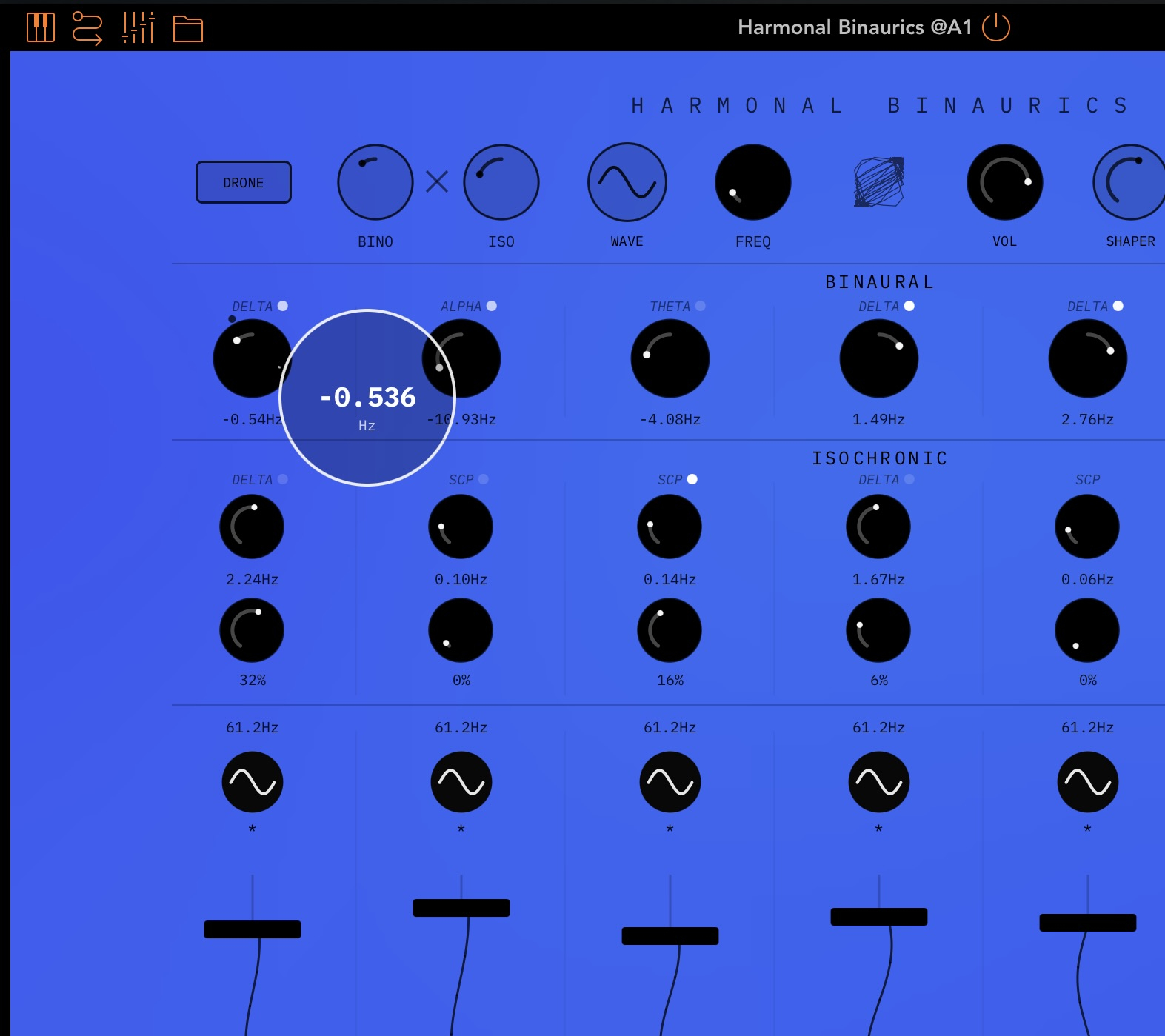
    I noticed that background colours seem to be random

  • Does not resize very well either. This could do with tons of optimizing. Let’s see how it goes, hopefully he’s up for the challenge. Should have got more feedback from the community prior to launch, probably not tested much, dev probably not a hardcore iOS person, I’m guessing.

  • @Pxlhg said:

    @waka_x said:
    great sounds and concept.
    bad interface - everything is so tiny...
    hope he will improve it.

    Sure but what ever control you touch you get this huge support circle, not ideal maybe but it's something.
    I noticed that background colours seem to be random

    Why are your sliders all bent out of shape on this lol?

  • @Gavinski said:

    @Pxlhg said:

    @waka_x said:
    great sounds and concept.
    bad interface - everything is so tiny...
    hope he will improve it.

    Sure but what ever control you touch you get this huge support circle, not ideal maybe but it's something.
    I noticed that background colours seem to be random

    Why are your sliders all bent out of shape on this lol?

    It's the illustration of the waveforms that fools the eye :D

  • I quite like the big circle actually, it’s a lot better than what many desktop devs do, cos they often put the info under a knob, where your finger covers it. They always think in terms of mouse, this is such a stupid and annoying thing that should be observed easily by anyone using the app on an iPad, and some of these devs should know better, having released ports on iOS for years, but they just keep doing it.

    But this big circle is far enough away from my finger that I can always see it clearly, I feel that aspect works well.

  • @Gavinski said:
    I quite like the big circle actually, it’s a lot better than what many desktop devs do, cos they often put the info under a knob, where your finger covers it. They always think in terms of mouse, this is such a stupid and annoying thing that should be observed easily by anyone using the app on an iPad, and some of these devs should know better, having released ports on iOS for years, but they just keep doing it.

    But this big circle is far enough away from my finger that I can always see it clearly, I feel that aspect works well.

    That's a fair point, I always use the pen so it's not as obvious but I know what you mean.

  • @Gavinski said:
    I quite like the big circle actually, it’s a lot better than what many desktop devs do, cos they often put the info under a knob, where your finger covers it. They always think in terms of mouse, this is such a stupid and annoying thing that should be observed easily by anyone using the app on an iPad, and some of these devs should know better, having released ports on iOS for years, but they just keep doing it.

    But this big circle is far enough away from my finger that I can always see it clearly, I feel that aspect works well.

    You’re probably right about the mouse on a lot of apps. When testing iPad apps you can test it on an iPad simulation, so when testing the interface it’s emulating touch. I like loading stuff onto hardware for testing after I get a rough draft.

    I do think there has to be ways to control CC and parameter values that’s more touch friendly. Something like pinching to increase values, swiping in some manner…and that’s about as many ideas as I have.

  • edited June 24

    Ok - I really like this app! :-) Probably my favorite from the recent spate of drone-apps. (And yes, I love those.) I really like the spacious and simple design of the UI, and the features are well though out for the iPad format. (Haven't played with the AUv3 yet.)

    Are there features I would like added? Probably. But I enjoy it as it is right now.

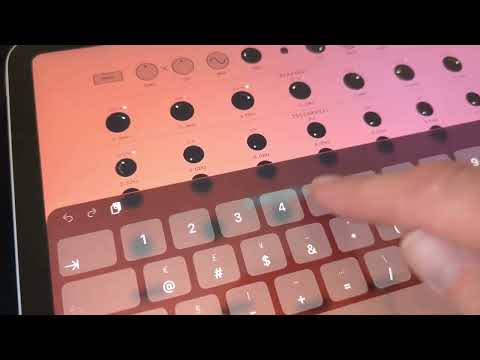
    While deciding I found this video demoing the iPad version - perhaps it can be helpful for others too:
  • @catbox said:
    Ok - I really like this app! :-) Probably my favorite from the recent spate of drone-apps. (And yes, I love those.) I really like the spacious and simple design of the UI, and the features are well though out for the iPad format. (Haven't played with the AUv3 yet.)

    Are there features I would like added? Probably. But I enjoy it as it is right now.

    While deciding I found this video demoing the iPad version - perhaps it can be helpful for others too:

    Thank you for posting that! The camera moves around so much that I got a little seasick watching it, but it's a nice walk-through. I wasn't thinking about getting it before, but now I probably will.

Sign In or Register to comment.