Loopy Pro: Create music, your way.
What is Loopy Pro? — Loopy Pro is a powerful, flexible, and intuitive live looper, sampler, clip launcher and DAW for iPhone and iPad. At its core, it allows you to record and layer sounds in real-time to create complex musical arrangements. But it doesn’t stop there—Loopy Pro offers advanced tools to customize your workflow, build dynamic performance setups, and create a seamless connection between instruments, effects, and external gear.
Use it for live looping, sequencing, arranging, mixing, and much more. Whether you're a live performer, a producer, or just experimenting with sound, Loopy Pro helps you take control of your creative process.
Download on the App StoreLoopy Pro is your all-in-one musical toolkit. Try it for free today.
Våld Labs Vekte — public beta (generative MIDI sequencer, VST3)

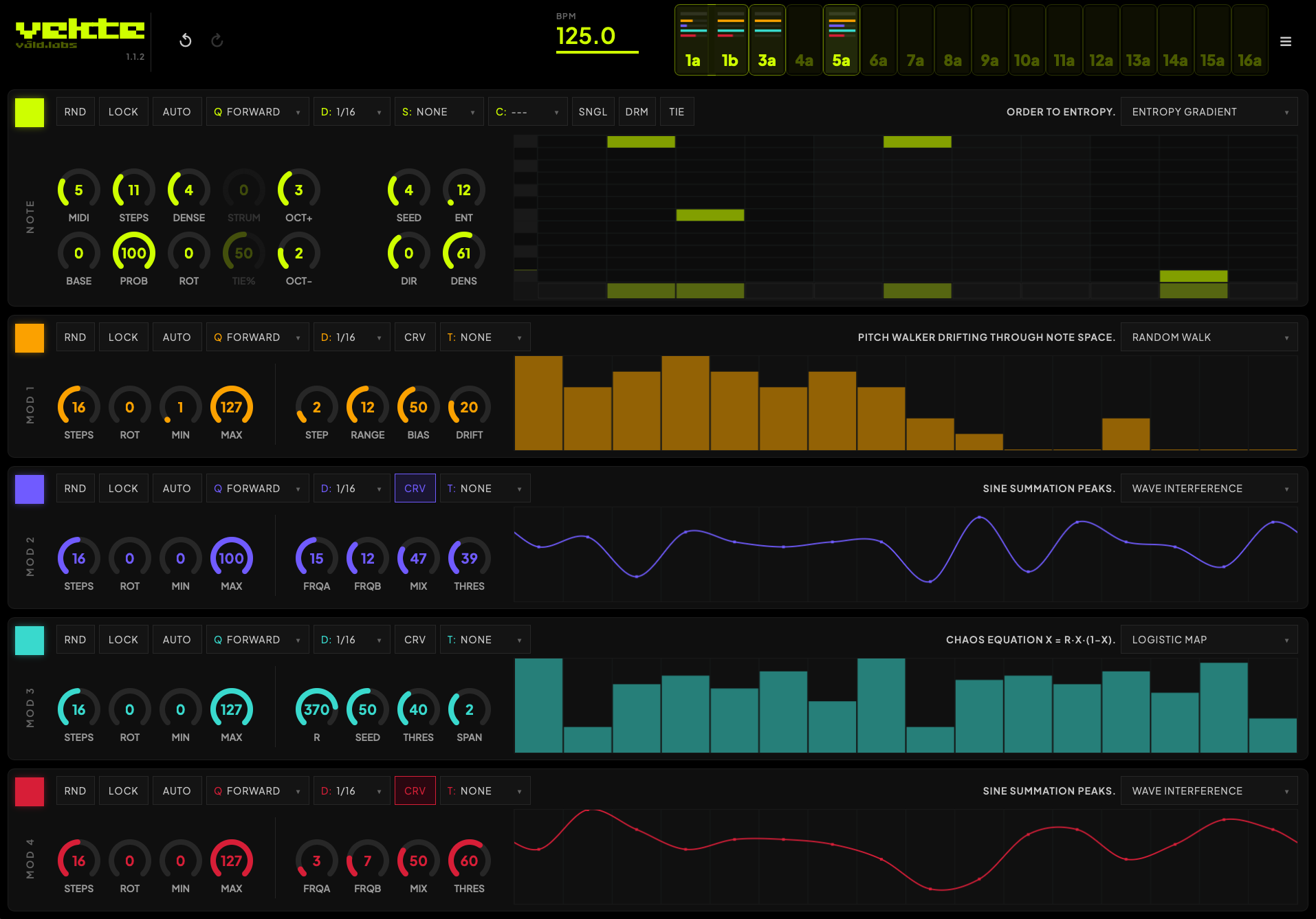
Vekte is a generative MIDI sequencer plugin. It runs 31 algorithms — Euclidean, Markov, cellular automata, Xenakis sieves, Kaprekar, logistic maps, and more — and uses them to write patterns to drive your instruments.
Every channel has one note lane and four modulation lanes. Each lane runs its own algorithm and can target velocity, length, any CC, transpose, scale, chord, octave, or another lane's parameters, with sixteen slots per session (which can be either routed freely to any channel, including multiple slots controlling one single channel).
The engine is deterministic. Each pattern is hashed from its algorithm and parameters into a seed, so a given configuration always produces the same result. Patterns are exact and repeatable, and you can export any state as a preset string to recall later or hand to someone else (this part is still WIP, and will be improved massively in the next one).
It began as the software side of Rekke, our hardware sequencer, and the two share part of the same algorithmic core.
This is a public beta. VST3 only for now, on Windows and macOS. AU and an iOS AUv3 build are planned, but I want VST3 solid first. Free during the beta.
I'm after real feedback: what breaks, which hosts misbehave, what's confusing, what's missing. Bug reports and DAW-specific quirks are the most useful thing you can send (you have a form in the menu for direct feedback from the app).
Hope you all like it!
Comments
Amazing !!
Looking forward to investigating this.
Thanks! Let me know if everything goes well, as it's the first public beta - it has some issues mostly on Windows installs, but if you could report them to me I can try to solve them
No iOS version?
under development!
I want in on that iOS beta once live
sure, i'll also post it here
Looking forward to the iPadOS version
Vekte 1.1.8 is out today. https://valdlabs.com/vekte
First the 1.1.8 changelog:
Everything since 1.1.6
If you're coming from an earlier build, 1.1.8 also includes everything added in
the 1.1.7 development line:
Try it free. 100% functional until mid August, then Demo — the
whole plugin then freezes every 15 minutes, then 10, then 5, then 1 - but with nothing held back. When the time's up, your work stays exactly as you left it; restart the demo or enter your license to keep going.
A license unlocks it permanently, no subscriptions.
5 new algorithms — Isorhythm, Tonnetz Walk, Pendulum Waves, Tether, and
Voss 1/f — bringing the total to 36. These new ones sound identical on every
machine and platform, down to the note.
Algorithms grouped by family in the dropdown — Rhythmic, Number/Sequence,
Chaos, Cellular, Harmonic, and Wave/Geometric — so the right one is easier to
find.
Seeded randomize — each lane's RND now shows a seed you can type back in
to reproduce a roll you liked. Seeds save with your project.
Compact preset keys — Copy Channel and Copy Song produce short keys
(instead of a huge block of text) that survive messaging apps and links.
Older keys and
.vektefiles still load.Swing lock per lane — lock a modulation lane's groove to the main swing so
it stays in the pocket on its own division.
Groove and timing carried over from 1.1.6: host-locked grid, per-lane
Swing and Humanize, and a visualizer that shows exactly what will play.
Installing
macOS 11 (Big Sur) or later — run
VEKTE-1.1.8.pkg. Signed and notarizedby Apple; it installs the VST3 without a security warning.
Windows 10/11 (64-bit) — run
VEKTE-Setup-1.1.8-x64.exe. It installseverything the plugin needs, including the required system runtimes, so it
loads on a clean machine.
VEKTE is a VST3 instrument that generates MIDI.
Load it on an instrument track and route its output to your synths and drums.
MIDI FX coming later.
Vekte Shareable Key (full channel state recovered with this string).
VEKTE — Feature List (1.1.8)
VEKTE is a 16-channel generative MIDI sequencer plugin by Vald Labs. Each
channel runs five independent lanes driven by mathematical algorithms. It
generates MIDI to play your instruments — every pattern is reproducible, so a
patch is a recipe you can save, share, and rebuild anywhere.
Platforms
VST3 for macOS (Apple Silicon + Intel, macOS 11 Big Sur or later) and
Windows (64-bit).
SOON: iOS AUv3 and Standalone MIDI processor for AUM, Drambo, Loopy and GarageBand, plus a
standalone app (with Bluetooth MIDI). iOS 14 or later.
Installs everything it needs on a clean machine (Windows bundles the required
system runtimes; the macOS installer is signed and notarized by Apple).
Sequencing core
Deterministic generation — a given algorithm and its settings always
produce the exact same pattern, fully recallable across sessions.
STEPS — a 1–32 step playback window over each lane.
Playhead modes — Forward, Reverse, Ping-Pong, Random, Brownian,
Random-Skip, Bounce, and quantized reverse variants.
Host sync — the grid phase-locks to your DAW's bar and beat; loop and seek
re-align automatically. A free-running clock drives the standalone app.
AUTO — auto-rotate a lane every cycle.
RND / LOCK / CHAOS — randomize one lane, protect a lane from randomizing,
or randomize everything at once.
Seeded randomize — each lane shows a seed you can type back in to
reproduce a roll you liked; seeds save with your project.
NOTE lane
Octave range (top and bottom) with scale-snapped normalize-stretch, so an
algorithm fills the range you set.
Root note, scale-snapped.
Scale-locked piano-roll editing — only in-scale rows are shown; click and
drag to draw steps and pitches. Scale set to NONE gives free chromatic editing.
SNGL (collapse to a single pitch), DRM (mono drum mode), and TIE
gating.
Four algorithm parameters (P1–P4) per lane.
MOD lanes (1–4)
Each MOD lane runs its own algorithm and routes a smooth 0–1 signal to a target:
Pitch — Transpose (in scale), Scale (within family), Chord (within
family), or Octave.
Generator shape — Steps, Rotation, Probability, Density, Trail, or Strum.
Plus a MIN/MAX output band per lane, and CRV smooth (Catmull-Rom)
interpolation for flowing curves instead of stepped values. CC output is emitted
at high resolution, including 14-bit for the CCs that support it. When a mod lane
drives a control, the matching knob or menu shows live feedback.
36 algorithms
Euclidean · Random Walk · Kaprekar · Fibonacci · Primes · Thue-Morse ·
Kolakoski · Cellular Automata · Markov · L-Systems · Logistic Map · Polyrhythm ·
Bresenham · Voice Leading · Cantor Set · Penrose · Harmonic Series · Lissajous ·
Drunk with Memory · Sieve (Xenakis) · Bouncing Ball · Call & Response · Tension
Curve · Game of Life · Gravity Wells · Entropy Gradient · Wave Interference ·
String Resonance · Run-Length · Turing Pattern · Flocking · Isorhythm ·
Tonnetz Walk · Pendulum Waves · Tether · Voss 1/f.
Grouped in the dropdown by family: Rhythmic, Number/Sequence, Chaos, Cellular,
Harmonic/Melodic, and Wave/Geometric.
The five newest algorithms use integer-exact math, so their patterns are
identical on every machine and platform — down to the note.
Each algorithm has four parameters and a one-line description in the menu, and
knob travel is tuned so equal turning gives roughly equal audible change.
Groove
Humanize on the NOTE lane and on each MOD lane — deterministic timing and
value jitter.
Swing lock per MOD lane — lock a lane's groove to the main swing so it
stays in the pocket on its own division.
All groove is computed per cycle and shown on the canvas, so what you see is
exactly what plays.
Scales & chords
73 scales across families: Diatonic/Modes, Pentatonic/Blues, Minor and
Major variants, Symmetric/Synthetic, World/Exotic, Greek/Tritone, and
Microtonal. NONE = chromatic.
39 chords: Triads (major/minor), Dominant, Sus/Power/Quartal, Dim/Aug.
Channels & slots
16 slots in the header: tap to select, double-tap to mute (the playhead keeps
moving; mutes are clean, no hung notes), drag to reorder.
Each slot shows a live indicator: a note blink and four mod-output bars.
can layer several on one MIDI channel.
MIDI routing
macOS — a built-in virtual "VEKTE" MIDI port; point your instrument
tracks at it (the reliable path for Ableton Live's per-channel routing).
Windows — pick a loopMIDI port in Menu → MIDI Output.
Vekte2Live — a bundled helper plugin that splits channels for chain-based
hosts and Live on Windows.
Transport stop always sends clean note-offs.
Visualization
Live piano-roll and bar/curve views with neon lane colors and a smooth 60 Hz
playhead.
Gate length shown as a tail inside each note; probability-muted notes shown
for the current cycle; swing and humanize visible on the grid.
Tooltips on every control; double-click a Humanize knob to reset it.
Presets & sharing
Channel key — a compact, copy-and-paste key for the current channel,
shown in a select-all textbox with a Copy button. Small enough to drop into a
message or link; paste it into any VEKTE to load the channel back exactly.
Copy / Paste and Save / Load for a single channel or the whole song.
Compact keys carry your inputs and manual edits; the engine regenerates the
rest, so keys stay short. Older keys and saved files keep working.
Full state also saves inside your DAW project.
Try it free / licensing
Start with a full 15-minute demo — the whole plugin, nothing held back.
The timer only counts active use, so idle time with the editor open doesn't
burn it. When the time's up your work stays exactly as it was; restart the
demo or enter your license to keep going.
A license unlocks the plugin permanently and keeps working offline.
note from Vald Labs — each dismissible.
I can’t figure out how to send midi to more than one channel (?)
I see this in the instructions:
macOS — a built-in virtual "VEKTE" MIDI port; point your instrument
tracks at it (the reliable path for Ableton Live's per-channel routing).
But I don’t understand it…
@valdlabs
sure, on Ableton Live follow this setup and it should work - i am working on a proper manual now, and it should be ready pretty soon.
On Vekte's note module, make sure each channel points to its own midi channel (or point two to one single channel for layered melodies and rhytms, and extra modulations)
make sure to turn on the new channel on Vekte as it's off by default (green square, and or the corresponding color on all modulation lanes, top left).
Ah yes, got it. I had done what you said, but I thought these represented different patterns/states rather than corresponding to each midi channel:

So I can’t draw notes into the piano roll? I just select a mode, like Euclidean or whatever, and then play around with the parameters?
Thanks @valdlabs !
How is the ipad build coming along? Very excited to try it.
VST 3 ! Gonna be pounding on this very soon.
Thanks
i've also launched my synth Tresse today
valdlabs.com/tresse
Looks very nice. Are there plans to port this for the iPad also?
yes surely, I am already running a private alpha version
After the synth Tresse is released on iOS! Sometime in August, i'll let you all know!
Here is the first version of the user manual, hope it clarifies the workflow!
https://valdlabs.com/vekte/manual.html
Thanks!!🙏
Sorry, missed this one:
You can draw notes on the piano roll (or disable them). Right now, once you change anything on the 4 algorithm parameters, those changes are gone - but i'm planning a workflow in which you can lock them so they persist even if you change algorithm, so you can create variations around your custom melody or rhythm.
Right now: when clicking once, you disable/delete them; if you click, hold and drag, you change the note.
It will be improved, promised!
I've underestimated how much people would want this functionality, and it turned out to be a popular request
Hope that clarifies!
Sometime in August (more towards the end, but it might be earlier!)
I'll post the Beta link here so the community can test it before it's commercial.
Agreed.
Great, thanks @valdlabs . Am really excited about this coming to iOS now. Pairing it with my Digitone 2 should be a killer combo.
Will the params (and in particular, the 4 algo knobs) be midi mappable? That would be very cool. When I say “midi mappable”, I mean midi learn, and not Midi CC, which still fucks with my brain despite some very generous and noble attempts by other forum users to help me understand it
Hmm, still confused @valdlabs . I’m sending midi out (via “external instrument”), to 5 channels, but only receiving on midi channel one on my digitone (?)
Also, still unable to draw notes on the piano roll (or disable them)….clicking once doesn’t seem to do anything. Holding and dragging doesn’t seem to do anything...
Ok, I am now not using “external instrument”, because I realised that in the little plant-based hamburger menu in the upper right corner , I can select midi output to be my external device. So I should be able to go direct from vekte to my Digitone, without routing through the Ableton “external instrument" .However, now it is only sending to midi channels 4 and 5,…but not 1,2 or 3 (?)
I’ll keep playing around...
Hello, have you changed the midi destination on each of the slot?

Also, what is your DAW? because in most i've tested it has no issue changing the notes. Might be something related to the window renderer.
I'm working on the iOS version right now, it's the biggest objective alongside the bug tracking if everything goes well, i should have a beta version next week and i'll place it here as soon as possible.
Let me know, thanks
Jaime
also in case you didn't see the post above, this might help:
https://valdlabs.com/vekte/manual.html
Hey @valdlabs , Yep, have changed the midi destination on each slot.
Am using Ableton.
Look forward to getting on the ipad beta
ok, the fact that it's only sending out to some specific channels is odd, since there are no internal distinctions regarding the channels; they're all treated the same with no discrimination. I'll look into it but if you place a midi monitor it would help figuring out if there is data coming through.
also, regarding the CC's - yes, i'm still studying the implementation because there are quite a lot of controls, and I want to make sure most bugs are taken care of before going forward with the implementation.
as a workaround for now, you can use the same CCmapper workflow I've written above, also with Vekte. The difference is that you need to click Configure to expose the controls on the parameter window. Press Configure, then on Vekte's interface you can click the control you wish to control remotely and it will appear on the list: in this screenshot I made an example by clicking Probability on Slot1. This makes the parameter accessible even for midi learn if you wish.
New version under way:
Lots of bugfixes, new automation modes and modifiers: ratchet and strum working together with a plucked Tresse patch