Loopy Pro: Create music, your way.
What is Loopy Pro? — Loopy Pro is a powerful, flexible, and intuitive live looper, sampler, clip launcher and DAW for iPhone and iPad. At its core, it allows you to record and layer sounds in real-time to create complex musical arrangements. But it doesn’t stop there—Loopy Pro offers advanced tools to customize your workflow, build dynamic performance setups, and create a seamless connection between instruments, effects, and external gear.
Use it for live looping, sequencing, arranging, mixing, and much more. Whether you're a live performer, a producer, or just experimenting with sound, Loopy Pro helps you take control of your creative process.
Download on the App StoreLoopy Pro is your all-in-one musical toolkit. Try it for free today.
Bounce — a phone-first DAW. Beta: AUv3 instruments + MIDI. Testers wanted

Hey all — solo dev, longtime lurker. I just launched a DAW called Bounce — Pocket Studio on the App Store, and the beta for the next few releases is open now. I'd love this community's abuse before they ship.
The premise: every mobile DAW I tried felt like a desktop UI crammed onto a touchscreen — iPad-first, thumbs never. Bounce is iPhone-first: one-handed clip editing, a timeline built for pinch and drag, count-in and go. C++ engine, ~10 ms round-trip on my device.
On the App Store today: 16 tracks, multitrack overdubbing with latency compensation, clip editing (split/trim/loop/pitch), tempo-synced looping with auto tempo-fit on imports, phase-vocoder time-stretch (keep pitch), 3-band EQ + compression + reverb/delay sends per track, volume/pan automation, and one-tap sharing of the entire project — another Bounce user opens it and keeps working. No account, no cloud, no subscription.
In the beta (what I need testers for):
AUv3 effect hosting — one insert per track, native plugin UI, per-project state, tempo context provided
AUv3 instrument hosting + MIDI tracks with a thumb-friendly piano roll (16th-note snap; notes stored in beats, so they follow tempo changes)
Instruments render in offline mix export too
Everything is fully unlocked in the beta — no purchases, no limits.
This forum owns more AUv3s than anywhere on earth, which is exactly the problem: I've tested a handful of effects and instruments, and every AU interprets the hosting contract a little differently. If you've got a folder full of weird synths, I want to know which ones go silent, glitch, or misbehave — plugin name + what happened is gold.
Honest current limitations: one insert per track (chains coming), MIDI tracks are gain/mute only for now (no sends/EQ on them yet), sends tap pre-insert, and piano-roll edits stop the transport by design.
TestFlight: https://testflight.apple.com/join/ndMeHwRu
Feedback here or through TestFlight's built-in feedback both reach me. Happy to answer anything about the engine or the hosting implementation — and genuinely grateful to anyone who kicks the tires. 🙏
Comments
Welcome to the forum. Not sure I'd have time for beta testing at this time, but best of luck to you mate.
@jwmmakerofmusic no worries at all — thanks for the welcome! No pressure on the beta — the 1.0 is live on the App Store if you're ever curious: https://apps.apple.com/us/app/bounce-pocket-studio/id6788175801
Cheers 🤘
Cool! Thanks. 😎
Just want to thank everyone so far that has joined the Beta!! Didn't know what to expect when posting here, but the support has been amazing.
Quick note - if anyone hits the paywall please leave a comment here and I'll give you a promo code to bypass it.
Casey
Quick 10-day update—and a sincere thank-you to everyone who downloaded Bounce, stress-tested it, reported strange AU behavior, or challenged one of my decisions here.
The AUv3 effect/instrument hosting and MIDI piano roll from my original post have now shipped. Since then, I’ve also added multi-insert FX chains, stem export, auto-mastering, built-in instruments and a sampler, performance pads, a step sequencer, edit-while-playing, and Booth Mode for recording vocals with lyrics, takes, and punch-in.
The most experimental addition is Prompt → Project, and I want to clarify what that means because “AI music” understandably makes a lot of musicians recoil.
Bounce does not generate a flattened, finished song and ask you to pretend you made it. It creates an actual editable project inside the DAW—separate tracks, instruments, clips, and MIDI. Every note can be moved, every sound replaced, and the entire result can be rearranged or completely dismantled. The goal is to accelerate the blank-canvas stage, not replace the musician.
I could still really use this forum’s help finding:
AUv3 plugins that fail to restore state or render correctly offline
Instrument timing and tempo-change edge cases
Problems inside longer, real-world projects
Places where the one-handed workflow stops feeling one-handed
Weird regressions caused by an arguably irresponsible amount of shipping 😅
Everything remains unlocked in TestFlight:
https://testflight.apple.com/join/ndMeHwRu
If you tried one of the early builds, I’d be incredibly grateful if you gave the current version another round of abuse. Thanks again to everyone who has kicked the tires so far—the feedback has already materially changed the app.
Hey @caseyolayos, my notes off a quick trial:
Recording audio worked fine via phone mic, it would be so nice to have clip-level fade handles, with the option of nonlinear fades.
Midi instrument selection: opened midi clip no problem, “Add Plugin” menu activates ok- a search function would be nice! Search via app title or developer title. Also, once auv3 is selected, when on simple piano roll grid view:
view is ok in portrait mode but in landscape mode buttons obstruct each other (see pic)
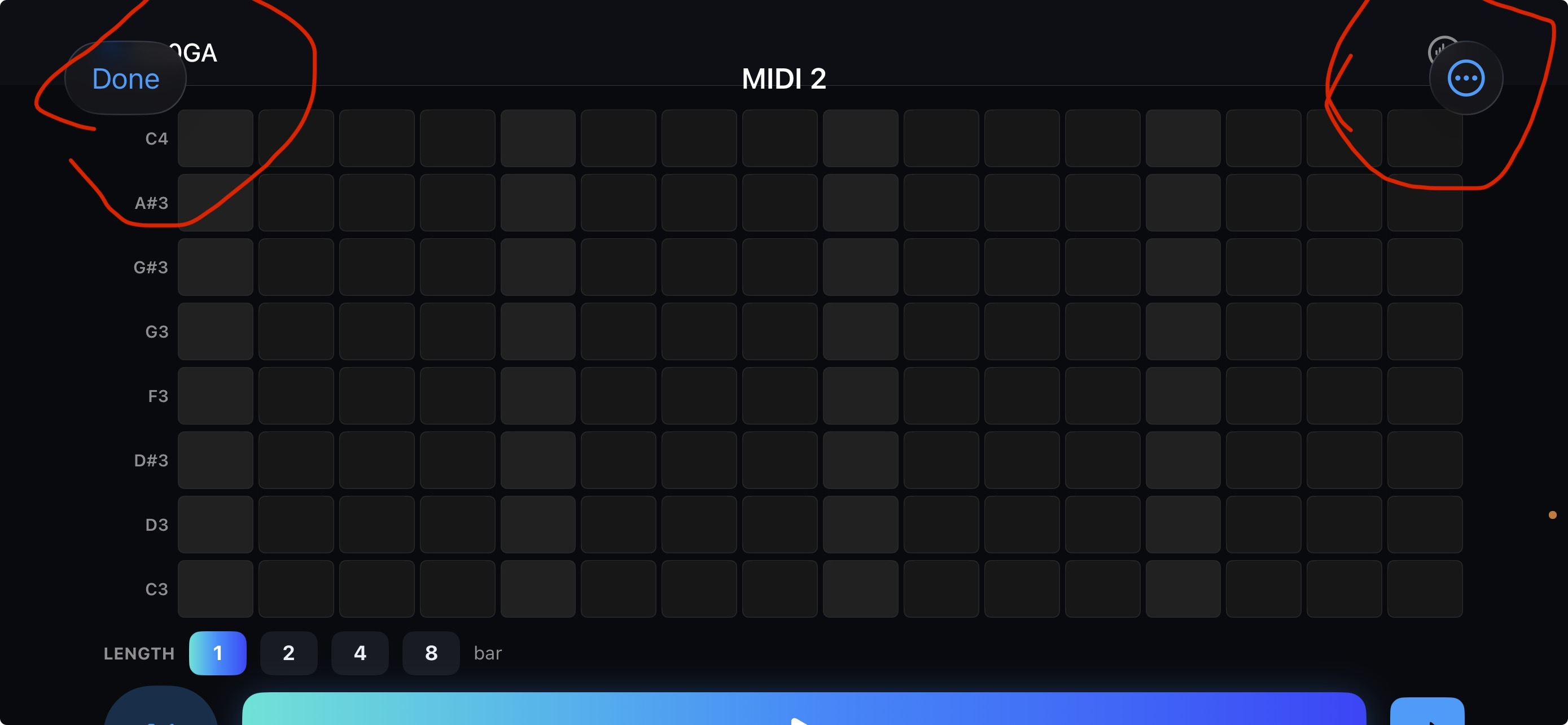
on entering “Advanced Piano Roll” it’s finally possible to open auv3 interface view
This all seems quite negative, I like the overall simplicity and interface, but lots of decision points to get to, for example, an auv3 drum machine + fx selection. It would be ace to have an app like this working smoothly with all my auv3 stuff.
Uninterested in the AI stuff, a “toggle all AI off” button would be appreciated. It’s just unwanted clutter from my POV.
Did I mention nonlinear fade clip handles already? Just checking…
Hello,
Very nice mobile DAW you have created. Here’s a couple comments.
Adding Auv3 instruments in you track took me a while to figure out. From the Arrange page can we have a button to go edit the Auv3 instrument settings? Also could we be able to zoom on Auv3, BA-1 is minuscule.
The Ai thing as left me confused who your target audience is. Musicians or people who want to play with a music app. Musicians do no need an app to make music for them. Creating music is our love and joy. Our escape from this crazy world. The journey is what makes it worth doing not the result. I don’t sit and listen to my old music, I create new one.
Bounce 3.0 update — a lot of this is done and heading to TestFlight shortly 🎛️
@Kewe_Esse @ecou — thank you both, this feedback directly shaped the next release. Here's what's landing in 3.0, on TestFlight soon:
AUv3 hosting (the big theme):
Plugin & FX search — filter by plugin or developer name
Cancel/back in the picker — no more being trapped once it's open
Open a plugin's own UI without the detour — it's now right there in the main editor, not buried in "Advanced"
Small plugin UIs scale up — BA-1 and friends fill the screen now, with pinch-to-zoom
Landscape overlap fixed — the piano-roll toolbar no longer collides (thanks for the screenshot)
Re-selecting the same instrument no longer stops playback
Clip fades — @Kewe_Esse, yes, finally: draggable fade handles on the top corners of any audio clip, with a linear or smooth (equal-power) curve. 🙂
Hide the AI — @ecou and @Kewe_Esse both: there's now a "Hide AI features" switch in Settings. Flip it and Spark, Generate, Sing a Hook, Flip It, Talk, and credits all disappear — Bounce reads as a straight DAW. On who it's for: it's for musicians. The AI is optional, off to the side, and never required — you can make a whole track without touching it.
Still chasing: @Kewe_Esse, the B00ga-not-playing-from-transport one worries me. Two quick questions so I can pin it down: does it make sound if you tap the pads/keys directly (so it's getting some MIDI), and has any AUv3 instrument played from the transport for you yet? That'll tell me if it's transport-sync or MIDI routing.
Resizable floating plugin windows are on the roadmap too — bigger job, but I agree it's the better model. More soon, and thanks again for pushing on the details.
Casey
Welcome @caseyolayos
Congrats on the work.
Thanks @Poppadocrock !!
@caseyolayos Can you cut and paste midi clips between tracks ? Can you add transport controls with the AUv3 window as changing presets be nice to be able to stop start etc without going to the main page. Thinking about it would be nice to have a transport controls on all windows mixer etc.
Can you expand on the current credit limits and how credits will work in regards “sing a hook.” It’s obviously quite niche not sure credits will be a popular choice though maybe IAP options instead?
@caseyolayos
Do you have a preferred support email addy?
Otherwise I can DM you here… probably better than long, rambling bug reports on this thread
@Kewe_Esse - [email protected] works!
@Jumpercollins thanks — good questions, keep 'em coming.
Cut/paste MIDI clips between tracks — not yet. Right now you can slide a clip along its own track, split, and duplicate it, but moving/copying clips between tracks isn't in there. I want it — putting proper copy/cut/paste + cross-track drag on the list.
Transport in the plugin/mixer windows — 100% agree, and it's the natural next step after the 3.0 host update. Opening an AUv3's UI just to have to jump back to start/stop is exactly the friction I want gone. Planning a shared play/stop (and I like the idea of a preset switcher right there too) that shows up on the plugin window, mixer, and editors — not just the main page.
Credits / Sing a Hook — quick clarification: credits are the in-app purchases — you top up a credit balance via IAP packs, and everything cloud-powered spends from that one wallet (Sing a Hook is 5 credits, generate-a-sound 1, stem-separation 10). New accounts start with 15 free. The reason it's metered rather than a one-time "unlock Sing a Hook" is that each generation has a real cloud cost on my end, so credits keep it pay-for-what-you-use instead of baking a big subscription into everyone's price. That said — genuinely interested in whether the pack sizes/pricing feel right to you, so tell me if they don't.
@caseyolayos Enjoyed my first test flight test drive, thank you. Selecting a midi clip stops playback, which was a bit of a killer. Can you please add Bluetooth audio output?
@caseyolayos - why do you keep using that weird long dash “—” in some of your messages and not in others? Does it mean something different? I swear I’ve seen that long dash somewhere else before
On it!! Thanks for test driving @steve99. Big update coming early this week, I'll make sure that's in there.
Hey everyone,
I've run into a good problem, I'm now getting more ideas and bug reports than I can properly track across forum threads, DMs, Emails, and TestFlight notes, and I really don't want anything to slip through the cracks.
So I've set up a proper feedback board: getbounce.app/feedback
Going forward, please post your feature requests and bug reports there. You can:
View what has been added on the "Roadmap" tab
Upvote the ones you want most - this genuinely drives what I build next
Follow what's planned, in progress, and shipped
I'm still reading this forum and not going anywhere .. the board just gives everything one home so I can prioritize properly instead of losing great ideas in my inbox.
Thanks again for helping shape Bounce. Keep it coming. 🙏
— Casey
Just joined the beta - looking forward to test it out...I be using it primarily to run stems (my own recorded ones) on stage for my gigs and it will be interesting to see if it has a "playlist" function to do this. But may evolve into something else as well.
Looks like a well compiled app at first glance! Thanks
Welcome, and thanks for giving it a spin! 🙏
Right now Bounce is organized around projects, one song per project - so for running your own stems you'd import them into a project (+ → Import Audio) and you get full live control while it plays: per-track mute/solo, levels, pan/EQ, plus the Perform pads. So the "run my stems live" part works today, within a song.
What it doesn't have yet is a real setlist/playlist layer — building an ordered set of songs and jumping between them seamlessly on stage, with the next one pre-loaded so there's no gap. That's a distinct live-performance feature, and it's a great use case.
One question so I scope it right: in your ideal flow, would you build the setlist ahead of time (drag songs into order, tap to advance to the next), and would you need gapless/crossfade between songs, or is a quick manual switch fine?
Really appreciate the feedback.
I'm going to add this to our feedback board so you can track it at https://www.getbounce.app/feedback
Enjoy the beta!
Just a simple proceed to the next song and wait (and/or user manual select the next song) for a user input to start, probably from a CC controller pad or similar.
The latter would be very helpful when running "dynamic" playlists, where the performer alters the list "on the fly" to suit the audience mood at the time. EG, sometimes you'll start with a "lay-back" set, but the crowd want to get into dancing immediately, or the reverse!
I am looking forward to testing this app, as I get tired of producing everything on the desktop PC and then needing to transfer to the stage ipad. If the stage iPad can be the DAW AND the player? Magic and I have tried the other DAW's for iOS and pretty much all were a bit lacking, and none ever scaled properly to the iPhone!
Quick one for this thread: Bounce now has a native Mac desktop version and it hosts your desktop plugins (FabFilter, Valhalla, etc. — full editors, v2 and v3). Projects sync both ways with the iOS app, so a phone sketch opens on the big screen. Free download at https://getbounce.app/mac (macOS 15+).
If an AU misbehaves in it, tell me - that's exactly the feedback that got the iOS host solid. And yes: freeze/bounce-to-audio is next on the list.
@caseyolayos great to see the beta developments come so fast. Thanks for Bluetooth audio, I thought it would be good for occasional 'lazy no cable' moments as well as for playing out creations, but it's actually pretty usable latency wise for knocking ideas together. About to check out the Mac version too. Keep it coming.
@caseyolayos So far so good with the Mac version, clean and fast. And the little guy can stay for now at least
@steve99 Bluetooth was a great suggestion and same here, it's how I car-test mixes now. Good timing on the Mac version too: if you run desktop plugins, that's where reports help most right now (every "this AU acts weird" makes the host tougher).
I named the little guy Bop, and I wasn't sure how he'd be received haha!
(Settings → Interface banishes him if you get tired of him 😂)
Next build: bounce any track to audio, FX chain and all. Keep it coming.
Been a while since i shared these too so here they are:
Testflight Link: https://testflight.apple.com/join/ndMeHwRu
Feedback Link: https://getbounce.app/feedback
@caseyolayos How much is Bounce Pro on Mac? I'm not keen on being asked to 'Sign in with Apple to unlock pro', especially when there's no transparency on the price.
@steve99 Fair hit, and you're right - the price should be visible before anything asks you to sign in.
Fixed: grab the latest build from the site and the paywall now leads with the price. (https://getbounce.app/mac)
To answer directly: Bounce Pro is $19.99, one-time. No subscription. Unlimited tracks/projects plus 50 AI credits, and one purchase covers iPhone, iPad, and Mac.
The sign-in isn't a data play — it's how one purchase works everywhere. The Mac build ships outside the App Store (that's what makes hosting your desktop plugins possible), so there's no StoreKit "restore" to lean on; your purchase ties to a Bounce ID instead, which is what lets it follow you across devices. It's Sign in with Apple specifically so there's no new password and you can hide your email. And an account stays entirely optional for everything except purchase/sync, you never need one to make music.
One honest heads-up: card processing on the Mac side is still clearing its own (payment provider) review - if checkout won't complete for a few days, that's why, not you.
@caseyolayos thank you, I appreciate the comprehensive reply 👍