Loopy Pro: Create music, your way.
What is Loopy Pro? — Loopy Pro is a powerful, flexible, and intuitive live looper, sampler, clip launcher and DAW for iPhone and iPad. At its core, it allows you to record and layer sounds in real-time to create complex musical arrangements. But it doesn’t stop there—Loopy Pro offers advanced tools to customize your workflow, build dynamic performance setups, and create a seamless connection between instruments, effects, and external gear.
Use it for live looping, sequencing, arranging, mixing, and much more. Whether you're a live performer, a producer, or just experimenting with sound, Loopy Pro helps you take control of your creative process.
Download on the App StoreLoopy Pro is your all-in-one musical toolkit. Try it for free today.
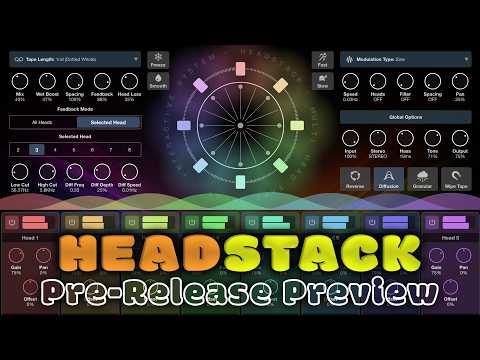
Headstack from 4 Pockets.

Comments
Well that looks fun, and sounds great!
At 2:54, Duran Duran start playing!
@Kashi yeah, that bit was cool af
I love Pauls inventiveness. This app seems to have the ability to create some crazy transitions. I'm excited
**removed comment since it is now irrelevant
It’s out today 12 noon UK time.
It’s out!!
https://apps.apple.com/us/app/headstack/id6781611375
great! thanks Nino for beeping the alarm.
anyone tried it yet !? impressions ?!?!
It seems almost a direct copy of Tug Phonon, free/donation on Mac/pc but not available on iOS. I was so wanting it on IOS and here we are. Been getting lost in it for about 20 minutes and I haven't even found the presets yet. The freeze function is brilliant using it in AUM, I'm just using one track with headstock going into Rymdigare, freezing the sound then just keep swapping AUVs at the top and playing over the frozen yet moving sound. Unfreeze play next instrument then swap again to play over. Really fluid, easy to use and great fun creating nice soundscapes and not even scratched the surface. Very musical. Highly recommended. :-)
thnx @deadpoetlive
great review:)
I use Tug Phonon on desktop too...
Just bought it, looks awesome.
Is the head wheel AU parameter exposed? How about the freeze function?
Well I’ll answer my own question: just about every knob and setting in the UI is exposed as s as parameter except for the coolest part of the app: the scratch wheel. I’ll drop Paul a line to see what is up with that.
Not working for me in Logic. Anyone else experience this or does it work for you, in Logic? (iPad Pro M1 -- 26.5.2)

I got another warning before this one (below) but can't recall what it said.
Aren’t their factory presets?
Not that I would need them🤭
Ok - opening in stand alone helps - presets are there.
It works for me in Logic. I think the issue you're having here is that your track is set to mono input (when you were recording a guitar perhaps). Set the input back to stereo and you should be good to go (it won't affect the already recorded audio).
Ah, alright I'll try that then. Thanks!
I find that sometimes (most of the time) putting the mix to 0 does not give a fully dry sound. Anyone else? Am I misunderstanding anything? Also, the Low and High Cut knobs seem not to be working. These comments refer to the AUv3 version.
The Tugphonon plugin which this is based on has the following option:
“Individual Modulation: When switched to Individual Modulation, each head has its own independent LFO. The global controls become inactive. Settings are found in each head's MOD tab (see Head Strip below).”
Wonder why this was not implemented here. Tugphonon also has various physical modeling resonator options etc built in which look like they’d be really useful. Wonder whether the dev would be open to adding those kinds of options.
You've hit on a couple more of my headscratchers with this app, @Gavinski. It DOES sound good and it feels like it could be really useful but I keep bumping into the rough edges. I'm really disappointed that the Wheel (which is so much fun) cannot be controlled via an exposed AU parameter. Paul responded on YouTube that it's not possible due to the way the wheel "snaps back" (apparently it breaks something in Logic Pro). So, yeah, this one is a "close but no cigar" so far for me.
Hadn’t noticed that about the wheel, pity. What other rough edges did you come across? Overall I think this is pretty cool so far. I do wish there was also an option to jump directly to very musically relevant values on the Spacing knob (25, 50, 75, for example) without having to drag through intermediate values, that would be very useful as a live performance control. One way to do this would be to have a small button beside the Spacing knob which would toggle between normal knob behaviour (changes written immediately) and the alternative behaviour (changes written when finger is lifted).
I noticed this too yesterday regarding the mixer to zero.
Overall, i am really happy with my purchase.
Me too, and I'm sure any bugs will be fixed. 4Pockets apps nearly always get a couple of pretty significant updates based on user feedback in the first weeks too.
Have to tip my hat to Paul. I just noted that HeadStack has already been updated with the AU parameter exposed to control the wheel with a hardware controller. And what a beast it is!
But how do you open those presets when using it in a daw like Aum?
This looks like the Fugue Machine of delays. Does it have multi-out by chance? Seems similar to Jira Jira Echoe in Mirack.
No multi out. I have a thorough vid on this on Patreon btw!
One time opened it in stand alone, presets are also available in AUM…