Loopy Pro: Create music, your way.
What is Loopy Pro? — Loopy Pro is a powerful, flexible, and intuitive live looper, sampler, clip launcher and DAW for iPhone and iPad. At its core, it allows you to record and layer sounds in real-time to create complex musical arrangements. But it doesn’t stop there—Loopy Pro offers advanced tools to customize your workflow, build dynamic performance setups, and create a seamless connection between instruments, effects, and external gear.
Use it for live looping, sequencing, arranging, mixing, and much more. Whether you're a live performer, a producer, or just experimenting with sound, Loopy Pro helps you take control of your creative process.
Download on the App StoreLoopy Pro is your all-in-one musical toolkit. Try it for free today.

Comments
Hmm, I like where they're going, here.
any info when this is planned to go on iOS ? Just to know that i can delete my iOS DAW project 🤣🤣
The VU Studio apps still in beta. Don’t think it will be long before it’s out though
Very interesting
I won’t hold my breath for this one. I believe the iOS version will be a stripped-down version of the desktop app. I already have more than enough audio sketching tools on iOS that I never use, and I’m not sure it’ll offer anything new compared to Loopy Pro or Zenbeats. But you never know—let’s hope I’m wrong.
Please don’t delete! Keeping an eye out for news of your project…
Just kidding.. doing it for myself in first place so nothing can stop me ))
))
Now in store.
https://apps.apple.com/gb/app/vu-studio/id6789577964
-
Ok good! I’ll put my eye back in for now, so.
This looks like a mini Ableton with drum rack/simpler. Definitely interested
For the Mac, it comes as an installer, which only contains the application file. That's a bit weird. You can just grab the app from the installer packager and drag it to the applications folder.
UI is hard to read. Very black, and the light mode has very thin text and ui elements. Definitely not accessible. Makes me want to open up Ableton instead
That's a shame. I imagine he'll work on that, VU... seems like a labour of love.
I just gave the iPhone version a quick 5 min test. I'll try the iPad later.
I quite like the UI as-is, but I didn't dig into the settings to see what can be edited.
Sample zooming seems limited, though I did load a 2 min sample to chop up in my test. Might be better with shorter material.
There doesn't seem to be any AU hosting, right now at least. A label above the sample window says 'SOURCE Audio Sample', which makes me think other sources might be an option down the line. It's something he added to VU950, so 🤞🏻. Based on this, I'd be happy to buy that as an IAP, and it might then become my main workhorse.
Sample import is pretty painless, there's a shortcut page for folders, too.
My main takeaway is that the workflow seems nice and straightforward, which is such a refreshing experience nowadays!
There is less mode switching and button pressing than VU950 (haven't tried that yet, but based on the vids I've seen).
One look at his YouTube tells you he's sampler mad, but he has clearly thought about simplifying the workflow here. As fun as a straight-up hardware emulation sounds, even the quickest hardware workflow is always going to be a convoluted way to work on a touchscreen.
It can't compete with Koala yet, if ever, but it is promising.
It has some good ideas but I think it’s a bit too complicated for an iPhone app.
For exemple, it have 3 levels: pattern, sequence, song. I think 2 levels would be enough.
Add a filter to a sound is a pain :
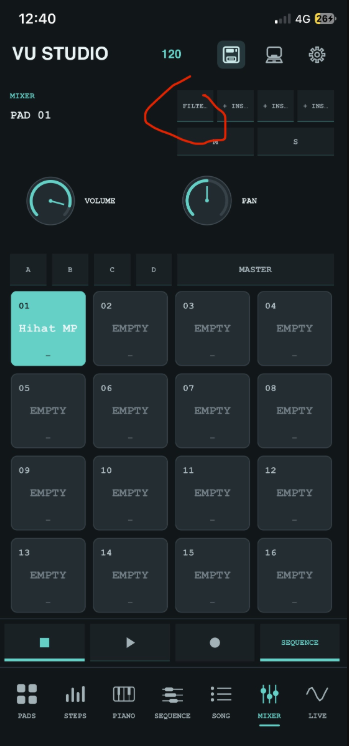
It lacks some very basic things like preview in the piano roll.
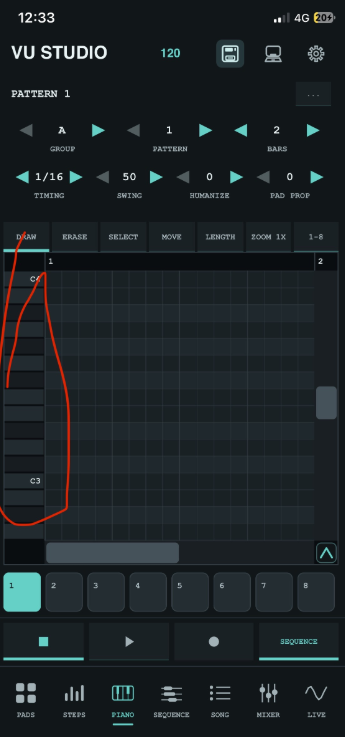
It can not be loaded as an AUv3 in a host
Hi everyone, dev of VU Studio in here
Thanks for nice comments and valuable feedback.
VU202 got the update and You can move the project into VU Studio also Vu Studio supports the .vu202, .espi, .koala project files and I mean VU Studio app and desktop
  (.espi projects - resample all pads before to keep that SP sound on sounds)
I'm working on Vu Studio every day now and I hope You gonna like it, I also don't believe that VU Studio will compete with Koala but I tried to make something powerful - but much easier to use than my other apps.
Thanks for your feedback. Good luck with the project!
This all sounds great, I’m looking forward to AU hosting for sure, FX too, I’m hoping. Eventually
This app is very nice to use, it’s fairly simple and you can do proper arranging in it with the song mode, which is something I miss in quite a few otherwise great samplers/grooveboxes. The thought and work you’ve put into the UX-side is impressive.
I think we’ve been missing something more MPC-like for iPadOS/iOS for a while, now.
Yeah, I know we have a few great SP-style apps. iMPC Pro 2 could have been great with some stability or love and care. Of course, there’s BM3, which deservedly has its fans, but to me, every step of the workflow is like searching for a card in a shuffled deck (to be fair to Intua, MPC One was much the same, but I’m probably in a minority on that!).
No doubt VU Studio would be better for staying fairly lightweight, but I’m looking forward seeing how it develops.