Loopy Pro: Create music, your way.
What is Loopy Pro? — Loopy Pro is a powerful, flexible, and intuitive live looper, sampler, clip launcher and DAW for iPhone and iPad. At its core, it allows you to record and layer sounds in real-time to create complex musical arrangements. But it doesn’t stop there—Loopy Pro offers advanced tools to customize your workflow, build dynamic performance setups, and create a seamless connection between instruments, effects, and external gear.
Use it for live looping, sequencing, arranging, mixing, and much more. Whether you're a live performer, a producer, or just experimenting with sound, Loopy Pro helps you take control of your creative process.
Download on the App StoreLoopy Pro is your all-in-one musical toolkit. Try it for free today.
Comments
Cracklepot!
Thank you for taking the time to ask! Go well!
Thank you for the quick reply! That helps me a lot. Going to try to get some Blooming, Shimmering action going now that I understand what they are.
I see what you mean regarding the reverse playback of notes in Ping pong mode. Thank for the tips about tweaking rhythm motion and trying different Composer styles. It definitely helps.
I also see now that to get the Ping Pong behavior I expected, I could build it myself by copying sections, putting them in order manually, and use forward or loop playback.
The user manual you have now is good. I understood it pretty easily. There are some features that could use more information, but that could be easily added when you get time. I think having detailed images of the UI in the manual to accompany text explaining the UI/workflow is helpful, especially when learning a new app. It keeps me in the manual, instead of bouncing back and forth from the manual to the app. But that’s just me, other people might prefer a leaner, cleaner text-only manual.
I get the D4 and D20 designations now (RPG dice). So cool. Are there plans to add more dice varieties eventually?
I just read here that I can get 3 more “voices” (i.e. MIDI Channel “parts”).
“Hold my beer”.
I like searchable User Manuals:
The PDF Manual can be seen and downloaded from
Https://fishtailmidi.com/Fishtail-User-Guide.pdf
So, I searched for clues to Bloom and Shimmer. I found Bloom in the “Bloom and Expression” button but still can’t see Shimmer. My Bloom settings added the “Bloom Bass” on the 5th channel… still need to see “Bloom Octave” for channel 6 and Shimmer for 7.
Any clues appreciated.
Try cranking the Bloom Pressure to max to get the Bloom and Shimmer activated, then try adjusting to taste on subsequent takes. Haven’t tried it myself yet, but that was the developer’s recommendation.
Bloom and Shimmer are part of the same system. Bloom Octave and Bloom Bass are obvious, but Shimmer is a third Bloom style, actually.
Thanks… I see a Shimmer labeled track now. Now I need a clue to activate the Bloom(in’) Octave. (I know it’s obvious but still not seeing it).
Since the output of value to me is always a MIDI file it would be a nice touch for me to be able to label the tracks with suitable target names:
Violins 1
Violins 2
Violas
Cellos
String Basses
Would match the Berlin Orchestra labels I see in StaffPad. Now sometimes I would like to use the Brass section labels or woodwinds or arbitrary Tuned Percussion (mallet-o-phones)…
Thanks for the feedback - yes - the 6 voices are reasonably easy to get - the 7th only occurs very occasionally. I tried my best to ensure the notes follow voice doubling rules of counterpoint for the extra 3 voices. I see them as special glints of colour enhancing the main 4 voices.
I have been trying to think about how to do a walk through video - I have written a script, I will get onto doing a recording as soon as possible.
The time signature fix has been approved for MacOS by apple, just awaiting iOS approval now - I am super pleased for users finding these things - I was sure that it was working - and don’t understand how it stopped working! Blimmin programming - I probably put a bracket in the wrong place at some point! I hope the time signature fix helps you. I found another bug whilst I was looking which I patched too. Keep the complaints and telling me what Fishtail isn’t doing well enough coming! (I especially like hearing the music you made with Fishtail thank you - that is very special to me, and OcularDebris really appreciates the comments some have made on her visual art and our collaboration. We are working on a drum machine at the moment - designed to be able to accompany Fishtail - actually making synth sounds this time (it is a synth Drum machine - not samples) - and be programmable by users as well as generative. It uses the same pitch, tempi and swing engine as Fishtail and allows very precisely tuned drums.
@amy_cin Please consider adding a tip jar so I can thank you for the updated features that I and others that want something I like.
I’d tip for the Time Signature fix and I have a need to be able to label channels with my desired
Instrument names… just a text field for me to over write your standard labels:
Or consider a Patreon offering to create a community since you are putting in a lot of effort but the “user base” might be constrained to folks that have an interest in
Musical theory based algorhythms.
The UPDATE is available (in the US?). I downloaded and tested sending a 7/8 time signature MIDI file into StaffPad and it’s 7/8 and the correct number of requested measures.
Now I need to understand more about how to generate some ensembles that are less esoteric.
The 7/8 has a ton of Triplet, Quintuplet, and Septuplets so it’s hard to actually hear the 7/8… it looks like Frank Zappa’s crazy notations intended to really challenge the “note reading” skills of Ruth Underwood, George Duke, Vinnie Coliuta, Chad Wackerman, Jean Luc Ponty… etc.
For example, I got:
Kia ora,
I do have a tip jar on my website. Fishtailmidi.com
Thank you. I am glad the time signatures work - they were meant to from the beginning sorry!
I think a lot of those phrases would be better as grace notes? Would that work better. The rhythm motion and swing will have a lot effect on the generation
The great thing for me is the ease of creation… I was just happy to see the Time Signature and number of bars in the MIDI file show up. If I have to notate that 32 bar run of notes it would take hours and hours. I can also use the “lasso” and repurpose any of the notation as required and save a ton of pencil entry.
For a Staffpad that’s complaining about the handwriting input “bugs” this provides an alternative
Workflow that I have been chasing for 2 years or so… how can I get complex rhythmic notation faster and multi-part scores to import. (NOW: labeling parts in Fishtail would also let me hear the result faster… re-labeling parts takes me ~2 minutes… 2 minutes of waiting).
StaffPad users can be so cruel and I am no exception. Handwriting accuracy for notation requires the touch of an artist with the pen. And yet there are composers that create work like this using their Pen…
Conrado Del Rosario doesn’t complain about StaffPad… he just finds a way to get the results he intends. It makes me ashamed at my lack of determination. But I will find workarounds and Fishtail
Is really fast and getting a lot of complex notation I can “cut and paste”, re-edit or just accept and enhance.
[edited response] OK. I will try that.
I rendered another FishTail Composition in StaffPad and uploaded the music to SoundCloud:
For anyone interested in seeing the Musical Notation that results in StaffPad from a FishTail MIDI import I made a YouTube screenshot video. NOTE: The quality of the audio is NOT great but the video shows how StaffPad adds value with a “Chord Chart” staff, a Tempo Track and an Automation Layer to control mixing of volumes.
I wanted to quickly create a “Sleep” aid and used FishTail as the MIDI generator in AUM.
4 instances of PianoTeq 9 playing “Hand Pans” and 1 Continua Synth with the great @Spidericemidas Preset called “Pad-Dreamcatcher”:
Those are beautiful and exquisite demonstrations of Fishtail thank you for sharing like this McD. Blimmin’ fantastic (!!!) if I may say! You do beautiful music - really delightful thank you.
I have been working on Gummy Drum - it is five synth voices that respond to MPE pitch - also I am working on a link between Gummy Drum and Fishtail right at the moment - where Gummy Drum does generative rhythms which can be edited. I will be looking for testers soon I hope!
Some great work here @McD …
Interesting app 👍
Indeed. The developer @amy_cin is working on a drumming app that will sync with FishTail.
Speaking of which…
The Gummy Drum public beta is live for iPhone, iPad and Apple-silicon Mac!
Join here: https://testflight.apple.com/join/frnYtcNr
You can check it out here - the beta for Fishtail with the shared space for Gummy is in awaiting approval at Apple Status… Gummy is running though… OcularDebris has plans to make it look beautiful, and that will be worked on soon!
iPhone open you get this is it frozen
Ok AU window is fine
Yeah, my standalone did the same. AU loaded fine.
Interesting UI!
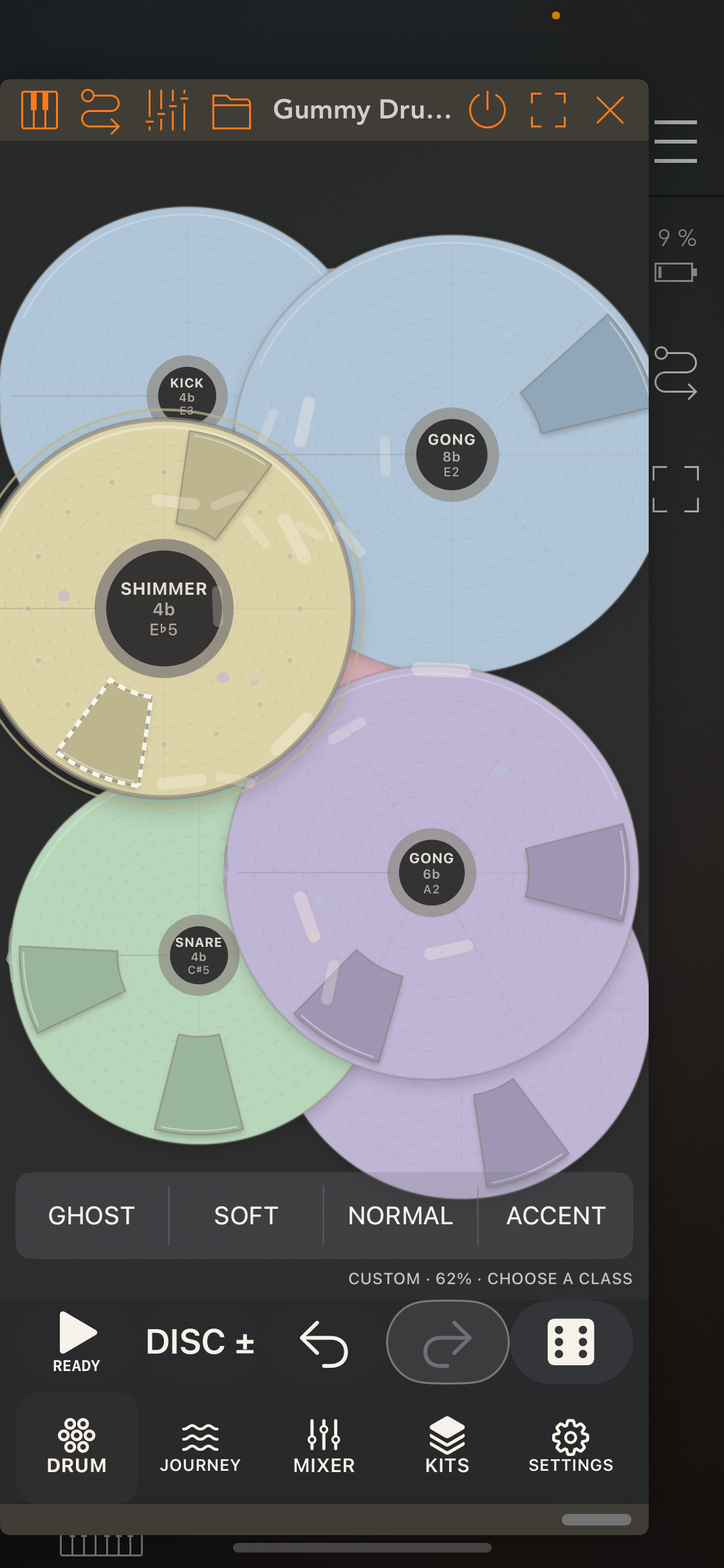
Possible stupid question - where is the button on fishtail to pair with gummy? I can tell gummy to connect via settings, but it just waits. Test flight instructions say there is a button in fishtail settings, but I can’t find it for looking.
Hi. I am still awaiting apple to approve the Fishtail beta that will allow this function
So the generative part isn’t working yet.
Ocular Debris has been thinking and doing mockup’s of the design. She’s been putting a lot of thought into Gummy
There is a good randomiser which approximation of part of the generative bit. Hold down the dice in pond view and control your randomisation - weight dice the way you like. Hold down the dice button…
And not at all a stupid question
Here is a video with the hoped for interactive behaviour - and a weird song - first five minutes is me setting up settings and making a mistake in the settings !!! Demonstrating what not to do !!! Doh!!!
And - it worked out to make (kind of?) music - which starts at about 5 minutes into the video - the first five minutes is me pushing settings with a looped Fishtail bit I liked
The Fishtail version that can talk to Gummy Drum is now available via TestFlight.
Let me know if you have any problems. I am working on the Gummy user guide - and Ocular Debris is doing design work now. I would love some more kits and drummers for Gummy if people are interested in contributing?
iPhone/iPad: Fishtail 1.0.3 (376)
Join the iOS/iPadOS beta: https://testflight.apple.com/join/sW8tq4BE
Mac: Fishtail for Mac 1.0.2 (379)
Join the macOS beta: https://testflight.apple.com/join/hCpczMmP
Gummy user guide draft:
https://fishtailmidi.com/Gummy-Drum-User-Guide-Draft-1-a83f6c91.pdf