Loopy Pro: Create music, your way.
What is Loopy Pro? — Loopy Pro is a powerful, flexible, and intuitive live looper, sampler, clip launcher and DAW for iPhone and iPad. At its core, it allows you to record and layer sounds in real-time to create complex musical arrangements. But it doesn’t stop there—Loopy Pro offers advanced tools to customize your workflow, build dynamic performance setups, and create a seamless connection between instruments, effects, and external gear.
Use it for live looping, sequencing, arranging, mixing, and much more. Whether you're a live performer, a producer, or just experimenting with sound, Loopy Pro helps you take control of your creative process.
Download on the App StoreLoopy Pro is your all-in-one musical toolkit. Try it for free today.
Vesper released

Hi all,
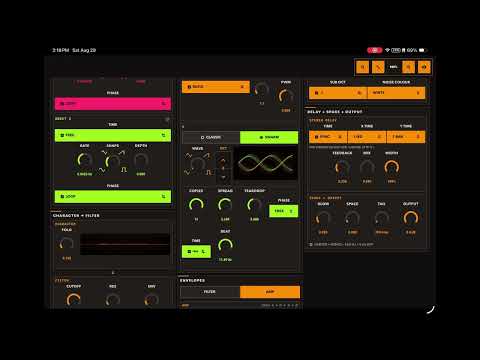
I’m looking for testers for Vesper, a touch-first virtual-analogue synthesiser built around a Swarm oscillator.
TestFlight builds are available for iPhone/iPad and macOS. I’d especially appreciate feedback on the sound and musical feel, CPU performance, MIDI/MPE behaviours, patch management, UI, and use inside hosts such as Loopy Pro and AUM.
I’m also looking for people who might enjoy designing patches. With your permission, contributions may be included in Vesper’s factory bank, with full credit.
iPhone/iPad:
https://testflight.apple.com/join/FcDycGVU
macOS:
https://testflight.apple.com/join/3FctVVbR
Thanks, I’d love to hear what you make with her.
Video of the interface and a piece I made with her here:
Comments
Won’t open on my iPhone 13 Pro Max


Thank you. :-) i’ll look now.
you need to work lot on CPU optimalisation - it eats enormous amout of CPU - realistically you need to squish it downto at least half of current one (tested with 8x swarm osc) to get at least into territory of synths which are also known for being CPU hungry .. Study DSP optimalisation techniques on iOS, there is a lot you can do … xCode Profiler is your friend, it reveals a LOT what is weong in code
Also UI is very rough, I would suggest to invest more time into making it the way that it better adopts to various window sizes - this is often even hardest part of job than DSP code ..
My general suggestion is put out public beta only when YOU will be super satisfied with synth and for yout it will be near to “finished” - to put into wilderness half-finished thing will make people put your product into “average, not interesting” category and later will be for you very hard to convince them your product is worth their attention.
Compare your synth with competitors which are approximately in same territory (supersaw/unison oscillators) - compare their UI with yours, rheir sound quality with yours, their features list with yours, their CPU load and stability in various AU hosts with your synth .. don’t get satisfied with average - there are tons of synths on iOS which are average and if you want build maitainable popular product you must do better ..
It is nice when somebody is trying to create something and I’ll respect that. Just giving you thoughts which I myself went through too when I started to work on my synth.
You have to be very strict with yourself if you want to succeed.
Open this one as a AU first by the looks of it then the standalone will open normally it’s usually the other way around!
https://fishtailmidi.com/Vesper-User-Guide.pdf
Oh, I am glad it opened for you Jumper - thank you. I was worried - that is a bit weird - I am not sure what happened there. I will look when apple send me diagnostics through.
Ngā mihi
Thanks dendy — the CPU feedback is useful. I’m seeing different performance here, so I’d really like to reproduce what you’re seeing.
Could you let me know the device, host/standalone, sample rate and buffer size, approximate polyphony, preset/settings you were using with 8× swarm, and which CPU meter/readout you were looking at?
That would give me something concrete to profile and optimise if there’s an edge case I’ve missed. Thanks for testing it.
The polyphony limit’s / device etc are in the User Guide I just uploaded. I have worked extremely hard on optimisation of this synthesiser - and believe that optimal resource use is ideal. You are welcome to contact me in a PM if you want to talk further.
Ngā mihi for your time
It didn’t open on my phone either
Iphone 13
For measuring performance you need to push your CPU to it’s limits to avoid CPU throttling which distorts mwasuremenr..
just pick some hosr (AUM has nice detailed info abour CPU consumption) - load there your synth for example in mode wirh 8x swarm oscillator which corespons to 8x unison in other synths by number of calculations (approx).. load some ither synth where you can also use unisoned oscillstor (for example Butter synth) now add for exsmple 4 instamces of your synth, 4 instances of orher synth - enough somyour global CPU meter is steady around 60-80% .. feed them both with same notes (for eysmple 4th note chord per instamce) .. then warch CPU load details in AUM, you see that your synth is esaring +2x more CPU (sand Butter is still not the one wirh best CPU optimalisation)
To get at bottom of that you need to run your project in profiler and analyse witch parts of code are comsuming most CPU and then develop some solution(like SIMD4 or SIMD8 and stuff like that)
example - your synth vs nuSaw both synth playing 2 oscillators one basic one 7x unison (which is basically your “swarm”) … each synth feeded with 8 notes chord… so all synths are doing +/- same ..
NuSaw is very well optimised synth, you can see yours needs a much more CPU for approximately same sound..
to be fair, added to project also Butter Synth and your is just slightly more cpu hungry than Butter - but that should be not consideeed as “good” cause BS is known for it’s higher CPU consumption ..
there is definitely huge room for improvement
Just question - your default sound - does it do any oversamoling by default ?? That would explain high CPU load … I just used default preset for rhis test, thenine which loads when synth starts, and just enabled 7 copies swarm on osc B - so if there is hidden somewhere in setting something like 8x oversaming then that is it, in that case i would suggest you to make this optional , not default
Thanks dendy, I genuinely appreciate the time and passion you’ve put into testing Vesper, particularly setting up the AUM comparisons and sharing the results.
To answer your question: there’s no secret 8× oversampling gremlin hiding under Vesper’s hood. The default sound and Swarm both run at the host sample rate. The oscillators use PolyBLEP band-limiting, and, that isn’t oversampling.
With seven Swarm copies, Oscillator B is running seven related oscillator lanes while Oscillator A remains active, so the test is exercising eight oscillator paths per played note.
I haven’t yet performed the same controlled multi-instance AUM comparison. I knew Swarm would be one of Vesper’s heavier modes and have put considerable work into making its maths efficient, but your results show that multi-instance profiling should be part of my next pass. I’ll reproduce the setup and profile the complete signal path.
If you have the device model, AUM sample rate and buffer size handy, those would help me match your results.
Thank you again for your time and care.
Ngā mihi,
Amy
my screenshots were made on iPhone 16 max, 48 khz project rate and 256 buffer
but this is basically irrelenvat, you should not look on absolute numbers but ro RELATIVE numbers when compared to other synths doinf +/- same stuff - by relarive comparation withbother ssynths younput out of equation absolute statistical eroros.
Also As i said you need to push entire projext acumulated CPU load up to 70-80% (which did not in thise screenshots) which effectively turns of CPU trhrottling and all cores are running really on full throttle
Thanks again for raising the multi-instance question.
It prompted me to establish a controlled performance baseline.
On my Mac (A MacBook Air), at 48 kHz with a 128-sample buffer, I tested an intentionally demanding configuration: eight held notes per instance, with seven Swarm copies.
Vesper instances Average realtime render budget
1 21.8%
2 43.6%
4 87.5% — near the edge
6 131.6%
8 175.1%
The workload increased, generally, linearly. I found no unusual overhead caused specifically by running multiple instances in the TestFlight build. The results confirm that several heavily voiced Swarms can exhaust the available audio-rendering time, as your test suggested. A much lighter one-note Swarm workload reached only 30.4% across eight instances.
Swarm does, quite literally, multiply! Your report has given us a useful performance benchmark to retain. Thank you for spending the time testing it.
I see, answer generated by AI 🤣
Ok, I am done here.
I don’t like it when I feel like people are being mean to me, so I filter them. Sorry. Feel free to talk to me and realise I am a person - I made a synth. I think it’s cool. You are welcome to come and go as you like - and - if people, were for example, to talk to me as I am a biach. Yeh - I put on the AI filter. PM me if you want a real conversation, I appreciate your questions and testing, and have found it difficult engaging in conversation with you as what you say in public is permanent. Go well. Thank you for the test dendy.
.
.
Kia ora everyone — a quick Vesper update!
The new Mac build is now live on TestFlight: B052 / version 1.0 (39). It is a universal build for both Apple-silicon and Intel Macs, with support for macOS Ventura 13 and later.
If the previous Mac version wouldn’t install, please try this one and confirm TestFlight shows build 39:
https://testflight.apple.com/join/3FctVVbR
Feedback is very welcome—especially your Mac model, macOS version, host, and whether you tested standalone or AUv3. Thank you! ☀️
Also - I updated the iOS build - which is intended to stop that launch on crash and inability to open in iOS27 beta
Thank you - go well
I have worked on performance - and improved its performance whilst maintaining the same output. Dendy was right (thank you for making me look at this very closely) — it was not as efficient as it could be. I have improved it. I hope this helps users - especially on phones!
Does anyone have any patches they would like to put in the factory bank for release?
Kia ora all, Vesper is now released and available! Thank you to the testers and as a thank you to anyone who tested Vesper, I would like to offer you a complimentary copy of Vesper for your preferred platform - send me a PM and I will organise it for you. I do have a limit on how many I can give out - and - I hope to be able to accomodate all testers.
There are soundbanks for Vesper on www.fishtailmidi.com/vesper and more are coming!