Loopy Pro: Create music, your way.
What is Loopy Pro? — Loopy Pro is a powerful, flexible, and intuitive live looper, sampler, clip launcher and DAW for iPhone and iPad. At its core, it allows you to record and layer sounds in real-time to create complex musical arrangements. But it doesn’t stop there—Loopy Pro offers advanced tools to customize your workflow, build dynamic performance setups, and create a seamless connection between instruments, effects, and external gear.
Use it for live looping, sequencing, arranging, mixing, and much more. Whether you're a live performer, a producer, or just experimenting with sound, Loopy Pro helps you take control of your creative process.
Download on the App StoreLoopy Pro is your all-in-one musical toolkit. Try it for free today.
Comments
yeah, same here. using an iphone 7 plus. when i try to open an audioshare file in a clip. nothing load. if i click to another clip in another column it's will load. but if i try to load another in a different column. nothing loads. it's very spuratic.and it never loads more than one file at a time. weird
Is there supposed to be a user loops folder where the imported loops go to?
how does the resampler work? does
it save to a pad, or to clip library ?
I like the app because it offers midi mapping of the audio clips (novation arent going to do this I recon) and has some fun clips and a nice buy clips model but getting my clips into the app is important for me. My point is AudioShare is still very difficult to use.
1) start a new session, import audioshare sample to slot one. It just doesnt load/appear!
If you import a clip into slot one then delete it by swipping it away it IS possible to load a audioshare sample into slot one.
Loading audioshare clips DOES seem to be possible if the right combination of modes (try with the pads button on, if it does work like that toggle it and it might work) but it is far from intuitive.
Ive tried on ipan mini 2 and air 2 with 10.2 ios with the same results. Maybe there is a trick to get is working but I havent found it after 15 mins
are you using the latest version of Looptunes? Also, I discovered, that if you are browsing in online mode, Audioshare (or Audiopaste) doesn't work in the current shipping version (I just submitted a new build to Apple, with a fix for that)
you arm the recording using the recording button in the bottom toolbar, select "Resample". Once the button is lit red, pressing an empty pad will start resampling on to it at the next bar. Pressing the pad again will stop resampling on the next bar, and start playing the recorded pad. It will also turn off all other pads that were playing before, in order to avoid doubling up the pads.
Deleted original install, installed update, deleted update, reinstalled update:
AudioShare import doesn't stick no matter how many times I repeat it. Does not import, pad cycles with clip name the defaults to blank. Deleted update.
Air 2 latest IOS
Dev is working on a fix.
Cool though I had thought this update was the fix.
is it possible to email or PM me a video of what you're seeing, so I can try to reproduce?
nm, I can actually reproduce it now.
I just uploaded a little video tutorial on looptunes recording. There’s a little easter egg in there too, for the upcoming 1.6 release):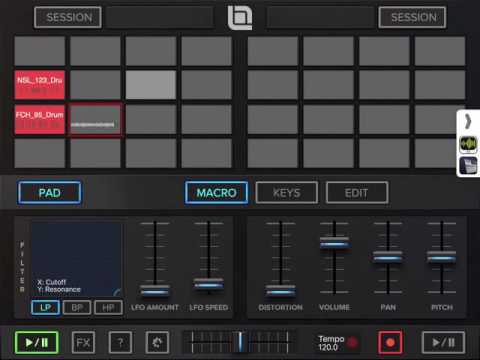
Currently it doesn't show up in the output side of AB?
correct. That’s the easter egg.....I’m about to submit a new version to the store (1.6), which will let you do that.
Awesomeness!!!
just released 1.5.2, which has the audioshare import fix, and a new filter field in the browser. Warming up 1.6 as well.
Enjoy
It works !!! You tha man!!!
Very strange I updated and it showed up in AB output but I did a reboot on the iPad and now it no longer shows up in AB.
You have to load Audioshare from within Looptunes. You cant share a Audioshare sample into Looptunes like you can with the other apps. For example, if you start a new session, you open up a pad, then in the box(to load sample from) you will see 2 little boxes(on the right hand side), one from AudioCopy, & then AudioShare. It works, but I found it a little buggy. What I mean is, is that LoopTunes, was not very responsive(a bit laggy). Even when you play the loaded sample from AudioShare, LoopyTunes felt a little unresponsive. But it's early days yet, & it's good o see the Dev is always working on it.
@5pinlink I had this exact same problem with the last version but this latest one has fixed all these problems for me on a ipad mini 2 with 10.2.
If your running the latest maybe do a delete - power cycle - reinstall! Just a suggestion.
What ipad and ios version have you got?
Update is not working for me either on Air 2. I did a clean install after reboot. AS import still not working...
I’ll have to try it with short samples, such as drum hits. It might barf when attempting to stretch a short sample to at least 1 bar length
I just tested on air 2 and AS import seems fine except for loops less that about 1.5 seconds. This is the first play Ive had with my loops and Im really enjoying it.
A couple of other things I noticed. I mapped midilfos to the cross fader and it worked fine but there is no indication/animation of the crossfader. It cosmetic but it would help with visual feedback. Also any chance double tap on sliders could reset them to default value?
Thanks for a great app
that’s an oversight (crossfader). I’ll add that in the next version.
Will also add double clicking/touching to reset faders soon. Seems like a desired feature.
I just unleashed 1.6, which has AB output. Happy AB recording
I just figured out that it wasn't working with AIFF files from AS. WAV files import just fine.
Confirmed.
Audiobus recording works,yeah! But recorded samples are not saved in the season.
Bug or I miss something?
FR : We definitely need a way to record from the AB panel. Maybe pressing rec button would auto select the next empty pad. And a nice play/stop button would be great (listening to AB transport buttons)
I figured out the problem with saving recording loops not working....
saving requires an 'importedLoops' directory to exist in the app's Documents directory. If you manually add it, it should work.
Will be fixed in the next version.