Loopy Pro: Create music, your way.
What is Loopy Pro? — Loopy Pro is a powerful, flexible, and intuitive live looper, sampler, clip launcher and DAW for iPhone and iPad. At its core, it allows you to record and layer sounds in real-time to create complex musical arrangements. But it doesn’t stop there—Loopy Pro offers advanced tools to customize your workflow, build dynamic performance setups, and create a seamless connection between instruments, effects, and external gear.
Use it for live looping, sequencing, arranging, mixing, and much more. Whether you're a live performer, a producer, or just experimenting with sound, Loopy Pro helps you take control of your creative process.
Download on the App StoreLoopy Pro is your all-in-one musical toolkit. Try it for free today.

Comments
Oh yes! Looking forward to this. Thx
Very well done, info and action packed, hard to believe it's only 4 minutes. This will open the door for folks that bought the app but havent gone inside to play. Many thanks.
Is there some kind of performance mode aka only show selection of controls?
All that scrolling drives me crazy.
This.
My qualm as well. It would be great to leave the zooming and spaghetti behind with a big knob performance view.
:
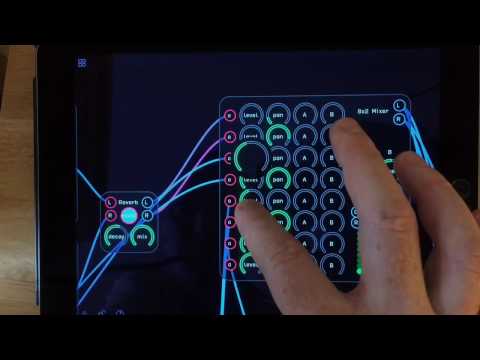
Part of the functionality is a kind of create-a-GUI deal, in which your choice of buttons, sliders, dials, and "LEDs" can front a huge gnarly build...
One example of a control surface and what lies beneath
Like mentioned above you can kind of make your own perforance view by grouping stuff then choosing what controls you want accessible, i think also you could send cc messages from a controller though I have not tried that
There are a few more things that bug me.
No link and no midiout. It just refuses to play along. I gave up on it.
I complained about that like a year ago, tumbleweed and shrugs.
Midi out is coming. Not sure about link
I haven't taken to Audulus 3 like I'd hoped, but I haven't given up on it yet. I see there's clearly custom power there for those who know what they're doing. I never got past some fairly basic patches that weren't as good as $1 apps I already have LOL
LOL
Did get lucky a couple of times putting together the right modules to get something unique and interesting. But, it was pure chance only.
However, after watching @RedSkyLullaby 's video, I was reminded that I don't have to build stuff from scratch. I can just get in there and play with patches Audulus 3 comes with, or download more user-created patches from their site. Then tweak, and/or add additional modules to what's already built.
I wish there was a way to reset a patch to default settings though. I'll take one of the more complex ones, move stuff around, change settings to get a different sound, add modules, etc. then at some point I've completely destroyed a perfectly good patch with no way to reset it to the way it was.
I hope they have Link on their list. +1 for a snapshot feature of somekind
Thanks for the vid
Create a copy of the original patch and then modify the copy.
Duh! Thanks!
For some reason, and I suspect it's the adjustment to the new modules & interface, I haven't felt inclined to experiment with v3 like i did in previous versions. Perhaps I got all I needed out of it early on, and maybe it's just not for me.
Understanding modular patches built by someone else is a tough one.
Examples show what can be done with a system, but the best way to dig it is DIY.
Start with simple things and extend them, preferably in directions that don't exist yet.
It's pointless to fake a Minimoog the modular way.
I have a highly sophisticated modular synth on a DSP system and never connected more than a dozen elements, enough for some strange & freaking sounds.
Serious stuff is way too time consuming (for me).
its very time consuming If it's complex stuff,
I rarely do it unless I think oh this is very interesting.
And you are really fucked if someone captured a lucky moment (the oh I didn't expect this to happen scenarios)
@Littlewoodg > @Littlewoodg said:
They did it, very cool. Thanks for pointing that out. I bought Audulous 2 but gave up on it because of the fiddliness of adjusting tiny knobs amidst the rat's nest of connections.
Going to give this a serious look when back on dry land, but am also going to start a band right now called Big Knob Performance View.
Gonna be yuge.