Loopy Pro: Create music, your way.

What is Loopy Pro?Loopy Pro is a powerful, flexible, and intuitive live looper, sampler, clip launcher and DAW for iPhone and iPad. At its core, it allows you to record and layer sounds in real-time to create complex musical arrangements. But it doesn’t stop there—Loopy Pro offers advanced tools to customize your workflow, build dynamic performance setups, and create a seamless connection between instruments, effects, and external gear.

Use it for live looping, sequencing, arranging, mixing, and much more. Whether you're a live performer, a producer, or just experimenting with sound, Loopy Pro helps you take control of your creative process.

Download on the App Store

Loopy Pro is your all-in-one musical toolkit. Try it for free today.

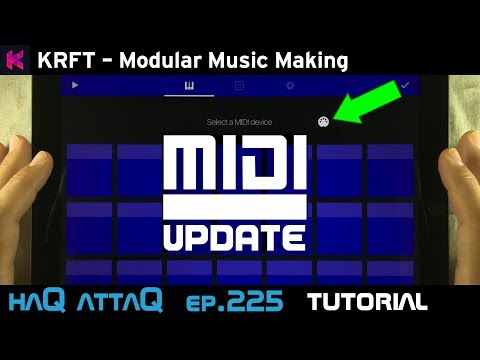
KRFT MIDI Out Tutorial │ feat KORG Gadget haQ attaQ - 225
KRFT is a killer app in so many ways and now Studio Amplify has also updated it with MIDI out. This means that we can now use KRFT like a MIDI sequencer with all of our most favorite hardware and software synthesizers, including any other sound generators that accepts MIDI. Not only that, we also have the ability to send MIDI CC data using knobs called dials, and Morph cells. The later one can also be used as automated CC modulation outputs. In this video I am showing you how it works and how to set it all up. Check it out!

haqattaq
Comments

  • While watching, some info about the Midi port. You are right ,it's a bug but for other reason.

    In the setup you made you chose Gadget midi port as destination on KRFT app configuration. So inside the Gadget app , midi will come only from 'Gadget' midi port .

    The bug is that KRFT should provide a 'KRFT' virtual midi port as destination . Then inside Gadget app ,midi would work from the 'KRFT' port.

    As usual great video , thank you very much :)

  • @Korakios said:
    While watching, some info about the Midi port. You are right ,it's a bug but for other reason.

    In the setup you made you chose Gadget midi port as destination on KRFT app configuration. So inside the Gadget app , midi will come only from 'Gadget' midi port .

    The bug is that KRFT should provide a 'KRFT' virtual midi port as destination . Then inside Gadget app ,midi would work from the 'KRFT' port.

    As usual great video , thank you very much :)

    Why would a virtual destination in KRFT help ?

  • I picked up KRFT ages ago and never opened it. But this...is fantastic. It's exactly what I've been looking for in terms of a fun, flexible sequencer that allows me to just jam and perform with a more "hardware" style approach. Really great video Jakob! Super inspiring.

  • @chimp_spanner said:
    I picked up KRFT ages ago and never opened it. But this...is fantastic. It's exactly what I've been looking for in terms of a fun, flexible sequencer that allows me to just jam and perform with a more "hardware" style approach. Really great video Jakob! Super inspiring.

    Glad you're enjoying it!!! Can you elaborate more on what you mean by a "hardware" style approach ? I'd be interested to hear! Thanks!

  • @Alex fox said:

    @Korakios said:
    While watching, some info about the Midi port. You are right ,it's a bug but for other reason.

    In the setup you made you chose Gadget midi port as destination on KRFT app configuration. So inside the Gadget app , midi will come only from 'Gadget' midi port .

    The bug is that KRFT should provide a 'KRFT' virtual midi port as destination . Then inside Gadget app ,midi would work from the 'KRFT' port.

    As usual great video , thank you very much :)

    Why would a virtual destination in KRFT help ?

    I mean midi destination which KRFT already provides. I was referring to the video where inside Gadget midi 'KRFT port' did not work , but KRFT app could provide a 'KRFT midi port' as destination.

    If you have A and B apps there are 2 ways to send midi. A-> B

    1. From A app you choose A midi port for output . In the B app you select A midi port for input
    2. From A app you choose B midi port for output . In the B app you select B midi port for input

    Same thing :)

  • @Korakios said:

    @Alex fox said:

    @Korakios said:
    While watching, some info about the Midi port. You are right ,it's a bug but for other reason.

    In the setup you made you chose Gadget midi port as destination on KRFT app configuration. So inside the Gadget app , midi will come only from 'Gadget' midi port .

    The bug is that KRFT should provide a 'KRFT' virtual midi port as destination . Then inside Gadget app ,midi would work from the 'KRFT' port.

    As usual great video , thank you very much :)

    Why would a virtual destination in KRFT help ?

    I mean midi destination which KRFT already provides. I was referring to the video where inside Gadget midi 'KRFT port' did not work , but KRFT app could provide a 'KRFT midi port' as destination.

    If you have A and B apps there are 2 ways to send midi. A-> B

    1. From A app you choose A midi port for output . In the B app you select A midi port for input
    2. From A app you choose B midi port for output . In the B app you select B midi port for input

    Same thing :)

    aha, got it :)

  • @chimp_spanner said:
    I picked up KRFT ages ago and never opened it. But this...is fantastic. It's exactly what I've been looking for in terms of a fun, flexible sequencer that allows me to just jam and perform with a more "hardware" style approach. Really great video Jakob! Super inspiring.

    Thank you so much! Alex and Jonah has done a superb job with KRFT. It's really fun to work with and as I've said many times, what I like most about KRFT is that you get to build a track and a live performance surface at the same time.

    Have fun with KRFT! =D

  • WTKWTK
    edited June 2017

    Freakin' awesome. Very inspiring. B)
    oops. I thought that I posted this comment in response to your other KRFT vs Korg Gadget video. Nontheless a great video. :D

  • @WTK said:
    Freakin' awesome. Very inspiring. B)
    oops. I thought that I posted this comment in response to your other KRFT vs Korg Gadget video. Nontheless a great video. :D

    Aw thank you! I'm happy you liked the video! =D

  • So using something like AUM, am I able to use KRFT controlling say Gadget and Gaget into AUM and record a jam to multiple separate tracks?

  • @Gunark said:
    So using something like AUM, am I able to use KRFT controlling say Gadget and Gaget into AUM and record a jam to multiple separate tracks?

    If you record the whole thing in Gadget won't that let you export separate STEM tracks afterwards?

  • @yowza said:

    @Gunark said:
    So using something like AUM, am I able to use KRFT controlling say Gadget and Gaget into AUM and record a jam to multiple separate tracks?

    If you record the whole thing in Gadget won't that let you export separate STEM tracks afterwards?

    I guess, I just imagined recording audio into a multitrack as opposed to midi data.

  • @Alex fox said:

    @chimp_spanner said:
    I picked up KRFT ages ago and never opened it. But this...is fantastic. It's exactly what I've been looking for in terms of a fun, flexible sequencer that allows me to just jam and perform with a more "hardware" style approach. Really great video Jakob! Super inspiring.

    Glad you're enjoying it!!! Can you elaborate more on what you mean by a "hardware" style approach ? I'd be interested to hear! Thanks!

    Well I've been looking at possibly getting into Beatstep or something like that so I can dynamically build up tracks but this is just way more fun. It's still tactile, and it feels like another piece of gear alongside my synths (real and virtual). Really great stuff :)

    One thing that would be great - and I don't know how feasible this is - is a performance object, maybe just like a little one octave mini keyboard that can be attached to a device so I can play live melodies while I bring layers in and out. Or it could be a little slide up panel with an output selector on it so I could bring it in and out of view and play whatever devices I have connected in real time. Obviously I could do that with a MIDI keyboard! But it'd be nice to have it all in KRFT.

  • @chimp_spanner said:

    @Alex fox said:

    @chimp_spanner said:
    I picked up KRFT ages ago and never opened it. But this...is fantastic. It's exactly what I've been looking for in terms of a fun, flexible sequencer that allows me to just jam and perform with a more "hardware" style approach. Really great video Jakob! Super inspiring.

    Glad you're enjoying it!!! Can you elaborate more on what you mean by a "hardware" style approach ? I'd be interested to hear! Thanks!

    Well I've been looking at possibly getting into Beatstep or something like that so I can dynamically build up tracks but this is just way more fun. It's still tactile, and it feels like another piece of gear alongside my synths (real and virtual). Really great stuff :)

    One thing that would be great - and I don't know how feasible this is - is a performance object, maybe just like a little one octave mini keyboard that can be attached to a device so I can play live melodies while I bring layers in and out. Or it could be a little slide up panel with an output selector on it so I could bring it in and out of view and play whatever devices I have connected in real time. Obviously I could do that with a MIDI keyboard! But it'd be nice to have it all in KRFT.

    Awesome - that's good to hear.

    RE: an on screen keyboard - you can build one out of fill cells. I made one in this jam I just uploaded (the blue cells at the bottom left):
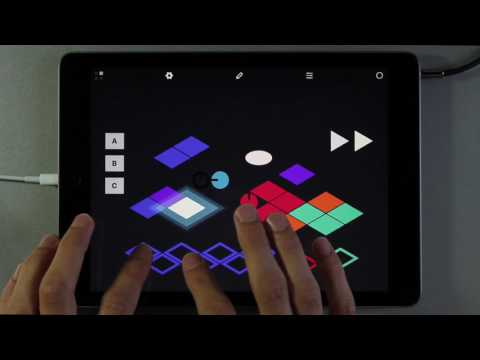
    It's not the most elegant solution but for now it works. We're looking into other options for future updates :#

  • Wow that was beautiful!!
    Were you using GeoShred on that?
    Could you share that Surface? Really wanna learn to make these type of songs so cool!

    @Alex fox said:

    @chimp_spanner said:

    @Alex fox said:

    @chimp_spanner said:
    I picked up KRFT ages ago and never opened it. But this...is fantastic. It's exactly what I've been looking for in terms of a fun, flexible sequencer that allows me to just jam and perform with a more "hardware" style approach. Really great video Jakob! Super inspiring.

    Glad you're enjoying it!!! Can you elaborate more on what you mean by a "hardware" style approach ? I'd be interested to hear! Thanks!

    Well I've been looking at possibly getting into Beatstep or something like that so I can dynamically build up tracks but this is just way more fun. It's still tactile, and it feels like another piece of gear alongside my synths (real and virtual). Really great stuff :)

    One thing that would be great - and I don't know how feasible this is - is a performance object, maybe just like a little one octave mini keyboard that can be attached to a device so I can play live melodies while I bring layers in and out. Or it could be a little slide up panel with an output selector on it so I could bring it in and out of view and play whatever devices I have connected in real time. Obviously I could do that with a MIDI keyboard! But it'd be nice to have it all in KRFT.

    Awesome - that's good to hear.

    RE: an on screen keyboard - you can build one out of fill cells. I made one in this jam I just uploaded (the blue cells at the bottom left):

    It's not the most elegant solution but for now it works. We're looking into other options for future updates :#

  • @MusicMan4Christ said:
    Wow that was beautiful!!
    Were you using GeoShred on that?
    Could you share that Surface? Really wanna learn to make these type of songs so cool!

    @Alex fox said:

    @chimp_spanner said:

    @Alex fox said:

    @chimp_spanner said:
    I picked up KRFT ages ago and never opened it. But this...is fantastic. It's exactly what I've been looking for in terms of a fun, flexible sequencer that allows me to just jam and perform with a more "hardware" style approach. Really great video Jakob! Super inspiring.

    Glad you're enjoying it!!! Can you elaborate more on what you mean by a "hardware" style approach ? I'd be interested to hear! Thanks!

    Well I've been looking at possibly getting into Beatstep or something like that so I can dynamically build up tracks but this is just way more fun. It's still tactile, and it feels like another piece of gear alongside my synths (real and virtual). Really great stuff :)

    One thing that would be great - and I don't know how feasible this is - is a performance object, maybe just like a little one octave mini keyboard that can be attached to a device so I can play live melodies while I bring layers in and out. Or it could be a little slide up panel with an output selector on it so I could bring it in and out of view and play whatever devices I have connected in real time. Obviously I could do that with a MIDI keyboard! But it'd be nice to have it all in KRFT.

    Awesome - that's good to hear.

    RE: an on screen keyboard - you can build one out of fill cells. I made one in this jam I just uploaded (the blue cells at the bottom left):

    It's not the most elegant solution but for now it works. We're looking into other options for future updates :#

    Sure - shared :)

  • TGIF!!!!!
    Gonna rock this one out!!
    Thanks Alex you guys are so awesome!

    @Alex fox said:

    @MusicMan4Christ said:
    Wow that was beautiful!!
    Were you using GeoShred on that?
    Could you share that Surface? Really wanna learn to make these type of songs so cool!

    @Alex fox said:

    @chimp_spanner said:

    @Alex fox said:

    @chimp_spanner said:
    I picked up KRFT ages ago and never opened it. But this...is fantastic. It's exactly what I've been looking for in terms of a fun, flexible sequencer that allows me to just jam and perform with a more "hardware" style approach. Really great video Jakob! Super inspiring.

    Glad you're enjoying it!!! Can you elaborate more on what you mean by a "hardware" style approach ? I'd be interested to hear! Thanks!

    Well I've been looking at possibly getting into Beatstep or something like that so I can dynamically build up tracks but this is just way more fun. It's still tactile, and it feels like another piece of gear alongside my synths (real and virtual). Really great stuff :)

    One thing that would be great - and I don't know how feasible this is - is a performance object, maybe just like a little one octave mini keyboard that can be attached to a device so I can play live melodies while I bring layers in and out. Or it could be a little slide up panel with an output selector on it so I could bring it in and out of view and play whatever devices I have connected in real time. Obviously I could do that with a MIDI keyboard! But it'd be nice to have it all in KRFT.

    Awesome - that's good to hear.

    RE: an on screen keyboard - you can build one out of fill cells. I made one in this jam I just uploaded (the blue cells at the bottom left):

    It's not the most elegant solution but for now it works. We're looking into other options for future updates :#

    Sure - shared :)

  • @Alex fox said:

    @chimp_spanner said:

    @Alex fox said:

    @chimp_spanner said:
    I picked up KRFT ages ago and never opened it. But this...is fantastic. It's exactly what I've been looking for in terms of a fun, flexible sequencer that allows me to just jam and perform with a more "hardware" style approach. Really great video Jakob! Super inspiring.

    Glad you're enjoying it!!! Can you elaborate more on what you mean by a "hardware" style approach ? I'd be interested to hear! Thanks!

    Well I've been looking at possibly getting into Beatstep or something like that so I can dynamically build up tracks but this is just way more fun. It's still tactile, and it feels like another piece of gear alongside my synths (real and virtual). Really great stuff :)

    One thing that would be great - and I don't know how feasible this is - is a performance object, maybe just like a little one octave mini keyboard that can be attached to a device so I can play live melodies while I bring layers in and out. Or it could be a little slide up panel with an output selector on it so I could bring it in and out of view and play whatever devices I have connected in real time. Obviously I could do that with a MIDI keyboard! But it'd be nice to have it all in KRFT.

    Awesome - that's good to hear.

    RE: an on screen keyboard - you can build one out of fill cells. I made one in this jam I just uploaded (the blue cells at the bottom left):

    It's not the most elegant solution but for now it works. We're looking into other options for future updates :#

    Oh wow, nice track man! This looks like how people would make music in some Cyberpunk future or something haha.

Sign In or Register to comment.