Loopy Pro: Create music, your way.
What is Loopy Pro? — Loopy Pro is a powerful, flexible, and intuitive live looper, sampler, clip launcher and DAW for iPhone and iPad. At its core, it allows you to record and layer sounds in real-time to create complex musical arrangements. But it doesn’t stop there—Loopy Pro offers advanced tools to customize your workflow, build dynamic performance setups, and create a seamless connection between instruments, effects, and external gear.
Use it for live looping, sequencing, arranging, mixing, and much more. Whether you're a live performer, a producer, or just experimenting with sound, Loopy Pro helps you take control of your creative process.
Download on the App StoreLoopy Pro is your all-in-one musical toolkit. Try it for free today.
Audiobus 3 / Sector Sync Problem?

@gmslayton’s recent Sector vid got me to Sectoring this past weekend. I just tried putting together an AB3/Loopy/AUM/Sector session, and I am finding that when I press AB3 (or AUMs) transport button that Sector plays a beat and then the audio output stops ... but when I switch to Sector it looks like it is playing.
If I play Sector’s play button it plays fine.
I have Sector set to receive MIDI Clock and IAA run/stop and clock. I’ve tried with and without MIDI clock.
This problem happens even with just AB3 and Sector.
I am not sure if I am doing something wrong or if I am running into a bug.
IOS 12.3.1 on an iOad Gen 6
@Michael ?
Comments
After a little more experimentation, the problem happens when Sector is set to IAA->Run/Stop and Clock. It works ok if one sets Run/Stop. I am able to send MIDI Clock to Sector from AB3 at the same time.
@j_liljedahl : this looks like a Sector issue.
Hi,
Try to set Sector on MidiClockSync OFF , FollowIAAHost RUN/STOP ONLY
I need sync, though.
It seems like the combination of midi clock receive works with IAA run/stop. I haven't double-checked to confirm that the sync is working but it seems like it does.
It syncs fine via IAA No clock needed
The run/stop mode as far as I can tell is just that. It starts when the clock is started but does no further sync which would result in drift over time.
Have you left it running without sync and found that it stays in sync over long periods of time?
http://preset.audiob.us/Wk6JeMlgJQKHbuy
It does sync , but not via midi , with IAA sync
I thought that the difference between run/stop and run/stop/clock was that in run/stop mode, it doesn't pay attention to IAA's clock.
@Korakios : you are correct. It does sync even if clock isn’t selected in the IAA prefs.
It’s just the naming confusing. I also expected run/stop&clock to sync properly in IAA since midi clock sync is a different setting and run/stop-only to ignore any sync from host.
Must be a bug . @j_liljedahl ?
Run/stop only ignores the IAA clock, but not the start/stop and tempo. It was added only to work around a bug that Cubasis used to have, where the actual time-clock signal was completely broken. It will not sync very well in this mode, and will drift or become offset.
For good IAA sync, put it in Follow host: ON and Run/Stop & Clock, and leave MIDI Clock Sync off.
I've heard a couple of users having an issue where SECTOR starts playing but then stops and makes no audio. I haven't been able to reproduce this bug, unfortunately, but since several users have reported it I'm sure the bug exists.
ON and Run/Stop & Clock is what causing issues , ON and Run/Stop Only works fine and Sector syncs via IAA tempo . Midi clock is disabled , 100% reproducible that’s why I think it’s a bug .
In my case audio doesn’t stop but it seems Sector plays smaller sections of the sliced samples
Some "proof" that it syncs fine here
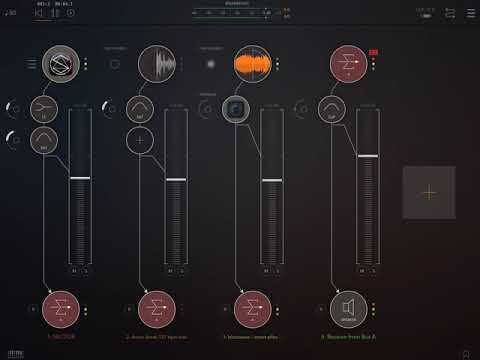
This is what happens. With run/stop and clock on, audio comes out of Sector as a short burst when Audiobus play is tapped. And no more sound comes out even though it looks like it is playing when I switch to Sector. I have to turn run/stop/clock off and use run/stop.
I am on iOS 12.3.1 on an
iPad gen 6 . I can post a video later today and provide an AB preset.
I am on iOS 12.3.1 too, iPad 2018.
I can’t upload a video ,it would take a day to upload
The video above shows the setup and problem. I had to use the mic to capture the audio. For some reason, the audio capture didn't work otherwise.
Out of curiosity, what happens if you turn off Audiobus App Start/Stop?
The same problem occurs.
Okay, well at least we can rule that out. Hmm. I too am unable to reproduce this (I just added Sector as newly-installed from the App Store, in the input slot in Audiobus, then hit play in AB).
Strange. I am finding that sending MIDI Clock and not doing IAA or Audiobus Start seems to work. What is weird is that with the Run/Stop/Clock optimism on turned on, the audio is played for the entire first slice but nothing else.
Sadly, run/stop by itself doesn't necessarily stay tightly synced over an extended period (as expected since there isn't any sync).
I haven't confirmed in a long session that Sector keeps tight-sync with MIDI Clock -- with other apps that support it, I have found Audiobus/IAA Sync to be solid. The Sector projects that I am creating are constantly varying -- so I am planning on more extended recording than 16 bar loops if the sync is working.
There is sync on “start/stop only” via IAA. You can easily confirm this by changing the tempo in AB and Sector responds immediately.
If it gets out of sync it’s another problem.
The settings I use and work are
I will look into this. But I haven't been able to reproduce it either.
Is it happening with all your SECTOR projects or only some?
With the settings I posted it stays tight for me
Edit: iOS 12.3 , iPad 6 gen (2018)
It has happened with every one that I have created. I'll see if it happens with the supplied projects.
As Jonatan explained, run/stop listens to start, stop and tempo commands. So without sync , it will still follow tempo changes.