Loopy Pro: Create music, your way.
What is Loopy Pro? — Loopy Pro is a powerful, flexible, and intuitive live looper, sampler, clip launcher and DAW for iPhone and iPad. At its core, it allows you to record and layer sounds in real-time to create complex musical arrangements. But it doesn’t stop there—Loopy Pro offers advanced tools to customize your workflow, build dynamic performance setups, and create a seamless connection between instruments, effects, and external gear.
Use it for live looping, sequencing, arranging, mixing, and much more. Whether you're a live performer, a producer, or just experimenting with sound, Loopy Pro helps you take control of your creative process.
Download on the App StoreLoopy Pro is your all-in-one musical toolkit. Try it for free today.
Is UNO Drum any good with iPad?

I’m thinking of grabbing one of these because it looks nifty, but is it easy to use with iPad DAWS? I looked at old threads on this but didn’t get a good sense of it. Thanks.
Comments
This is a great review of the uno drum, worth checking out this honest review if you haven’t already seen it.
Excellent. Thanks. I’ll check that out when I get a moment. I’ve seen reviews of the device, just not how well it works with iPad.
Just watched the last minute of the review to get the summary and it sounds like ‘give it a miss’. Damn! Thanks for the heads-up on this, though - saves me a good few quid.
I know there has been some firmware updates since so maybe some issues have been resolved but i am cautious over this one.
Thanks. I’m cautious now, too. I’ve got controllers but this would be my first piece of proper hardware, so I don’t want to spoil it by buying a dud.
@Samu i believe you have one? Whats your take?
I only have the UNOSynth, not the UNODrum sorry...
I do have a Volca Drum though
Ah, sorry, got my uno’s mixed up ☺️
What’s the volca like? Play nicely with iPad?
I mainly use the Volca Drum as sampler fodder synced to the Volca Bass.
The random function on it is pretty nice for 'happy accidents' that can be sampled.
I find that Fractal Bits is quite close to the Volca Drum when it comes to 'type of sounds' that can be generated.
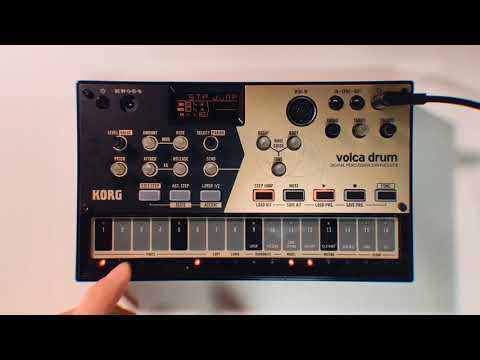

There's plenty of weirder videos of the Volca Drum on Youtube
Thanks, I’ll have a look. No midi out, though, no, so it’s not possible to capture midi using it? Seems like a bit of a bummer, or am I missing something?
@audio_DT have you ever thought about a digitakt? Ive been thinking about that as a drum machine and sample player. They seem to be around 450 euro secondhand.
Yeah, I have but it costs quite a bit! But i do tend to try to buy things that will definitely not result in buyers regret, so maybe I’ll check that out, too, and bite them bullet and try to get a second hand one. I’m just wary of buying second hand electronic goods, though, and the brand new one if prohibitively expensive. But I’m tempted to will check it out. Thanks again. The uni synth looks really good, too, I have to say 🙂
No Volca has midi out but Volca Drum has midi in and automation of all the parameters using Midi CC if needed.
I mainly got the Volca Drum as 'sampler fodder' and to accompany my Volca Bass.
When syncing the Volca Bass to Volca Drum it's possible to use swing which the Volca Bass doesn't otherwise have.
I'd suggest going to a local music store to check it out and play with it.
This nordic dude always get me itching for one, maybe elektron will add class compliant like they did for the recent update to the analogue heat and i will get it.
Yeah, that’s a good idea - visiting an actual shop had not even crossed my mind. Might do that. Cheers.
Ha - that does look amazing, I have to admit. Sample-based, though? I’ll have to look into it further.
That's a preproduction unit and those issues mentioned are not the typical experience.
Check out Jakob Haq's latest video with UNO Drum:
UNO Drum is hardly a "miss" for many (including pretty much every other video you'll find). Give it a try if you can, it's a beast of a little box at a great price.
On another audio forum, here's a comparison to a similar-priced unit, which I've redacted to not dig on a competitor:
@ikmultimedia is there any chance of getting Stimming to do a Post Production Unit re-Review? Because his initial one was so absolutely damning to the product ..that would be the only real "undo" upon viewers first impressions of the unit made via that first review of his.
Brilliant idea! I love the stimming reviews.
I seem to have inadvertently opened a can of worms. Jakob’ s review is very good, but I do wonder sometimes about the extent to which the YouTube reviews are really objective. But uno drum does look very nice so I’m still thinking of giving it a go. If I buy it on amazon, I can easily return it if it’s as Stimming says it is.
While you’re here, could I ask about midi in and out? Is it plug and play, in that sense? I’d be using it primarily with NS2, Xequence 2 and AUM. Thanks.
I would think if you doubt the objectivity of Jakob's review (and he's definitely well-respected around here, didn't think he would be viewed as anything but objective) you'd do the same with Stimming. Especially when we've countered every claim made, not just due to preproduction unit but also watching where someone who doesn't hit the actual touchpad is shocked when hitting outside of the actual touchpad doesn't create a sound, etc.
The MIDI ports, though they use breakout cables, function just as MIDI ports would on the back of any synth so you'd be good to go.
I’m convinced, don’t worry 🙂. As soon as I’ve got the cash I’m going to invest. Next week, I expect.
I've got the Uno Drum, it arrived this morning. Just been having fun with it as standalone but I don't know how to get it working with the iPad. I use an iPad Pro 2018 and have connected the UnoDrum to the iPad via a dongle I have (the HyperDrive). But how do I get sound from UnoDrum into the iPad? I've no idea at the moment - a newb error, no doubt. My impression was that the sound would travel through the USB cable. Is this not right? When I set up the UnoDrum to 'USB' for the clock, nothing happens. I'm using AUM and UnoDrum is registered as plugged in in that app, but nothing happens when I do anything from AUM (i.e. there's no sound and no transport, either). My question is, what a I doing wrong here? I thought I didn't need to buy an audio interface to use UnoDrum with the iPad. Am I wrong about this? I've had a mess about with the drum machine, which was great fun, but the key thing is being able to connect it to my iPad, and so far I've failed miserably! Thanks.
https://www.musicradar.com/reviews/ik-multimedia-uno-drum
Here's a link to a review of it.
I had a look on the website.
The usb is for power and possibly data, methinks for their app.
The audio in is for another external device and
they market it for using it together with their Uno synth.
The audio out is to hear the sounds that have been generated by the Uno itself.
It isn't an audio interface.
You need a separate audio interface I do believe.
Also both the audio in's and audio outs are summed to mono.
You could try using a stereo 3.5mm to 3.5mm jack cable
to get the sound from the UNO into your iPad but the sound quality
will not be as good as using an actually interface.
I think this is accurate.
Thanks for this, I appreciate it. I’ve just ordered a Steinberg Audi interface, so hopefully that will sort things (he says, frustratedly). Thanks again 👍
Incidentally, I noticed that uno drum doesn’t do midi out for each drum channel, which is a bit of pain. Nice sounds, though, so I’ll persevere with it, I think. Next up: Arturia microfreak.
@audio_DT
No problem.
Have fun with the microFreak when you get it.