Loopy Pro: Create music, your way.

What is Loopy Pro?Loopy Pro is a powerful, flexible, and intuitive live looper, sampler, clip launcher and DAW for iPhone and iPad. At its core, it allows you to record and layer sounds in real-time to create complex musical arrangements. But it doesn’t stop there—Loopy Pro offers advanced tools to customize your workflow, build dynamic performance setups, and create a seamless connection between instruments, effects, and external gear.

Use it for live looping, sequencing, arranging, mixing, and much more. Whether you're a live performer, a producer, or just experimenting with sound, Loopy Pro helps you take control of your creative process.

Download on the App Store

Loopy Pro is your all-in-one musical toolkit. Try it for free today.

Cubasis 2 join/glue audio clips?

I am just getting to grips with Cubasis 2- I can cut up audio clips but I cannot work out how to stick two together. Any ideas? thanks

Comments

  • @robosardine said:
    I am just getting to grips with Cubasis 2- I can cut up audio clips but I cannot work out how to stick two together. Any ideas? thanks

    Afaik you can’t....
    Work around is to freeze the audio track........if you turn off the option to delete after unfreeze (somewhere in settings) you can carry on editing afterwards.

  • That's great- thanks for that :)

  • This makes me think about a feature that would be nice in a future update of Cubasis.
    It's similar to attaching a 'magnet' to chain objects on a track so they would stick together but could also easily be separated when needed.

  • edited December 2017

    @Samu said:
    This makes me think about a feature that would be nice in a future update of Cubasis.
    It's similar to attaching a 'magnet' to chain objects on a track so they would stick together but could also easily be separated when needed.

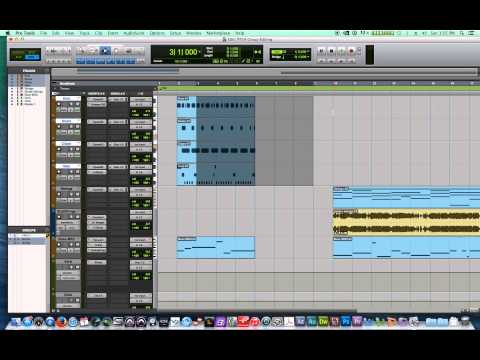
    Does any iOS DAW have the "Groups" feature that you find in ProTools? You can select blocks of audio across various tracks and group them as a region that can be moved around together. And you can ungroup at any time. Also, if you make an "edit group," any audio adjustments you make to one piece applies to all of them.

    EDIT: Found this example.
  • @robosardine said:
    I am just getting to grips with Cubasis 2- I can cut up audio clips but I cannot work out how to stick two together. Any ideas? thanks

    I've just come across this and am really quite shocked by it. I split a 64 bar loop that I'd imported into AUM so that I could fade out the last four bars of the loop so that it would 'loop' with no noticeable join. I've just now discovered that not only is it impossible to merge back together two audio clips but also, weirdly, when I try to fade out the four bars I split off from the 60 bars, I find that when I select "fade out", it fades out the entire 64 bars. Is this right, or am I being stupid again? I find it really surprising that Cubasis can't do these simple tasks.

  • This is a super old thread but unfortunately Cubasis is still lagging behind when it comes to audio editing...

    The problem with 'split' is that it does NOT create a new audio file and the audio editor in Cubasis has no easy way to set the start/end in the audio editor to match that of the audio event.

    So for example when you split the last 4 bars, select the new event and drop into the audio editor the entire file is selected thus the fade out will fade out the entire file not the last 4 bars since they were not selected...

    So one way to do a proper fade out is to select the portion in the audio editor and apply fade out or use the event handles and do the fade out (on a selected clip drag the top square from top left or top right to do the fade in/out).

    No one knows when the next Cubasis update drops but it could use some serious 'pro' features when it comes to audio editing.

  • wimwim
    edited November 2019

    @audio_DT said:

    @robosardine said:
    I am just getting to grips with Cubasis 2- I can cut up audio clips but I cannot work out how to stick two together. Any ideas? thanks

    I've just come across this and am really quite shocked by it. I split a 64 bar loop that I'd imported into AUM so that I could fade out the last four bars of the loop so that it would 'loop' with no noticeable join. I've just now discovered that not only is it impossible to merge back together two audio clips but also, weirdly, when I try to fade out the four bars I split off from the 60 bars, I find that when I select "fade out", it fades out the entire 64 bars. Is this right, or am I being stupid again? I find it really surprising that Cubasis can't do these simple tasks.

    You need to select the region that you want to fade before selecting fade-out.

    Or, just use drag the little rectangle in the upper-right hand corner of the clip in the timeline to the left to do a non-destructive fade. Zoom in to do finer adjustments.

  • @wim said:

    @audio_DT said:

    @robosardine said:
    I am just getting to grips with Cubasis 2- I can cut up audio clips but I cannot work out how to stick two together. Any ideas? thanks

    I've just come across this and am really quite shocked by it. I split a 64 bar loop that I'd imported into AUM so that I could fade out the last four bars of the loop so that it would 'loop' with no noticeable join. I've just now discovered that not only is it impossible to merge back together two audio clips but also, weirdly, when I try to fade out the four bars I split off from the 60 bars, I find that when I select "fade out", it fades out the entire 64 bars. Is this right, or am I being stupid again? I find it really surprising that Cubasis can't do these simple tasks.

    You need to select the region that you want to fade before selecting fade-out.

    Or, just use drag the little rectangle in the upper-right hand corner of the clip in the timeline to the left to do a non-destructive fade. Zoom in to do finer adjustments.

    Thanks, @wim, I'll give that a try. I'm not sure what you mean by selecting a region - I thought you just selected the clip and then did a 'fade out' from the audio clip menu? I'll have another look now...

  • @audio_DT said:

    @wim said:

    @audio_DT said:

    @robosardine said:
    I am just getting to grips with Cubasis 2- I can cut up audio clips but I cannot work out how to stick two together. Any ideas? thanks

    I've just come across this and am really quite shocked by it. I split a 64 bar loop that I'd imported into AUM so that I could fade out the last four bars of the loop so that it would 'loop' with no noticeable join. I've just now discovered that not only is it impossible to merge back together two audio clips but also, weirdly, when I try to fade out the four bars I split off from the 60 bars, I find that when I select "fade out", it fades out the entire 64 bars. Is this right, or am I being stupid again? I find it really surprising that Cubasis can't do these simple tasks.

    You need to select the region that you want to fade before selecting fade-out.

    Or, just use drag the little rectangle in the upper-right hand corner of the clip in the timeline to the left to do a non-destructive fade. Zoom in to do finer adjustments.

    Thanks, @wim, I'll give that a try. I'm not sure what you mean by selecting a region - I thought you just selected the clip and then did a 'fade out' from the audio clip menu? I'll have another look now...

    Gotcha! I didn't even know about the region's in the sample editor because I've never before really used Cubasis for audio. I used to use it for midi, but then dropped it for NS2, only to just realise how easy it is to export stems from AUM. I then looked again at Cubasis this evening and was a bit flummoxed. Massive thanks once again, @wim, for being a lifesaver :smile: . This is fun, and I don't mind looking like a complete wally :smile:

  • @audio_DT said:

    @audio_DT said:

    @wim said:

    @audio_DT said:

    @robosardine said:
    I am just getting to grips with Cubasis 2- I can cut up audio clips but I cannot work out how to stick two together. Any ideas? thanks

    I've just come across this and am really quite shocked by it. I split a 64 bar loop that I'd imported into AUM so that I could fade out the last four bars of the loop so that it would 'loop' with no noticeable join. I've just now discovered that not only is it impossible to merge back together two audio clips but also, weirdly, when I try to fade out the four bars I split off from the 60 bars, I find that when I select "fade out", it fades out the entire 64 bars. Is this right, or am I being stupid again? I find it really surprising that Cubasis can't do these simple tasks.

    You need to select the region that you want to fade before selecting fade-out.

    Or, just use drag the little rectangle in the upper-right hand corner of the clip in the timeline to the left to do a non-destructive fade. Zoom in to do finer adjustments.

    Thanks, @wim, I'll give that a try. I'm not sure what you mean by selecting a region - I thought you just selected the clip and then did a 'fade out' from the audio clip menu? I'll have another look now...

    Gotcha! I didn't even know about the regions in the sample editor because I've never before really used Cubasis for audio. I used to use it for midi, but then dropped it for NS2, only to just realise how easy it is to export stems from AUM. I then looked again at Cubasis this evening and was a bit flummoxed. Massive thanks once again, @wim, for being a lifesaver :smile: . This is fun, and I don't mind looking like a complete wally :smile:

  • @audio_DT said:

    @wim said:

    @audio_DT said:

    @robosardine said:
    I am just getting to grips with Cubasis 2- I can cut up audio clips but I cannot work out how to stick two together. Any ideas? thanks

    I've just come across this and am really quite shocked by it. I split a 64 bar loop that I'd imported into AUM so that I could fade out the last four bars of the loop so that it would 'loop' with no noticeable join. I've just now discovered that not only is it impossible to merge back together two audio clips but also, weirdly, when I try to fade out the four bars I split off from the 60 bars, I find that when I select "fade out", it fades out the entire 64 bars. Is this right, or am I being stupid again? I find it really surprising that Cubasis can't do these simple tasks.

    You need to select the region that you want to fade before selecting fade-out.

    Or, just use drag the little rectangle in the upper-right hand corner of the clip in the timeline to the left to do a non-destructive fade. Zoom in to do finer adjustments.

    Thanks, @wim, I'll give that a try. I'm not sure what you mean by selecting a region - I thought you just selected the clip and then did a 'fade out' from the audio clip menu? I'll have another look now...

  • @audio_DT said:

    @audio_DT said:

    @audio_DT said:

    @wim said:

    @audio_DT said:

    @robosardine said:
    I am just getting to grips with Cubasis 2- I can cut up audio clips but I cannot work out how to stick two together. Any ideas? thanks

    I've just come across this and am really quite shocked by it. I split a 64 bar loop that I'd imported into AUM so that I could fade out the last four bars of the loop so that it would 'loop' with no noticeable join. I've just now discovered that not only is it impossible to merge back together two audio clips but also, weirdly, when I try to fade out the four bars I split off from the 60 bars, I find that when I select "fade out", it fades out the entire 64 bars. Is this right, or am I being stupid again? I find it really surprising that Cubasis can't do these simple tasks.

    You need to select the region that you want to fade before selecting fade-out.

    Or, just use drag the little rectangle in the upper-right hand corner of the clip in the timeline to the left to do a non-destructive fade. Zoom in to do finer adjustments.

    Thanks, @wim, I'll give that a try. I'm not sure what you mean by selecting a region - I thought you just selected the clip and then did a 'fade out' from the audio clip menu? I'll have another look now...

    Gotcha! I didn't even know about the regions in the sample editor because I've never before really used Cubasis for audio. I used to use it for midi, but then dropped it for NS2, only to just realise how easy it is to export stems from AUM. I then looked again at Cubasis this evening and was a bit flummoxed. Massive thanks once again, @wim, for being a lifesaver :smile: . This is fun, and I don't mind looking like a complete wally :smile:

    Yep, that’s why we’re all here - to learn. B)

    For most of my uses, the non-destructive fade in/out in the timeline is good enough, without having to resort to actually editing the clip.

  • @wim said:

    Wouldn't it be nice if Cubasis auto selected the 'audio region' of the file when double tapping on an audio region and going into the editor? This would save a lot of time especially if the audio file has many 'cuts' on the time-line.

    In the 4 bar chop example tapping on the 4 bar chunk would just select the last for bars of the source file.
    For precise cuts it's best to turn the time-line indication to 'time' instead of the default 'bars/beats'.

    Will be very interesting to see what future Cubasis updates will bring regarding audio-editing among other things...

  • @wim said:

    @audio_DT said:

    @audio_DT said:

    @audio_DT said:

    @wim said:

    @audio_DT said:

    @robosardine said:
    I am just getting to grips with Cubasis 2- I can cut up audio clips but I cannot work out how to stick two together. Any ideas? thanks

    I've just come across this and am really quite shocked by it. I split a 64 bar loop that I'd imported into AUM so that I could fade out the last four bars of the loop so that it would 'loop' with no noticeable join. I've just now discovered that not only is it impossible to merge back together two audio clips but also, weirdly, when I try to fade out the four bars I split off from the 60 bars, I find that when I select "fade out", it fades out the entire 64 bars. Is this right, or am I being stupid again? I find it really surprising that Cubasis can't do these simple tasks.

    You need to select the region that you want to fade before selecting fade-out.

    Or, just use drag the little rectangle in the upper-right hand corner of the clip in the timeline to the left to do a non-destructive fade. Zoom in to do finer adjustments.

    Thanks, @wim, I'll give that a try. I'm not sure what you mean by selecting a region - I thought you just selected the clip and then did a 'fade out' from the audio clip menu? I'll have another look now...

    Gotcha! I didn't even know about the regions in the sample editor because I've never before really used Cubasis for audio. I used to use it for midi, but then dropped it for NS2, only to just realise how easy it is to export stems from AUM. I then looked again at Cubasis this evening and was a bit flummoxed. Massive thanks once again, @wim, for being a lifesaver :smile: . This is fun, and I don't mind looking like a complete wally :smile:

    Yep, that’s why we’re all here - to learn. B)

    For most of my uses, the non-destructive fade in/out in the timeline is good enough, without having to resort to actually editing the clip.

    Yeah, you're absolutely right. I just wasn't aware of it. I'm happy again :blush: :smiley: . Cheers.

  • @wim said:

    @audio_DT said:

    @wim said:

    @audio_DT said:

    @robosardine said:
    I am just getting to grips with Cubasis 2- I can cut up audio clips but I cannot work out how to stick two together. Any ideas? thanks

    I've just come across this and am really quite shocked by it. I split a 64 bar loop that I'd imported into AUM so that I could fade out the last four bars of the loop so that it would 'loop' with no noticeable join. I've just now discovered that not only is it impossible to merge back together two audio clips but also, weirdly, when I try to fade out the four bars I split off from the 60 bars, I find that when I select "fade out", it fades out the entire 64 bars. Is this right, or am I being stupid again? I find it really surprising that Cubasis can't do these simple tasks.

    You need to select the region that you want to fade before selecting fade-out.

    Or, just use drag the little rectangle in the upper-right hand corner of the clip in the timeline to the left to do a non-destructive fade. Zoom in to do finer adjustments.

    Thanks, @wim, I'll give that a try. I'm not sure what you mean by selecting a region - I thought you just selected the clip and then did a 'fade out' from the audio clip menu? I'll have another look now...

    Yep, got it now. Simple when you know how!

  • I would also like to be able to increase/decrease the gain of an audio file. Unless there is already a way to do this which I don’t know about..?

  • wimwim
    edited November 2019

    @TimRussell said:
    I would also like to be able to increase/decrease the gain of an audio file. Unless there is already a way to do this which I don’t know about..?

    You can normalize the file, which gets it to the maximum gain possible without clipping, then use the handle that is at the top-center of the clip in the timeline to adjust the gain down from there.

  • Aha! I see I can also fade in/out this way too

  • But have to freeze the track after

Sign In or Register to comment.